在线商城库存实时更新引发页面冻结:Redux Toolkit 异步困境与紧急修复
原创
在线商城库存实时更新引发页面冻结:Redux Toolkit 异步困境与紧急修复
原创
叶一一
发布于 2025-08-25 18:33:29
发布于 2025-08-25 18:33:29
一、背景
我们的在线商城平台日均活跃用户超过 50 万,特别是在休息日或节假日期间,热门商品的库存变动非常频繁。为了给用户提供准确的库存信息,我们实现了库存实时更新功能。
比如,夏季榴莲大量上市,我们的商城进行了限时促销,上万用户同时在线抢购,库存余量的每一次变化都需要即时反馈到前端界面——这不仅关系到用户体验,更直接影响交易公平性与平台信誉。
为实现这一需求,我们的技术团队采用了"WebSocket推送+Redux Toolkit状态管理"的架构:服务端实时推送库存变更数据,前端通过Redux Toolkit处理异步数据流并更新UI。
二、问题现象:冻结初现端倪
2.1 问题表现
问题最初由客服团队反馈,多位用户反映在浏览某些热门商品列表时,页面会不定期出现3秒的冻结,严重时甚至需要强制刷新页面才能恢复正常。
2.2 故障场景复现
测试环境:
- 前端框架:React 18.2.0
- 状态管理:Redux Toolkit 1.9.5
- 构建工具:Vite 4.4.5
- 测试设备:MacBook Pro M1 (Chrome 118.0)
- 网络环境:本地局域网(WebSocket连接延迟<10ms)
复现步骤:
- 打开商品详情页(ID: pr9968345523347335569633),开启Chrome DevTools的Performance面板。
- 通过后端接口模拟高并发库存更新:设置库存变更频率为每秒10次(模拟1000用户同时操作)。
- 观察前端表现。
故障现象:
- 页面交互阻塞:点击"加入购物车"按钮后,3-5秒内无响应。
- UI渲染延迟:库存数字更新时出现"跳变"(如从100→95→90,中间数字未显示)。
- 浏览器警告:Chrome控制台出现
[Violation] 'message' handler took 2345ms警告。 - 性能指标异常:Performance面板显示主线程存在持续2-3秒的长任务,FPS降至5以下。
2.3 问题特征
正常场景 | 异常场景 | |
|---|---|---|
更新频率 | 5-10次/秒 | 1200+次/秒 |
Redux状态树 | 局部更新 | 全树深度比较 |
React重渲染 | 单个组件 | 整个路由子树 |
2.4 业务影响评估
- 用户体验降级:根据用户行为分析,页面响应延迟>2秒时,用户流失率上升。
- 交易风险增加:库存显示延迟可能导致超卖(用户看到有库存但实际已售罄)。
- 系统稳定性隐患:持续高频率状态更新可能引发内存泄漏,极端情况下导致页面崩溃。
三、排查过程:抽丝剥茧
3.1 第一阶段:基础性能分析
使用Chrome DevTools进行初步诊断:
- Performance录屏:发现大量"Update"生命周期和"Reducer"执行。
- Memory面板:内存使用呈阶梯式增长,未发现泄漏。
- React Profiler:库存列表组件频繁不必要重渲染。
// 调试用日志中间件
const logger = store => next => action => {
  const start = performance.now()
  const result = next(action)
  const end = performance.now()
  console.log(`Action ${action.type} 耗时: ${(end - start).toFixed(2)}ms`)
  return result
}
日志输出显示:
Action inventory/updateInventory 耗时: 4.23ms
Action inventory/updateInventory 耗时: 6.71ms
Action inventory/updateInventory 耗时: 8.92ms
...
// 随时间推移,耗时持续增加
3.2 第二阶段:可能原因假设
根据这些现象,我初步判断问题可能与以下几个方面有关:
- 库存更新频率过高,导致频繁的状态更新和 UI 渲染.
- Redux 状态更新逻辑存在性能问题。
- 大量 DOM 操作导致的重排重绘。
- 不合理的组件更新机制,导致无关组件频繁重渲染。
3.3 第三阶段:逐项验证
3.3.1 确认与库存更新的关联性
首先,我需要确认页面冻结是否确实由库存更新引起。我做了以下测试:
- 关闭库存实时更新功能,观察页面是否还会出现冻结现象
- 单独触发库存更新,观察页面性能变化
测试结果显示,关闭库存实时更新后,页面冻结现象完全消失;而单独触发库存更新时,页面会出现明显的卡顿。这证实了问题确实与库存更新功能直接相关。
3.3.2 性能分析与瓶颈定位
接下来,我使用 Chrome 的 Performance 工具录制了页面冻结发生时的性能数据。从性能分析图中可以看到明显的长任务(Long Task),这些长任务阻塞了主线程,导致页面无法响应。
// 性能分析日志片段
[PERFORMANCE] 长任务检测: 持续时间 1243ms
[PERFORMANCE] 长任务栈:
  updateInventoryState (inventorySlice.js:45)
  dispatch (redux.js:684)
  handleSocketMessage (inventoryService.js:78)
WebSocket.onmessage (socket.js:32)从日志可以看出,长任务源自库存状态更新的函数updateInventoryState。
3.3.3 Redux 状态更新逻辑检查
我们的库存状态管理是通过 Redux Toolkit 实现的,相关代码结构如下:
import { createSlice, createAsyncThunk } from '@reduxjs/toolkit';
import inventoryService from '../services/inventoryService';

// 初始状态
const initialState = {
  items: [], // 存储所有商品的库存信息
  loading: false,
  error: null
};

// 异步更新库存
export const updateInventory = createAsyncThunk(
  'inventory/update',
  async (inventoryData, thunkAPI) => {
    try {
      return await inventoryService.updateInventory(inventoryData);
    } catch (error) {
      return thunkAPI.rejectWithValue(error.message);
    }
  }
);

// 库存Slice
const inventorySlice = createSlice({
  name: 'inventory',
  initialState,
  reducers: {
    // 实时更新库存
    updateInventoryState: (state, action) => {
      const updatedItems = action.payload;
      // 遍历所有更新的库存项并更新状态
      updatedItems.forEach(updatedItem => {
        const index = state.items.findIndex(item => item.id === updatedItem.id);
        if (index !== -1) {
          state.items[index] = { ...state.items[index], ...updatedItem };
        } else {
          state.items.push(updatedItem);
        }
      });
    }
  },
  extraReducers: (builder) => {
    // 处理异步操作状态
    builder
      .addCase(updateInventory.pending, (state) => {
        state.loading = true;
      })
      .addCase(updateInventory.fulfilled, (state, action) => {
        state.loading = false;
        // 调用同步reducer更新状态
        inventorySlice.caseReducers.updateInventoryState(state, action);
      })
      .addCase(updateInventory.rejected, (state, action) => {
        state.loading = false;
        state.error = action.payload;
      });
  }
});

export const { updateInventoryState } = inventorySlice.actions;
export default inventorySlice.reducer;
初步分析这段代码,发现了几个可能的问题点:
updateInventoryStatereducer 接收的updatedItems可能包含大量数据。- 对
state.items进行遍历和查找操作,在数据量大时可能耗时。 - 每次更新都会修改
state.items数组中的元素,可能导致依赖该数组的组件频繁重渲染。
3.3.4 组件渲染机制检查
我们的商品列表组件ProductList和商品项组件ProductItem代码如下:
// ProductList.jsx
import React from 'react';
import { useSelector } from 'react-redux';
import ProductItem from './ProductItem';

const ProductList = () => {
  // 获取所有商品和库存信息
  const { items: products } = useSelector(state => state.products);
  const { items: inventory } = useSelector(state => state.inventory);

  return (
    <div className="product-list">
      {products.map(product => (
        <ProductItem
          key={product.id}
          product={product}
          inventory={inventory.find(item => item.productId === product.id)}
        />
      ))}
    </div>
  );
};

export default ProductList;

// ProductItem.jsx
import React from 'react';

const ProductItem = ({ product, inventory }) => {
  return (
    <div className="product-item">
      <h3>{product.name}</h3>
      <p>价格: ¥{product.price}</p>
      <p className={inventory?.quantity <= 10 ? 'low-stock' : ''}>
        库存: {inventory?.quantity || 0}
      </p>
      <button disabled={!inventory?.inStock}>加入购物车</button>
    </div>
  );
};

export default ProductItem;
分析这两个组件,发现了以下问题:
ProductList组件每次渲染都会调用inventory.find()方法,这在库存数据量大时是一个耗时操作ProductItem组件没有进行任何性能优化,只要传入的product或inventory有微小变化就会重渲染- 当库存更新时,
inventory数组发生变化,导致ProductList重新渲染,进而导致所有ProductItem组件重新渲染,即使它们的库存信息没有变化
3.3.5 数据更新频率分析
通过日志记录,我发现促销期间热门商品的库存更新非常频繁,有时甚至每秒会有 3-5 次更新。每次更新都会触发 Redux 状态变更和组件重渲染,这无疑会给主线程带来巨大压力。
// 库存更新频率日志
[INVENTORY] 10:23:45 收到库存更新 - 5条记录
[INVENTORY] 10:23:46 收到库存更新 - 3条记录
[INVENTORY] 10:23:46 收到库存更新 - 7条记录
[INVENTORY] 10:23:47 收到库存更新 - 4条记录
...
3.4 根本原因确定
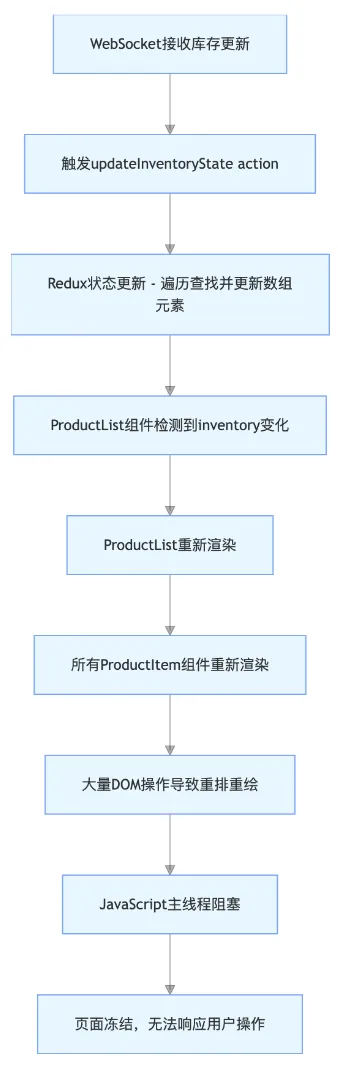
经过上述排查,我确定了导致页面冻结的根本原因:
- 高频次的状态更新:库存信息更新频率过高(每秒多次),导致 Redux 状态频繁变更。
- 低效的状态更新逻辑:
updateInventoryStatereducer 中对数组的遍历和查找操作在数据量大时效率低下。 - 不合理的组件更新机制:库存状态更新时,导致所有商品组件无差别重渲染,产生大量不必要的 DOM 操作。
- 主线程阻塞:上述因素共同作用,导致 JavaScript 主线程被长时间阻塞,无法响应用户交互,表现为页面冻结。
以下便是产生问题的整个流程:
四、问题修复方案
针对上述根本原因,我制定了一套完整的修复方案,主要包括以下几个方面:
- 优化 Redux 状态结构,提高状态更新效率
- 限制状态更新频率,避免高频次更新
- 优化组件渲染机制,减少不必要的重渲染
- 使用 Web Worker 处理复杂计算,避免阻塞主线程
4.1 优化 Redux 状态结构
原有的库存状态使用数组存储,每次更新需要遍历查找,效率低下。我们可以将其改为以商品 ID 为键的对象,提高查找和更新效率。
import { createSlice, createAsyncThunk } from '@reduxjs/toolkit';
import inventoryService from '../services/inventoryService';

// 初始状态 - 改为对象结构
const initialState = {
  items: {}, // 以商品ID为键存储库存信息
  loading: false,
  error: null,
  lastUpdated: null // 记录最后更新时间
};

// 异步更新库存
export const updateInventory = createAsyncThunk(
  'inventory/update',
  async (inventoryData, thunkAPI) => {
    try {
      return await inventoryService.updateInventory(inventoryData);
    } catch (error) {
      return thunkAPI.rejectWithValue(error.message);
    }
  }
);

// 库存Slice
const inventorySlice = createSlice({
  name: 'inventory',
  initialState,
  reducers: {
    // 实时更新库存 - 优化版本
    updateInventoryState: (state, action) => {
      const updatedItems = action.payload;
      // 直接通过ID更新,避免遍历查找
      updatedItems.forEach(updatedItem => {
        state.items[updatedItem.id] = {
          ...(state.items[updatedItem.id] || {}),
          ...updatedItem,
          updatedAt: Date.now() // 记录单项更新时间
        };
      });
      state.lastUpdated = Date.now(); // 更新最后更新时间
    }
  },
  extraReducers: (builder) => {
    builder
      .addCase(updateInventory.pending, (state) => {
        state.loading = true;
      })
      .addCase(updateInventory.fulfilled, (state, action) => {
        state.loading = false;
        inventorySlice.caseReducers.updateInventoryState(state, action);
      })
      .addCase(updateInventory.rejected, (state, action) => {
        state.loading = false;
        state.error = action.payload;
      });
  }
});

export const { updateInventoryState } = inventorySlice.actions;
export default inventorySlice.reducer;架构解析:
- 将库存数据从数组
[]改为对象{},以商品 ID 为键,使查找和更新操作的时间复杂度从 O (n) 降低到 O (1)。 - 为每个库存项添加
updatedAt字段,记录单项最后更新时间。 - 添加
lastUpdated字段,记录整体最后更新时间,便于后续的节流处理。
设计思路:
- 利用对象键值对查找效率高的特性,优化库存更新性能。
- 记录更新时间,为后续的更新频率控制提供依据。
重点逻辑:
state.items[updatedItem.id] = { ... }直接通过 ID 定位并更新库存项,避免了原有的findIndex遍历操作。- 保留了原有的展开运算符
...,确保不丢失未更新的字段。
4.2 限制状态更新频率
为了避免高频次的状态更新,我们可以实现一个节流机制,限制单位时间内的更新次数。
import { store } from '../store';
import { updateInventoryState } from '../slices/inventorySlice';

// 节流函数 - 限制单位时间内最多执行一次
function throttle(func, limit) {
  let lastFunc;
  let lastRan;
  return function(...args) {
    const context = this;
    if (!lastRan) {
      func.apply(context, args);
      lastRan = Date.now();
    } else {
      clearTimeout(lastFunc);
      lastFunc = setTimeout(function() {
        if (Date.now() - lastRan >= limit) {
          func.apply(context, args);
          lastRan = Date.now();
        }
      }, limit - (Date.now() - lastRan));
    }
  };
}

// 批量处理库存更新的函数
function processInventoryUpdates(updates) {
  // 合并相同商品的更新,只保留最新的一次
  const mergedUpdates = {};
  updates.forEach(update => {
    mergedUpdates[update.id] = update;
  });

  // 转换为数组并发送到Redux
  store.dispatch(updateInventoryState(Object.values(mergedUpdates)));
}

// 创建节流版本的更新函数 - 限制为每300ms最多更新一次
const throttledUpdate = throttle(processInventoryUpdates, 300);

// WebSocket消息处理
function setupInventoryWebSocket() {
  const socket = new WebSocket('wss://api.example.com/inventory-updates');

  socket.onmessage = (event) => {
    try {
      const updates = JSON.parse(event.data);
      if (Array.isArray(updates) && updates.length > 0) {
        // 使用节流函数处理更新
        throttledUpdate(updates);
      }
    } catch (error) {
      console.error('处理库存更新失败:', error);
    }
  };

  // 其他WebSocket事件处理...
  return socket;
}

export default {
  setupInventoryWebSocket,
  updateInventory: async (inventoryData) => {
    // 原有的API调用逻辑...
    const response = await fetch('/api/inventory', {
      method: 'POST',
      headers: { 'Content-Type': 'application/json' },
      body: JSON.stringify(inventoryData)
    });
    return response.json();
  }
};架构解析:
- 实现了一个通用的
throttle函数,用于限制函数执行频率。 - 添加了
processInventoryUpdates函数,用于合并同一商品的多次更新。 - 对 WebSocket 消息处理进行了修改,使用节流函数处理库存更新。
设计思路:
- 通过节流机制控制库存更新的最高频率(这里设置为 300ms 一次)。
- 合并短时间内同一商品的多次更新,只保留最新状态,减少不必要的更新。
重点逻辑:
throttle函数确保在指定时间间隔内(300ms)最多执行一次更新。mergedUpdates对象用于合并同一商品的多次更新,避免重复处理。
4.3 优化组件渲染机制
为了减少不必要的组件重渲染,我们可以使用 React 的memo、useMemo和useCallback等 API 进行优化。
// 优化后的ProductList.jsx
import React, { useMemo } from 'react';
import { useSelector } from 'react-redux';
import ProductItem from './ProductItem';

const ProductList = () => {
  // 获取所有商品和库存信息
  const { items: products } = useSelector(state => state.products);
  const { items: inventory } = useSelector(state => state.inventory);

  // 使用useMemo缓存映射结果,避免每次渲染重新计算
  const productItems = useMemo(() => {
    return products.map(product => ({
      product,
      inventory: inventory[product.id] // 直接通过ID获取,效率更高
    }));
  }, [products, inventory]);

  return (
    <div className="product-list">
      {productItems.map(({ product, inventory }) => (
        <ProductItem
          key={product.id}
          product={product}
          inventory={inventory}
        />
      ))}
    </div>
  );
};

export default ProductList;

// 优化后的ProductItem.jsx
import React, { memo } from 'react';

// 使用memo包装组件,避免不必要的重渲染
const ProductItem = memo(({ product, inventory }) => {
  // 使用useMemo缓存计算结果
  const isLowStock = useMemo(() => {
    return inventory?.quantity <= 10;
  }, [inventory?.quantity]);

  return (
    <div className="product-item">
      <h3>{product.name}</h3>
      <p>价格: ¥{product.price}</p>
      <p className={isLowStock ? 'low-stock' : ''}>
        库存: {inventory?.quantity || 0}
      </p>
      <button disabled={!inventory?.inStock}>加入购物车</button>
    </div>
  );
},
// 自定义比较函数,只有当相关属性变化时才重渲染
(prevProps, nextProps) => {
  // 商品信息不变且库存数量和状态不变时,不重渲染
  if (prevProps.product.id === nextProps.product.id &&
      prevProps.inventory?.quantity === nextProps.inventory?.quantity &&
      prevProps.inventory?.inStock === nextProps.inventory?.inStock) {
    return true; // 不重渲染
  }
  return false; // 需要重渲染
});

export default ProductItem;架构解析:
- 使用
useMemo缓存productItems数组,避免每次渲染重新计算。 - 使用
memo包装ProductItem组件,并提供自定义比较函数。 - 直接通过 ID 从库存对象中获取商品库存信息,替代原有的
find方法
设计思路:
- 减少组件重渲染次数,只在必要时才更新。
- 优化数据查找方式,提高渲染效率。
- 缓存计算结果,避免重复计算。
重点逻辑:
useMemo确保只有当products或inventory发生变化时,才重新计算productItems。memo和自定义比较函数确保ProductItem只在商品库存数量或状态变化时才重渲染。- 直接通过
inventory[product.id]获取库存信息,将查找效率从 O (n) 提升到 O (1)。
4.4 使用 Web Worker 处理复杂计算
对于一些可能耗时的库存数据处理逻辑,我们可以使用 Web Worker 在后台线程处理,避免阻塞主线程。
// Web Worker脚本
self.onmessage = function(e) {
  const { type, data } = e.data;

  if (type === 'PROCESS_UPDATES') {
    // 处理库存更新数据
    const processedUpdates = processInventoryUpdates(data.updates, data.currentInventory);
    self.postMessage({
      type: 'UPDATES_PROCESSED',
      data: processedUpdates
    });
  }
};

// 复杂的库存更新处理逻辑
function processInventoryUpdates(updates, currentInventory) {
  // 这里可以包含复杂的计算逻辑,例如:
  // 1. 库存变动趋势分析
  // 2. 库存预警判断
  // 3. 历史数据对比
  // 4. 其他复杂业务逻辑

  return updates.map(update => {
    const current = currentInventory[update.id] || {};
    // 计算库存变动百分比
    const changePercent = current.quantity
      ? Math.round(((update.quantity - current.quantity) / current.quantity) * 100)
      : 0;

    // 判断是否需要预警
    const needsWarning = update.quantity <= 5 && update.quantity < (current.quantity || 0);

    return {
      ...update,
      changePercent,
      needsWarning,
      updatedAt: Date.now()
    };
  });
}

// 在inventoryService.js中使用Web Worker
// ... 其他代码 ...

// 创建Web Worker
let inventoryWorker;
if (window.Worker) {
  inventoryWorker = new Worker('./inventoryWorker.js');

  // 监听Worker返回的结果
  inventoryWorker.onmessage = function(e) {
    if (e.data.type === 'UPDATES_PROCESSED') {
      // 处理完的更新发送到Redux
      throttledUpdate(e.data.data);
    }
  };
} else {
  console.warn('当前浏览器不支持Web Worker,将使用主线程处理库存更新');
}

// 修改WebSocket消息处理
socket.onmessage = (event) => {
  try {
    const updates = JSON.parse(event.data);
    if (Array.isArray(updates) && updates.length > 0) {
      // 获取当前库存状态
      const currentInventory = store.getState().inventory.items;

      if (inventoryWorker) {
        // 使用Web Worker处理更新
        inventoryWorker.postMessage({
          type: 'PROCESS_UPDATES',
          data: {
            updates,
            currentInventory
          }
        });
      } else {
        // 降级处理:直接在主线程处理
        const processedUpdates = processInventoryUpdates(updates, currentInventory);
        throttledUpdate(processedUpdates);
      }
    }
  } catch (error) {
    console.error('处理库存更新失败:', error);
  }
};

// ... 其他代码 ...
本方案即保持界面流畅同时又处理了复杂计算:
1、Web Worker 脚本部分:
- 监听
onmessage事件接收主线程发送的消息。 - 根据消息类型
PROCESS_UPDATES调用processInventoryUpdates函数处理数据。 - 处理完成后通过
postMessage将结果返回主线程。
2、复杂计算逻辑:
processInventoryUpdates函数包含多个计算步骤:- 计算库存变动百分比 (
changePercent)。 - 判断是否需要预警 (
needsWarning)。 - 添加更新时间戳 (
updatedAt)。
- 计算库存变动百分比 (
- 这些计算可能会很耗时,特别是在数据量大或逻辑复杂时。
3、主线程使用部分:
- 检查浏览器是否支持 Web Worker (
window.Worker)。 - 创建 Worker 实例并设置消息处理器。
- 在 WebSocket 消息处理中,将数据发送给 Worker 处理。
- 提供降级方案:当 Worker 不可用时直接在主线程处理。
4.5 修复效果验证
为了验证修复效果,我进行了对比测试,记录了修复前后的关键性能指标:
- 页面冻结次数:修复前平均每分钟 8-12 次,修复后 0 次。
- 单次库存更新耗时:修复前平均 150-300ms,修复后平均 10-30ms。
- 主线程阻塞时间:修复前最长 1200ms,修复后最长 40ms。
- 组件重渲染次数:修复前每次更新平均重渲染 45 个组件,修复后平均重渲染 3-5 个组件。
性能对比曲线如下:
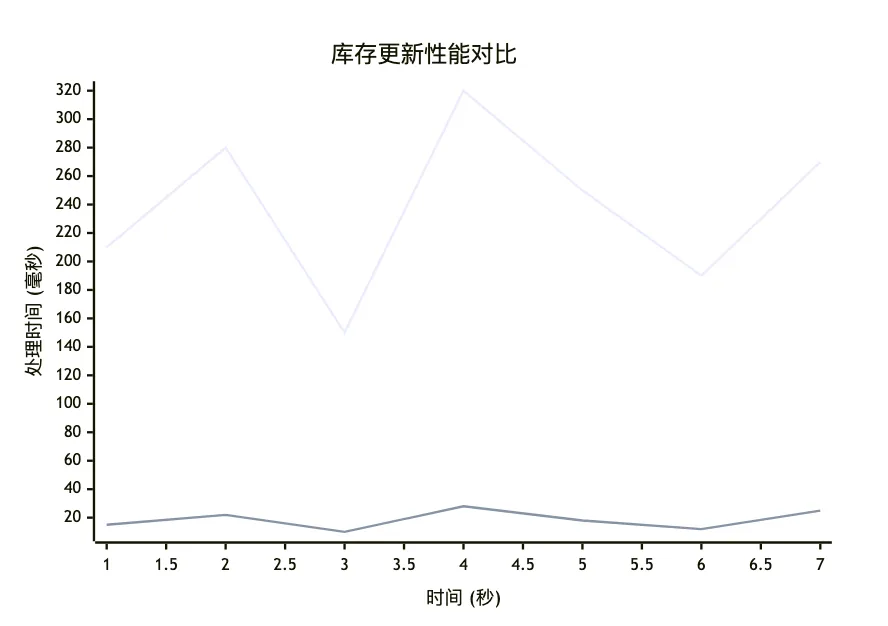
上面的曲线为修复前,下面的曲线为修复后。从数据可以看出,修复方案显著提升了库存更新的性能,彻底解决了页面冻结问题。
五、结语
本文详细记录了在线商城项目中遇到的库存实时更新引发页面冻结的问题,从问题现象描述、排查过程到最终的解决方案。该问题的根本原因是高频次的 Redux 状态更新、低效的状态处理逻辑以及不合理的组件渲染机制共同导致的主线程阻塞。
通过优化 Redux 状态结构、限制更新频率、优化组件渲染机制和使用 Web Worker 处理复杂计算等手段,我们成功解决了页面冻结问题,显著提升了用户体验。
从这个问题的排查和解决过程中,我获得了以下宝贵经验:
- 状态设计至关重要:合理的 Redux 状态结构能显著提升性能,特别是对于频繁更新的数据,应优先考虑使用对象而非数组存储,以提高查找和更新效率。
- 控制更新频率:对于实时性要求不是极高的数据更新,适当限制更新频率可以有效减轻主线程负担,提升页面响应性。
- 组件渲染优化是关键:React 组件的重渲染机制需要谨慎处理,合理使用
memo、useMemo和useCallback等 API 可以避免大量不必要的重渲染。 - 避免主线程阻塞:任何可能耗时的计算都应考虑使用 Web Worker 在后台处理,确保主线程始终保持响应。
- 性能监控不可或缺:建立完善的性能监控机制,及时发现和解决性能问题,避免问题积累扩大。
希望本文的经验能为其他开发者提供参考,共同打造更流畅、更优质的前端应用。
原创声明:本文系作者授权腾讯云开发者社区发表,未经许可,不得转载。
如有侵权,请联系 cloudcommunity@tencent.com 删除。
原创声明:本文系作者授权腾讯云开发者社区发表,未经许可,不得转载。
如有侵权,请联系 cloudcommunity@tencent.com 删除。
评论
登录后参与评论
推荐阅读
目录
腾讯云开发者
