打造零故障架构:基于 Keepalived 的 Nginx 和 HAProxy 高可用实战指南
原创
打造零故障架构:基于 Keepalived 的 Nginx 和 HAProxy 高可用实战指南
原创
智维攻城狮
发布于 2025-08-27 10:37:31
发布于 2025-08-27 10:37:31
打造零故障架构:基于 Keepalived 的 Nginx 和 HAProxy 高可用实战指南
一、为什么要上 Keepalived 高可用?
在生产环境中,单点故障(SPOF) 是架构稳定性的最大敌人。 无论是 Nginx 还是 HAProxy,一旦入口节点宕机,整个业务就会中断。 Keepalived 的作用就是——让入口节点“永不宕机”。
- 核心原理:通过 VRRP 协议在多台服务器之间漂移一个虚拟 IP(VIP)
- 效果:主节点挂了,VIP 自动切换到备节点,业务无感知
二、架构拓扑
        ┌──────────────┐
        │   Client     │
        └──────┬───────┘
               │
         VIP: 192.168.1.100
               │
    ┌──────────┴──────────┐
    │                     │
┌───▼───┐           ┌─────▼────┐
│ Nginx │           │ HAProxy  │
│ Master│           │ Backup   │
└───┬───┘           └─────┬────┘
    │                     │
    └──────────┬──────────┘
               │
         ┌─────▼─────┐
         │  Backend  │
         └───────────┘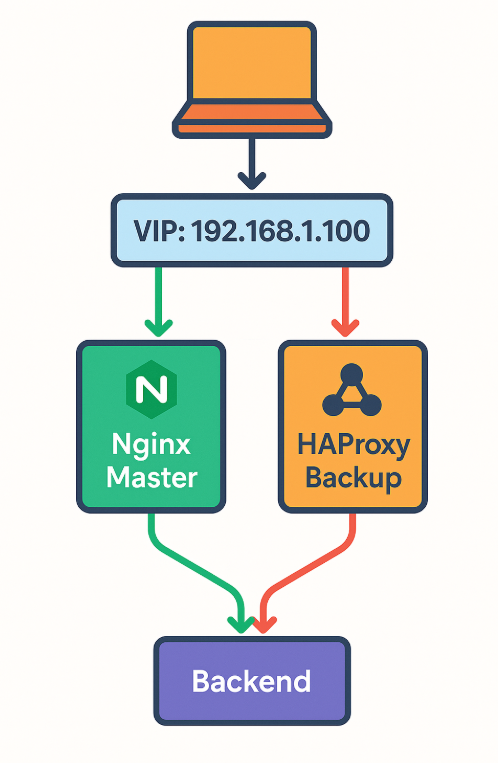
image-20250826112150694
三、环境准备
节点角色 | 主机名 | IP 地址 | 说明 |
|---|---|---|---|
Master | lb01 | 192.168.1.11 | 主入口 |
Backup | lb02 | 192.168.1.12 | 备用入口 |
VIP | - | 192.168.1.100 | 漂移 IP |
四、安装 Keepalived
CentOS / RHEL 系列
yum install -y keepalivedDebian / Ubuntu 系列
apt-get update && apt-get install -y keepalived五、配置 Keepalived
1. Master 节点 /etc/keepalived/keepalived.conf
vrrp_instance VI_1 {
state MASTER
interface eth0
virtual_router_id 51
priority 100
advert_int 1
authentication {
auth_type PASS
auth_pass 123456
}
virtual_ipaddress {
192.168.1.100/24
}
track_script {
chk_nginx
}
}
vrrp_script chk_nginx {
script "/etc/keepalived/check_nginx.sh"
interval 2
weight -20
}2. Backup 节点
vrrp_instance VI_1 {
state BACKUP
interface eth0
virtual_router_id 51
priority 90
advert_int 1
authentication {
auth_type PASS
auth_pass 123456
}
virtual_ipaddress {
192.168.1.100/24
}
track_script {
chk_nginx
}
}
vrrp_script chk_nginx {
script "/etc/keepalived/check_nginx.sh"
interval 2
weight -20
}六、健康检查脚本
vi /etc/keepalived/check_nginx.sh
把以下内容填入#!/bin/bash
if ! pgrep nginx > /dev/null; then
systemctl start nginx
sleep 2
if ! pgrep nginx > /dev/null; then
exit 1
fi
fi
exit 0给到执行权限
chmod +x /etc/keepalived/check_nginx.sh七、启动与验证
systemctl enable keepalived --now- 在 Master 上执行:
ip addr show eth0应看到 VIP 192.168.1.100 已绑定
- 停止 Master 的 Nginx 或 Keepalived:
systemctl stop nginx几秒后,VIP 会自动漂移到 Backup 节点
八、结合 HAProxy 的高可用
如果入口层是 HAProxy,只需将健康检查脚本改为:
bash
#!/bin/bash
if ! pgrep haproxy > /dev/null; then
    systemctl start haproxy
    sleep 2
    if ! pgrep haproxy > /dev/null; then
        exit 1
    fi
fi
exit 0
九、生产优化建议
- 双向健康检查:不仅检测进程,还可检测端口或 HTTP 状态码
- 防脑裂:结合
unicast_peer或notify脚本,避免双主 - 日志监控:开启 Keepalived 日志,方便故障排查
- 自动化部署:用 Ansible/SaltStack 批量推送配置
十、总结
通过 Keepalived + Nginx/HAProxy,我们可以在入口层实现秒级故障切换,让业务在节点宕机时依然平稳运行。 这套方案部署简单、成本低,非常适合中小型企业和高可用入门实践。
原创声明:本文系作者授权腾讯云开发者社区发表,未经许可,不得转载。
如有侵权,请联系 cloudcommunity@tencent.com 删除。
原创声明:本文系作者授权腾讯云开发者社区发表,未经许可,不得转载。
如有侵权,请联系 cloudcommunity@tencent.com 删除。
评论
登录后参与评论
推荐阅读
目录
腾讯云开发者

Copyright © 2013 - 2026 Tencent Cloud. All Rights Reserved. 腾讯云 版权所有
深圳市腾讯计算机系统有限公司 ICP备案/许可证号:粤B2-20090059  粤公网安备44030502008569号
腾讯云计算(北京)有限责任公司 京ICP证150476号 | 京ICP备11018762号