mysql备份又报错了:mysqldump: Error 3024: Query execution was interrupted, maximum stat
原创
mysql备份又报错了:mysqldump: Error 3024: Query execution was interrupted, maximum stat
原创
大大刺猬
发布于 2026-01-19 18:03:14
发布于 2026-01-19 18:03:14
导读
mysql备份又报错了, 又是不一样的报错, 这备份的报错怕不是都快遇到完了.
有一个比较大的库之前一直是物理备份(xtrabackup),但最近由于某种需求,需要手动发起1次逻辑备份. 故使用类似如下SQL得到了如下报错:
[root@ddcw21 ~]#mysqldump -h127.0.0.1 -P3314 -p123456 --databases db2 --set-gtid-purged=OFF > /dev/null
mysqldump: [Warning] Using a password on the command line interface can be insecure.
mysqldump: Error: 'Query execution was interrupted, maximum statement execution time exceeded' when trying to dump tablespaces
mysqldump: Error 3024: Query execution was interrupted, maximum statement execution time exceeded when dumping table `ddcw_alltype_table` at row: 344
分析
这报错提示很明显, 就是"查询中断了, 因为最大执行时间到了". 这种通常都有相关的参数,我们直接show global variables like '%execu%';
(root@127.0.0.1) [(none)]> show global variables like '%execu%';
+----------------------------------+---------------------------------------------+
| Variable_name                    | Value                                       |
+----------------------------------+---------------------------------------------+
| gtid_executed                    | b68e2434-cd30-11ec-b536-000c2980c11e:1-9537 |
| gtid_executed_compression_period | 0                                           |
| max_execution_time               | 10000                                       |
+----------------------------------+---------------------------------------------+
3 rows in set (0.00 sec)果然存在一个参数max_execution_time, 该参数是限制select语句的执行时间的(单位:毫秒), 不含存储过程.
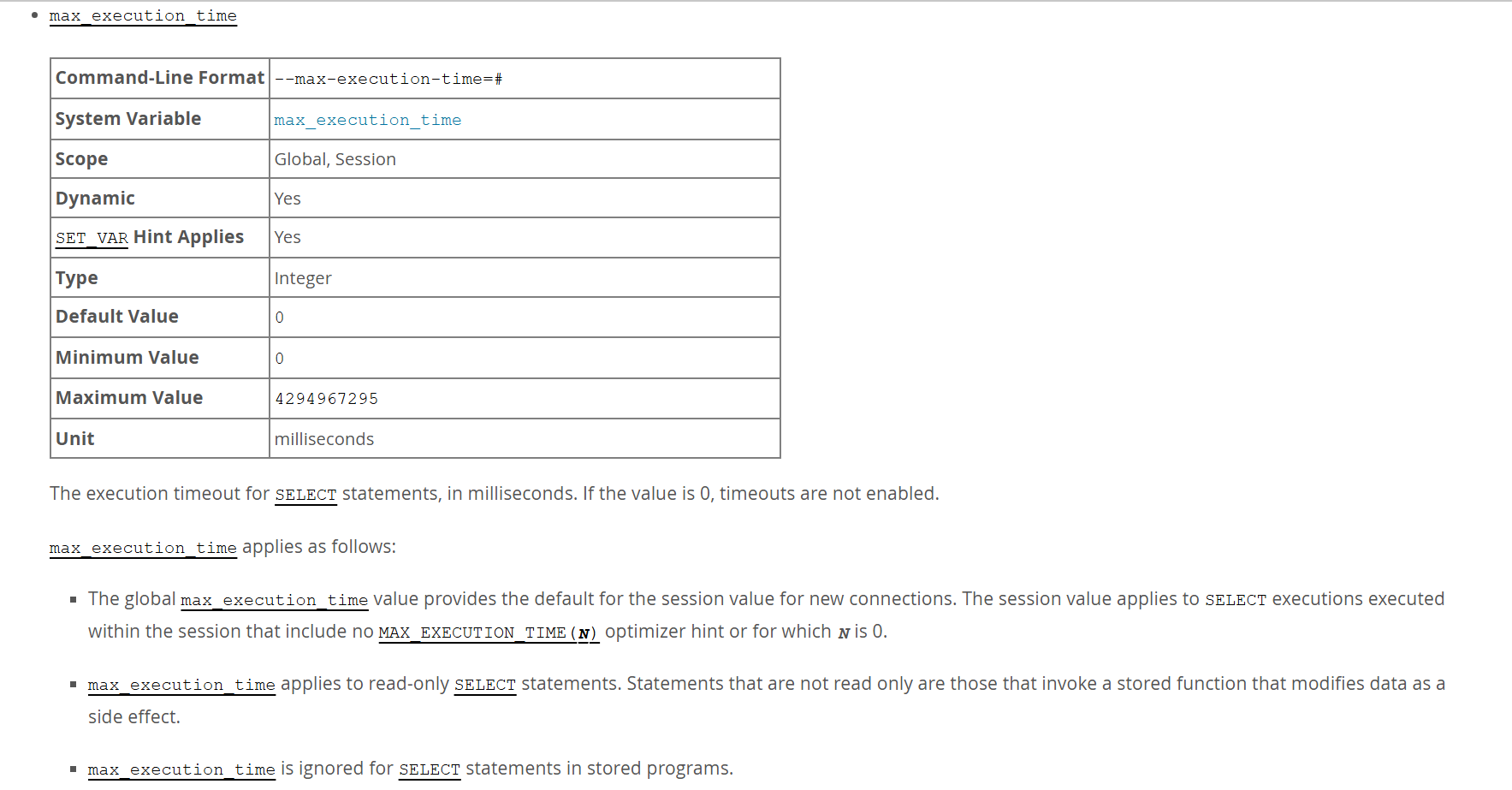
那么问题就结了, 解决方案也很简单, 将max_execution_time的值调大即可, 或者设置为0(不限制).
拓展
系统初始化
3年前,我们查看mysqld启动流程的时候,其中有个初始化组件init_server_components里面有个叫定时器的初始化my_timer_initialize
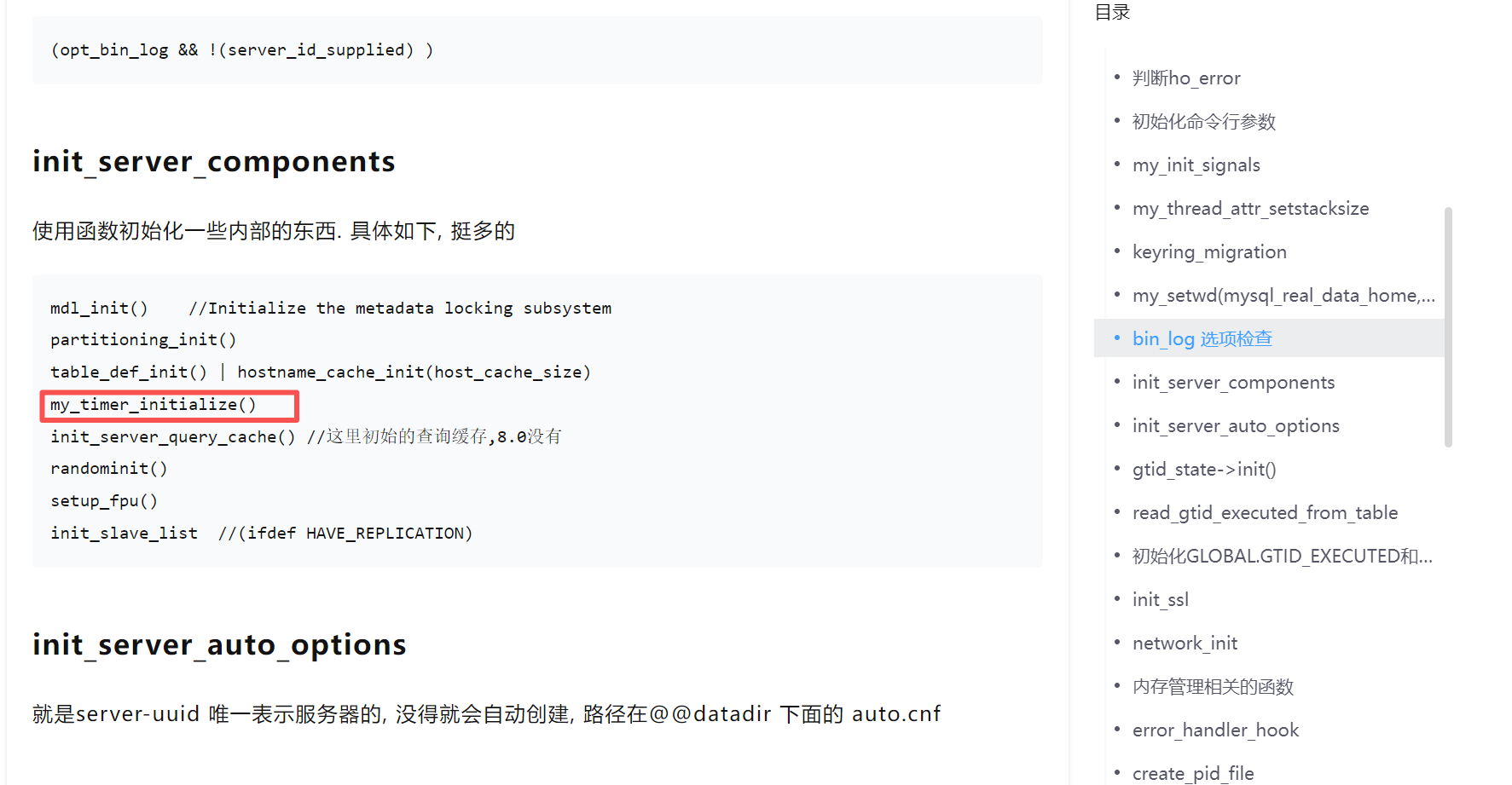
这玩意是不是就是初始化的和'max_execution_time'相关的呢? 我们先看下my_timer_initialize初始化了啥? 这个初始化和操作系统相关,我们是linux的,看posix的,发现是'return 0' 也就没啥好看的了.
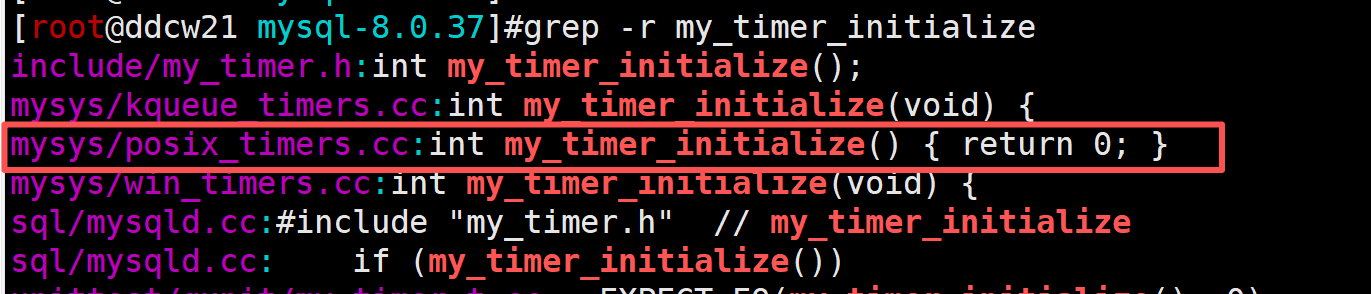
但init_server_components中还设置了"have_statement_timeout = SHOW_OPTION_YES"
  /*
    Timers not needed if only starting with --help.
  */
  if (!is_help_or_validate_option()) {
    if (my_timer_initialize())
      LogErr(ERROR_LEVEL, ER_CANT_INIT_TIMER, errno);
    else
      have_statement_timeout = SHOW_OPTION_YES;
  }
这个flag(have_statement_timeout)看起来就更像是max_execution_time相关的了.
sql执行
我们再来看看连接之后的SQL执行时,该参数是在哪使用的, 我们直接查看sql/sql_select.cc中的Sql_cmd_dml::execute实现, 简单整理得到如下:
bool Sql_cmd_dml::execute(THD *thd) {
....
  // If a timer is applicable to statement, then set it.
  if (is_timer_applicable_to_statement(thd))
    statement_timer_armed = set_statement_timer(thd);
....
  if (statement_timer_armed && thd->timer) reset_statement_timer(thd);
......
存在一个判断is_timer_applicable_to_statement,若成功,则调用set_statement_timer设置线程的定时.
我们瞅瞅is_timer_applicable_to_statement又是干啥的?
static inline bool is_timer_applicable_to_statement(THD *thd) {
  /*
    The following conditions must be met:
      - is SELECT statement.
      - timer support is implemented and it is initialized.
      - statement is not made by the slave threads.
      - timer is not set for statement
      - timer out value of is set
      - SELECT statement is not from any stored programs.
  */
  return (thd->lex->sql_command == SQLCOM_SELECT &&
          (have_statement_timeout == SHOW_OPTION_YES) && !thd->slave_thread &&
          !thd->timer &&
          (thd->lex->max_execution_time || thd->variables.max_execution_time) &&
          !thd->sp_runtime_ctx);
}
这个判断就比较简单了, 需要满足如下6种情况:
- 是select
- 启用了定时器
- 不是slave线程
- 没有设置相关hint
- max_execution_time有值
- 不是存储过程
看着是不是很眼熟, 和官方文档的描述几乎完全一样.
然后我们再来看看"调用set_statement_timer设置线程的定时"
bool set_statement_timer(THD *thd) {
  ulong max_execution_time = get_max_execution_time(thd);

  thd->timer = thd_timer_set(thd, thd->timer_cache, max_execution_time);
  thd->timer_cache = nullptr;

  if (thd->timer)
    thd->status_var.max_execution_time_set++;
  else
    thd->status_var.max_execution_time_set_failed++;

  return thd->timer;
}
逻辑很简单, 即调用thd_timer_set设置线程最大执行时间为max_execution_time,然后给状态值max_execution_time_set/max_execution_time_set_failed 加1. 我们直接show global stauts即可查看
(root@127.0.0.1) [(none)]> show global status like 'max_execution_time_set%';
+-------------------------------+-------+
| Variable_name                 | Value |
+-------------------------------+-------+
| Max_execution_time_set        | 19    |
| Max_execution_time_set_failed | 0     |
+-------------------------------+-------+
2 rows in set (0.00 sec)
我们再来看看sql/sql_timer.cc中的thd_timer_set又在干嘛:
THD_timer_info *thd_timer_set(THD *thd, THD_timer_info *thd_timer,
                              unsigned long time) {
  /* Create a new thread timer object if one was not provided. */
  if (thd_timer == nullptr && (thd_timer = thd_timer_create()) == nullptr)
    return nullptr;

  /* Mark the notification as pending. */
  thd_timer->thread_id = thd->thread_id();

  /* Arm the timer. */
  if (DBUG_EVALUATE_IF("thd_timer_set_failure", 0, 1) &&
      !my_timer_set(&thd_timer->timer, time))
    return thd_timer;

  /* Dispose of the (cached) timer object. */
  thd_timer_destroy(thd_timer);

  return nullptr;
}
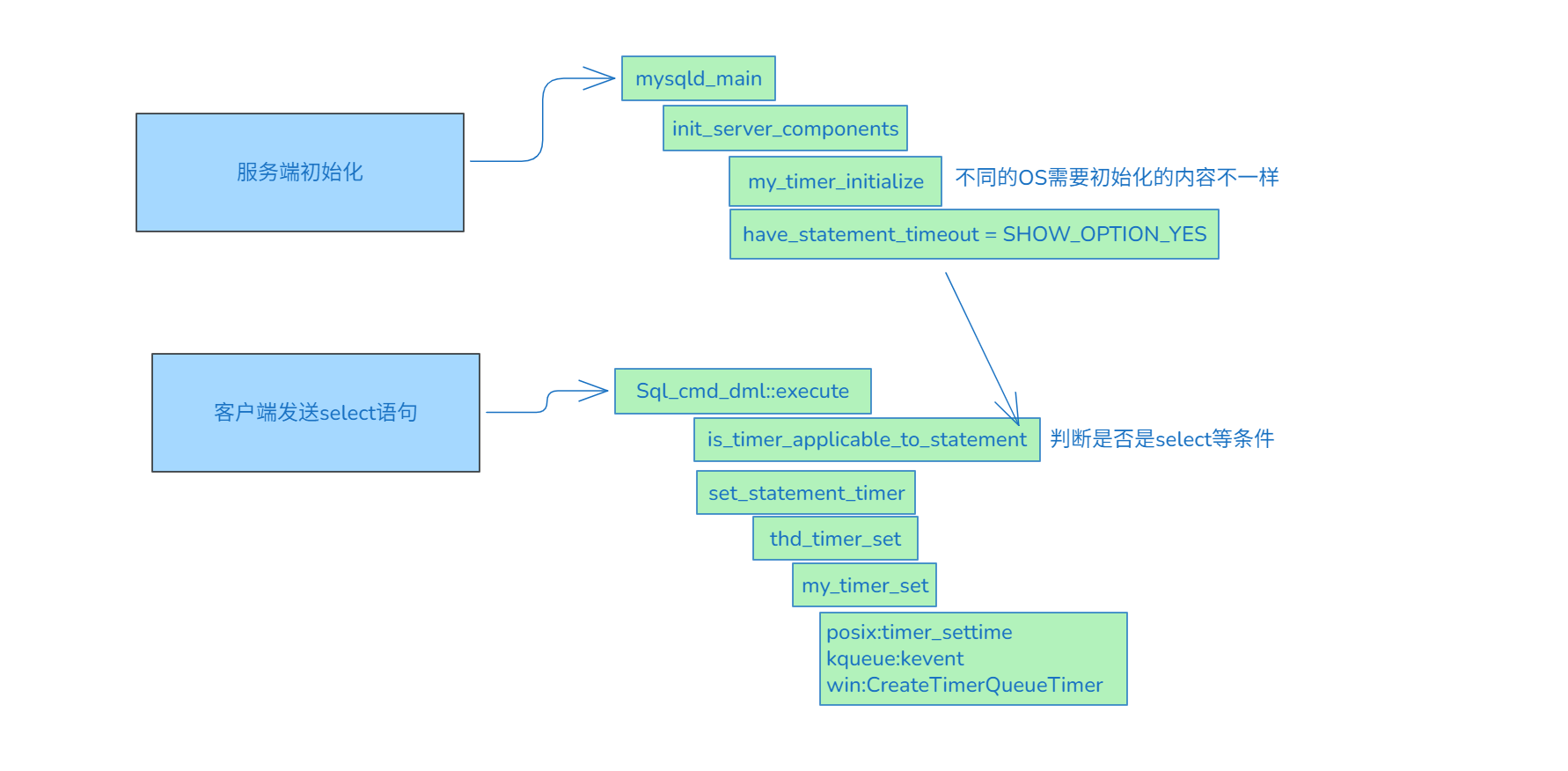
逻辑看起来也比较简单,就是创建定时器,绑定时间,销毁定时器.而设置超时my_timer_set的实现得看操作系统了.
Linux使用timer_settime,macos之类的使用kevent,win使用CreateTimerQueueTimer.
看起来比较懵,一个个调用跟套娃似的.我们简单来个图理解下:
总结
本次mysqldump备份报错"mysqldump: Error 3024"
原因比较简单: 备份的sql语句执行时间达到了max_execution_time毫秒.
解决方法也比较简单:设置更大的max_execution_time即可.
参考
https://dev.mysql.com/doc/refman/8.0/en/server-system-variables.html#sysvar_max_execution_time
原创声明:本文系作者授权腾讯云开发者社区发表,未经许可,不得转载。
如有侵权,请联系 cloudcommunity@tencent.com 删除。
原创声明:本文系作者授权腾讯云开发者社区发表,未经许可,不得转载。
如有侵权,请联系 cloudcommunity@tencent.com 删除。
评论
登录后参与评论
推荐阅读
目录
腾讯云开发者

Copyright © 2013 - 2026 Tencent Cloud. All Rights Reserved. 腾讯云 版权所有
深圳市腾讯计算机系统有限公司 ICP备案/许可证号:粤B2-20090059  粤公网安备44030502008569号
腾讯云计算(北京)有限责任公司 京ICP证150476号 | 京ICP备11018762号