BinSentry 启动调试反汇编与Python SDK使用入门

BinSentry 启动调试反汇编与Python SDK使用入门

王瑞MVP
发布于 2026-10-05 08:18:46
发布于 2026-10-05 08:18:46
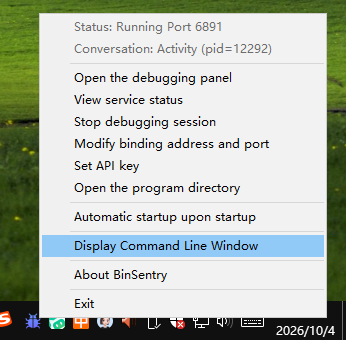
BinSentry 内置调试引擎,支持两种调试场景:调试 EXE 可执行程序、调试 DLL 动态链接库,两种模式均可通过 Python SDK 脚本进行远程调用控制。启动 BinSentry 服务端后,可以打开控制台窗口查看程序完整执行日志;控制台持续打印日志会带来性能损耗,生产环境建议关闭控制台输出,提升调试执行效率。
通过使用如下方式打开控制台窗口,观察程序的详细执行流程。控制台打开状态下由于持续输出会导致调试变慢,生产环境中建议关闭输出窗口屏蔽输出,提高执行效率。
image
调试命令有两种,一种是debug主要用于附加一个exe可执行程序,另一个是debug_dll主要针对的是dll动态链接库,使用dll调试是通过加载BinLoader32.exe到进程空间内,并通过切入DLL模块实现的。
以EXE调试为例,使用如下代码打开一个调试功能。
from BinSentry import *

if __name__ == "__main__":
    config = Config(
        address="127.0.0.1",
        port=6891,
        api_key="45d3552b12b12cdf2c831344311cf81e"
        )

    client = BinSentryClient(config=config)

    dbg = client.debug("c://win32.exe","","c://")
    print(dbg)
执行后输出如下提示:
{
  "status": "success",
  "result": {
    "state": true,
    "message": "Debugging session started",
    "pid": 1204,
    "tid": 4372,
    "path": "c://win32.exe"
  },
  "timestamp": 3185671
}
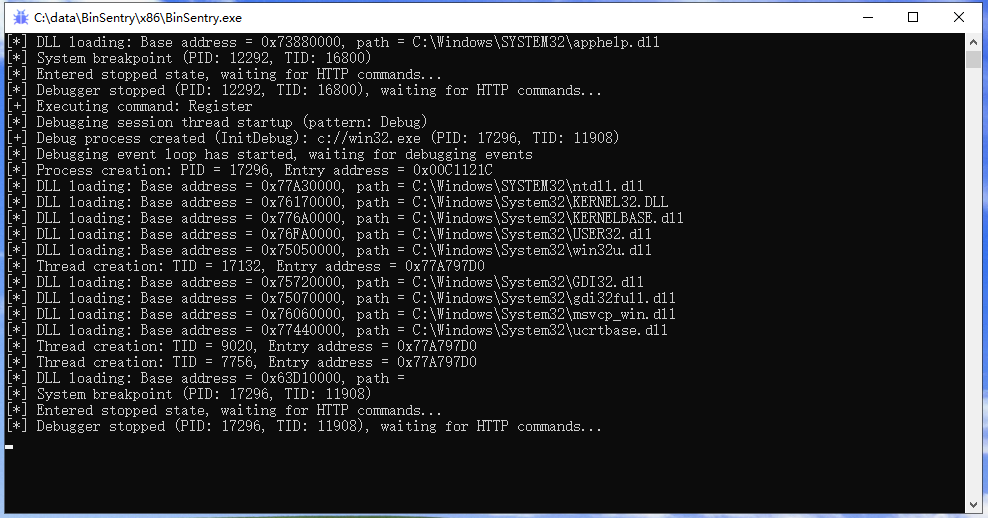
同理,后台会看到页面加载执行流程:
image
此时,可以通过这个句柄接口,完成其他功能的调用测试,例如读取寄存器的值,并输出EIP中的内容。
from BinSentry import *
import json

if __name__ == "__main__":
    config = Config(
        address="127.0.0.1",
        port=6891,
        api_key="45d3552b12b12cdf2c831344311cf81e"
    )
    client = BinSentryClient(config=config)
    try:
        client.detach()
    except Exception:
        pass

    raw_dbg_resp = client.debug("c://win32.exe", "", "c://")

    # SDK返回原始JSON字符串,务必loads转dict
    dbg = json.loads(raw_dbg_resp)
    print("Debug session:", dbg)

    if dbg["status"] != "success":
        print("Create debug session failed:", dbg["result"]["message"])
        exit(-1)

    # 读取寄存器值
    raw_reg_resp = client.register()
    resp = json.loads(raw_reg_resp)
    print("Register response: ", resp)

    # 读取EIP寄存器
    if resp["status"] == "success":
        eip_val = resp["result"]["registers"]["eip"]
        eip_hex = resp["result"]["registers"]["eipHex"]
        print(f"EIP decimal = {eip_val}")
        print(f"EIP hex = {eip_hex}")

    # 后续恢复运行
    client.run()
输出内容如下所示:
Debug session:
{
    'status': 'success',
    'result': {
        'state': True,
        'message': 'Debuggingsessionstarted',
        'pid': 17136,
        'tid': 9252,
        'path': 'c: //win32.exe'
    },
    'timestamp': 3602921
}

Register response:
{
    'status': 'success',
    'result': {
        'command': 'Register',
        'registers': {
            'eax': 0,
            'eaxHex': '0x00000000',
            'ebx': 16,
            'ebxHex': '0x00000010',
            'ecx': 12910592,
            'ecxHex': '0x00C50000',
            'edx': 0,
            'edxHex': '0x00000000',
            'esi': 24387496,
            'esiHex': '0x01741FA8',
            'edi': 18706432,
            'ediHex': '0x011D7000',
            'esp': 20312972,
            'espHex': '0x0135F38C',
            'ebp': 20313016,
            'ebpHex': '0x0135F3B8',
            'eip': 2007886279,
            'eipHex': '0x77ADE9C7',
            'eflags': 582,
            'eflagsHex': '0x00000246',
            'cs': 35,
            'csHex': '0x00000023',
            'ss': 43,
            'ssHex': '0x0000002B',
            'ds': 43,
            'dsHex': '0x0000002B',
            'es': 43,
            'esHex': '0x0000002B',
            'fs': 83,
            'fsHex': '0x00000053',
            'gs': 43,
            'gsHex': '0x0000002B',
            'dr0': 0,
            'dr0Hex': '0x00000000',
            'dr1': 0,
            'dr1Hex': '0x00000000',
            'dr2': 0,
            'dr2Hex': '0x00000000',
            'dr3': 0,
            'dr3Hex': '0x00000000',
            'dr6': 0,
            'dr6Hex': '0x00000000',
            'dr7': 0,
            'dr7Hex': '0x00000000',
            'fp_control': 639,
            'fp_status': 0,
            'fp_tag': 65535,
            'mxcsr': 0,
            'xmm': [
                '0x00000000000000000000000000000000',
                '0x00000000000000000000000000000000',
                '0x00000000000000000000000000000000',
                '0x00000000000000000000000000000000',
                '0x00000000000000000000000000000000',
                '0x00000000000000000000000000000000',
                '0x00000000000000000000000000000000',
                '0x00000000000000000000000000000000',
                '0x00000000000000000000000000000000',
                '0x00000000000000000000000000000000',
                '0x00000000000000000000000000000000',
                '0x00000000000000000000000000000000',
                '0x00000000000000000000000000000000',
                '0x00000000000000000000000000000000',
                '0x00000000000000000000000000000000',
                '0x00000000000000000000000000000000'
            ]
        },
        'state': True
    },
    'timestamp': 3602937
}

EIP decimal = 2007886279
EIP hex = 0x77ADE9C7
拿到EIP的值,就可以继续执行反汇编功能:
from BinSentry import *
import json

if __name__ == "__main__":
    config = Config(
        address="127.0.0.1",
        port=6891,
        api_key="45d3552b12b12cdf2c831344311cf81e"
    )
    client = BinSentryClient(config=config)
    try:
        client.detach()
    except Exception:
        pass

    raw_dbg_resp = client.debug("c://win32.exe", "", "c://")

    # SDK返回原始JSON字符串,务必loads转dict
    dbg = json.loads(raw_dbg_resp)
    print("Debug session:", dbg)

    if dbg["status"] != "success":
        print("Create debug session failed:", dbg["result"]["message"])
        exit(-1)

    # 读取寄存器值
    raw_reg_resp = client.register()
    resp = json.loads(raw_reg_resp)
    eip_hex = resp["result"]["registers"]["eipHex"]
    print(f"EIP hex = {eip_hex}")

    # EIP反汇编
    raw_disasm_resp = client.dissasembler(address=eip_hex,count=5)
    print("Disassemble response: ", raw_disasm_resp)

    # 后续恢复运行
    client.run()
执行反汇编并输出前5行。
Debug session:
{
    'status': 'success',
    'result': {
        'state': True,
        'message': 'Debuggingsessionstarted',
        'pid': 15548,
        'tid': 7616,
        'path': 'c: //win32.exe'
    },
    'timestamp': 4107531
}

EIP hex = 0x77ADE9C7

Disassemble response:
{
  "status": "success",
  "result": {
    "command": "Dissasembler",
    "address": 2007886279,
    "addressHex": "0x77ADE9C7",
    "count": 5,
    "instructions": [
      {
        "address": 2007886279,
        "ad\ndressHex": "0x77ADE9C7",
        "bytes": "EB 07",
        "mnemonic": "jmp",
        "op_str": "0x77ade9d0",
        "module": "ntdll.dll"
      },
      {
        "address": 2007886281,
        "addressHex": "0x77ADE9C9",
        "bytes": "33 C0",
        "mnemonic": "\nxor",
        "op_str": "eax, eax",
        "module": "ntdll.dll"
      },
      {
        "address": 2007886283,
        "addressHex": "0x77ADE9CB",
        "bytes": "40",
        "mnemonic": "inc",
        "op_str": "eax",
        "module": "ntdll.dll"
      },
      {
        "address": 2007886284,
        "addressHex": "0x77ADE9CC",
        "bytes": "C3",
        "mnemonic": "ret",
        "op_str": "",
        "module": "ntdll.dll"
      },
      {
        "address": 2007886285,
        "addressHex": "0x77ADE9CD",
        "bytes": "8B 65 E8",
        "mnemonic": "mov",
        "op_str": "esp, dword ptr [ebp - 0x18]",
        "module": "ntdll.dll"
      }
    ],
    "state": true
  },
  "timestamp": 4107546
}
本文参与 腾讯云自媒体同步曝光计划,分享自作者个人站点/博客。
原始发表:2026-10-04,如有侵权请联系 cloudcommunity@tencent.com 删除
腾讯云开发者

Copyright © 2013 - 2026 Tencent Cloud. All Rights Reserved. 腾讯云 版权所有
深圳市腾讯计算机系统有限公司 ICP备案/许可证号:粤B2-20090059  粤公网安备44030502008569号
腾讯云计算(北京)有限责任公司 京ICP证150476号 | 京ICP备11018762号