pi学习笔记-Compaction
原创
pi学习笔记-Compaction
原创
4cos90
修改于 2026-11-19 01:06:36
修改于 2026-11-19 01:06:36
现在只要谈到Agent几乎必然会提到上下文压缩,如果更熟悉一些会直接开始聊cc的五层上下文压缩机制——但是在上下文达到1M的现在,上下文压缩应该是一种罕见的行为,至少我绝大部分对话都不会撑满上下文,也从不会触发压缩。
为了保持命中前缀缓存,我们不应该在上下文达到上限前轻易的做任何压缩行为。 并且压缩应该是一次性完成的,我们要避免多轮次反复的压缩。
先看看pi的 compaction.md 是怎么介绍的:
Pi提供两种摘要机制,上下文压缩 和 分支摘要。 我们这次主要看上下文压缩。触发时机是 上下文超出阈值 主动执行 /compact ,provider 溢出错误(stopReason: "error" + isContextOverflow)或早停的 length(输出被 token 上限截断)
自动触发上下文压缩的条件是:contextTokens > contextWindow - reserveTokens
reserveTokens的默认配置是 16384 token。
这意味着一般1M上下文的模型,可以用到接近99%才会主动触发压缩。
即使是老的100k上下文的模型,也可以用到超过80%才会主动触发压缩。
Overview
Pi has two summarization mechanisms:
Mechanism | Trigger | Purpose |
|---|---|---|
Compaction | Context exceeds threshold, or | Summarize old messages to free up context |
Branch summarization |
| Preserve context when switching branches |
Both use closely related structured formats and track file operations cumulatively. Summarization requests disable prompt-cache writes because these one-off prompts are unlikely to be reused.
When It Triggers
Auto-compaction triggers when:
contextTokens > contextWindow - reserveTokensBy default, reserveTokens is 16384 tokens (configurable in ~/.pi/agent/settings.json or <project-dir>/.pi/settings.json). It only decides when compaction starts. Summary requests use the model's output limit, reduced when needed so input and output fit the context window.
During a multi-turn agent run, Pi checks the canonical projected context after tools finish and their results are appended, before starting the next assistant response. If the threshold is crossed, Pi compacts during prepareNextTurn, then performs the existing catch-up steering poll before turn_start. It skips this between-turn check when the completed tool batch terminates the run and no queued message requires another response. Pi also checks before a new user prompt and performs final-attempt overflow recovery after the low-level run ends.
A provider context-overflow error or an early final stopReason: "length" can select one compact-and-retry recovery attempt. Length responses with tool calls retain their synthetic failed tool results and follow the ordinary tool/queue scheduler rather than forcing the run to end.
You can also trigger manually with /compact [instructions], where optional instructions focus the summary.
找到手动压缩的入口
在注释里面我们看到除了手动触发压缩,还有两个入口:_checkCompaction()和_runAutoCompaction()
checkCompaction 的触发点是:agent_end 结束之后 或者 新prompt提交前。 如果判断需要触发压缩,调用_runAutoCompaction()。
	/**
	 * Manually compact the session context.
	 *
	 * This is the manual entry point used by `/compact`, RPC, and extensions. It is
	 * separate from automatic threshold/overflow compaction, which enters through
	 * `_checkCompaction()` and `_runAutoCompaction()`. After preparation and the
	 * `session_before_compact` hook, both paths call the lower-level `compact()`
	 * function imported from `./compaction/index.ts`, unless the hook cancels or
	 * supplies a custom result.
	 *
	 * Aborts the current agent operation first. Manual compaction never retries or
	 * continues the interrupted agent turn.
	 *
	 * @param customInstructions Optional instructions for the compaction summary
	 */
	async compact(customInstructions?: string): Promise<CompactionResult> {

	}
_checkCompaction的前置判断,值得关注的是
assistantMessage.stopReason ==="aborted" 属于用户主动取消的场景,不触发压缩。
当切换模型时,contextWindow 按产出这条消息的那个模型(旧模型)取窗口,且消息来自不同模型时跳过溢出检查——目的正是防止“旧小模型的溢出错误给新大模型触发压缩”。(小模型e.g. opus,切换到大模型 e.g. codex emm.. 这都啥时候写的注释,可是就算那时候codex只有4k啊!)
当模型最后一次输出(assistant) 比最新一次 compact 更老的时候,不触发压缩。
	private async _checkCompaction(assistantMessage: AssistantMessage, skipAbortedCheck = true): Promise<boolean> {
		const settings = this.settingsManager.getCompactionSettings(this.model);
		if (!settings.enabled) return false;

		// Skip if message was aborted (user cancelled) - unless skipAbortedCheck is false
		if (skipAbortedCheck && assistantMessage.stopReason === "aborted") return false;

		// Skip overflow check if the message came from a different model.
		// This handles the case where user switched from a smaller-context model (e.g. opus)
		// to a larger-context model (e.g. codex) - the overflow error from the old model
		// shouldn't trigger compaction for the new model. Under a virtual selection, the
		// physical model that produced the message supplies the limits.
		const messageModel = this._modelForMessage(assistantMessage);
		const sameModel = messageModel !== undefined;
		const contextWindow = (messageModel ?? this.model)?.contextWindow ?? 0;

		// Skip compaction checks if this assistant message is older than the latest
		// compaction boundary. This prevents a stale pre-compaction usage/error
		// from retriggering compaction on the first prompt after compaction.
		const compactionEntry = getLatestCompactionEntry(this.sessionManager.getBranch());
		const assistantIsFromBeforeCompaction =
			compactionEntry !== null && assistantMessage.timestamp <= new Date(compactionEntry.timestamp).getTime();
		if (assistantIsFromBeforeCompaction) {
			return false;
		}

		// Automatic cases 1 and 2: context overflow.
		// A length stop is recoverable when output ended below the model's original desired limit,
		// independent of the configured context size or any context-clamped provider request limit.
		const currentProjection = this.sessionManager.buildSessionProjection();
		const assistantEntryId = this._findPersistedMessageEntryId(assistantMessage);
		const assistantIsProjected =
			assistantEntryId === undefined ||
			currentProjection.entries.some(
				(entry) =>
					entry.sourceEntry.id === assistantEntryId &&
					entry.messages.some((message) => message.role === "assistant"),
			);
		const branch = this.sessionManager.getBranch();
		const assistantIndex = assistantEntryId ? branch.findIndex((entry) => entry.id === assistantEntryId) : -1;
		const entriesAfterAssistant = assistantIndex >= 0 ? branch.slice(assistantIndex + 1) : [];
		const hasPostAssistantContextEdit = entriesAfterAssistant.some((entry) => entry.type === "context_edit");
		const latestAssistantEdit = entriesAfterAssistant
			.filter(
				(entry): entry is ContextEditEntry => entry.type === "context_edit" && entry.targetId === assistantEntryId,
			)
			.at(-1);
		const assistantRetainedForExplicitRecovery =
			assistantEntryId === undefined ||
			(!entriesAfterAssistant.some((entry) => entry.type === "compaction") &&
				latestAssistantEdit?.replacement !== null);
		const assistantUsageMatchesProjection = assistantIsProjected && !hasPostAssistantContextEdit;
		const explicitOverflow = assistantMessage.stopReason === "error" && isContextOverflow(assistantMessage);
		const contextOverflow =
			sameModel &&
			((explicitOverflow && assistantRetainedForExplicitRecovery) ||
				(assistantUsageMatchesProjection && isContextOverflow(assistantMessage, contextWindow)));
		const recoverableLength =
			sameModel && assistantIsProjected && isRecoverableLength(assistantMessage, messageModel.maxTokens);
_runAutoCompaction除了来自_checkCompaction的调用以外,还有两个调用点:
prepareNextTurnWithContext:在工具结果追加完、下一次请求前。
agent.prepareRequest:在正式请求llm之前。
对当前模型进行一次contextTokens > contextWindow - reserveTokens的计算,如果超过阈值了触发压缩。
这里我有一些疑惑的,为什么要在下一轮turn开始的时候检查一次,然后在request前又检查一次,这个中间难道context还会变吗?
在pi里有一个Virtual Models的概念,允许用户在界面选择一个 Virtual Models + 扩展写的 route 策略。在每次实际请求时根据策略选择对应的模型。 因此在 prepareNextTurnWithContext 的时候,如果用户选择的是 Virtual Models ,此时还没有跑过 route 策略,尚未得知真实调用的模型,也不知道对应的 contextWindows。 所以在prepareRequest之前拿到了真实的模型还要再检查一遍。
看看压缩方法实际都做了啥
代码太多了,我截取了一些关键步骤
首先emit compaction_start 事件
一样是和agentloop ,toolexecute 中经典的结构:prepareCompaction,runDefaultCompaction, 结果添加进message。
最后 emit compaction_end 事件
	async compact(customInstructions?: string): Promise<CompactionResult> {
		this._emit({ type: "compaction_start", reason: "manual" });
		try {
			const preparation = prepareCompaction(pathEntries, settings);
			if (!preparation) {
				// Check why we can't compact
				const lastEntry = pathEntries[pathEntries.length - 1];
				if (lastEntry?.type === "compaction") {
					throw new Error("Already compacted");
				}
				throw new Error("Nothing to compact (session too small)");
			}
			const result = await this._runDefaultCompaction(
				preparation,
				model,
				customInstructions,
				this._compactionAbortController.signal,
				"manual",
			);
			this.sessionManager.appendCompaction(summary, firstKeptEntryId, tokensBefore, details, fromExtension, usage);
			this._emit({
				type: "compaction_end",
				reason: "manual",
				result: compactionResult,
				aborted: false,
				willRetry: false,
			});
			return compactionResult;
		}
	}
prepareCompaction
之前看到的每一个prepare方法都反复展示了pi的设计理念。这里自然得细看。
首先如果上一轮对话结尾就是 compaction。直接return不重复压缩。
export function prepareCompaction(
	pathEntries: SessionEntry[],
	settings: CompactionSettings,
): CompactionPreparation | undefined {
	if (pathEntries.length > 0 && pathEntries[pathEntries.length - 1].type === "compaction") {
		return undefined;
	}

	const projection = buildSessionProjection(pathEntries);
	const projectedEntries = projection.entries;
	const sourceEntries = projectedEntries.map((entry) => entry.sourceEntry);
	// The newest compaction is projected first. Older compaction entries can still
	// occur in its retained raw range, but their projected contribution is empty.
	const prevCompactionIndex = projectedEntries.findIndex(
		(entry) => entry.sourceEntry.type === "compaction" && entry.messages.length > 0,
	);

	let previousSummary: string | undefined;
	let boundaryStart = 0;
	if (prevCompactionIndex >= 0) {
		previousSummary = (projectedEntries[prevCompactionIndex].sourceEntry as CompactionEntry).summary;
		// The canonical projection has already selected the previous compaction's retained tail.
		boundaryStart = prevCompactionIndex + 1;
	}
	const boundaryEnd = projectedEntries.length;
	const tokensBefore = estimateProjectedContextTokens(projection, pathEntries).tokens;
	const cutPoint = findProjectedCutPoint(projectedEntries, boundaryStart, boundaryEnd, settings.keepRecentTokens);

	const firstKeptEntry = projectedEntries[cutPoint.firstKeptEntryIndex]?.sourceEntry;
	if (!firstKeptEntry?.id) return undefined;
	const firstKeptEntryId = firstKeptEntry.id;
	const historyEnd = cutPoint.isSplitTurn ? cutPoint.turnStartIndex : cutPoint.firstKeptEntryIndex;

	const messagesToSummarize = projectedEntries
		.slice(boundaryStart, historyEnd)
		.flatMap(getMessagesFromProjectedEntryForCompaction);
	const turnPrefixMessages = cutPoint.isSplitTurn
		? projectedEntries
				.slice(cutPoint.turnStartIndex, cutPoint.firstKeptEntryIndex)
				.flatMap(getMessagesFromProjectedEntryForCompaction)
		: [];

	if (messagesToSummarize.length === 0 && turnPrefixMessages.length === 0) return undefined;

	// Extract file operations from edited model-visible messages and the previous compaction.
	const fileOps = extractFileOperations(messagesToSummarize, sourceEntries, prevCompactionIndex);

	// Also extract file ops from turn prefix if splitting
	if (cutPoint.isSplitTurn) {
		for (const msg of turnPrefixMessages) {
			extractFileOpsFromMessage(msg, fileOps);
		}
	}

	return {
		firstKeptEntryId,
		messagesToSummarize,
		turnPrefixMessages,
		isSplitTurn: cutPoint.isSplitTurn,
		tokensBefore,
		previousSummary,
		fileOps,
		settings,
	};
}
buildSessionProjection
看到这边也是重新回顾了一下Session和Projection的概念。
我们打开cc的history文件夹,里面每个Session都是一个jsonl文件。
Pi也是类似的机制,一个jsonl文件等于一个Session,每一行是一个 entry。 文件中的行通过 id 和 parent id 组织成树结构。
Session 只允许 append,不允许修改。
当我们会话真实运行时,我们实际上处于一颗Session树的某一个entry上,这时候我们通过 build projection 的方式,动态计算组织出我们这个entry上真实能看到的context。
下一步是找到上一轮compaction 的entry。
插入一下compact的核心操作流程
上面已经提到了 Session 只能 append,不可篡改。
需要让 projection中靠前的entry,替换为compact之后的summary。
为了完成上述两条线的同步,PI采用了这样的操作流程:
1.选出需要压缩的 entry 条目(从投影中第一条 非compactEntry开始,到 firstKeptEntryId - 1 的entry)。
2.将选出的entry条目生成 summary。
3.在Session中追加一条 CompactionEntry,里面记录 summary 和 firstKeptEntryId。
4.在构建投影的时候,读到 CompactionEntry时按照 firstKeptEntryId 放弃前 firstKeptEntryId - 1 条 entry,并替换为summary
How It Works
- Find cut point: Walk backwards through the finalized session projection, accumulating token estimates until
keepRecentTokens(default 20k, configurable in~/.pi/agent/settings.jsonor<project-dir>/.pi/settings.json) is reached - Extract messages: Collect projected messages from the previous kept boundary (or session start) up to the cut point
- Generate summary: Call LLM to summarize with structured format, passing the previous summary as iterative context when present
- Append entry: Save
CompactionEntrywith summary andfirstKeptEntryId - Rebuilds context: Session rebuilds the context for the next request, using summary + messages from
firstKeptEntryIdonwards
Before compaction:

  entry:  0     1     2     3      4     5     6      7      8     9
        ┌─────┬─────┬─────┬──────┬─────┬─────┬──────┬──────┬─────┬─────┐
        │ hdr │ usr │ ass │ tool │ usr │ ass │ tool │ tool │ ass │ tool│
        └─────┴─────┴─────┴──────┴─────┴─────┴──────┴──────┴─────┴─────┘
                └────────┬───────┘ └──────────────┬──────────────┘
               messagesToSummarize            kept messages
                                   ↑
                          firstKeptEntryId (entry 4)

After compaction (new entry appended):

  entry:  0     1     2     3      4     5     6      7      8     9     10
        ┌─────┬─────┬─────┬──────┬─────┬─────┬──────┬──────┬─────┬─────┬─────┐
        │ hdr │ usr │ ass │ tool │ usr │ ass │ tool │ tool │ ass │ tool│ cmp │
        └─────┴─────┴─────┴──────┴─────┴─────┴──────┴──────┴─────┴─────┴─────┘
               └──────────┬──────┘ └──────────────────────┬───────────────────┘
                 not sent to LLM                    sent to LLM
                                                         ↑
                                              starts from firstKeptEntryId

What the LLM sees:

  ┌────────┬─────────┬─────┬─────┬──────┬──────┬─────┬──────┐
  │ system │ summary │ usr │ ass │ tool │ tool │ ass │ tool │
  └────────┴─────────┴─────┴─────┴──────┴──────┴─────┴──────┘
       ↑         ↑      └─────────────────┬────────────────┘
    prompt   from cmp          messages from firstKeptEntryId
继续往下:
如果之前有CompactEntry ,找出 previousSummary 上一次的 summary 和 boundaryStart 本轮摘要的上边界。
estimateProjectedContextTokens
估算投影上下文已经用了多少token,估算也分2层:
第一层:estimateContextTokens 是 从投影出的 messages 里倒序找最后一条带有效 usage 的 assistant 消息(跳过 aborted/error/全零 usage),如果找到的话就直接使用api返回的真实token用量——这是精确值不是估算。
第二层:陈旧性检查,如果存在 entry.type === "context_edit" || entry.type === "compaction" 发生的 index 晚于 usageEntryIndex 统计用量的 entryindex (也就是说先回复了usageEntry,然后执行了一次压缩)。说明这个 usage 反映的是被改写/压缩之前的旧上下文。
此时会针对每一条 entry 执行 estimateTokens(message); 因为pi 不知道调用模型的真实的tokenize。所以这里采用的估算方式是 Math.ceil(chars / 4) ,显然这只对英文/代码成立,对中文的预估就偏差比较大了,不过即使低估了触发了溢出异常,也会兜底进行一次压缩。
/** Estimate projected context without trusting usage captured before a later edit or compaction. */
export function estimateProjectedContextTokens(
	projection: SessionProjection,
	branchEntries: SessionEntry[],
): ContextUsageEstimate {
	const estimate = estimateContextTokens(projection.messages);
	if (estimate.lastUsageIndex !== null) {
		let projectedMessageIndex = 0;
		let usageEntryId: string | undefined;
		for (const entry of projection.entries) {
			const nextMessageIndex = projectedMessageIndex + entry.messages.length;
			if (estimate.lastUsageIndex < nextMessageIndex) {
				usageEntryId = entry.sourceEntry.id;
				break;
			}
			projectedMessageIndex = nextMessageIndex;
		}

		const usageEntryIndex = usageEntryId ? branchEntries.findIndex((entry) => entry.id === usageEntryId) : -1;
		let latestInvalidatingEntryIndex = -1;
		for (let i = branchEntries.length - 1; i >= 0; i--) {
			const entry = branchEntries[i];
			if (entry.type === "context_edit" || entry.type === "compaction") {
				latestInvalidatingEntryIndex = i;
				break;
			}
		}
		if (usageEntryIndex > latestInvalidatingEntryIndex) return estimate;
	}

	const currentSystem = getCurrentSystemMessage(projection.messages);
	let tokens = currentSystem ? estimateTokens(currentSystem) : 0;
	for (const message of projection.messages) {
		if (message.role !== "system") tokens += estimateTokens(message);
	}
	return { tokens, usageTokens: 0, trailingTokens: tokens, lastUsageIndex: null };
}
findProjectedCutPoint
找到本次压缩需要 summary 的entry list,按照前面操作流程的介绍:
先收集所有合法cutpoint:投影后 messages 里含 user/assistant/custom 等消息的 entry;toolResult 永远不是候选(tool call 和 result 不能拆开);compaction entry 排除。
从 endIndex-1 向回累积估算 token,够到 keepRecentTokens 时,向后(更晚方向)找第一个候选cutpoint作为切点。向前对齐意味着实际保留的尾部可能略小于预算,但绝不切开 toolCall/toolResult 对。(当然在针对中文的估算仍然存在 chat / 4 的问题,意味着如果尾部主要是中文的情况下,会多保留近4倍的token)
然后做了两次小修正:
检查从cutpoint 到 end 这一部分的message,是否存在被投影忽视的文本(比如assistant输出的时候跨过了上下文窗口,触发了自动修复生成了 entry.sourceEntry.type === "context_edit" 的一条entry,此时会将压缩的cutpoint向后推进一格,但是不恢复这条内容。
检查cutpoint之前的entry有没有message.length == 0的上下文不可见条目,如果有的话划进不压缩的部分,cutpoint前移。
此处有一些疑问,因为不可见条目对左侧summary没有影响,同样对边界右侧预估token也没有影响。划到哪边都不改变后续的结果。是为了保持投影中边界信息的完整性?
function findProjectedCutPoint(
	entries: ProjectedSessionEntry[],
	startIndex: number,
	endIndex: number,
	keepRecentTokens: number,
): CutPointResult {
	const cutPoints: number[] = [];
	for (let i = startIndex; i < endIndex; i++) {
		const entry = entries[i];
		if (entry.sourceEntry.type !== "compaction" && entry.messages.some(isCutPointMessage)) cutPoints.push(i);
	}
	if (cutPoints.length === 0) {
		return { firstKeptEntryIndex: startIndex, turnStartIndex: -1, isSplitTurn: false };
	}

	let accumulatedTokens = 0;
	let exceededBudget = false;
	let cutIndex = cutPoints[0];
	for (let i = endIndex - 1; i >= startIndex; i--) {
		const messageTokens = entries[i].messages.reduce((sum, message) => sum + estimateTokens(message), 0);
		if (messageTokens === 0) continue;
		accumulatedTokens += messageTokens;
		if (accumulatedTokens >= keepRecentTokens) {
			exceededBudget = true;
			cutIndex = cutPoints.find((candidate) => candidate >= i) ?? cutPoints[cutPoints.length - 1];
			break;
		}
	}

	// A recovery attempt and its omission edits are context-invisible after the last
	// visible input. Advance only for a closed suffix containing an omitted assistant
	// attempt; arbitrary metadata must not move the cut past unsent input.
	const suffix = entries.slice(cutIndex + 1, endIndex);
	const isIntrinsicallyVisible = (entry: ProjectedSessionEntry): boolean =>
		entry.sourceEntry.type !== "context_edit" && sessionEntryToContextMessages(entry.sourceEntry).length > 0;
	const isOmitted = (entry: ProjectedSessionEntry): boolean =>
		isIntrinsicallyVisible(entry) && entry.messages.length === 0;
	const omittedSuffixIds = new Set(suffix.filter(isOmitted).map((entry) => entry.sourceEntry.id));
	const hasExternalReplacement = suffix.some(
		(entry) =>
			entry.sourceEntry.type === "context_edit" &&
			entry.sourceEntry.replacement !== null &&
			!omittedSuffixIds.has(entry.sourceEntry.targetId),
	);
	const isRecoveryOmissionSuffix =
		exceededBudget &&
		!hasExternalReplacement &&
		suffix.some(
			(entry) =>
				entry.sourceEntry.type === "message" && entry.sourceEntry.message.role === "assistant" && isOmitted(entry),
		) &&
		suffix.every(
			(entry) => entry.sourceEntry.type !== "compaction" && (!isIntrinsicallyVisible(entry) || isOmitted(entry)),
		);
	if (isRecoveryOmissionSuffix) cutIndex++;

	while (cutIndex > startIndex) {
		const previous = entries[cutIndex - 1];
		if (previous.sourceEntry.type === "compaction" || previous.messages.length > 0) break;
		cutIndex--;
	}
	const startsTurn = isProjectedTurnStart(entries[cutIndex]);
	const turnStartIndex = startsTurn ? -1 : findProjectedTurnStartIndex(entries, cutIndex, startIndex);
	return {
		firstKeptEntryIndex: cutIndex,
		turnStartIndex,
		isSplitTurn: !startsTurn && turnStartIndex !== -1,
	};
}
extractFileOperations && extractFileOpsFromMessage
pi的摘要中 工具调用是单独记录的。
extractFileOpsFromMessage 负责单条消息的提取:从 assistant 消息的 toolCall 调用块里拿工具名和 path 参数;toolResult 只在带 nestedCalls(codemode 脚本的嵌套调用)时才贡献。
这里又有一种消息 turnPrefixMessages ,他代表的是一个 user-message span(从 user 到下个 user 之间的整个 turn)自己超过了 keepRecentTokens,预算在任何 turn 边界都兜不住,切点被迫落进 turn 内部。turnPrefixMessages = 这个巨型 turn 从起点到切点的前半截。(想出这种边界条件的开发,到底经历了什么。。。)
这样就完成了整个summary 的prepare。 主要是从投影中得到了如下信息:
- 摘要切点的位置:firstKeptEntryId
- 需要执行摘要的内容:messagesToSummarize && turnPrefixMessages
- token估算:tokensBefore
- 之前已经进行过的摘要内容: previousSummary
- 工具调用记录: fileOps
compact
到真正调用LLM生成摘要这一步,就显得非常简洁了。直接调用即可。
唯一值得注意的是针对有 turnPrefixMessages 的场景,另外单独调用了一次LLM摘要。
在 summary 最后再追加上工具调用记录(居然是代码写入的):
summary += formatFileOperations(readFiles, modifiedFiles);
/**
 * Generate summaries for compaction using prepared data.
 * Returns CompactionResult - SessionManager adds uuid/parentUuid when saving.
 *
 * @param preparation - Pre-calculated preparation from prepareCompaction()
 * @param customInstructions - Optional custom focus for the summary
 * @param sessionId - Optional routing session ID forwarded without enabling prompt caching
 */
export async function compact(
	preparation: CompactionPreparation,
	model: Model<any>,
	apiKey: string | undefined,
	headers?: Record<string, string>,
	customInstructions?: string,
	signal?: AbortSignal,
	thinkingLevel?: ThinkingLevel,
	streamFn?: StreamFn,
	env?: Record<string, string>,
	retry?: RetryPolicy,
	callbacks?: RetryCallbacks,
	sessionId?: string,
): Promise<CompactionResult> {
	const {
		firstKeptEntryId,
		messagesToSummarize,
		turnPrefixMessages,
		isSplitTurn,
		tokensBefore,
		previousSummary,
		fileOps,
	} = preparation;

	// Generate summaries and merge into one
	let summary: string;
	let summaryUsage: Usage;

	if (isSplitTurn && turnPrefixMessages.length > 0) {
		let historyText = previousSummary ?? "No prior history.";
		let historyUsage: Usage | undefined;
		if (messagesToSummarize.length > 0) {
			const historyResult = await generateSummaryWithUsage(
				messagesToSummarize,
				model,
				undefined,
				apiKey,
				headers,
				signal,
				customInstructions,
				previousSummary,
				thinkingLevel,
				streamFn,
				env,
				retry,
				callbacks,
				sessionId,
			);
			historyText = historyResult.text;
			historyUsage = historyResult.usage;
		}
		const turnPrefixResult = await generateTurnPrefixSummary(
			turnPrefixMessages,
			model,
			apiKey,
			headers,
			env,
			signal,
			thinkingLevel,
			streamFn,
			retry,
			callbacks,
			sessionId,
			customInstructions,
		);
		// Merge into single summary
		summary = `${historyText}\n\n---\n\n**Turn Context (split turn):**\n\n${turnPrefixResult.text}`;
		summaryUsage = historyUsage ? combineUsage(historyUsage, turnPrefixResult.usage) : turnPrefixResult.usage;
	} else {
		// Just generate history summary
		const result = await generateSummaryWithUsage(
			messagesToSummarize,
			model,
			undefined,
			apiKey,
			headers,
			signal,
			customInstructions,
			previousSummary,
			thinkingLevel,
			streamFn,
			env,
			retry,
			callbacks,
			sessionId,
		);
		summary = result.text;
		summaryUsage = result.usage;
	}

	// Compute file lists and append to summary
	const { readFiles, modifiedFiles } = computeFileLists(fileOps);
	summary += formatFileOperations(readFiles, modifiedFiles);

	if (!firstKeptEntryId) {
		throw new Error("First kept entry has no UUID - session may need migration");
	}

	return {
		summary,
		firstKeptEntryId,
		tokensBefore,
		usage: summaryUsage,
		details: { readFiles, modifiedFiles } as CompactionDetails,
	};
}
取得summary之后,剩下的操作相比大家都想得到的:
给session中 append 一条 compactentry记录本轮压缩的结果。
emit compaction_end 事件。
			this.sessionManager.appendCompaction(summary, firstKeptEntryId, tokensBefore, details, fromExtension, usage);
			this._emit({
				type: "compaction_end",
				reason: "manual",
				result: compactionResult,
				aborted: false,
				willRetry: false,
			});
在经过三个主要过程的学习之后,不难看出pi中有三条线
1.session - jsonl 审计日志,只允许追加
2.context - pi的真实运行环境
3.messages - 模型可以看到内容,通过session build projection的方式动态计算得到
在每一轮的运行过程中,我们的目标是 在大量异步事件进行的同时, 保持这三条线的状态始终对齐。
为此pi写了大量幂等的对齐方法,在每一个环境可能发生改变的过程之后,调用幂等的对齐方法重新对齐状态。
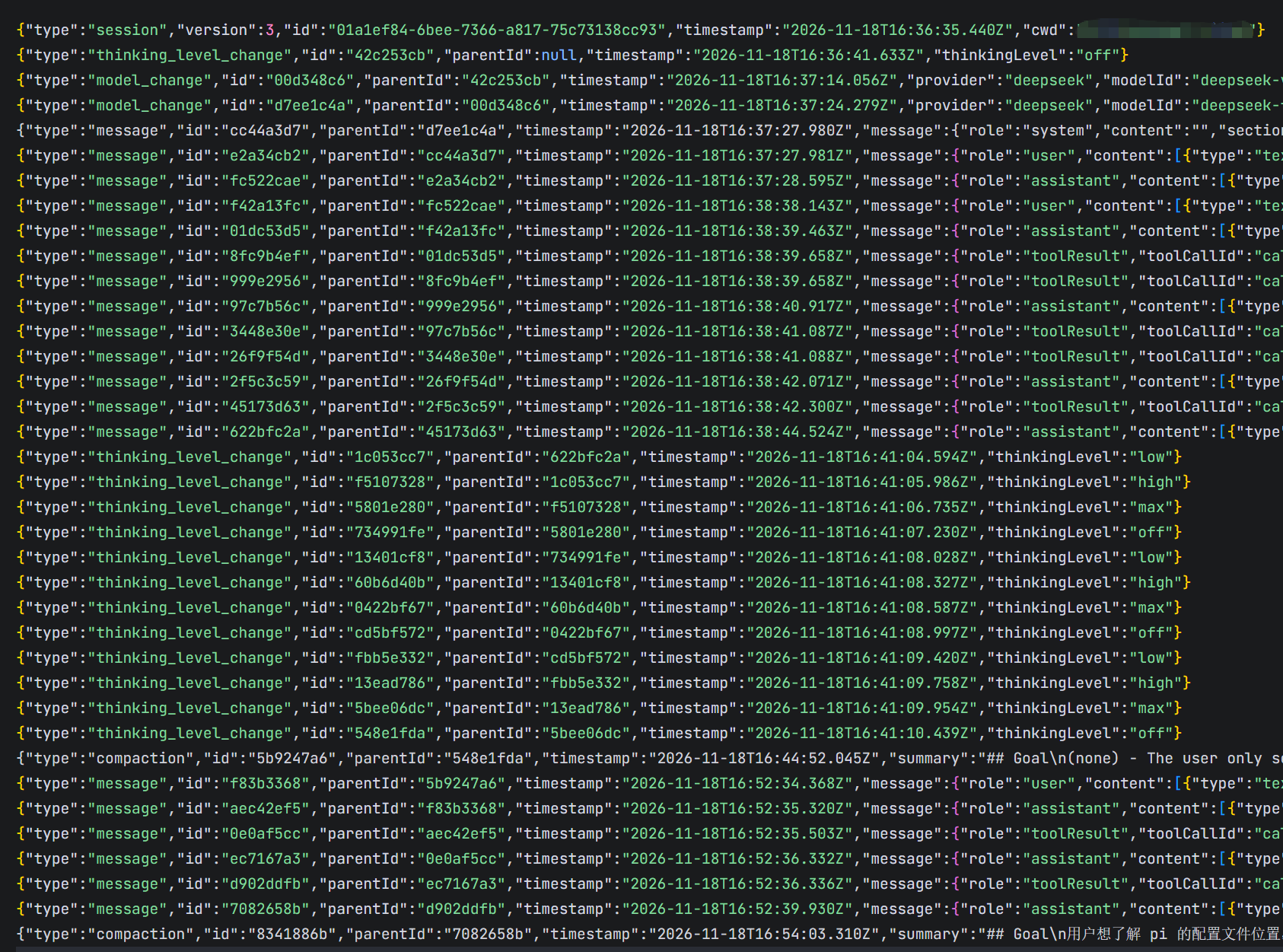
最后真实的在pi上试了一下压缩过程,看一下session的真实文件。 才发现原来会有类似切换thinkingLevel 这样system message。 这些entry本身就不带message字段,所以在压缩时候划分在哪里都不会影响压缩,然后前几天agentloop中的 toolsAdded。split turn也看到了(因为把keepRecentTokens设置成了100,很容易就触发了)。基本和我们之前看到的源码都对应上了。
原创声明:本文系作者授权腾讯云开发者社区发表,未经许可,不得转载。
如有侵权,请联系 cloudcommunity@tencent.com 删除。
目录
腾讯云开发者

Copyright © 2013 - 2026 Tencent Cloud. All Rights Reserved. 腾讯云 版权所有
深圳市腾讯计算机系统有限公司 ICP备案/许可证号:粤B2-20090059  粤公网安备44030502008569号
腾讯云计算(北京)有限责任公司 京ICP证150476号 | 京ICP备11018762号