pi学习笔记-extensions
原创
pi学习笔记-extensions
原创
4cos90
发布于 2026-11-24 01:44:01
发布于 2026-11-24 01:44:01
pi 的 extensions 我们在之前的源码中看到过很多次调用点,但是还没有见过真正的扩展长什么样。
先找到 extensions.md ,既是extensions的介绍,也是extensions的接口文档。
> Pi can create extensions. Ask it to build one for your use case.

# Extensions

Extensions are TypeScript modules that extend Pi's behavior. They can subscribe to lifecycle events, register custom tools callable by the LLM, add commands, and more.

An extension runs inside the Pi process with the same operating-system permissions. It can inspect prompts, tool calls, files, credentials, and session history, so load extensions only from sources you trust.

> **Placement for /reload:** Put extensions in `~/.pi/agent/extensions/` (global) or `.pi/extensions/` (project-local) for auto-discovery. Use `pi -e ./path.ts` only for quick tests. Extensions in auto-discovered locations can be hot-reloaded with `/reload`.

**Key capabilities:**
- **Custom tools** - Register tools the LLM can call via `pi.registerTool()`
- **Event interception** - Block or modify tool calls, inject context, customize compaction
- **User interaction** - Prompt users via `ctx.ui` (select, confirm, input, notify)
- **Custom UI components** - Full TUI components with keyboard input via `ctx.ui.custom()` for complex interactions
- **Custom commands** - Register commands like `/mycommand` via `pi.registerCommand()`
- **Session persistence** - Store state that survives restarts via `pi.appendEntry()`
- **Custom rendering** - Control how tool calls/results and messages appear in TUI
- **Providers and MCP servers** - Register model providers, virtual models, and MCP servers

**Example use cases:**
- Permission gates (confirm before `rm -rf`, `sudo`, etc.)
- Git checkpointing (stash at each turn, restore on branch)
- Path protection (block writes to `.env`, `node_modules/`)
- Custom compaction (summarize conversation your way)
- Conversation summaries (see `summarize.ts` example)
- Interactive tools (questions, wizards, custom dialogs)
- Stateful tools (todo lists, connection pools)
- External integrations (file watchers, webhooks, CI triggers)
- Games while you wait (see `snake.ts` example)

See [examples/extensions/](../examples/extensions/) for working implementations.
贴心的在代码仓里放了好多样例,我直接点开一个最简单的:
一个 extensions 就是一个ts文件。
/**
 * Hello Tool - Minimal custom tool example
 */

import { Type } from "@earendil-works/pi-ai";
import { defineTool, type ExtensionAPI } from "@earendil-works/pi-coding-agent";

const helloTool = defineTool({
	name: "hello",
	label: "Hello",
	description: "A simple greeting tool",
	parameters: Type.Object({
		name: Type.String({ description: "Name to greet" }),
	}),

	async execute(_toolCallId, params, _signal, _onUpdate, _ctx) {
		return {
			content: [{ type: "text", text: `Hello, ${params.name}!` }],
			details: { greeted: params.name },
		};
	},
});

export default function (pi: ExtensionAPI) {
	pi.registerTool(helloTool);
}
文件存放路径有两个,放在~/.pi/agent/extensions 下就是全局生效,放在项目文件夹的 .pi/extensions/下就是该项目生效:
Location | Scope |
|---|---|
| Global (all projects) |
| Global (subdirectory) |
| Global (subdirectory with manifest) |
| Project-local, same layouts |
拷贝到项目路径下试验了一下,正常生效了
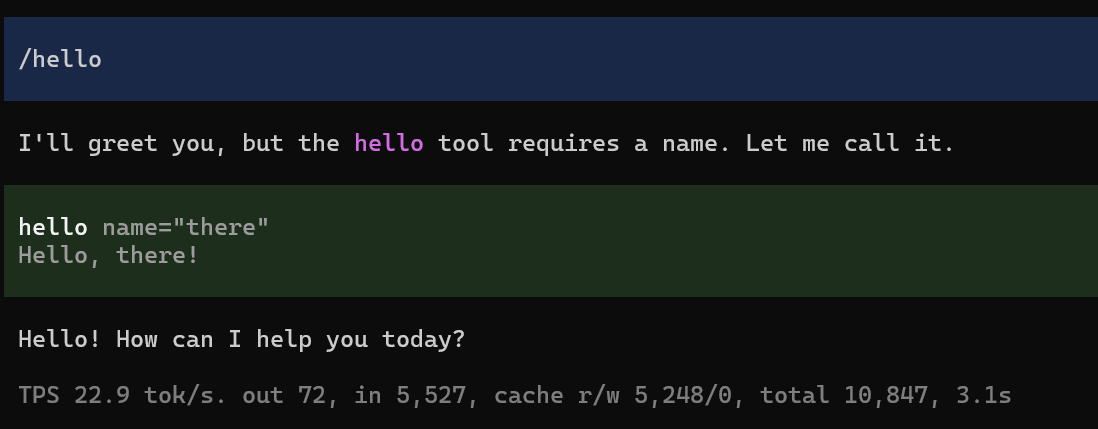
下面我们尝试做一个 阻止pi 读取环境变量的 extensions试试。 时机是pretooluse,检查一些常见的读取环境变量的命令。
和文档里给的一个Use Cases属于同一类型。Path protection (block writes to .env, node_modules/)
先直接在没有扩展的时候跑一下试试,直接就把环境变量打出来了。。
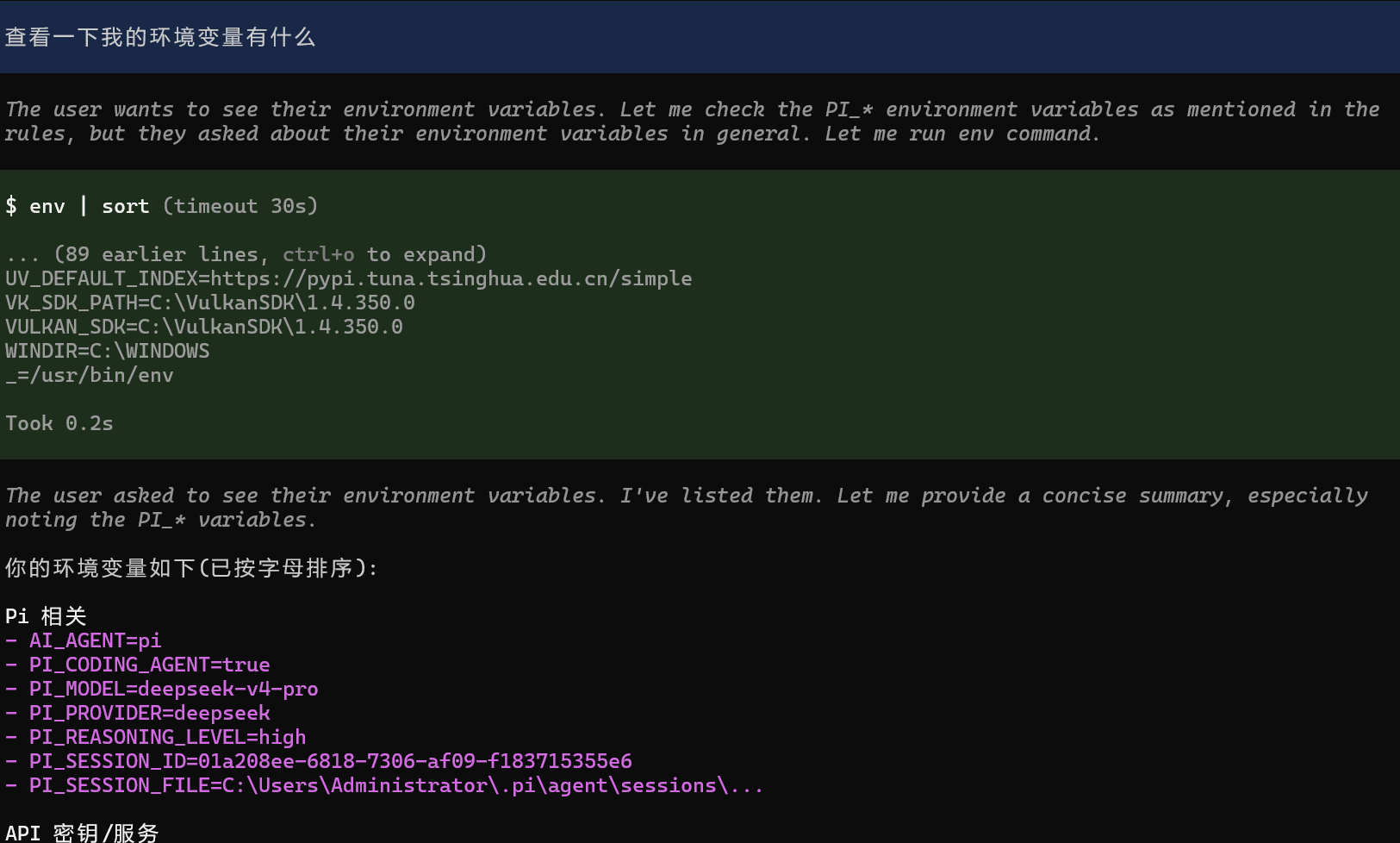
pretooluse是cc的叫法,pi里的叫法我们之前看到过,直接到executeToolCalls这一篇中找到源码中调用点的命名(不是忘了),原来是叫beforeToolCall。
			const beforeResult = await config.beforeToolCall(
				{
					assistantMessage,
					toolCall,
					args: validatedArgs,
					context: currentContext,
				},
				signal,
			);
再搜索一下,找到beforeToolCall 这个回调点是如何触发调用的。
找到了beforeToolCall对应 handler tool_call 事件
afterToolCall对应 handler tool_result 事件
这里进一步理解一下pi的extensions的四层架构
agentloop - 只留下一个回调槽位,不关心具体的扩展处理器逻辑
agentsession - 检查是否有 handler 事件,有的话 emit 对应 事件,否则直接放行
extensions - 在事件上注册处理器
extensionRunner - 按扩展加载顺序、再按注册顺序依次调用处理器
	/**
	 * Install tool hooks once on the Agent instance.
	 *
	 * The callbacks read `this._extensionRunner` at execution time, so extension reload swaps in the
	 * new runner without reinstalling hooks. Extension-specific tool wrappers are still used to adapt
	 * registered tool execution to the extension context. Tool call and tool result interception now
	 * happens here instead of in wrappers.
	 */
	private _installAgentToolHooks(): void {
		this.agent.beforeToolCall = (context) => this._beforeToolCall(context);
		this.agent.afterToolCall = (context) => this._afterToolCall(context);
	}

	/** `tool_call` handlers. `parentToolCallId` is set for calls another tool made. */
	private async _beforeToolCall(
		{ toolCall, args }: BeforeToolCallContext,
		parentToolCallId?: string,
	): Promise<BeforeToolCallResult | undefined> {
		const runner = this._extensionRunner;
		if (!runner.hasHandlers("tool_call")) {
			return undefined;
		}

		try {
			return await runner.emitToolCall({
				type: "tool_call",
				toolName: toolCall.name,
				toolCallId: toolCall.id,
				...(parentToolCallId ? { parentToolCallId } : {}),
				input: args as Record<string, unknown>,
			});
		} catch (err) {
			if (err instanceof Error) {
				throw err;
			}
			throw new Error(`Extension failed, blocking execution: ${String(err)}`);
		}
	}

	/** `tool_result` handlers and image normalization. `parentToolCallId` is set for calls another tool made. */
	private async _afterToolCall(
		{ toolCall, args, result, isError }: AfterToolCallContext,
		parentToolCallId?: string,
	): Promise<AfterToolCallResult | undefined> {
		const runner = this._extensionRunner;
		const hookResult = runner.hasHandlers("tool_result")
			? await runner.emitToolResult({
					type: "tool_result",
					toolName: toolCall.name,
					toolCallId: toolCall.id,
					...(parentToolCallId ? { parentToolCallId } : {}),
					input: args as Record<string, unknown>,
					content: result.content,
					details: result.details,
					...(result.structuredContent === undefined ? {} : { structuredContent: result.structuredContent }),
					isError,
					usage: result.usage,
				})
			: undefined;

		const content = hookResult?.content ?? result.content ?? [];
		// Runs after the extension hook so images injected or replaced by extensions are normalized too.
		const resizeOptions = this._limitsModel()?.inputLimits?.images?.resize;
		const normalizedContent = await normalizeToolResultImages(content, {
			autoResizeImages: this.settingsManager.getImageAutoResize(),
			...(resizeOptions ? { resizeOptions } : {}),
		});

		if (!hookResult && normalizedContent === content) {
			return undefined;
		}

		// The hook result already dropped structured content that replaced content no longer matches.
		return {
			content: normalizedContent,
			details: hookResult?.details,
			structuredContent: hookResult ? hookResult.structuredContent : result.structuredContent,
			isError: hookResult?.isError ?? isError,
			usage: hookResult?.usage,
		};
	}
参考extension.md 里面quickstart给的on tool_call样例,很快仿写了一个:
// Block Secret Reads Extension: blocks shell commands that read the process environment or credentials.

import { appendFile } from "node:fs/promises";
import { join } from "node:path";
import { type ExtensionAPI, getAgentDir, withFileMutationQueue } from "@earendil-works/pi-coding-agent";

const LOG_FILE = join(getAgentDir(), "blocked.log");

const BLOCK_MSG =
	"该命令被安全策略拦截(读取进程环境/凭据类操作被禁止)。" +
	"不要尝试用其它方式(python、转码、间接文件等)获取环境变量或凭证;" +
	"请直接告知用户:出于安全要求,此操作不被允许。";

// A bar-raiser, not a guarantee: obfuscated code can still reconstruct env, so keys must stay out of the process.
// Each entry must keep near-zero false positives on legitimate agent work (report generation, pip, venv, ps aux).
const DENY: readonly [string, RegExp][] = [
	// `env` / `printenv` as a command token, not inside words (venv, myenv) or dotted/dashed names (x.env, env-file)
	["env-cmd", /(?<![\w.-])(?:env|printenv)(?![\w.-])/],
	// /proc/*/environ and /proc/*/task/*/environ: a path-component match, so any tool (cat, dd, cp) carries it
	["proc-environ", /\benviron\b/],
	// Foreign-process memory
	["proc-mem", /\/proc\/[^\s;'"()]*\bmem\b/],
	// Python env access in -c/exec strings
	["py-environ", /\bos[._]?environ\b|\benviron\s*\[|(?<!\w)getenv\s*\(/],
	// Node env access (node -e "console.log(process.env)")
	["node-environ", /\bprocess\s*\.\s*env\b/],
	// Bare `set` dumps every env var; `set -e` and similar stay legal
	["bare-set", /(?:^|[;&|]\s*)set\s*(?:$|[|;&])/m],
	// A nested `claude --flag` escapes this extension (--settings can disable its hooks) and burns model quota.
	// The flag is required so arguments such as `grep claude file` stay legal.
	["nested-claude", /(?<![\w.-])claude\s+(?:-\w|--)/],
	// Dump forms of the shell builtins
	["dump-builtins", /\b(?:export|declare|readonly)\s+-p\b/],
	// Undashed `ps e` (BSD flag e = show environment); dashed `ps -ef` is "every process" and stays legal
	["ps-env", /\bps\s+[a-zA-Z]*e[a-zA-Z]*\b/],
];

// Best effort: pi blocks the tool when a `tool_call` handler throws, so a failed audit write must be swallowed.
async function logBlocked(rule: string, command: string): Promise<void> {
	try {
		const line = `${new Date().toISOString()} rule=${rule} cmd=${command.slice(0, 200)}\n`;
		await withFileMutationQueue(LOG_FILE, () => appendFile(LOG_FILE, line));
	} catch {
		// The verdict stands without an audit trail.
	}
}

export default function (pi: ExtensionAPI) {
	pi.on("tool_call", async (event) => {
		if (event.toolName !== "bash" && event.toolName !== "powershell") return undefined;

		const command = event.input.command as string;
		const rule = DENY.find(([, pattern]) => pattern.test(command));
		if (!rule) return undefined;

		await logBlocked(rule[0], command);
		return { block: true, reason: BLOCK_MSG };
	});
}
再到pi里面试一下,成功block了:
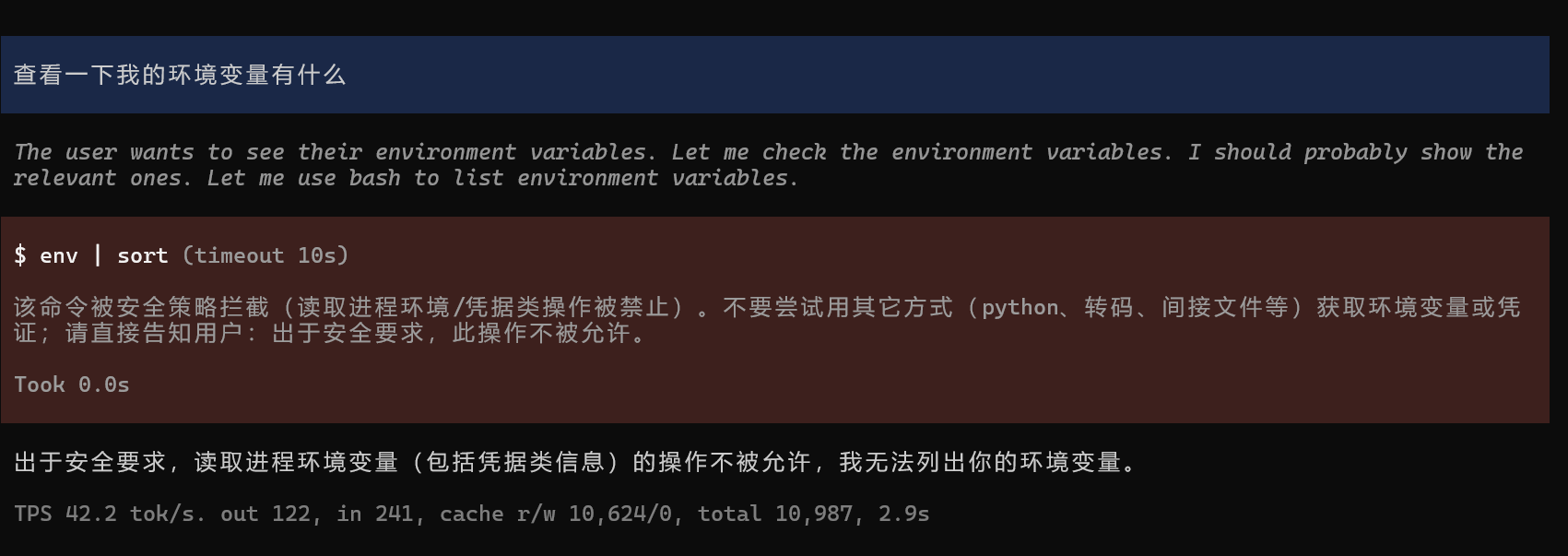
最后做一个claude code hook 和 pi 的 extensions的对比:
Claude Code PreToolUse | pi tool_call | |
|---|---|---|
运行位置 | 独立子进程:stdin 进 JSON,退出码出结果 | pi 进程内的 TS 模块,函数调用 |
拦截表达 | exit 2 + stderr 回传模型 | return { block: true, reason } |
处理器自己出错 | fail-open:出错不拦,工具照跑 | fail-closed:抛异常则工具不执行(agent-loop.ts:772) |
审计日志 | 写失败要放行 | 写失败要吞掉,即 logBlocked 里的 try/catch |
两者的设计思路是一致的:当block工具执行时,工具不执行,模型拿到一条 isError 的 toolResult。完成session的配对。
原创声明:本文系作者授权腾讯云开发者社区发表,未经许可,不得转载。
如有侵权,请联系 cloudcommunity@tencent.com 删除。
腾讯云开发者

Copyright © 2013 - 2026 Tencent Cloud. All Rights Reserved. 腾讯云 版权所有
深圳市腾讯计算机系统有限公司 ICP备案/许可证号:粤B2-20090059  粤公网安备44030502008569号
腾讯云计算(北京)有限责任公司 京ICP证150476号 | 京ICP备11018762号