GPT-Live-1.1 客户端委派实战:用 Webhook + HiFox 给编码 Agent 接上全双工语
原创
GPT-Live-1.1 客户端委派实战:用 Webhook + HiFox 给编码 Agent 接上全双工语
原创
一个幽默的程序员
发布于 2026-11-26 12:19:11
发布于 2026-11-26 12:19:11
在工程团队里给 AI Agent 加语音入口,最大的坑不是识别率,而是延迟预算的硬冲突:全双工语音要求 1 秒左右给出反馈,否则体验像卡死;但编码 Agent 读仓库、跑测试、修 Bug 动辄耗时几分钟。本文基于 OpenAI 的 gpt-live-1.1 客户端委派(Client delegation)机制,结合 HiFox 的自动化 Webhook 与任务看板,给出一套前后端分离的可复现落地架构与 TypeScript 路由代码。原文参考:GPT-Live-1.1 给 AI Agent 加语音实战。
一、架构选型:为什么必须选客户端委派
gpt-live-1.1 运行在 v1/live/sessions 接口上,支持全双工流式音频、随时打断和函数调用(不直接支持 v1/realtime 或 v1/responses,也不接收图片)。创建会话时必须在两种委派模式中二选一,切换模式需重建会话:
对比项 | Responses 委派 | 客户端委派(Client delegation) |
|---|---|---|
后端执行方 | OpenAI 通过 Responses API 托管 | 你自己的后端应用 |
核心配置 | delegation.type: "responses"+ model/tools | delegation.type: "client" |
后端能力范围 | 单个指定模型(如 gpt-6-luna/gpt-6-sol) | 任意自有系统、CLI 或本地 Agent |
结果回传方式 | OpenAI 自动闭环 | session.commentary.append/session.thinking.append |
适用场景 | 标准查询与云端工具调用 | 接入团队现有的编码 Agent 工作流 |
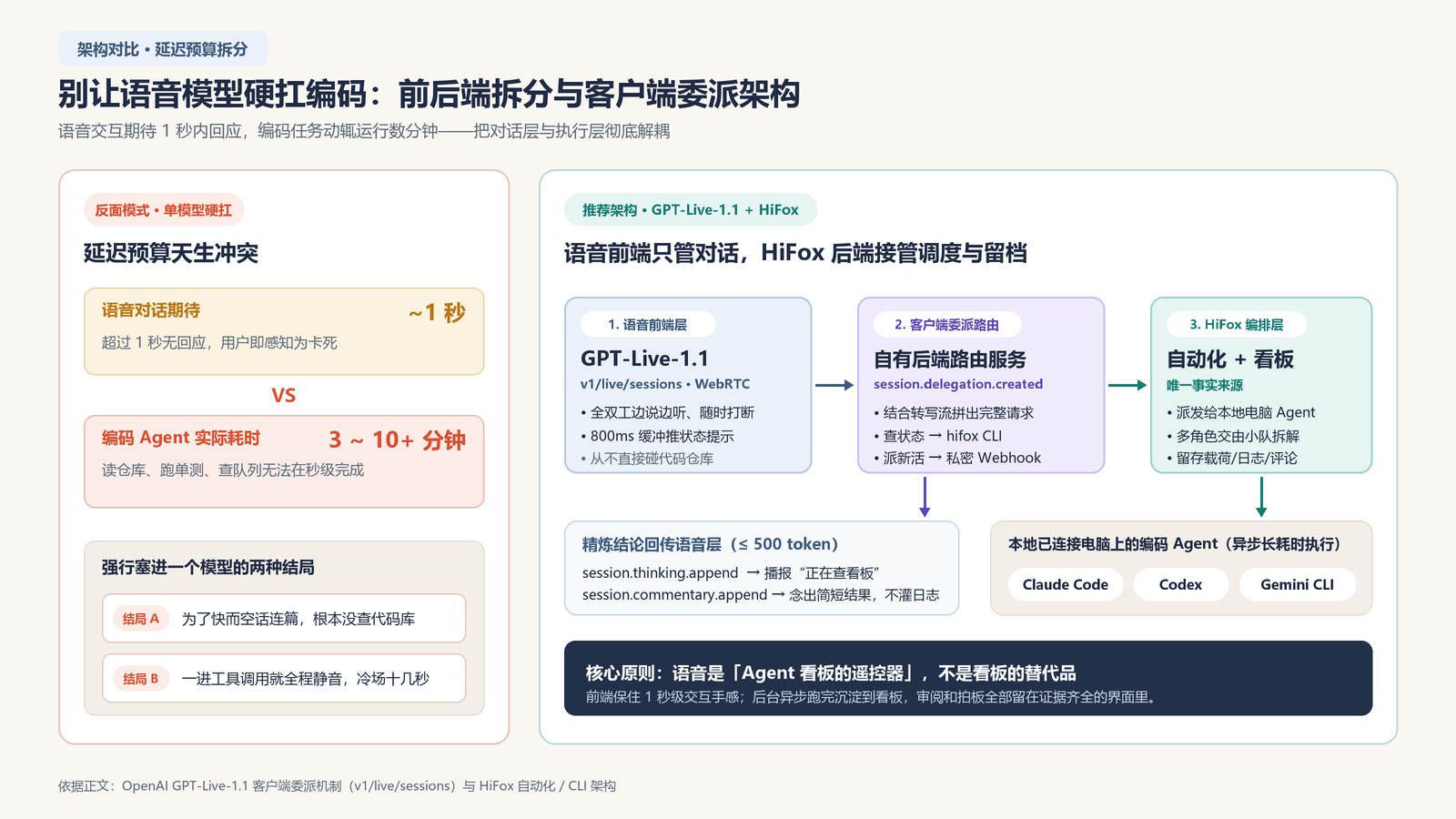
图 1:单模型硬扛与 GPT-Live-1.1 + HiFox 前后端拆分委派架构对比
图 1:单模型硬扛 vs 前后端拆分委派架构
要驱动跑在本地或私有环境里的 Claude Code、Codex、Gemini CLI,只能走客户端委派。架构上采用「语音层只传话,HiFox 管调度与留档」的分工:
- 查状态(“昨晚的夜间测试过了吗?”):后端调用
hifoxCLI 读取看板,几秒内口头播报。 - 派新活(“让 Agent 查一下登录偶现失败的用例”):后端 POST 到 HiFox 自动化私密 Webhook,拉起对应 Agent 或小队异步执行。
- 审批决策(“直接合了吧”):后端直接拒绝,要求回到看板审阅 diff 与运行日志,避免口头误听和审计缺失。
二、四步落地配置(含完整路由代码)
第 1 步:在 HiFox 创建自动化与 Webhook 触发器
在 HiFox 中,自动化(Automation)归属于空间,负责按规则把工作派发给指定 Agent 或小队,并保留触发载荷与运行历史。添加 Webhook 触发器后会生成一个私密 POST URL——完整 URL 仅在创建弹窗中显示一次,需立即存入密钥管理。
编写自动化指令时明确三点:从触发载荷读取请求、将产出写回任务评论、遇到高风险变更时暂停等待人工拍板。接入语音前,先点击界面右上角「立即运行」手动跑通一次,确认 Agent 与已连接电脑的链路正常。
第 2 步:以客户端模式创建 GPT-Live 会话
在会话配置中指定 gpt-live-1.1 与 client 委派模式。acknowledgement_delay_ms: 800 给后端留出 800 毫秒缓冲,方便在模型说出通用套话前先推入更具体的状态提示(传输层建议优先使用 WebRTC,也支持 WebSockets):
export const session = {
model: "gpt-live-1.1",
instructions:
"You are the voice front end for an engineering team's agent board. " +
"Delegate status questions and new work requests. Never approve, merge, or deploy.",
delegation: {
type: "client",
acknowledgement_delay_ms: 800,
},
};
第 3 步:路由 session.delegation.created 到 HiFox
这里有两个容易忽略的工程细节:一是 session.delegation.created 事件本身不包含用户原话,需要应用结合转写流自行拼出完整请求;二是每次 session.commentary.append 回传存在 500 token 上限,只传精炼结论,别把整段日志塞进去。
import { execFile } from "node:child_process";
import { promisify } from "node:util";
const run = promisify(execFile);
const WEBHOOK_URL = process.env.HIFOX_AUTOMATION_WEBHOOK_URL!;
async function handleDelegation(connection: any, delegationId: string, request: string) {
connection.send({
type: "session.thinking.append",
event_id: `start_${delegationId}`,
delegation_id: delegationId,
content: "Request received. Checking the agent board.",
});
if (isStatusQuestion(request)) {
const { stdout } = await run("hifox", ["task", "list", "--status", "In Progress", "--output", "json"]);
const tasks = JSON.parse(stdout);
return speak(connection, delegationId, `${tasks.length} tasks are in progress right now.`);
}
const res = await fetch(WEBHOOK_URL, {
method: "POST",
headers: { "Content-Type": "application/json" },
body: JSON.stringify({ source: "voice", request }),
});
if (!res.ok) {
return speak(connection, delegationId, "I couldn't start that run. Nothing was assigned.");
}
return speak(connection, delegationId, "An agent run has started. The result will land on the board.");
}
function speak(connection: any, delegationId: string, content: string) {
connection.send({
type: "session.commentary.append",
event_id: `result_${delegationId}`,
delegation_id: delegationId,
content, // 单次上限 500 tokens
});
}
注意播报措辞:派活成功只回传“已启动运行,结果将落回看板”,绝不提前宣称“已完成”,且必须在收到 res.ok 后再确认。
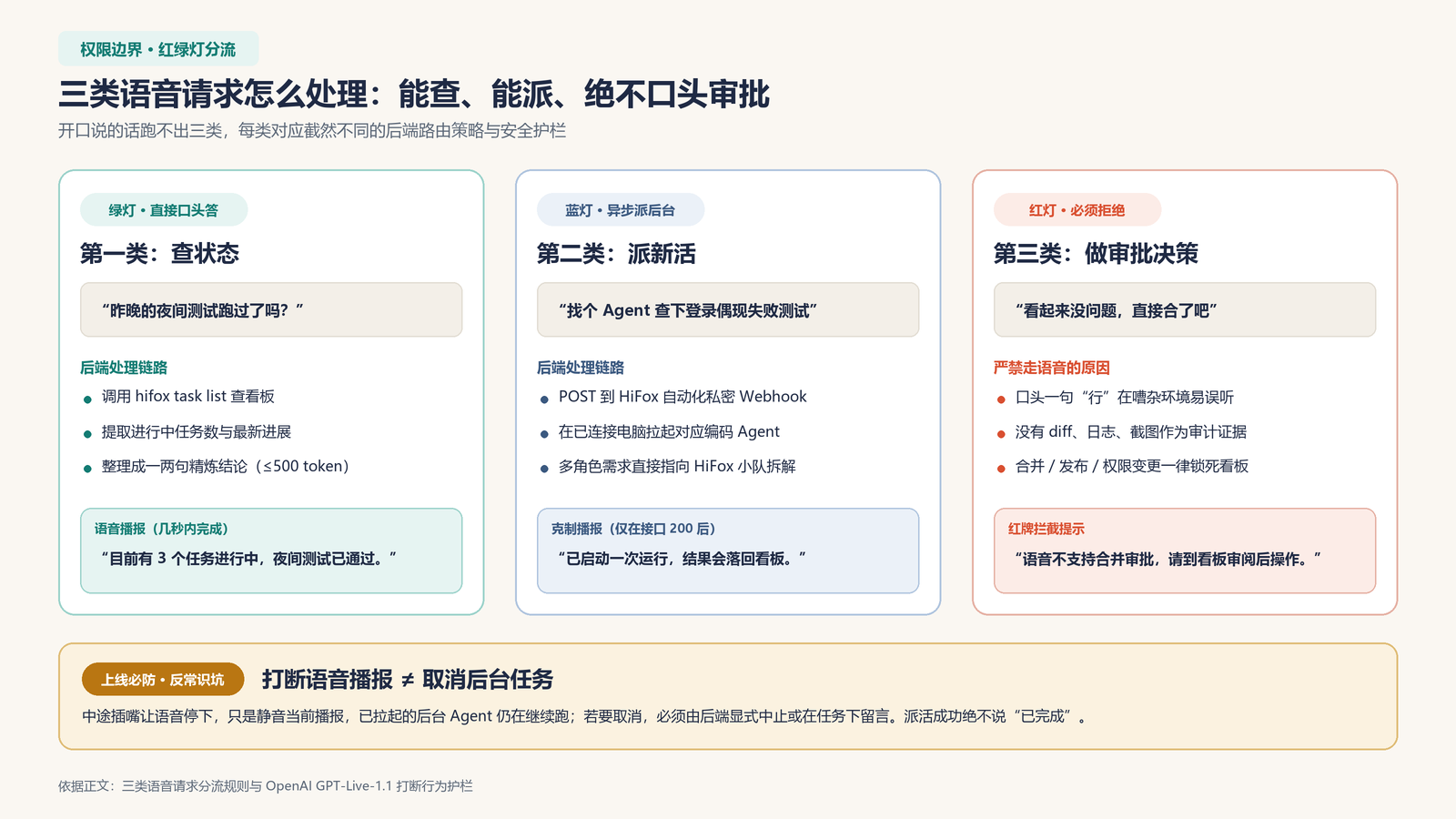
图 2:三类语音请求红绿灯分流与打断不取消后台任务护栏
图 2:三类语音请求分流红线与打断护栏
第 4 步:以看板为唯一事实来源
Agent 执行往往持续数分钟,语音通话通常早已结束。HiFox 看板保留完整触发载荷、运行历史与任务评论,团队成员在看板里审阅结果;下次再通过语音查进度时,CLI 状态查询链路会直接念出最新结论。
三、成本结构与上线四条护栏
计费项 | GPT-Live-1.1(OpenAI 文档,2026-11-20) |
|---|---|
接口端点 | v1/live/sessions |
活跃会话 | $0.05 / 分钟 |
待机状态 | $0.02 / 分钟(WebRTC 暂停推理期间) |
并发参考 | 与 GPT-Live-1 独立计限(参考 Live-1:Build 50 / Launch 300 / Grow 500,Free 不开放) |
后端调用 | 按所配模型或既有套餐另行计费 |
按活跃单价算,一次 10 分钟的语音进度同步仅产生 $0.50 语音时长费。HiFox 侧不转售 Token,Agent 执行直接消耗各运行时绑定的 Claude Code、Codex 或 API 套餐,状态汇总也可交给 gpt-6-luna 等低成本模型。
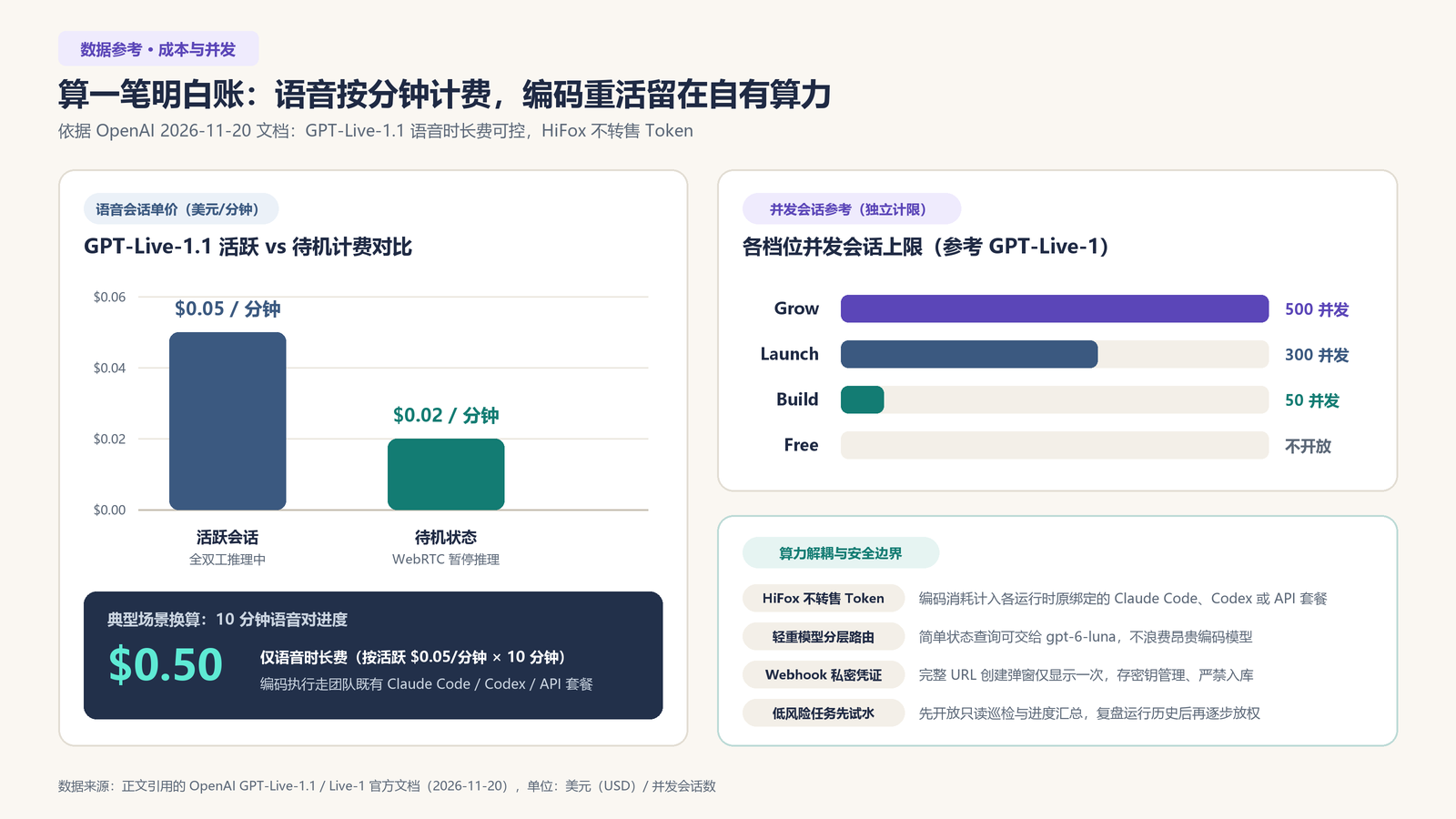
图 3:GPT-Live-1.1 活跃与待机单价、并发档位及自有算力解耦结构
图 3:GPT-Live-1.1 计费、并发与算力解耦
上线第一天建议同步加上四条护栏:
- 打断不会取消后台任务:用户插话只停掉语音播报,不会中止已触发的后端运行;若需口头取消,必须由后端显式中止或去任务下留言。
- 严管 Webhook URL:视同私密凭证,绝不提交进代码库;一旦泄露立即在 HiFox 自动化设置中重新生成。
- 从低风险任务起步:先开放只读巡检、进度汇总等可观测任务,复盘多次运行记录后再放宽写入权限。
- 多 Agent 协作收口在 HiFox 内部:复杂口头需求直接把 Webhook 指向 HiFox 小队,由小队队长在内部拆解,不要在语音路由层硬写多步编排。
下一步可以直接上手:在 HiFox 创建一个带 Webhook 触发器的自动化并点「立即运行」测通,再将客户端模式的 gpt-live-1.1 会话指过去。完整实践细节见 原文。
原创声明:本文系作者授权腾讯云开发者社区发表,未经许可,不得转载。
如有侵权,请联系 cloudcommunity@tencent.com 删除。
目录
腾讯云开发者

Copyright © 2013 - 2026 Tencent Cloud. All Rights Reserved. 腾讯云 版权所有
深圳市腾讯计算机系统有限公司 ICP备案/许可证号:粤B2-20090059  粤公网安备44030502008569号
腾讯云计算(北京)有限责任公司 京ICP证150476号 | 京ICP备11018762号