
根据文本消息设置sweetalert2宽度自动
根据文本消息设置sweetalert2宽度自动
提问于 2021-12-08 18:43:54
我正在使用sweetalert2库来显示基本的警报消息,但有些消息比其他消息更广泛。
可以将警报容器的witdh设置为auto,所以消息修复在一行中?
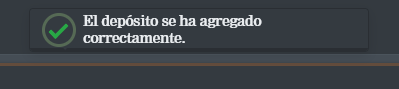
作为默认行为,宽度设置为360 it,但我需要一个解决办法使它自动.希望有人能帮我。谢谢
PD:如果有问题的话,我用的是Symfony 4.4。默认配置是:
const Toast = Swal.mixin({
    toast: true,
    position: 'top',
    showConfirmButton: false,
    timer: 3000,
    timerProgressBar: true,
});
以及模板中的火灾事件:
<script>
    {% for type, msgs in app.session.flashBag.all() %}
        {% for msg in msgs %}
            Toast.fire({
                icon: '{{ type }}',
                title: '{{ msg }}'
            });
       {% endfor %}
    {% endfor %}
</script>回答 2
Stack Overflow用户
回答已采纳
发布于 2021-12-13 20:34:36
经过一些研究,没有运气,尝试和错误是最好的方式得到一个丙酸盐的解决方案。
首先,从sweetalert2库覆盖一些css样式:
.swal2-container {
    padding: 0.4em;
}

.swal2-toast {
    max-width: inherit;
}

body.swal2-toast-shown .swal2-container {
    width: unset;
}

.swal2-popup.swal2-toast .swal2-title {
    margin: 9px 5px auto;
}
然后,在脚本标记中创建一个画布元素,并使用字体样式计算canva的宽度.
<script>
        {% for type, msgs in app.session.flashBag.all() %}
        {% for msg in msgs %}

        inputText = '{{ msg }}';
        font = "0.875rem Nimrod MT";

        canvas = document.createElement("canvas");
        context = canvas.getContext("2d");
        context.font = font;
        width = context.measureText(inputText).width;
        formattedWidth = Math.ceil(width) + 100;

        Toast.fire({
            icon: '{{ type }}',
            title: '{{ msg }}',
            width: formattedWidth,
        });

        {% endfor %}
        {% endfor %}
    </script>
最终结果:


希望这个解决方案能帮助别人..。
Stack Overflow用户
发布于 2022-10-26 09:16:55
const Toast = Swal.mixin({
  toast: true,
  position: 'top-end',
  showConfirmButton: false,
  timer: 3000,
  timerProgressBar: true,
  didOpen: (toast) => {
    toast.addEventListener('mouseenter', Swal.stopTimer)
    toast.addEventListener('mouseleave', Swal.resumeTimer)
  }
})

Toast.fire({
  icon: 'success',
  title: 'Signed in successfully'
}).swal2-popup.swal2-toast {
padding: .5em 1em !important;
display: flex !important;
width: auto !important;
}
.swal2-popup.swal2-toast .swal2-title {
margin: .75em .25em !important;
}<script src="https://cdn.jsdelivr.net/npm/sweetalert2@11"></script>
尝试上面的代码片段中的css。为我工作不需要剧本。
页面原文内容由Stack Overflow提供。腾讯云小微IT领域专用引擎提供翻译支持
原文链接:
https://stackoverflow.com/questions/70280194
复制相关文章
相似问题
腾讯云开发者
