
QListView通过QStyledItemDelegate::createEditor设置自定义编辑器
QListView通过QStyledItemDelegate::createEditor设置自定义编辑器
提问于 2021-12-11 09:24:06
我想在每个QListView单元格中显示自定义小部件(3个标签、宽度、不同字体和2个工具按钮)。小部件必须处理鼠标事件,以正确处理悬停事件并单击按钮。(因此,我不能仅仅用QStyledItemDelegate::paint()绘制它)。
下面是我希望列表视图中的每一行都是这样的:
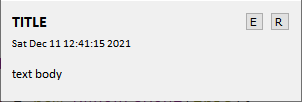
的主要思想: QAbstractItemView::openPersistentEditor()。
#include <QApplication>

#include <QWidget>
#include <QHBoxLayout>
#include <QLabel>
#include <QToolButton>
#include <QVBoxLayout>

#include <QDateTime>

#include <QListView>
#include <QStringListModel>
#include <QStyledItemDelegate>

class Form : public QWidget
{
    //Q_OBJECT

public:
    explicit Form(QWidget *parent = nullptr)
        :QWidget(parent)
    {
        verticalLayout = new QVBoxLayout(this);
        horizontalLayout = new QHBoxLayout();

        labelTitle = new QLabel(this);
        labelTitle->setFont(QFont("Calibri", 12, QFont::Bold));
        horizontalLayout->addWidget(labelTitle);

        toolButtonEdit = new QToolButton(this);
        toolButtonEdit->setText("E");
        horizontalLayout->addWidget(toolButtonEdit);

        toolButtonRemove = new QToolButton(this);
        toolButtonRemove->setText("R");
        horizontalLayout->addWidget(toolButtonRemove);

        verticalLayout->addLayout(horizontalLayout);

        labelDate = new QLabel(this);
        labelDate->setFont(QFont("Calibri", 8));
        verticalLayout->addWidget(labelDate);

        labelText = new QLabel(this);
        labelText->setFont(QFont("Calibri", 10));
        verticalLayout->addWidget(labelText);

        verticalLayout->setStretch(2, 1);

        setMinimumSize(QSize(300, 50));
    }

public:
    QVBoxLayout *verticalLayout;
    QHBoxLayout *horizontalLayout;
    QLabel *labelTitle;
    QToolButton *toolButtonEdit;
    QToolButton *toolButtonRemove;
    QLabel *labelDate;
    QLabel *labelText;
};


class MyDelegate : public QStyledItemDelegate
{
public:
    QWidget* createEditor(QWidget *parent, const QStyleOptionViewItem &option, const QModelIndex &index) const override
    {
        auto editor = new Form(parent);
        return editor;
    }

    void setEditorData(QWidget *ed, const QModelIndex &index) const override
    {
        QVariant var = index.model()->data(index, Qt::DisplayRole);

        if (Form *editor = dynamic_cast<Form*>(ed))
        {
            editor->labelTitle->setText("SYMBOL");
            editor->labelDate->setText("date-time");
            editor->labelText->setText(var.toString());
        }
    }
    void updateEditorGeometry(QWidget *editor, const QStyleOptionViewItem& option, const QModelIndex &)const override
    {
        editor->setGeometry(option.rect);
    }
};

int main(int argc, char *argv[])
{
    QApplication a(argc, argv);

    Form form(nullptr);
    form.labelTitle->setText("TITLE");
    form.labelDate->setText(QDateTime::currentDateTime().toString());
    form.labelText->setText("text body");
    form.show();

    auto model = new QStringListModel;
    model->setStringList(QStringList()
        << "text body 1"
        << "text body 2"
        << "text body 3");

    auto view = new QListView(nullptr);
    view->setModel(model);
    view->setItemDelegate(new MyDelegate);

    int rowCount = model->rowCount();
    for (int row = 0; row < rowCount; ++row)
    {
        QModelIndex index = model->index(row, 0);
        view->openPersistentEditor(index);
    }

    view->show();

    return a.exec();
}
这里是列表视图的实际外观:
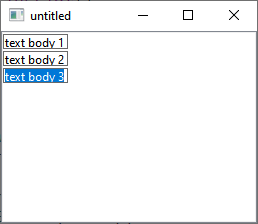
如何设置这样一个自定义小部件来显示视图单元格?
回答 1
Stack Overflow用户
发布于 2021-12-12 15:37:41
请注意,在定义自己的委托MyDelegate时,您从未实际使用它(即通过调用QAbstractItemView::setItemDelegate() )。因此,在调用QLineEdit时,可以看到默认的委托(QString类型的数据是一个简单的openPersistentEditor() )。
页面原文内容由Stack Overflow提供。腾讯云小微IT领域专用引擎提供翻译支持
原文链接:
https://stackoverflow.com/questions/70313963
复制相关文章
相似问题
腾讯云开发者
