
Microsoft无法访问该文件(Java -> cmd /c python -> Excel)
Microsoft无法访问该文件(Java -> cmd /c python -> Excel)
提问于 2022-01-13 14:03:47
我从基于JavaEE的API (cmd /c python <args>通过ProcessBuilder)调用以下Python脚本,该脚本访问Excel将表导出为PDF:
import sys

import win32com.client

import pathlib

if len(sys.argv) < 5:
    print("Usage: %s input.xls output.pdf worksheet range" % sys.argv[0])
    exit(1)

o = win32com.client.Dispatch("Excel.Application")
o.Visible = False

wb_path = r'C:\Develop\uploadedFile_5232859756803526399.xlsx'
path_to_pdf = sys.argv[2]
worksheet_idx = sys.argv[3]
print_area = sys.argv[4]

wb = o.Workbooks.Open(wb_path)

ws = wb.Worksheets[int(worksheet_idx)]
ws.Activate()
ws.PageSetup.Zoom = False
ws.PageSetup.FitToPagesTall = 1
ws.PageSetup.FitToPagesWide = 1
ws.PageSetup.PrintArea = print_area

wb.ActiveSheet.ExportAsFixedFormat(0, path_to_pdf)

wb.Close(True)
o.Quit()
wb_path = r'C:\Develop\uploadedFile_5232859756803526399.xlsx只是为了wb = o.Workbooks.Open(wb_path)的测试目的(wb_path =sys.argv[1]也不起作用),这会引发以下错误:
Traceback (most recent call last):
2022-01-13 14:46:24 INFO  [utils.CMDUtils]   File "C:\scripts\scriptWin.py", line 23, in <module>
2022-01-13 14:46:24 INFO  [utils.CMDUtils]     wb = o.Workbooks.Open(wb_path)
2022-01-13 14:46:24 INFO  [utils.CMDUtils]   File "<COMObject <unknown>>", line 5, in Open
2022-01-13 14:46:24 INFO  [utils.CMDUtils] pywintypes.com_error: (-2147352567, 'Exception occurred.', (0, 'Microsoft Excel', "Microsoft Excel cannot access the file 'C:\\Develop\\uploadedFile_5232859756803526399.xlsx'. There are several possible reasons:\n\n• The file name or path does not exist.\n• The file is being used by another program.\n• The workbook you are trying to save has the same name as a currently open workbook.", 'xlmain11.chm', 0, -2146827284), None)
我做错什么了?当我在Windows2019服务器上与管理员直接在CMD (通过远程桌面)调用此脚本时,它将正常运行。
编辑
下面是我的Java代码片段:
String catalinaBase = System.getProperty("catalina.base");
File logsFolder = new File(catalinaBase, "logs");

try(FileOutputStream fos = new FileOutputStream(new File(logsFolder,"cmd.log"));) {

            List<String> python3 = new ArrayList<>();
            if(OSUtils.isWindows()){
                python3.add("cmd /c");
                python3.add("python");
            }else{
                python3.add("python3");
            }
            python3.add(quoteStr(pythonScript.getAbsolutePath()));

            if(params != null && params.size() > 0){
                params.stream().forEach(p->{
                    python3.add(quoteStr(p));
                });
            }

            ProcessBuilder pb = new ProcessBuilder(python3);
            pb.redirectErrorStream(true);

            Process process = OSUtils.isWindows() ?
                    Runtime.getRuntime().exec(String.join(" ", pb.command())) :
                    pb.start();

            StreamGobbler errorGobbler = new StreamGobbler(process.getErrorStream(), "ERROR", fos, log);
            StreamGobbler outputGobbler = new StreamGobbler(process.getInputStream(), "OUTPUT", fos, log);

            errorGobbler.start();
            outputGobbler.start();

            exitVal = process.waitFor(60, TimeUnit.SECONDS);

            if(!exitVal){
                errorGobbler.stopThread();
                outputGobbler.stopThread();
                process.destroyForcibly();
            }

        } catch (Exception e) {
            e.printStackTrace();
}StreamGobbler与此类似:https://gist.github.com/jmartisk/6535784
回答 1
Stack Overflow用户
回答已采纳
发布于 2022-01-14 12:20:52
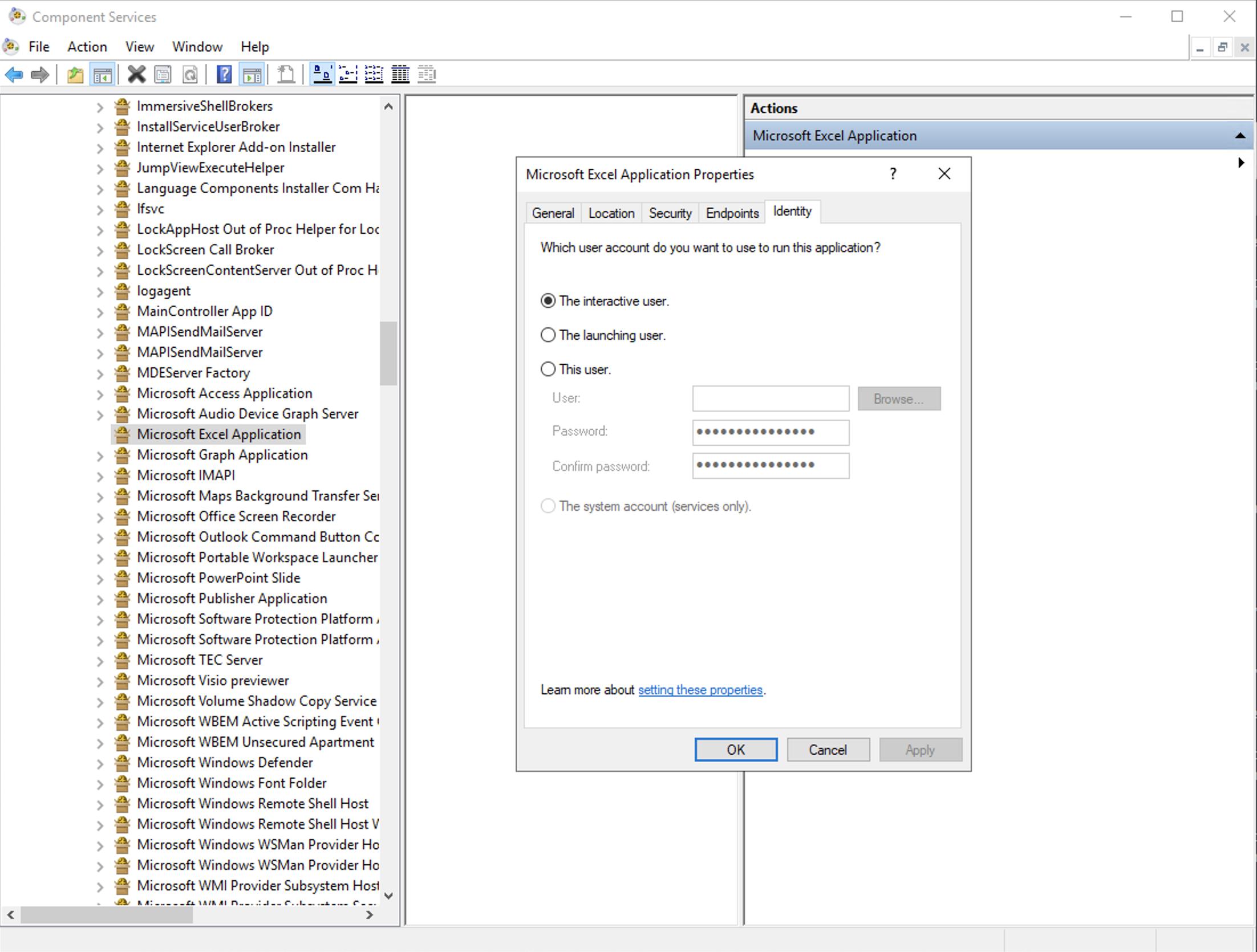
这是个背景问题。
打开DCOMCNFG,展开Component,Microsoft,DCOM Config,并在Identity选项卡下找到-> Properties ->,将其设置为“交互式用户”(仅限RDP)或“此用户”。背景服务。
页面原文内容由Stack Overflow提供。腾讯云小微IT领域专用引擎提供翻译支持
原文链接:
https://stackoverflow.com/questions/70697912
复制相关文章
相似问题
腾讯云开发者
