
未加载的库:@rpath/hermes.framework/hermes
未加载的库:@rpath/hermes.framework/hermes
提问于 2022-01-27 08:12:39
我已经在我的react本机(v0.64)应用程序中启用了Hermes。每次我运行应用程序时,我都会跟踪堆栈跟踪。
dyld: dyld cache load error: shared cache file open() failed
dyld: Library not loaded: @rpath/hermes.framework/hermes
  Referenced from: /Users/sharktank/Library/Developer/CoreSimulator/Devices/A32F4931-51A8-4D22-AEFB-625F834CE221/data/Containers/Bundle/Application/71773888-08D5-4B82-9545-07F6B1538864/COSPM-DEV.app/COSPM-DEV
  Reason: image not found
dyld: launch, loading dependent libraries
DYLD_SHARED_CACHE_DIR=/Users/sharktank/Library/Developer/CoreSimulator/Caches/dyld/20E232/com.apple.CoreSimulator.SimRuntime.iOS-14-4.18D46
DYLD_ROOT_PATH=/Applications/Xcode.app/Contents/Developer/Platforms/iPhoneOS.platform/Library/Developer/CoreSimulator/Profiles/Runtimes/iOS.simruntime/Contents/Resources/RuntimeRoot
DYLD_LIBRARY_PATH=/Users/sharktank/Library/Developer/Xcode/DerivedData/COSPM-atbujvbobdbyehckyoqrdgmqiubm/Build/Products/Debug-iphonesimulator:/Applications/Xcode.app/Contents/Developer/Platforms/iPhoneOS.platform/Library/Developer/CoreSimulator/Profiles/Runtimes/iOS.simruntime/Contents/Resources/RuntimeRoot/usr/lib/system/introspection
DYLD_INSERT_LIBRARIES=/Applications/Xcode.app/Contents/Developer/Platforms/iPhoneOS.platform/Library/Developer/CoreSimulator/Profiles/Runtimes/iOS.simruntime/Contents/Resources/RuntimeRoot/usr/lib/libBacktraceRecording.dylib:/Applications/Xcode.app/Contents/Developer/Platforms/iPhoneOS.platform/Library/Developer/CoreSim
(lldb)
我在Podfile中启用了hermes,并且在Pods文件夹中安装了pod。项目位于另一个项目旁边的单一体系结构中。另一个在同一个单回购包中使用Hermes的应用程序运行良好,没有崩溃。
Podfile:
require_relative '../../../node_modules/react-native/scripts/react_native_pods'
require_relative '../../../node_modules/@react-native-community/cli-platform-ios/native_modules'

platform :ios, '10.0'
source 'https://github.com/CocoaPods/Specs.git'

target 'COSPM' do
  config = use_native_modules!

  use_react_native!(
    :path => config[:reactNativePath],
    # to enable hermes on iOS, change `false` to `true` and then install pods
    :hermes_enabled => true
  )

  pod 'RNVectorIcons', :path => '../../../node_modules/react-native-vector-icons'

 # Firebase
  pod 'Firebase'
  pod 'Firebase/Core'
  pod 'Firebase/Messaging'
  pod 'CodePush', :path => '../../../node_modules/react-native-code-push'


  target 'COSPMTests' do
    inherit! :complete
    # Pods for testing
  end

  # Enables Flipper.
  #
  # Note that if you have use_frameworks! enabled, Flipper will not work and
  # you should disable the next line.
  use_flipper!()

  post_install do |installer|
    react_native_post_install(installer)
  end
end
我正在使用Xcode 12.4。
我尝试了一些无效的解决方案:
- 清洁Pods和npm包,清洁以前的构建和重建
- 清除看守人和城域绑定器缓存和重建
回答 5
Stack Overflow用户
发布于 2022-09-08 06:01:14
我在反应本机0.70时也面临着同样的问题
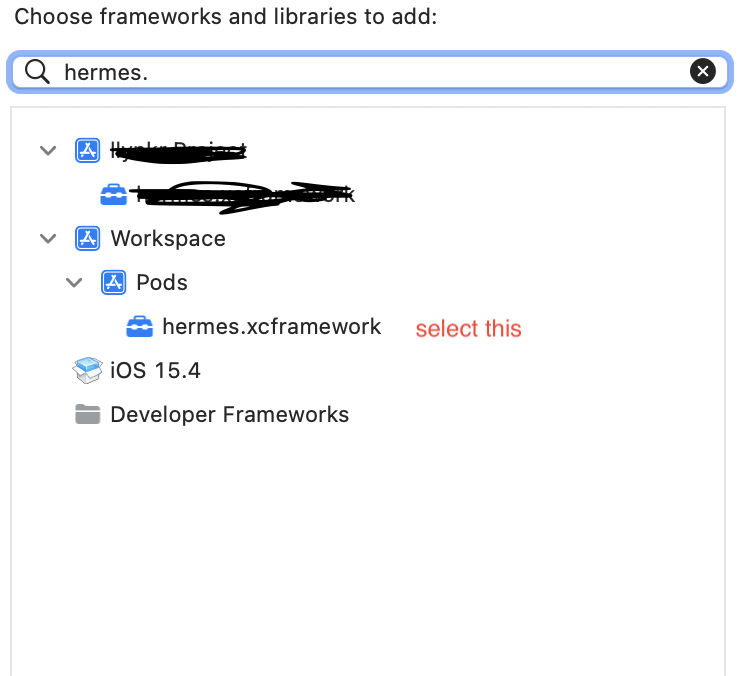
选择,然后遵循以下步骤
- goto 构建阶段
- 内部链接二进制与图书馆部分
- 单击Add项并搜索hermes.xcframework并添加它
- 重建应用
Stack Overflow用户
发布于 2022-09-07 06:38:26
这解决了我在RN 0.70中的问题。在Xcode中,使用库实现->构建阶段的->链接二进制

Stack Overflow用户
发布于 2022-05-04 14:02:58
尝试以下几个方面:
- 在Podfile中将
hermes_enabled值从true更改为false - 通过(纱线安装)重新安装npm/纱线依赖项
- 重新安装吊舱(cd ios && pods安装)
- 运行应用程序(react本机运行-ios)
我尝试过几次,将hermes_enabled从true改为false和back,并且一旦它开始工作。
页面原文内容由Stack Overflow提供。腾讯云小微IT领域专用引擎提供翻译支持
原文链接:
https://stackoverflow.com/questions/70875239
复制相关文章
相似问题
腾讯云开发者

Copyright © 2013 - 2026 Tencent Cloud. All Rights Reserved. 腾讯云 版权所有
深圳市腾讯计算机系统有限公司 ICP备案/许可证号:粤B2-20090059  粤公网安备44030502008569号
腾讯云计算(北京)有限责任公司 京ICP证150476号 | 京ICP备11018762号