
本机基输入全宽度
本机基输入全宽度
提问于 2022-01-29 20:54:55
我不知道我做错了什么,但我不能将输入设置为接受100%的父VStack视图:
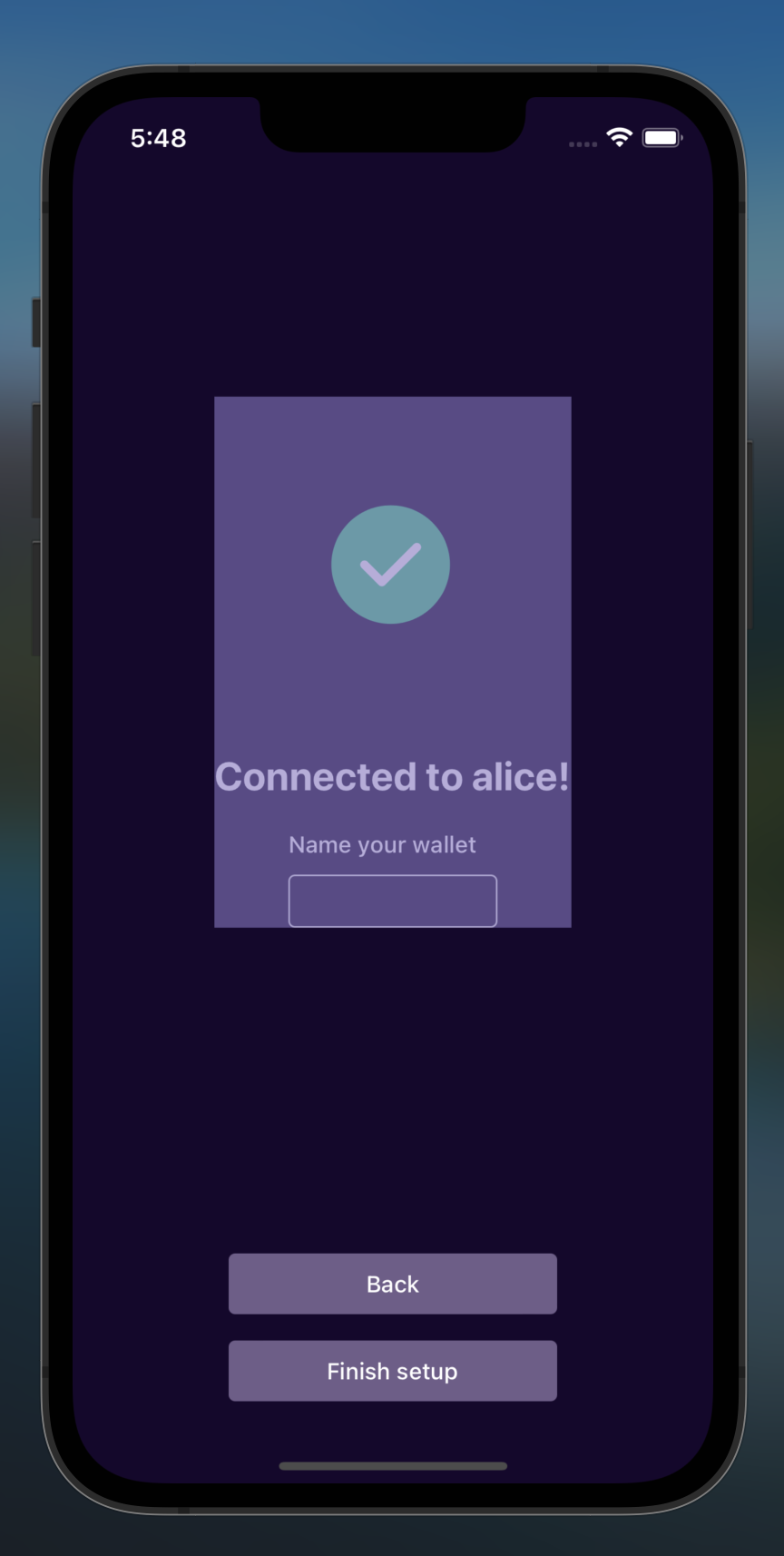
我的Input封装在一个FormControl中,它应该占用父VStack的全部宽度,但它没有。我尝试添加flex={1}、width="100%"和alignSelf="stretch",但是没有工作。
以下是代码:
    <VStack space="md" justifyContent="center" alignItems="center">
      <LottieView
        source={success}
        style={lottieStyle(200, 200).container}
        autoPlay
        loop={false}
      />

      <Heading numberOfLines={2} textAlign="center">
        Connected to {alias}!
      </Heading>

      <Input name="walletName" label="Name your wallet" />
</VStack>我的Input只是一个包装器:
    <FormControl isInvalid={hasErrors(name, touched, errors)}>
      {label && <FormControl.Label>{label}</FormControl.Label>}
      <NBInput
        value={value}
        onChangeText={handleChange(name)}
        onBlur={handleBlur(name)}
        {...rest}
      />
      <FormControl.ErrorMessage leftIcon={<WarningOutlineIcon size="xs" />}>
        {errorMessage(name, touched, errors)}
      </FormControl.ErrorMessage>
</FormControl>我想要实现的是将FormControl作为一个整体设置为它的父组件的所有宽度空间。
Stack Overflow用户
发布于 2022-02-01 19:15:37
我试着根据你提供的信息复制这个问题,但没能做到。这是我正在玩的小吃。
但是,我还是要求你尝试一些可能解决你的问题的方法。
- 在
w='100%'上添加VStack。 - 从
alignItems中删除VStack。
如果这两件事解决不了它,请分享一份零食,因为我们可能遗漏了什么。
页面原文内容由Stack Overflow提供。腾讯云小微IT领域专用引擎提供翻译支持
原文链接:
https://stackoverflow.com/questions/70909647
复制相关文章
相似问题
腾讯云开发者

Copyright © 2013 - 2026 Tencent Cloud. All Rights Reserved. 腾讯云 版权所有
深圳市腾讯计算机系统有限公司 ICP备案/许可证号:粤B2-20090059  粤公网安备44030502008569号
腾讯云计算(北京)有限责任公司 京ICP证150476号 | 京ICP备11018762号