
颤振网格视图生成器
颤振网格视图生成器
提问于 2022-02-27 17:59:00
我正在做这个简单的游戏,和Qix游戏一样。
我成功地使我的物体像我想要的那样移动,现在我需要在物体移动时感觉到这个场,例如,当物体移动到第142位置时,物体在161位置,那么块161应该被着色。
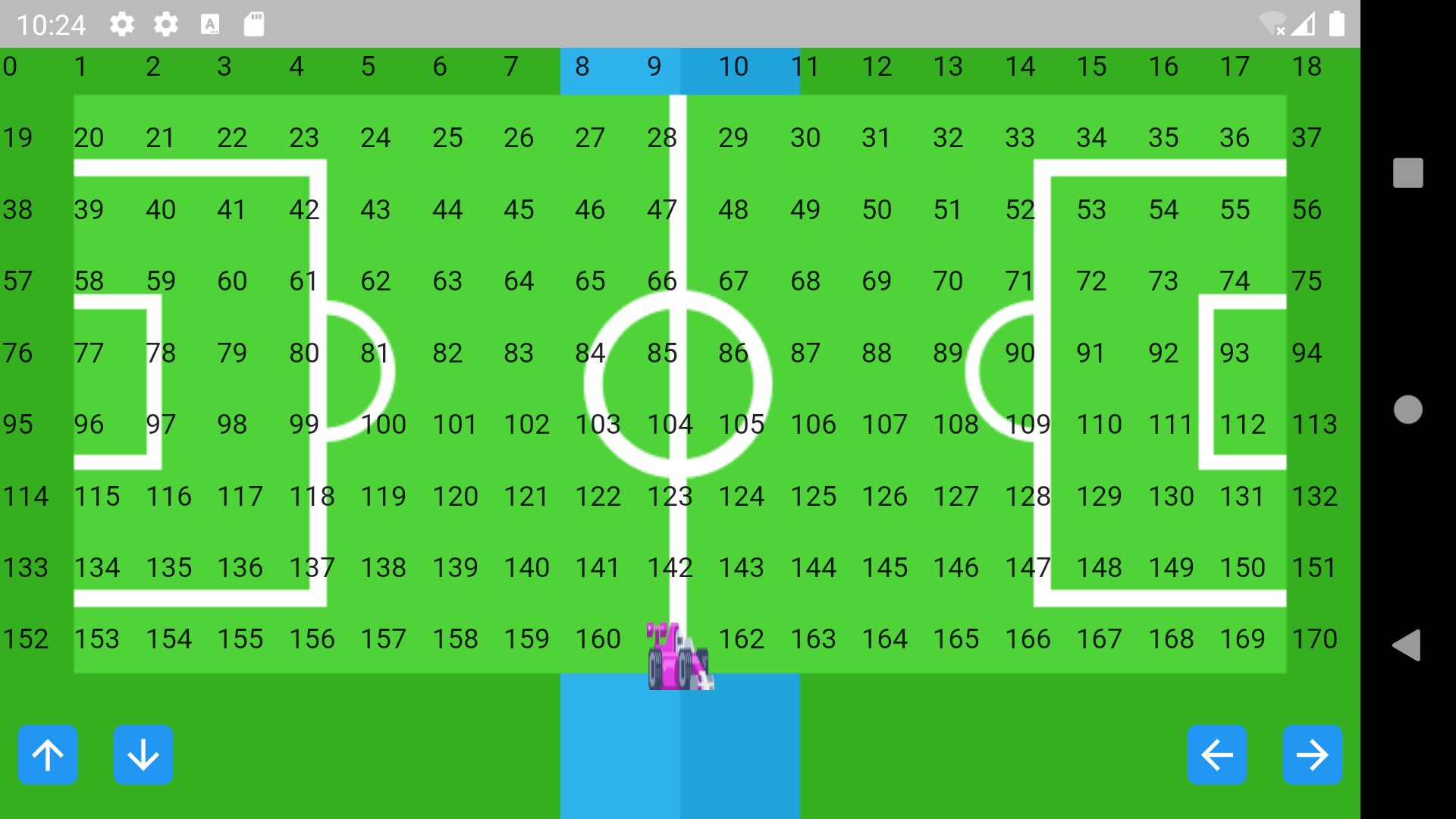
我正在使用这个网格视图来使对象移动这里是如何移动对象
//Movemoent Functions
  void moveUp() {
    if (myField.contains(playerPosition - numberInRow)) {
      setState(() {
        playerPosition -= numberInRow;
      });
    }
  }

  void moveDown() {
    if (myField.contains(playerPosition + numberInRow)) {
      setState(() {
        playerPosition += numberInRow;
      });
    }
  }

  void moveLeft() {
    if (myField.contains(playerPosition)) {
      if (leftCorner.contains(playerPosition)) {
      } else {
        setState(() {
          playerPosition--;
        });
      }
    }
  }

  void moveRight() {
    if (myField.contains(playerPosition)) {
      if (rightCorner.contains(playerPosition)) {
      } else {
        setState(() {
          playerPosition++;
        });
      }
    }
  }
对于UI,下面是我如何构建我的领域
Expanded(
                flex: 5,
                child: GridView.builder(
                  physics: const NeverScrollableScrollPhysics(),
                  itemCount: numberOfSquares,
                  gridDelegate: SliverGridDelegateWithFixedCrossAxisCount(
                    crossAxisCount: numberInRow,
                  ),
                  itemBuilder: (context, index) {
                    if (playerPosition == index) {
                      return MyPixel(
                        color: Colors.transparent,
                        child: const Myplayer(),
                      );
                    } else {
                      return MyPixel(
                        color: Colors.transparent,
                        child: Text(index.toString()),
                      );
                    }
                  },
                ),
),我使用一个从0到170的所有数字的列表来进行移动,myField是一个列表。
完整小部件:
class Mygame extends StatefulWidget {
  const Mygame({Key? key}) : super(key: key);
  static String route = "mygame";
  @override
  State<Mygame> createState() => _MygameState();
}

class _MygameState extends State<Mygame> {
  //variables
  static int numberInRow = 19;
  int numberOfSquares = numberInRow * 10;
  int playerPosition = Random().nextInt(171);
  String direction = "right";
  Color color = const Color.fromARGB(0, 250, 250, 250);
  //variables
  //
  //Functions
  void startgame() {
    Timer.periodic(
      const Duration(milliseconds: 1000),
      (timer) {
        switch (direction) {
          case "up":
            moveUp();
            break;
          case "down":
            moveDown();
            break;
          case "left":
            moveLeft();
            break;
          case "right":
            moveRight();
            break;
        }
      },
    );
  }

  //Functions

  //Movemoent Functions
  void moveUp() {
    if (myField.contains(playerPosition - numberInRow)) {
      setState(() {
        playerPosition -= numberInRow;
      });
    }
  }

  void moveDown() {
    if (myField.contains(playerPosition + numberInRow)) {
      setState(() {
        playerPosition += numberInRow;
      });
    }
  }

  void moveLeft() {
    if (myField.contains(playerPosition)) {
      if (leftCorner.contains(playerPosition)) {
      } else {
        setState(() {
          playerPosition--;
        });
      }
    }
  }

  void moveRight() {
    if (myField.contains(playerPosition)) {
      if (rightCorner.contains(playerPosition)) {
      } else {
        setState(() {
          playerPosition++;
        });
      }
    }
  }
  //Movemoent Functions

  @override
  Widget build(BuildContext context) {
    return Scaffold(
      body: SafeArea(
        child: Container(
          height: MediaQuery.of(context).size.height,
          width: MediaQuery.of(context).size.width,
          decoration: const BoxDecoration(
            image: DecorationImage(
              image: AssetImage("assets/images/bg.png"),
              fit: BoxFit.cover,
            ),
          ),
          child: Column(
            children: [
              Expanded(
                flex: 5,
                child: GridView.builder(
                  physics: const NeverScrollableScrollPhysics(),
                  itemCount: numberOfSquares,
                  gridDelegate: SliverGridDelegateWithFixedCrossAxisCount(
                    crossAxisCount: numberInRow,
                  ),
                  itemBuilder: (context, index) {
                    if (playerPosition == index) {
                      return MyPixel(
                        color: Colors.transparent,
                        child: const Myplayer(),
                      );
                    } else {
                      return MyPixel(
                        color: Colors.transparent,
                        child: Text(index.toString()),
                      );
                    }
                  },
                ),
              ),
              Expanded(
                child: Row(
                  mainAxisAlignment: MainAxisAlignment.spaceBetween,
                  children: [
                    Row(
                      children: [
                        RoundIconButton(
                          icon: Icons.arrow_upward,
                          onPress: () {
                            direction = "up";

                            startgame();
                          },
                        ),
                        RoundIconButton(
                          icon: Icons.arrow_downward,
                          onPress: () {
                            direction = "down";

                            startgame();
                          },
                        ),
                      ],
                    ),
                    Row(
                      children: [
                        RoundIconButton(
                          icon: Icons.arrow_back,
                          onPress: () {
                            direction = "left";

                            startgame();
                          },
                        ),
                        RoundIconButton(
                          icon: Icons.arrow_forward,
                          onPress: () {
                            direction = "right";

                            startgame();
                          },
                        ),
                      ],
                    ),
                  ],
                ),
              ),
            ],
          ),
        ),
      ),
    );
  }
}回答 1
Stack Overflow用户
回答已采纳
发布于 2022-02-28 15:45:27
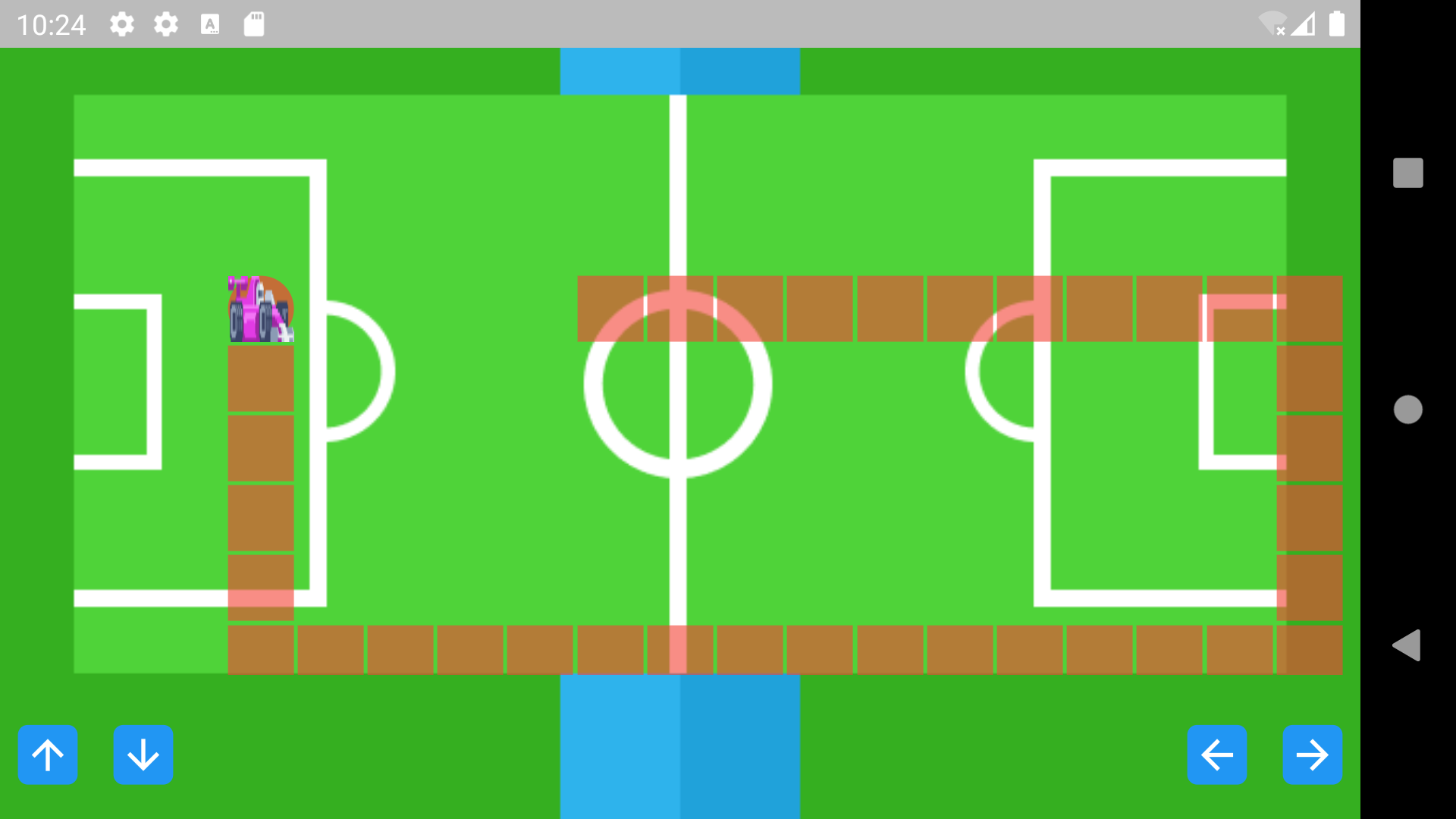
因此,我通过创建一个空列表来解决这个问题,每当对象索引与方框索引相等时,该索引就会添加到列表中。
if (playerPosition == index) {
if (feelField.contains(index)) {
} else {
 feelField.add(index);
 }
}
我创建了一个新的小部件来替换当前的小部件。
import 'package:flutter/material.dart';

class FeelField extends StatelessWidget {
  const FeelField({Key? key}) : super(key: key);

  @override
  Widget build(BuildContext context) {
    return Padding(
      padding: const EdgeInsets.all(1.0),
      child: Container(
        color: const Color.fromARGB(155, 244, 67, 54),
      ),
    );
  }
}
在Grid视图中,我返回了以下内容:
if (feelField.contains(index)) {
 return const FeelField();
} else {
 return MyPixel(
color: Colors.transparent,
);
UI看起来很难看,哈哈,但这是一个解决方案。现在体育场看起来像这样
页面原文内容由Stack Overflow提供。腾讯云小微IT领域专用引擎提供翻译支持
原文链接:
https://stackoverflow.com/questions/71287224
复制相关文章
相似问题
腾讯云开发者

Copyright © 2013 - 2026 Tencent Cloud. All Rights Reserved. 腾讯云 版权所有
深圳市腾讯计算机系统有限公司 ICP备案/许可证号:粤B2-20090059  粤公网安备44030502008569号
腾讯云计算(北京)有限责任公司 京ICP证150476号 | 京ICP备11018762号