
Python计算器有问题
Python计算器有问题
提问于 2022-03-08 01:09:05
所以我增加了一个功能来有效地写百分比,你所要做的就是有一个数字,比如说6,然后按下百分比,计算器会自动写出0.06。当您开始键入计算器的表达式时,所有这些操作都很好:
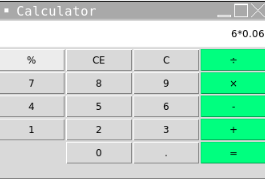
但是当你按等号时,事情就变糟了:
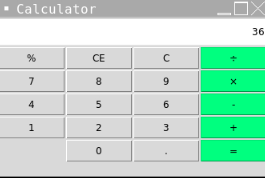
因为我数学太差了,我真的认为这是正确的答案,所以现在我终于可以继续做其他的事情了,对吧?但当我在谷歌上搜索时,它说6*0.06是0.36,而不是36。
当我做6/0.06时,我得到的是1,而不是100,这意味着,每当我除法时,我得到的东西比实际答案低100倍,每当我乘以时,我得到的东西比我要求的要高100倍。
下面是百分比函数:
def percent():
  global expression
  last_num = expression[-1]
  percent = int(last_num)/100
  equation.set(f"{expression[:-1]}{percent}")
任何帮助都将不胜感激!
Stack Overflow用户
回答已采纳
发布于 2022-03-08 04:25:30
仅对最后一个数字执行操作,对于大于1位数的数字是不起作用的。下面是我在percent函数中所做的修改,以使逻辑工作。此外,使用eval函数计算表达式,给出输入"6*6“、"6/6”和"5/70“的预期结果。
from tkinter import *
import string
window = Tk()

entry1string = StringVar()
entry_1 = Entry(window,textvariable=entry1string)
entry_1.pack()

def percent():
    global expression
    expression = entry1string.get()
    #instead of last_num look for entire number e.g. in "60%", "60"
    #so first find the operator which is used in the expression ( /, *, ...etc.)
    operator = next((ele for ele in expression if ele in string.punctuation), None)
    #Now get the number from the last whose % we need to calculate first
    percent_num = expression.split(operator)[-1]   #from the last everything after that '/' or '*' operator
    #Also get the entire rest of the expression
    #i.e. get the number before that operator along with the operator
    rest_exp = expression.split(operator)[0]+operator

    #print(percent_num)
    percent = int(percent_num)/100
    exprsn = f"{rest_exp}{percent}"
    print(exprsn)
    ans = eval(exprsn)
    Label(window, text=ans).pack()

button1 = Button(window, text="%", command=percent)
button1.pack()
window.mainloop()页面原文内容由Stack Overflow提供。腾讯云小微IT领域专用引擎提供翻译支持
原文链接:
https://stackoverflow.com/questions/71388928
复制相关文章
相似问题
腾讯云开发者

Copyright © 2013 - 2026 Tencent Cloud. All Rights Reserved. 腾讯云 版权所有
深圳市腾讯计算机系统有限公司 ICP备案/许可证号:粤B2-20090059  粤公网安备44030502008569号
腾讯云计算(北京)有限责任公司 京ICP证150476号 | 京ICP备11018762号