
绘制JPanel的全部高度线
除了最后一件事外,我的代码大部分都在起作用。当绘制的线数超过20时,就不会画出所有的面板。
**看我截图的右下角。这些线部分沿着面板的全部高度走下去。我需要它把整个高度降下来。**
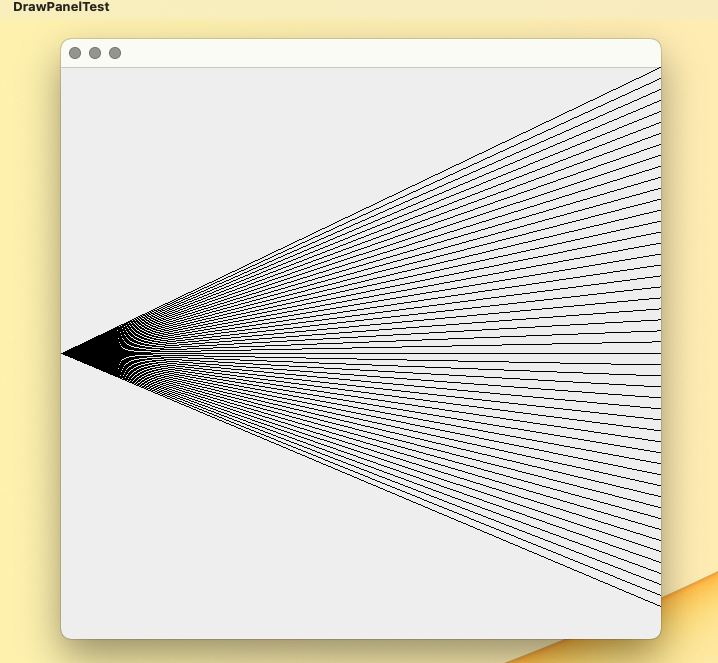
这是我的DrawPanelTest代码
// Creating JPanel to display DrawPanel
import javax.swing.JFrame;
import javax.swing.JOptionPane;

public class DrawPanelTest
{
   public static void main(String[] args)
   {
      int nValue = 0; // declare variable to store user input. Default value 0.
      Boolean flag = true; // initalize flag to true for argument value of while-loop

      // while-loop to prompt user input
      while (flag) {
         // prompt user for the value of N
         nValue = Integer.parseInt(JOptionPane.showInputDialog("Enter number of lines between 2 and 100."));

        // user input validation. Valid input is nValue [2, 100]
        if (nValue < 2 || nValue > 100) {
           nValue = Integer.parseInt(JOptionPane.showInputDialog("Enter number of lines between 2 and 100."));
        } else {
           flag = false; // if user input is correct, while-loop will end
        } // end if-else
      } // end while-loop

      // displays the value of N to make sure it really is correct; This works
      // String message = String.format("The value of n is: %d ", nValue);
      // JOptionPane.showMessageDialog(null, message);

      // create a panel that contains our drawing
      DrawPanel drawPanel = new DrawPanel(nValue);
      // create a new frame to hold the panel
      JFrame application = new JFrame();

      // set the frame to exit when closed
      application.setDefaultCloseOperation(JFrame.EXIT_ON_CLOSE);
      application.add(drawPanel); // add panel to the frame
      application.setSize(600, 600); // set the size of the frame
      application.setVisible(true); // make the frame visible
   }
 } // end class DrawPanelTest
这是我的代码DrawPanel
 // Using drawLine() to connect the corners of a panel
import java.awt.Graphics;
import javax.swing.JPanel;


public class DrawPanel extends JPanel
{
  int numLines;

  // constructor initializes DrawPanel and initializes
  // numLines with the argument value of n
  public DrawPanel(int n)
  {
    numLines = n;
  }

  // draws a X from the corners of the panel
  public void paintComponent( Graphics g)
  {
    // call paintComponent to ensure the panel displays correctly
    super.paintComponent(g);

    int width = getWidth(); // total width
    int height = getHeight(); // total height
    int x1 = 0; // starting x-coordinate
    int y1 = height / 2; // starting y-coordinate
    int x2 = width; // initial value for end x-coordinate
    int spaceValue = 0; // represents the space between the lines
    int stepValue = height/numLines; // represents the increment value starting from top right corner

    for (int i = 0; i <= numLines; i++) {
      if (numLines == 2) {
        g.drawLine(x1, y1, x2, 0);
        g.drawLine(x1, y1, x2, height);
        break;
      } // end numLines == 2

      else if (numLines >= 3) {
        g.drawLine(x1, y1, x2, spaceValue);
        spaceValue += stepValue;
      } // end else if
    } // end for-loop
  } // end paintComponent
} // end class DrawPanel
我认为我的问题在于DrawPanel第41行。我不认为我在正确地计算线条之间的空格,所以它们最终取了整个面板的高度。
提前谢谢你的帮助。
回答 3
Stack Overflow用户
发布于 2022-03-16 02:51:01
您对"stepValue“的计算有两个问题:
- stepValue是小的,所以最后一行永远不会出现在底部的
- 中,stepValue由于整数的计算而被截断,所以每次将截断的值加到"spaceValue“中,都会得到一个稍微不太准确的值。
假设您有一个高度为600的面板,线条数为3。
你的计算是:
int stepValue = 600 / 3 = 200我认为这是错误的,因为你将用"spaceValue“为0,200,400画3条线,所以最后一条线( 600)永远不会被画出来。
事实上,我认为计算的方法应该是:
double stepValue = (double)height / (numLine - 1);这意味着:
double stepValue = 600 / (3 - 1) = 300.它将给出"spaceValue“为0,300,600的行,这将是在顶部、中部和底部的一行。
所以你的绘画循环就变成了:
for (int i = 0; i < numLines; i++)
{
    g.drawLine(x1, y1, x2, spaceValue);
    spaceValue += stepValue;
}Stack Overflow用户
发布于 2022-03-16 02:59:28
我认为问题之一就是“整数除法”问题。
int stepValue = height / numLines;正在截断结果。例如,如果height为400,而行数为6,则stepValue将是66而不是67 (这将允许对66.6666进行舍入)
现在,您可以自己“舍入”这个值,但是我更愿意使用可用的API来为我做这些事情。
Line2D.Double支持双精度参数,这使得它非常适合这项工作。
@Override
protected void paintComponent(Graphics g) {
    super.paintComponent(g);
    Graphics2D g2d = (Graphics2D) g.create();
    if (lineCount > 1) {
        double gap = getHeight() / (double)(lineCount - 1);
        for (int i = 0; i < lineCount; i++) {
            Line2D line = new Line2D.Double(0, getHeight() / 2, getWidth(), i * gap);
            g2d.draw(line);
        }
    } else {
        g2d.drawLine(0, getHeight() / 2, getWidth(), getHeight() / 2);
    }
    g2d.dispose();
}
可运行的例子。
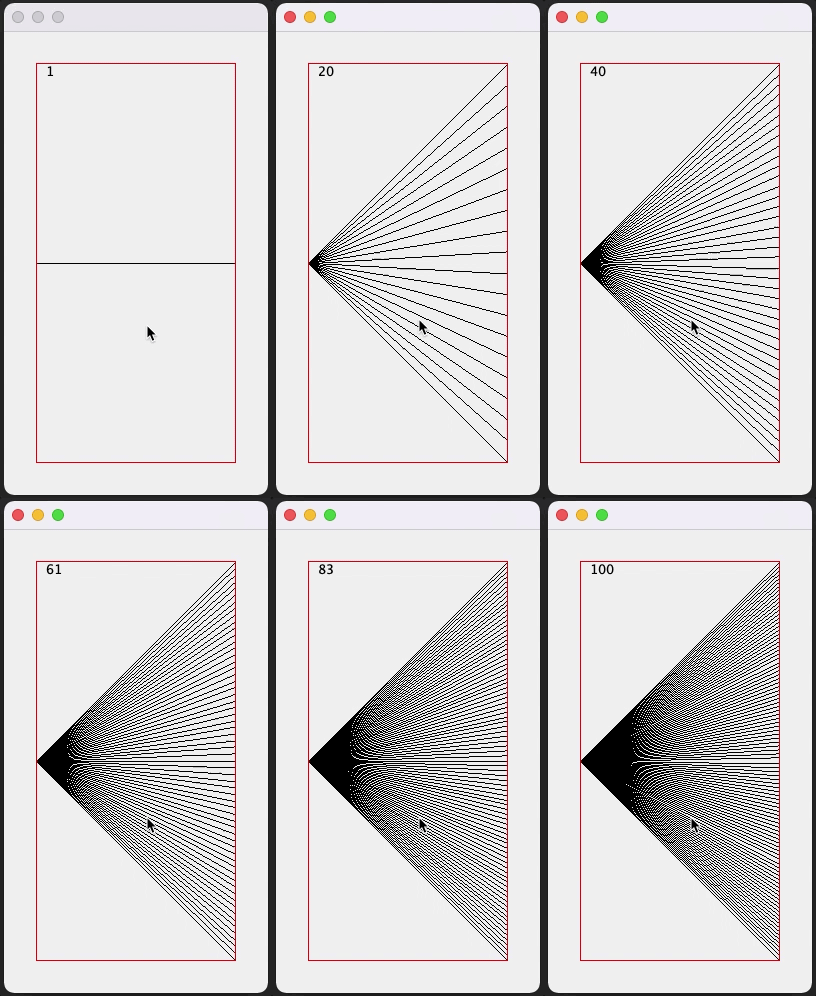
import java.awt.BorderLayout;
import java.awt.Color;
import java.awt.Dimension;
import java.awt.EventQueue;
import java.awt.FontMetrics;
import java.awt.Graphics;
import java.awt.Graphics2D;
import java.awt.event.MouseAdapter;
import java.awt.event.MouseEvent;
import java.awt.geom.Line2D;
import javax.swing.JFrame;
import javax.swing.JPanel;
import javax.swing.border.EmptyBorder;
import javax.swing.border.LineBorder;

public class Main {
    public static void main(String[] args) {
        new Main();
    }

    public Main() {
        EventQueue.invokeLater(new Runnable() {
            @Override
            public void run() {
                JFrame frame = new JFrame();
                JPanel contentPane = new JPanel(new BorderLayout());
                contentPane.setBorder(new EmptyBorder(32, 32, 32, 32));
                frame.setContentPane(contentPane);
                frame.add(new TestPane());
                frame.pack();
                frame.setLocationRelativeTo(null);
                frame.setVisible(true);
            }
        });
    }

    public class TestPane extends JPanel {

        private int lineCount = 1;

        public TestPane() {
            setBorder(new LineBorder(Color.RED));
            addMouseListener(new MouseAdapter() {
                @Override
                public void mouseClicked(MouseEvent e) {
                    lineCount++;
                    repaint();
                }
            });
        }

        @Override
        public Dimension getPreferredSize() {
            return new Dimension(200, 400);
        }

        @Override
        protected void paintComponent(Graphics g) {
            super.paintComponent(g);
            Graphics2D g2d = (Graphics2D) g.create();
            FontMetrics fm = g2d.getFontMetrics();
            g2d.drawString(Integer.toString(lineCount), 10, fm.getAscent());
            if (lineCount > 1) {
                double gap = getHeight() / (double) (lineCount - 1);
                for (int i = 0; i < lineCount; i++) {
                    Line2D line = new Line2D.Double(0, getHeight() / 2, getWidth(), i * gap);
                    g2d.draw(line);
                }
            } else {
                g2d.drawLine(0, getHeight() / 2, getWidth(), getHeight() / 2);
            }
            g2d.dispose();
        }

    }
}Stack Overflow用户
发布于 2022-03-16 02:31:55
在for循环中,更改
for (int i = 0; i < numLines; i++) {至
for (int i = 0; i <= numLines; i++) {迭代组件的完整高度。i必须与numLines相等,才能达到统一。
https://stackoverflow.com/questions/71491143
复制相似问题
腾讯云开发者

Copyright © 2013 - 2026 Tencent Cloud. All Rights Reserved. 腾讯云 版权所有
深圳市腾讯计算机系统有限公司 ICP备案/许可证号:粤B2-20090059  粤公网安备44030502008569号
腾讯云计算(北京)有限责任公司 京ICP证150476号 | 京ICP备11018762号