
如何使用vscode扩展测试生成覆盖率报告
如何使用vscode扩展测试生成覆盖率报告
提问于 2022-03-29 14:36:50
我正在实现一个VSCode扩展。我在此链接之后设置了这个项目。
它使用一个src/test/runTest.ts文件生成一个初学者项目:
import * as path from 'path';

import { runTests } from '@vscode/test-electron';

async function main() {
    try {
        // The folder containing the Extension Manifest package.json
        // Passed to `--extensionDevelopmentPath`
        const extensionDevelopmentPath = path.resolve(__dirname, '../../');

        // The path to test runner
        // Passed to --extensionTestsPath
        const extensionTestsPath = path.resolve(__dirname, './suite/index');

        // Download VS Code, unzip it and run the integration test
        await runTests({ extensionDevelopmentPath, extensionTestsPath });
    } catch (err) {
        console.error('Failed to run tests');
        process.exit(1);
    }
}

main();和package.json中的一个命令
{
    "compile": "tsc -p ./",
    "pretest": "npm run compile && npm run lint",
    "lint": "eslint src --ext ts",
    "test": "node ./out/test/runTest.js"
}
有没有办法用它生成覆盖报告?
回答 1
Stack Overflow用户
发布于 2022-08-18 17:31:22
VSCode扩展单元测试使用遮罩下的摩卡咖啡。您可以使用许多可用的框架(例如c8、取笑、伊斯坦布尔等)生成覆盖报告,就像在任何其他类型记录/Javascript项目中一样。
安装您选择的框架,这里我使用c8
npm i --save-dev c8并添加到脚本中
  "scripts": {
    "compile": "tsc -p ./",
    "pretest": "npm run compile && npm run lint",
    "lint": "eslint src --ext ts",
    "test": "node ./out/test/runTest.js",
    "coverage": "c8 --check-coverage npm run test"
}根据您的扩展名,您可能需要创建一个配置文件,其中包含要检查覆盖率的文件。在这里,我们检查放置在.js dir下的已编译的out/文件,还排除了负责单元测试的文件,即out/test/ (通常)。
.c8rc
{
  "all": true,
  "include": ["out/**"],
  "exclude": ["**/node_modules/**", "out/test/"],
  "reporter": ["html", "text"]
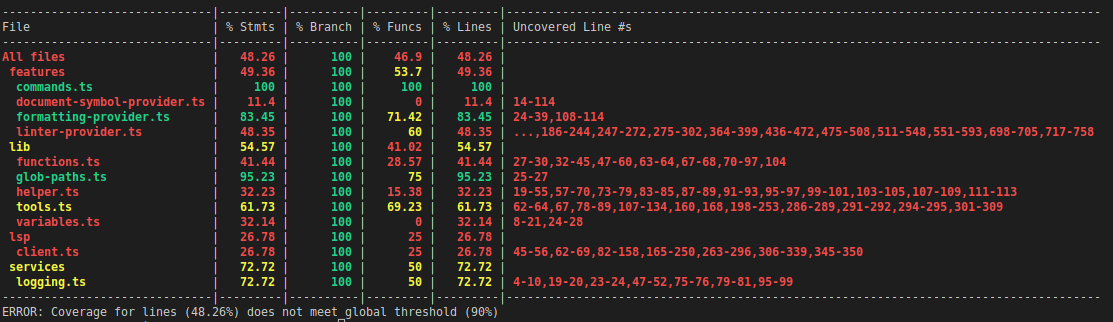
}运行coverage脚本,您将得到覆盖范围的输出
npm run coverage
页面原文内容由Stack Overflow提供。腾讯云小微IT领域专用引擎提供翻译支持
原文链接:
https://stackoverflow.com/questions/71664061
复制相关文章
相似问题
腾讯云开发者

Copyright © 2013 - 2026 Tencent Cloud. All Rights Reserved. 腾讯云 版权所有
深圳市腾讯计算机系统有限公司 ICP备案/许可证号:粤B2-20090059  粤公网安备44030502008569号
腾讯云计算(北京)有限责任公司 京ICP证150476号 | 京ICP备11018762号