
WPF与WinForms Oxyplot自定义工具提示/跟踪器
WPF与WinForms Oxyplot自定义工具提示/跟踪器
提问于 2022-04-04 14:06:18
我正在构建一个WPF应用程序,并使用OxyPlot呈现一个图表。
为了最大化图表的性能,我切换到了OxyPlot.WindowsForms,并使用WindowsFormsHost嵌入了图表。来源:https://oxyplot.userecho.com/de/communities/1/topics/35-wpf-performance
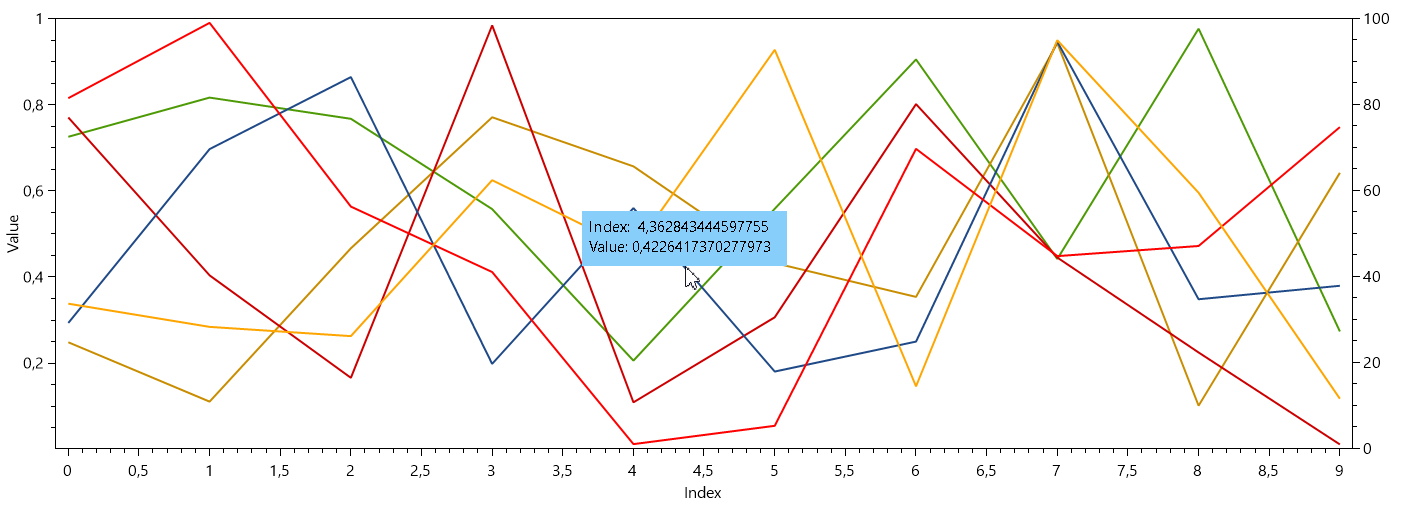
缩放是我正在绘制的图表中非常重要的一部分,但是OxyPlot.WindowsForms似乎没有一个好看的工具提示。
WindowsForms:
WPF:
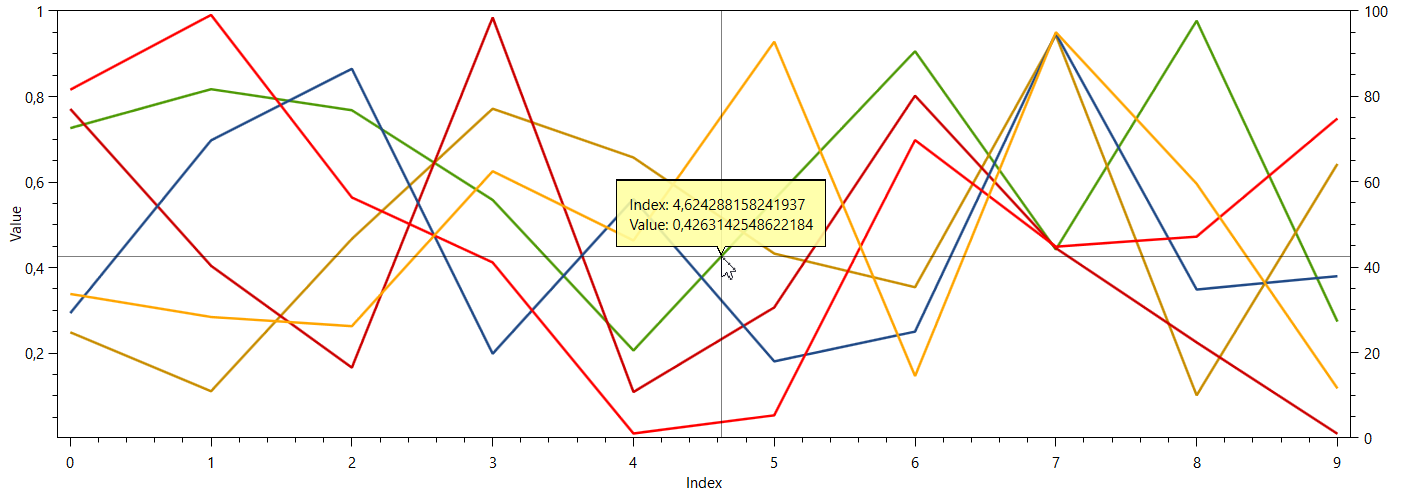
有任何方法可以自定义WindowsForms工具提示,使其看起来像WPF工具提示吗?最重要的是点的垂直和水平线。
回答 1
Stack Overflow用户
回答已采纳
发布于 2022-04-04 16:15:19
查看组件的源代码,它实际上不是一个工具提示,是个标签。一个选项可以是获取私有trackingLabel并在控件的区域上应用更改(或者最好用支持该形状的自定义标签替换它)。
此外,要绘制十字跟踪器,您可以处理Paint事件的情节,并绘制水平和垂直线的基础上的中心标签。
嗯,我上面提到的只是一个快速的解决办法,其结果如下:
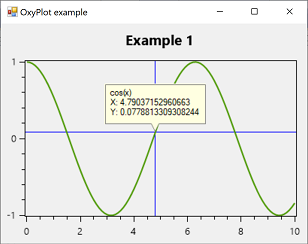
使用以下代码:
private Label trackerLabel;
private void Form1_Load(object sender, EventArgs e)
{
    var trackerLabelField = plotView1.GetType().GetField("trackerLabel",
        System.Reflection.BindingFlags.NonPublic | System.Reflection.BindingFlags.Instance);
    trackerLabel = new BalloonLabel()
    {
        Visible = false,
        Parent = plotView1
    };
    trackerLabelField.SetValue(plotView1, trackerLabel);

    var myModel = new PlotModel { Title = "Example 1" };
    myModel.Series.Add(new FunctionSeries(Math.Cos, 0, 10, 0.1, "cos(x)"));
    this.plotView1.Model = myModel;
    this.plotView1.Paint += PlotView1_Paint;
    trackerLabel.VisibleChanged += TrackerLabel_VisibleChanged;
}
private void TrackerLabel_VisibleChanged(object sender, EventArgs e)
{
    plotView1.Invalidate();
}
private void PlotView1_Paint(object sender, PaintEventArgs e)
{
    if (trackerLabel.Visible)
    {
        var r = plotView1.Model.PlotArea;
        e.Graphics.DrawLine(Pens.Blue, trackerLabel.Left + trackerLabel.Width / 2, (int)r.Top,
            trackerLabel.Left + trackerLabel.Width / 2, (int)r.Bottom);
        e.Graphics.DrawLine(Pens.Blue, (int)r.Left, trackerLabel.Bottom, (int)r.Right, trackerLabel.Bottom);
    }
}
这个气球标签,我认为这是一个很好的起点:
using System;
using System.Drawing;
using System.Drawing.Drawing2D;
using System.Windows.Forms;
public class BalloonLabel : Label
{
    public BalloonLabel()
    {
        BackColor = SystemColors.Info;
        Padding = new Padding(5, 5, 5, 20);
        ArrowSize = new Size(10, 20);
        AutoSize = true;
    }
    private Size arrowSize;
    public Size ArrowSize
    {
        get { return arrowSize; }
        set
        {
            arrowSize = value;
            this.RecreateRegion();
        }
    }

    private GraphicsPath GetBalloon(Rectangle bounds)
    {
        GraphicsPath path = new GraphicsPath();
        path.StartFigure();

        if (arrowSize.Width > 0 && arrowSize.Height > 0)
        {
            path.AddLine(bounds.Left, bounds.Bottom - arrowSize.Height / 2, bounds.Left, bounds.Top);
            path.AddLine(bounds.Left, bounds.Top, bounds.Right, bounds.Top);
            path.AddLine(bounds.Right, bounds.Top, bounds.Right, bounds.Bottom - arrowSize.Height / 2);
            path.AddLine(bounds.Right, bounds.Bottom - arrowSize.Height / 2, bounds.Left + bounds.Width / 2 + arrowSize.Width / 2, bounds.Bottom - arrowSize.Height / 2);
            path.AddLine(bounds.Left + bounds.Width / 2 + arrowSize.Width / 2, bounds.Bottom - arrowSize.Height / 2,
                bounds.Left + bounds.Width / 2, bounds.Bottom);
            path.AddLine(bounds.Left + bounds.Width / 2, bounds.Bottom,
                bounds.Left + bounds.Width / 2 - arrowSize.Width / 2, bounds.Bottom - arrowSize.Height / 2);
            path.AddLine(bounds.Left + bounds.Width / 2 - arrowSize.Width / 2, bounds.Bottom - arrowSize.Height / 2,
                bounds.Left, bounds.Bottom - arrowSize.Height / 2);
        }
        else
        {
            path.AddLine(bounds.Left, bounds.Bottom, bounds.Left, bounds.Top);
            path.AddLine(bounds.Left, bounds.Top, bounds.Right, bounds.Top);
            path.AddLine(bounds.Right, bounds.Top, bounds.Right, bounds.Bottom);
            path.AddLine(bounds.Right, bounds.Bottom, bounds.Left, bounds.Bottom);
        }
        path.CloseFigure();
        return path;
    }

    private void RecreateRegion()
    {
        var r = ClientRectangle;
        using (var path = GetBalloon(r))
            this.Region = new Region(path);
        this.Invalidate();
    }
    protected override void OnSizeChanged(EventArgs e)
    {
        base.OnSizeChanged(e);
        this.RecreateRegion();
    }
    protected override void OnPaint(PaintEventArgs e)
    {
        base.OnPaint(e);
        var r = ClientRectangle;
        r.Inflate(-1, -1);
        using (var path = GetBalloon(r))
        {
            e.Graphics.SmoothingMode = SmoothingMode.AntiAlias;
            using (var pen = new Pen(Color.Gray, 1) { Alignment = PenAlignment.Inset })
                e.Graphics.DrawPath(pen, path);
            if (Parent != null)
                Parent.Invalidate();
        }
    }
}
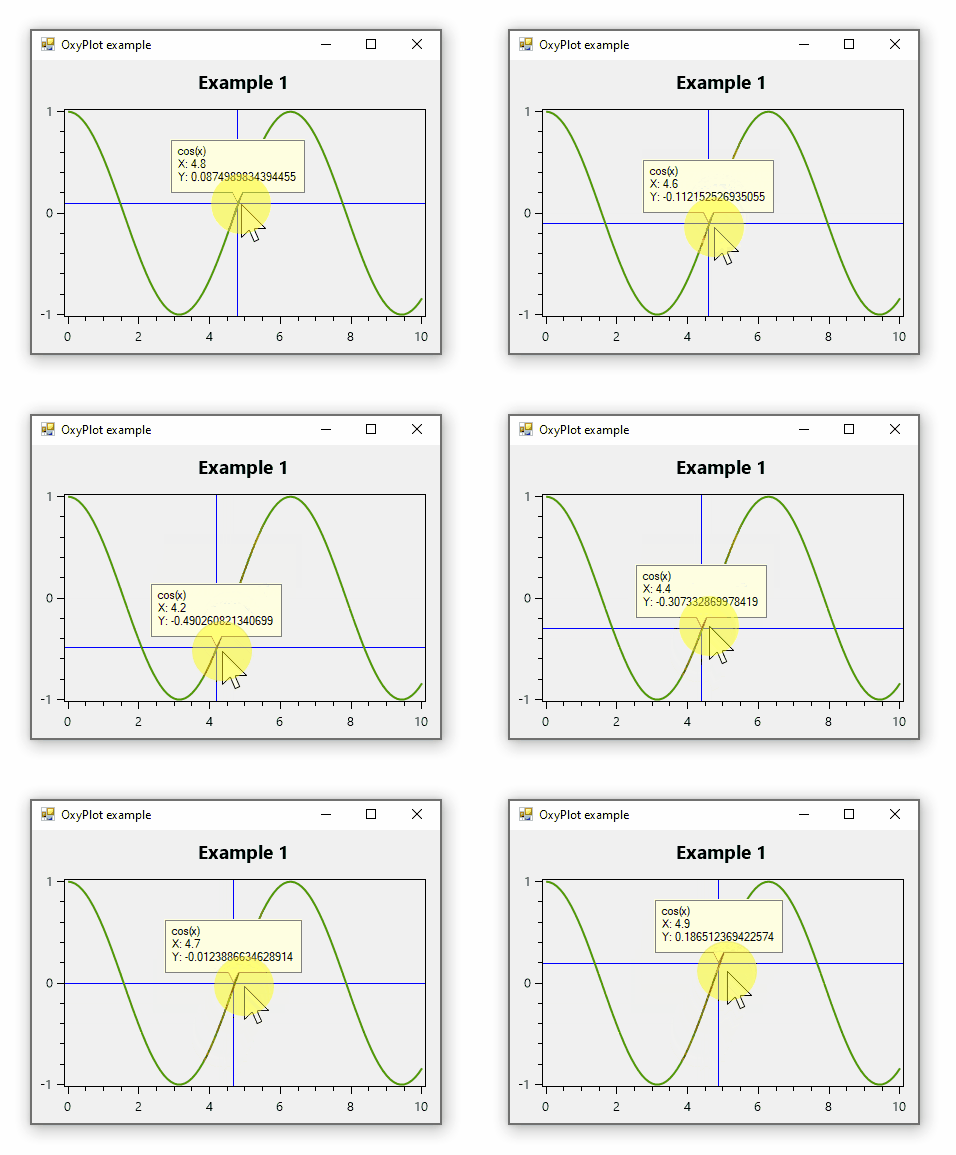
以下是动画结果:
页面原文内容由Stack Overflow提供。腾讯云小微IT领域专用引擎提供翻译支持
原文链接:
https://stackoverflow.com/questions/71738632
复制相关文章
相似问题
腾讯云开发者

Copyright © 2013 - 2026 Tencent Cloud. All Rights Reserved. 腾讯云 版权所有
深圳市腾讯计算机系统有限公司 ICP备案/许可证号:粤B2-20090059  粤公网安备44030502008569号
腾讯云计算(北京)有限责任公司 京ICP证150476号 | 京ICP备11018762号