
在python OpenCV中,如何有效地逐像素遍历图像?
我想做的是用每个像素的值在另一个相应的图像中画一个圆圈,一个像素一个像素的循环。
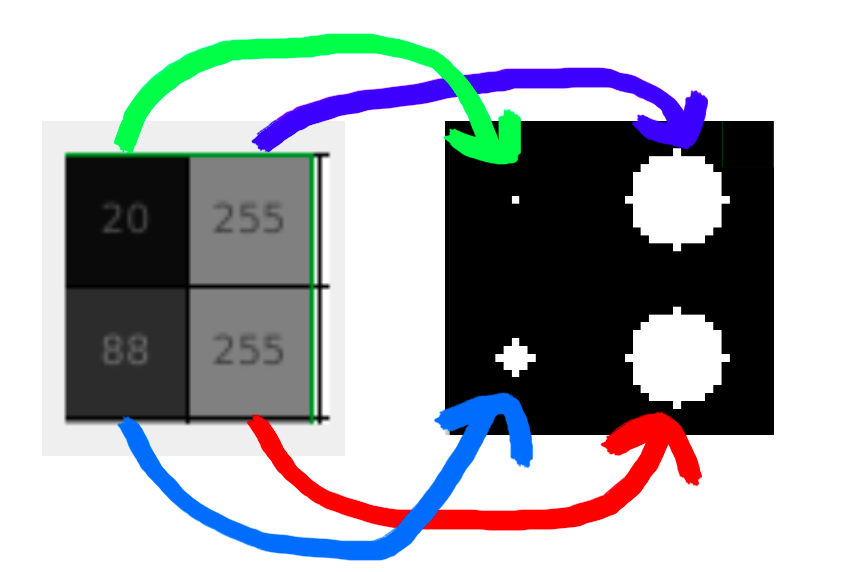
我的做法如下:
it = np.nditer(pixels, flags=['multi_index'])
while not it.finished:
    y, x = it.multi_index
    color = it[0]
    it.iternext()
    center = (x*20 + 10, y*20 + 10) # corresponding circle center
    cv2.circle(circles, center, int(8 * color/255), 255, -1)
这样的循环有点慢。我试着添加numba的@njit装饰师,但显然它在opencv上有问题。
输入图像为32x32像素,它们映射到输出图像,即32x32圆圈,每个圆圈在20x20像素正方形内绘制,即输出图像为640x640像素。
一张图像需要大约100 or才能被转换成圆圈,我希望把它降低到30 or或更低。
有什么建议吗?
回答 1
Stack Overflow用户
发布于 2022-04-10 23:02:13
在以下情况下:
处理绘图的
- 可能的选项数量不超过常识值(在本例中为:256)
- 的速度很重要(我想总是这样)
- 没有其他限制阻止这种方法(
)
最好的方法是“缓存”绘图(在另一个数组中预先绘制它们(或根据需要的开销按需要绘制它们),当绘图通常应该发生时,只需从缓存中获取适当的绘图并将其放置到目标区域(正如@ChristophRackwitz在其中一个注释中所述),这是一个非常快速的NumPy操作(与绘图相比)。
顺便提一下,这是一种通用的方法,不一定局限于绘图。
但是你声称你得到的结果是:~每一张32x32图像100毫秒(一张640×640圆圈),对我来说没有任何意义(因为OpenCV也是快速的,1024圈不应该是什么大问题),所以我创建了一个程序来说服自己。
code00.py
#!/usr/bin/env python

import itertools as its
import sys
import time

import cv2
import numpy as np


def draw_img_orig(arr_in, arr_out, *args):
    factor = round(arr_out.shape[0] / arr_in.shape[0])
    factor_2 = factor // 2
    it = np.nditer(arr_in, flags=["multi_index"])
    while not it.finished:
        y, x = it.multi_index
        color = it[0]
        it.iternext()
        center = (x * factor + factor_2, y * factor + factor_2) # corresponding circle center
        cv2.circle(arr_out, center, int(8 * color / 255), 255, -1)


def draw_img_regular_iter(arr_in, arr_out, *args):
    factor = round(arr_out.shape[0] / arr_in.shape[0])
    factor_2 = factor // 2
    for row_idx, row in enumerate(arr_in):
        for col_idx, col in enumerate(row):
            cv2.circle(arr_out, (col_idx * factor + factor_2, row_idx * factor + factor_2), int(8 * col / 255), 255, -1)


def draw_img_cache(arr_in, arr_out, *args):
    factor = round(arr_out.shape[0] / arr_in.shape[0])
    it = np.nditer(arr_in, flags=["multi_index"])
    while not it.finished:
        y, x = it.multi_index
        yf = y * factor
        xf = x *factor
        arr_out[yf: yf + factor, xf: xf + factor] = args[0][it[0]]
        it.iternext()


def generate_input_images(shape, count, dtype=np.uint8):
    return np.random.randint(256, size=(count,) + shape, dtype=dtype)


def generate_circles(shape, dtype=np.uint8, func=lambda x: int(8 * x / 255), color=255):
    ret = np.zeros((256,) + shape, dtype=dtype)
    cy = shape[0] // 2
    cx = shape[1] // 2
    for idx, arr in enumerate(ret):
        cv2.circle(arr, (cx, cy), func(idx), color, -1)
    return ret


def test_draw(imgs_in, img_out, count, draw_func, *draw_func_args):
    print("\nTesting {:s}".format(draw_func.__name__))
    start = time.time()
    for i, e in enumerate(its.cycle(range(imgs_in.shape[0]))):
        draw_func(imgs_in[e], img_out, *draw_func_args)
        if i >= count:
            break
    print("Took {:.3f} seconds ({:d} images)".format(time.time() - start, count))


def test_speed(shape_in, shape_out, dtype=np.uint8):
    imgs_in = generate_input_images(shape_in, 50, dtype=dtype)
    #print(imgs_in.shape, imgs_in)
    img_out = np.zeros(shape_out, dtype=dtype)
    circles = generate_circles((shape_out[0] // shape_in[0], shape_out[1] // shape_in[1]))
    count = 250
    test_draw(imgs_in, img_out, count, draw_img_orig)
    test_draw(imgs_in, img_out, count, draw_img_regular_iter)
    test_draw(imgs_in, img_out, count, draw_img_cache, circles)


def test_accuracy(shape_in, shape_out, dtype=np.uint8):
    img_in = np.arange(np.product(shape_in), dtype=dtype).reshape(shape_in)
    circles = generate_circles((shape_out[0] // shape_in[0], shape_out[1] // shape_in[1]))
    data = (
        (draw_img_orig, "orig.png", None),
        (draw_img_regular_iter, "regit.png", None),
        (draw_img_cache, "cache.png", circles),
    )
    imgs_out = [np.zeros(shape_out, dtype=dtype) for _ in range(len(data))]
    for idx, (draw_func, out_name, other_arg) in enumerate(data):
        draw_func(img_in, imgs_out[idx], other_arg)
        cv2.imwrite(out_name, imgs_out[idx])
    for idx, img in enumerate(imgs_out[1:], start=1):
        if not np.array_equal(img, imgs_out[0]):
            print("Image index different: {:d}".format(idx))


def main(*argv):
    dt = np.uint8
    shape_in = (32, 32)
    factor_io = 20
    shape_out = tuple(i * factor_io for i in shape_in)
    test_speed(shape_in, shape_out, dtype=dt)
    test_accuracy(shape_in, shape_out, dtype=dt)


if __name__ == "__main__":
    print("Python {:s} {:03d}bit on {:s}\n".format(" ".join(elem.strip() for elem in sys.version.split("\n")),
                                                   64 if sys.maxsize > 0x100000000 else 32, sys.platform))
    rc = main(*sys.argv[1:])
    print("\nDone.")
    sys.exit(rc)
Notes
- 除了使用np.nditer的实现(我把它放在一个名为draw_img_orig的函数中)之外,我还创建了另外两个:
- One that iterates the input array _Python_icly (_draw\_img\_regular\_iter_)- One that uses cached circles, and also iterates via _np.nditer_ (_draw\_img\_cache_)就测试而言,有两个测试--每个测试都在3种方法(上面的方法)上执行:
- Speed: measure the time took to process a number of images- Accuracy: measure the output for a _32x32_ input containing the interval _**[0, 255]**_ (4 times)输出
在粘贴到cfati@CFATI-5510-0:e:\Work\Dev\StackOverflow\q071818080> (或其他)页面(或其他页面)时,
sopr.bat ###设置了更短的提示符,以便更适合于粘贴在StackOverflow (或其他)页面中。18:08:50) MSC v.1929 64位(AMD64) 064位在win32上测试draw_img_orig需要0.908秒(250个图像)测试draw_img_regular_iter需要1.061秒(250个图像)测试draw_img_cache需要0.426秒(250个图像)完成。prompt> prompt> dir /b cache.png码00.py orig.png regit.png
上面是速度测试的结果:正如所见,您的方法对250个图像只花了不到1秒的时间!,所以我是对的,我不知道您的慢度来自哪里,但它不是来自这里(也许您弄错了?)
常规方法速度稍慢,而缓存方法的~2X速度更快。
我在笔记本电脑上运行了代码:
- Win 10 pc064
- CPU: Intel i7 6820 as @ 2.70GHz (相当旧的)
- GPU:不相关,因为我在执行
时没有注意到任何尖峰
关于准确性测试,所有(3)输出数组都是相同的(没有其他消息),这里有一个保存的图像:
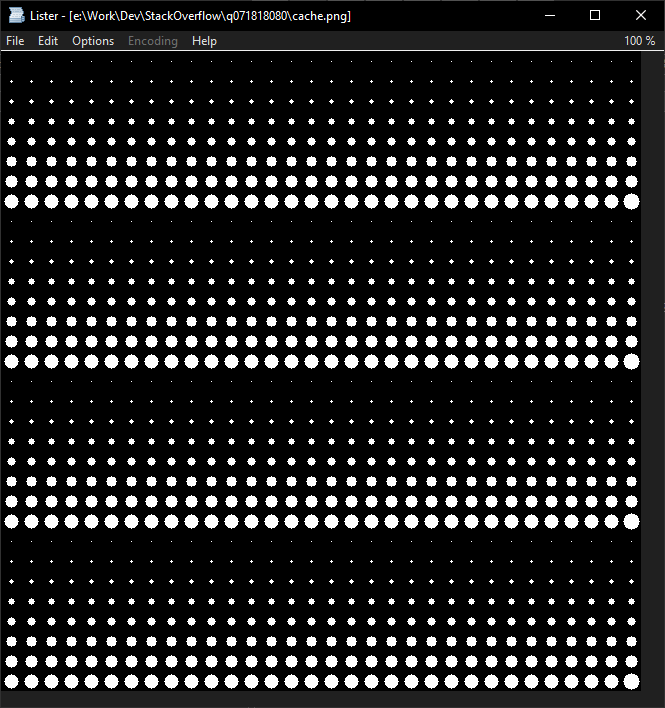
https://stackoverflow.com/questions/71818080
复制相似问题
腾讯云开发者

Copyright © 2013 - 2026 Tencent Cloud. All Rights Reserved. 腾讯云 版权所有
深圳市腾讯计算机系统有限公司 ICP备案/许可证号:粤B2-20090059  粤公网安备44030502008569号
腾讯云计算(北京)有限责任公司 京ICP证150476号 | 京ICP备11018762号