
运行程序时VScode扩展代码运行程序不工作/错误(python)
运行程序时VScode扩展代码运行程序不工作/错误(python)
提问于 2022-05-08 15:22:51
当我安装代码运行程序扩展而无法运行python程序时,会弹出以下错误:
Copyright © Microsoft Corporation. All rights reserved.
Try the new cross-platform PowerShell https://aka.ms/pscore6
Warning: PowerShell detected that you might be using a screen-reader and has disabled PSReadLine for compatibility purposes.
If you want to re-enable it, run 'Import - Module PSReadLine'.
PS C:\Users\Admin\OneDrive\Máy tính\py projects python -u " C\Users\ Admin\OneDrive\Máy tính\py project\test.py " python : The term 'python' is not recognized as the name of a cmdlet , function ,script file ,or operable program. Check the spelling of the name ,or if a path was included ,verify that the path is correct and try again.
At line :1 char :1
+ python -u " C:\Users\Admin\OneDrive\Máy tính\py project\test.py "  ' ~~~~~~
+ CategoryInfo : ObjectNotFound: (python:String) [], CommandNotException
+ FullyQualifiedErrorId : CommandNotFoundException当我关闭扩展时,代码将正常运行,但当我打开错误时会弹出。谢谢你阅读我的问题!(·https://i.stack.imgur.com/62MI3.png·̀ω·́)✧1:

回答 2
Stack Overflow用户
回答已采纳
发布于 2022-05-09 02:34:02
什么意思“关闭延长其工作正常”。根据错误报告,这应该是Python环境变量设置的一个问题。您试过名为“运行Python文件”的方式吗?这是延伸塔的一个功能。
顺便说一下,您应该已经安装了python扩展。
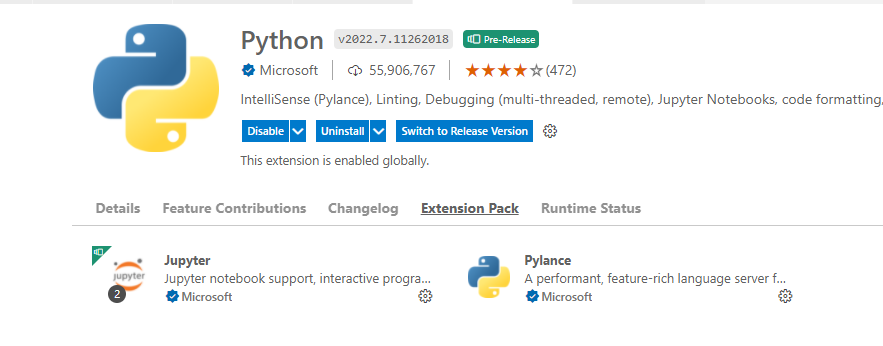
更新:
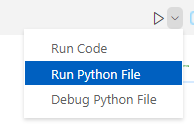
您可以使用此选项运行python文件。这是Microsoft正式提供的文件运行选项。
Stack Overflow用户
发布于 2022-05-08 21:32:07
确保安装了python。在VScode的左下角,您必须选择一个解释器并确保选择python。如果需要选择语言,请选择python,并将文件命名为"FileName.py“。
页面原文内容由Stack Overflow提供。腾讯云小微IT领域专用引擎提供翻译支持
原文链接:
https://stackoverflow.com/questions/72162456
复制相关文章
相似问题
腾讯云开发者

Copyright © 2013 - 2026 Tencent Cloud. All Rights Reserved. 腾讯云 版权所有
深圳市腾讯计算机系统有限公司 ICP备案/许可证号:粤B2-20090059  粤公网安备44030502008569号
腾讯云计算(北京)有限责任公司 京ICP证150476号 | 京ICP备11018762号