
如何使用命令行访问加密的SQLite db文件而不是DB浏览器接口
如何使用命令行访问加密的SQLite db文件而不是DB浏览器接口
提问于 2022-05-09 09:27:36
目前,我可以使用SQLite的DB浏览器在Mac上打开密码加密的DB文件。
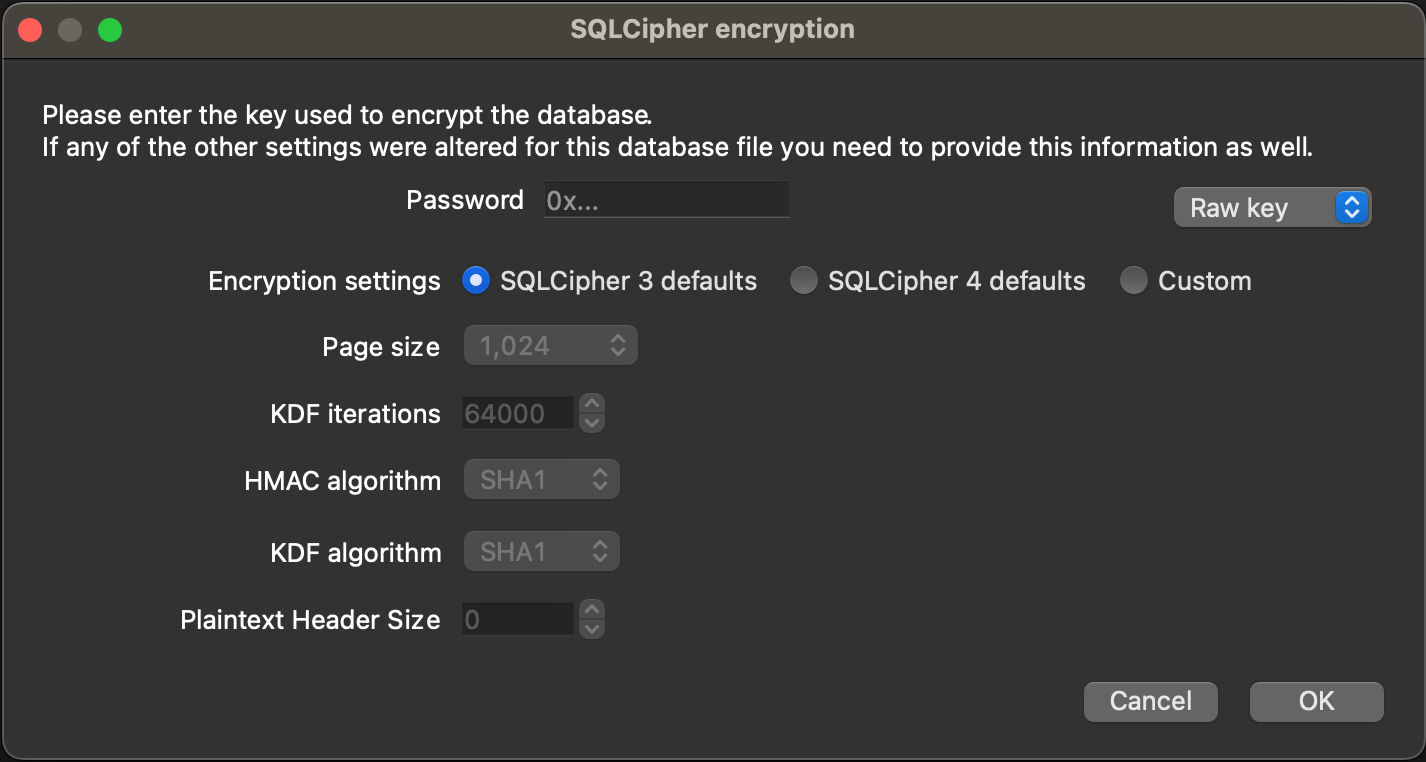
按图像显示的选项:
0x...)
- SQLCipher 3默认的
- 原始密钥(
)
我想使用命令行而不是DB浏览器打开这个文件。
尝试遵循命令,但到目前为止似乎没有运气。
sqlcipher xxx.db
SQLite version 3.37.2 2022-01-06 13:25:41 (SQLCipher 4.5.1 community)
Enter ".help" for usage hints.
sqlite> pragma key="0xMyKey";
ok
sqlite> .tables
Error: file is not a database
预先感谢您的帮助,以便我可以使用命令行访问或导出sqlite,就像mysql (mysql -u .& mysqldump)一样。
回答 1
Stack Overflow用户
发布于 2022-05-09 14:21:41
通过以下链接找到文档:https://www.zetetic.net/sqlcipher/sqlcipher-api/
sqlcipher xxx.db
SQLite version 3.37.2 2022-01-06 13:25:41 (SQLCipher 4.5.1 community)
Enter ".help" for usage hints.
sqlite> PRAGMA key = "x'{KEY_WITHOUT_0X}'"; // Replace {KEY_WITHOUT_0X} with your key without 0x!
ok
sqlite> PRAGMA cipher_page_size = 1024;
sqlite> PRAGMA kdf_iter = 64000;
sqlite> PRAGMA cipher_hmac_algorithm = HMAC_SHA1;
sqlite> PRAGMA cipher_kdf_algorithm = PBKDF2_HMAC_SHA1;
sqlite> PRAGMA cipher_default_plaintext_header_size = 0;
sqlite> 页面原文内容由Stack Overflow提供。腾讯云小微IT领域专用引擎提供翻译支持
原文链接:
https://stackoverflow.com/questions/72169732
复制相关文章
相似问题
腾讯云开发者

Copyright © 2013 - 2026 Tencent Cloud. All Rights Reserved. 腾讯云 版权所有
深圳市腾讯计算机系统有限公司 ICP备案/许可证号:粤B2-20090059  粤公网安备44030502008569号
腾讯云计算(北京)有限责任公司 京ICP证150476号 | 京ICP备11018762号