
Android BottomNavigationView:图标和文本之间的空间太大
最近,底部导航栏开始在文本和图标之间包含一些奇怪的空间(我想在我更新了依赖项之后):
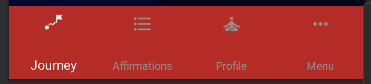
(用红色看到边界)
现在,在图标和文本之间似乎有一个间隔,它把图标和文本都推到了酒吧的最末端。到目前为止,我发现的只是使用app:itemPaddingTop尝试手动将图标向下推,但这破坏了较小设备上的视图。
这是xml:
<com.google.android.material.bottomnavigation.BottomNavigationView
        android:id="@+id/nav_view"
        android:layout_width="match_parent"
        android:layout_height="0dp"
        android:background="?android:attr/windowBackground"
        app:itemBackground="@color/darkGalaxy"
        app:itemIconTint="@color/bottom_nav_color_selector"
        app:itemTextColor="@color/bottom_nav_color_selector"
        app:labelVisibilityMode="labeled"
        app:layout_constraintBottom_toBottomOf="parent"
        app:layout_constraintHeight_default="percent"
        app:layout_constraintHeight_percent="0.1"
        app:layout_constraintLeft_toLeftOf="parent"
        app:layout_constraintRight_toRightOf="parent"
        app:menu="@menu/bottom_nav_menu" />
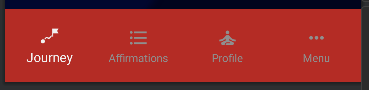
是否有办法使两者垂直地以最小的边距居中?
基本上是这样的:
回答 2
Stack Overflow用户
发布于 2022-05-16 19:48:55
经过一些测试后,我发现这是因为我用app:layout_constraintHeight_percent="0.1"设置的自定义高度。把条子拉得比它高得离奇,像这样的内容空间(几个月前我第一次做的时候就不一样了)。
无论如何,我只有这个百分比的高度在那里,因为使用android:layout_height="wrap_content"在底部导航栏使它占据了大部分的屏幕。但是通过测试,我发现这只是因为我在使用android:background="?android:attr/windowBackground"。我不记得我为什么使用它,但删除它使wrap_content工作。
Stack Overflow用户
发布于 2022-10-19 15:07:25
经过研究发现,app:itemPaddingTop和app:itemPaddingBottom属性可以帮助调整BottomNavigationView项中图标和标签之间的空间。
实际上,它们只是管理视图的顶部边缘和图标之间的空间,然后分别管理底部边缘和标签之间的空间,但这也使得增加/减少图标和标签之间的空间成为可能。
https://stackoverflow.com/questions/72250744
复制相似问题
腾讯云开发者

Copyright © 2013 - 2026 Tencent Cloud. All Rights Reserved. 腾讯云 版权所有
深圳市腾讯计算机系统有限公司 ICP备案/许可证号:粤B2-20090059  粤公网安备44030502008569号
腾讯云计算(北京)有限责任公司 京ICP证150476号 | 京ICP备11018762号