
在云函数中使用forEach时,我无法使.sendToDevice()方法工作
我可以使用下面所示的第二个函数向iOS设备发送消息。我在集合名"users“中获取文档id,它位于第一级,并使用存储在令牌子集合中的令牌(因此是admin.firestore().collection('users').doc(userId).collection('tokens') )发送消息。
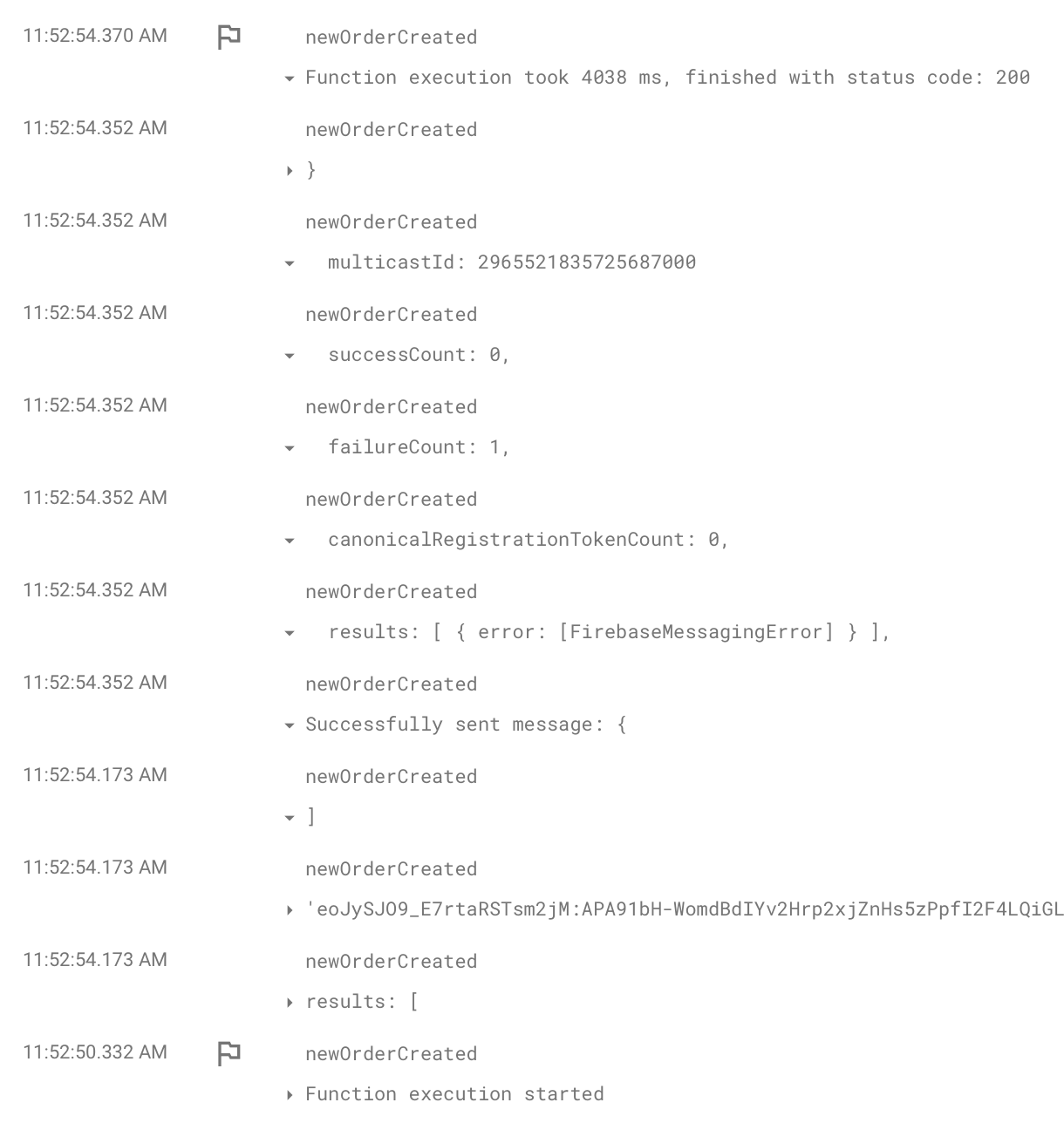
我必须改变函数查找用户的方式。现在,我需要一个查询才能找到用户,而不是依赖于用户的文档id。作为一个查询,除非我错了,否则我不得不使用forEach来向用户发送消息。该函数现在看起来如下所示。本质上,一旦我知道我有需要接收消息的用户,我就使用原始函数格式发送消息,但是消息从未发送过。我在日志中看到的只是Firebase消息传递错误,我还没有弄清楚错误在哪里。
exports.sendMessage = functions.https.onRequest(async (res, response) => {

const body = res.body;
const orderTotal = body.total;
const orderId = String(body.id);

const query = await usersRef.where('token', '==', token).get();

if (query.empty) {
    console.log('No matching documents.');
    return;
}

query.forEach(doc => {

    const tokens = usersRef.doc(doc.id).collection('tokens');
    tokens.get()

        .then(snapshot => {

            const results = [];

            snapshot.forEach(doc => {
                const fcmToken = doc.data().fcmToken
                console.log("fcmToken =>", fcmToken);
                results.push(fcmToken);
            })

            const payload = {
                notification: {
                    title_loc_key: 'notify_title',
                    subtitle_loc_key: 'notify_subtitle',
                    body_loc_key: 'notify_body',
                    badge: '1',
                    sound: 'cha-ching.caf',
                    mutable_content: 'true'
                },
                data: {
                    'total': orderTotal,
                    'orderId': orderId
                }
            }

            response.send([results, , payload])

            admin.messaging().sendToDevice(results, payload).then((response) => {
                // Response is a message ID string.
                console.log('Successfully sent message:', response);
                return { success: true };
            }).catch((error) => {
                return { error: error.code };
            })
        })
        .catch(err => {
            console.log("Error getting documents", err);
        });


});

});
这是我在使用文档id时使用的原始函数。
exports.sendMessage = functions.https.onRequest(async (res, response) => {

const body = res.body
const orderTotal = body.total
const orderId = String(body.id)

const tokenReference = admin.firestore().collection('users').doc(userId).collection('tokens')
const tokenSnapshots = await tokenReference.get()

const results = []

tokenSnapshots.forEach(tokenSnapshot => {
    const fcmToken = tokenSnapshot.data().fcmToken
    results.push(fcmToken)
})

const payload = {
    notification: {
        title_loc_key: 'notify_title',
        subtitle_loc_key: 'notify_subtitle',
        body_loc_key: 'notify_body',
        badge: '1',
        sound: 'cha-ching.caf',
        mutable_content: 'true'
    },
    data: {
        'total': orderTotal,
        'orderId': orderId
    }
}

response.send([results, , payload])

admin.messaging().sendToDevice(results, payload).then((response) => {
    console.log('Successfully sent message:', response);
    return { success: true };
}).catch((error) => {
    return { error: error.code };
})

})
错误的截图:
回答 2
Stack Overflow用户
发布于 2022-06-19 13:51:14
onRequest()函数在返回响应时终止。您在response.send()之后使用response.send()。也要确保你正确地处理所有的承诺。尝试重构使用的async-await语法,如下所示:
exports.sendMessage = functions.https.onRequest(async (res, response) => {
  try {
    const body = res.body;
    const orderTotal = body.total;
    const orderId = String(body.id);

    const query = await usersRef.where("token", "==", "TOKEN").get();

    if (query.empty) {
      console.log("No matching documents.");
      return;
    }

    // Query tokens of all users at once
    const tokenSnapshots = await Promise.all(
      query.docs.map((user) => usersRef.doc(user.id).collection("tokens").get())
    );

    // Array of all fcmTokens
    const results = tokenSnapshots.reduce((acc, snapshot) => {
      acc = [...acc, ...snapshot.docs.map((doc) => doc.data().fcmToken)];
      return acc;
    }, []);

    const payload = { ...FCM_PAYLOAD };

    const fcmResponse = await getMessaging().sendToDevice(results, payload);

    console.log("Successfully sent message:", fcmResponse);

    response.send([results, , payload]);
  } catch (error) {
    console.log(error);
    response.json({ error: "An error occured" });
  }
});还可以查看终止HTTP函数。
Stack Overflow用户
发布于 2022-06-24 16:41:55
经过几天的努力,这个功能并没有什么问题。我不知道VPN是如何工作的,但是在我的iPhone上启用它是我没有得到通知的原因。
我暂停了VPN,并收到了通知。
https://stackoverflow.com/questions/72677323
复制相似问题
腾讯云开发者

Copyright © 2013 - 2026 Tencent Cloud. All Rights Reserved. 腾讯云 版权所有
深圳市腾讯计算机系统有限公司 ICP备案/许可证号:粤B2-20090059  粤公网安备44030502008569号
腾讯云计算(北京)有限责任公司 京ICP证150476号 | 京ICP备11018762号