
为什么Codemirror编辑器不水平滚动长行?
为什么Codemirror编辑器不水平滚动长行?
提问于 2022-06-27 07:37:51
我有一个代码镜像版本: 5.65.3和Blazor。当我在编辑器中有很长的行时,水平滚动不起作用,而是使用页面的滚动,它破坏了整个页面。
如下所示:
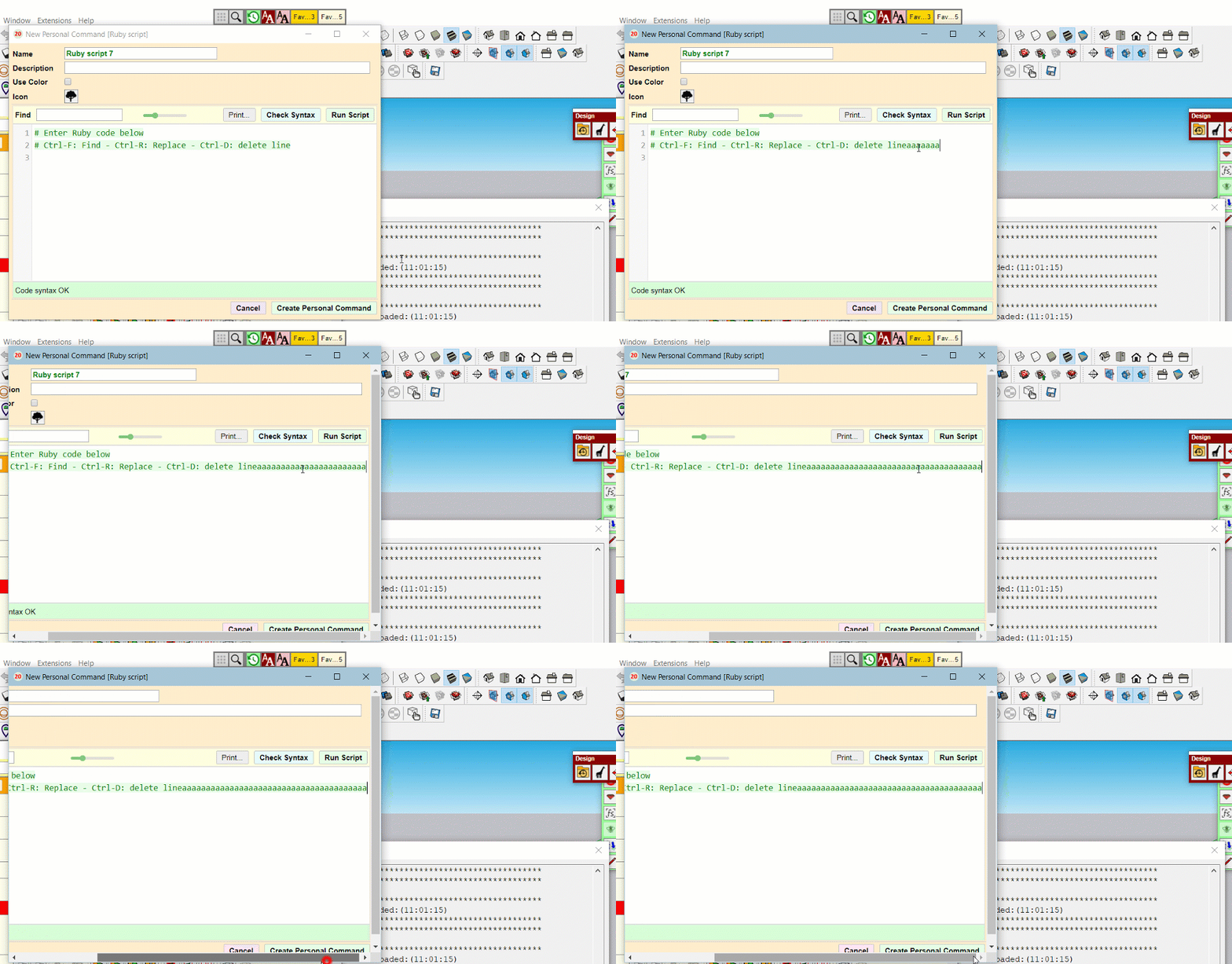
我不认为我在Codemirror中改变了任何CSS。
下面是一些相关的CSS行:
    .CodeMirror {
  /* Set height, width, borders, and global font properties here */
  font-family: monospace;
  height: 750px;
  color: black;
  direction: ltr;

}


.CodeMirror-scroll {
  overflow: scroll !important; /* Things will break if this is overridden */
  /* 50px is the magic margin used to hide the element's real scrollbars */
  /* See overflow: hidden in .CodeMirror */
  margin-bottom: -50px; margin-right: -50px;
  padding-bottom: 50px;
  height: 100%;
  outline: none; /* Prevent dragging from highlighting the element */
  position: relative;
  z-index: 0;
}
我通过这段代码调用codemirror:( onchange是因为我将Blazor用于绑定目的)
window.editor= function (dontNetObjRef) {

    editor = CodeMirror.fromTextArea(document.getElementById('myTextArea'), {
        lineNumbers: true,
        indentUnit: 4,
        lineWrapping: true,
        tabMode: "shift",
        gutters: ["CodeMirror-lint-markers"]
    });

    //JavaScript function use the onchange event of CodeMirror to invoke the C# method and pass the value of the myTextArea .

    editor.on("change", editor => {
        dontNetObjRef.invokeMethodAsync("UpdateField", editor.getValue());
        // console.log(editor.getValue());

});注意:即使我使用了lineWrapping: true,它也移到了第二行,并对滚动进行了同样的处理。此外,当我设置1000 of这样的固定宽度时,它工作得很好,但如果用户的屏幕大小发生变化,我想让它自动运行。
回答 1
Stack Overflow用户
发布于 2022-06-27 13:55:50
感谢Jax-p给了我一些解决问题的提示。
我在.CodeMirror类中添加了max-width:70vm,在.CodeMirror-scroll中添加了max-width:70vm
影响更改的另一件事是,我将文本区域放置在<div class=col-11>中,这影响了CSS中的宽度,所以我只是删除了它,一切都正常。
页面原文内容由Stack Overflow提供。腾讯云小微IT领域专用引擎提供翻译支持
原文链接:
https://stackoverflow.com/questions/72768501
复制相关文章
相似问题
腾讯云开发者

Copyright © 2013 - 2026 Tencent Cloud. All Rights Reserved. 腾讯云 版权所有
深圳市腾讯计算机系统有限公司 ICP备案/许可证号:粤B2-20090059  粤公网安备44030502008569号
腾讯云计算(北京)有限责任公司 京ICP证150476号 | 京ICP备11018762号