
Jquery Datatables样式在asp net核心剃刀页部分视图中不起作用
Jquery Datatables样式在asp net核心剃刀页部分视图中不起作用
提问于 2022-06-29 07:13:29
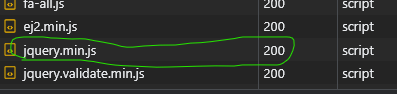
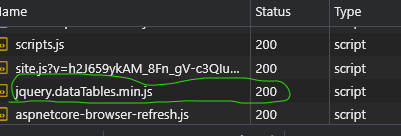
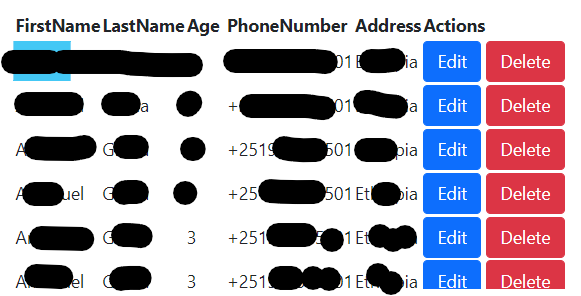
我有一个部分视图,其中有一个datatable来显示客户列表。所有操作都很好,只是数据不受样式限制,搜索也不显示。我已经添加了所有的引用,并在这个JS Fiddle上试用了它,它运行得很好。但是当涉及到我的剃须刀页面时,它没有,我已经在end.Below中包含了我的外坑的屏幕截图是我的代码。
_Layout.cshtml
    <html>
    <head>
        <meta charset="utf-8" />
        <meta http-equiv="X-UA-Compatible" content="IE=edge" />
        <meta name="viewport" content="width=device-width, initial-scale=1, shrink-to-fit=no" />
        <meta name="description" content="" />
        <meta name="author" content="" />
        <title>@ViewBag.Title</title>
        <link href="https://cdn.datatables.net/1.12.1/css/jquery.dataTables.min.css" rel="stylesheet"/>
    </head>
    <body class="sb-nav-fixed">
        @RenderBody()
    <script src="https://code.jquery.com/jquery-3.5.1.min.js" integrity="sha256-9/aliU8dGd2tb6OSsuzixeV4y/faTqgFtohetphbbj0=" crossorigin="anonymous"></script>
    <script src="https://cdn.datatables.net/1.12.1/js/jquery.dataTables.min.js"></script>
    </body>
    </html>
Custormers.cshtml
@model Web.Pages.Customer.CustomersModel
@{
    ViewData["Title"] = "Registration";
}
<div class="card">
    <div class="col-sm-12" style="padding:20px">
        <a onclick="jQueryModalGet('?handler=CreateOrEdit','New Customer')" class="btn btn-success">
            Create
        </a>

        <a id="reload" class="btn bg-warning">
            Reload
        </a>
    </div>
    <div id="viewAll" class="card-body table-responsive"></div>
</div>

@section Scripts
{
    <script>
        $(document).ready(function () {
            $('#viewAll').load('?handler=ViewAllPartial');
        });
        $(function () {
            $('#reload').on('click', function () {
                $('#viewAll').load('?handler=ViewAllPartial');
            });
        });
    </script>
}
CustomersModel.cs
{
    public class CustomersModel : PageModel
    {
        private readonly ICustomerRepository _customer;
        private readonly IUnitOfWork _unitOfWork;
        private readonly IRazorRenderService _renderService;
        private readonly ILogger<CustomersModel> _logger;

        public CustomersModel(ILogger<CustomersModel> logger, ICustomerRepository customer, IRazorRenderService renderService)
        {
            _logger = logger;
            _customer = customer;
            _renderService = renderService;
        }
        public IEnumerable<Core.Entities.Customer> Customers { get; set; }
        public IEnumerable<CustomerModel> CustomerModel{ get; set; }

        public void OnGet()
        {
        }

        public PartialViewResult OnGetViewAllPartial()
        {
            CustomerModel = _customer.GetAsync();
            return new PartialViewResult
            {
                ViewName = "_ViewAll",
                ViewData = new ViewDataDictionary<IEnumerable<CustomerModel>>(ViewData, CustomerModel)
            };
        }
    }
}
_ViewAll.cshtml
@model IEnumerable<CustomerModel>


<table class="display" id="#dataTable">
    <thead>
        <tr>
            <th>
                FirstName
            </th>
            <th>
                LastName
            </th>
            <th>
                Age
            </th>
            <th>
                PhoneNumber
            </th>
            <th>
                Address
            </th>
        </tr>
    </thead>
    <tbody>
        @if (Model.Count() != 0)
        {
            @foreach (var customer in Model)
            {
                <tr>
                    <td>
                        @customer.FirstName
                    </td>
                    <td>
                        @customer.LastName
                    </td>
                    <td>
                        @customer.Age
                    </td>
                    <td>
                        @customer.PhoneNumber
                    </td>
                    <td>
                        @customer.Address
                    </td>
                </tr>
            }
        }
    </tbody>
</table>
<script>
    $(document).ready(function () {
        $("#dataTable").DataTable();
    });
</script>更新网络选项卡

页面原文内容由Stack Overflow提供。腾讯云小微IT领域专用引擎提供翻译支持
原文链接:
https://stackoverflow.com/questions/72797214
复制相关文章
相似问题
腾讯云开发者

Copyright © 2013 - 2026 Tencent Cloud. All Rights Reserved. 腾讯云 版权所有
深圳市腾讯计算机系统有限公司 ICP备案/许可证号:粤B2-20090059  粤公网安备44030502008569号
腾讯云计算(北京)有限责任公司 京ICP证150476号 | 京ICP备11018762号