
如何关闭Windows powershell上的语法高亮显示?
如何关闭Windows powershell上的语法高亮显示?
提问于 2022-07-13 14:54:22
我在Windows 10上使用PowerShell。虽然我已经能够调整背景和大部分前景色,
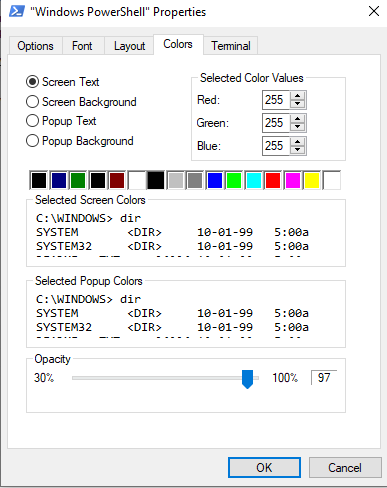
我似乎不知道如何关闭语法高亮显示或更改颜色

这个设置在哪里?
回答 1
Stack Overflow用户
发布于 2022-07-13 15:05:06
动态语法突出显示来自Windows 10中随PSReadLine module附带的PowerShell。
您可以将所有令牌颜色“重置”到控制台主机应用程序使用的任何颜色:
# Prepare a dictionary to hold all the new token-color mappings
$colorMap = @{}

# Fetch the possible coloring options
Get-PSReadLineOption |Get-Member *Color -MemberType Property |ForEach-Object {
    # Add a mapping to our dictionary that overrides the existing setting with whatever foreground color is used by the console
    $colorMap[$_.Name -replace 'Color$'] = [Console]::ForegroundColor
}

# Use the dictionary to update the highlighting settings
Set-PSReadLineOption -Colors $colorMap页面原文内容由Stack Overflow提供。腾讯云小微IT领域专用引擎提供翻译支持
原文链接:
https://stackoverflow.com/questions/72968361
复制相关文章
相似问题
腾讯云开发者

Copyright © 2013 - 2026 Tencent Cloud. All Rights Reserved. 腾讯云 版权所有
深圳市腾讯计算机系统有限公司 ICP备案/许可证号:粤B2-20090059  粤公网安备44030502008569号
腾讯云计算(北京)有限责任公司 京ICP证150476号 | 京ICP备11018762号