
如何绕过Cloudflare 503请打开JavaScript并重新加载页面
我知道这可能是一个常见的问题,但我相信这是一个不同的问题。
Cloudflare通过响应状态代码503并说“请打开JavaScript并重新加载页面”来阻止以编程方式发送请求。python requests模块和curl命令都会引发此错误。但是,使用Chrome浏览器在同一台主机上浏览是可以的,即使是在“隐匿”模式下。
我曾尝试过,但未能绕过它:
- 使用
cloudscraper模块。像this - Copy所有的头,包括
user-agent,cookie从打开的浏览器页面。比如this - Use
mechanize模块。像this - Use
requests_html一样在页面上运行JS脚本。就像this
根据我的检查,我发现在一个新打开的Chrome窗口中,当访问https://onlinelibrary.wiley.com/doi/full/10.1111/jvs.13069时,会发生以下请求:
- 浏览器在没有cookie的情况下向url发送请求。服务器响应302使用
cookieSet=1查询param (即https://onlinelibrary.wiley.com/doi/full/10.1111/jvs.13069?cookieSet=1)重定向到同一个url。响应还包含set-cookie头。响应没有body. - Browser发送请求到重定向的url,并带有设置的cookie。服务器响应302来重定向到原始url,而不需要查询param。响应不包含任何body.
- Browser头,并且没有使用以前设置的cookie发送原始url的
set-cookie发送请求。服务器用我们希望看到的HTML内容响应200作为它的主体.
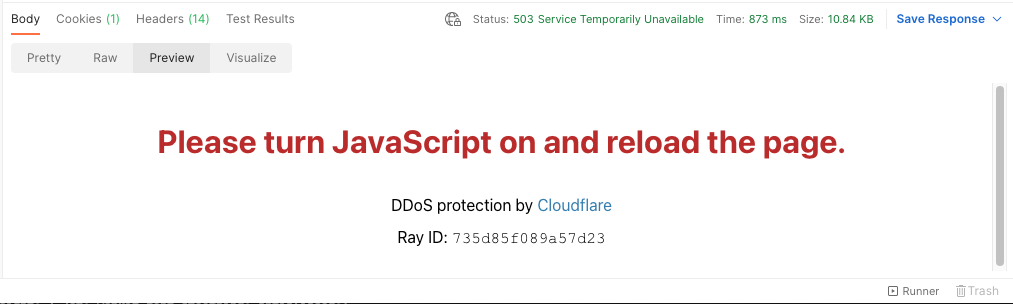
但是,在不启用重定向的卷曲请求中(即没有-L arg),我得到了状态代码503和一个HTML正文,上面写着Please turn JavaScript on and reload the page.。
curl -i -v 'https://onlinelibrary.wiley.com/doi/abs/10.1111/jvs.13069' \
--header 'accept: text/html,application/xhtml+xml,application/xml;q=0.9,image/avif,image/webp,image/apng,*/*;q=0.8,application/signed-exchange;v=b3;q=0.9' \
--header 'accept-encoding: gzip, deflate, br' \
--header 'accept-language: en-US,en;q=0.9,zh-CN;q=0.8,zh;q=0.7,ja;q=0.6' \
--header 'cache-control: no-cache' \
--header 'cookie: MAID=k4Rf/MejFqG1LjKdveWUPQ==; I2KBRCK=1; rskxRunCookie=0; rCookie=i182bjtmkm3tmujm7wb4xl6fx8wuv; osano_consentmanager_uuid=35ffb0d0-e7e0-487a-a6a5-b35cad9e589f; osano_consentmanager=EtuJH5neWpR-w0VyI9rGqVBE85dQA-2D4f3nUxLGsObfRMLPNtojj-WolqO0wrIvAr3wxlwRPXQuL0CCFvMIDZxXehUBFEicwFqrV4kgDwBshiqbbfh1M3w3V6WWcesS8ZLdPX4iGQ3yTPaxmzpOEBJbeSeY5dByRkR7P2XyOEDAWPT8by2QQjsCt3y3ttreU_M3eV_MJCDCgknIWOyiKdL_FBYJz-ddg8MFAb1N8YBTRQbQAg8r-bSO1vlCqPyWlgzGn-A5xgIDWlCDIpej0Xg2rjA=; JSESSIONID=aaaFppotKtA-t7ze73Rjy; SERVER=WZ6myaEXBLGhNb4JIHwyZ2nYKk2egCfX; MACHINE_LAST_SEEN=2022-08-05T00%3A52%3A30.362-07%3A00; __cf_bm=d9mhQ_ZtETjf41X0VuxDl6GkIZbQtNLJnNIOtDoIPuA-1659685954-0-AXLwPXO1kJb2/IQc+zIesAsL71FoLTgRJqS5M5fxizuFMTw92mMT/yRv5cIq6ZMiRcZE1DchGsO2ZZMdv+/P4JSdUDMAcepY/oXIKFQgauELPNrwiwG/7XYXFRy91+qreazjYASX6Fq0Ir90MNfJ8EcWc10KJyGvSN7QtledQ6Lu9B5S1tqHoxlddPAMOtdL6Q==; lastRskxRun=1659686676640' \
--header 'pragma: no-cache' \
--header 'sec-ch-ua: ".Not/A)Brand";v="99", "Google Chrome";v="103", "Chromium";v="103"' \
--header 'sec-ch-ua-mobile: ?0' \
--header 'sec-ch-ua-platform: "macOS"' \
--header 'sec-fetch-dest: document' \
--header 'sec-fetch-mode: navigate' \
--header 'sec-fetch-site: none' \
--header 'sec-fetch-user: ?1' \
--header 'upgrade-insecure-requests: 1' \
--header 'user-agent: Mozilla/5.0 (Macintosh; Intel Mac OS X 10_15_7) AppleWebKit/537.36 (KHTML, like Gecko) Chrome/103.0.0.0 Safari/537.36'

*   Trying 162.159.129.87...
* TCP_NODELAY set
* Connected to onlinelibrary.wiley.com (162.159.129.87) port 443 (#0)
* ALPN, offering http/1.1
* Cipher selection: ALL:!EXPORT:!EXPORT40:!EXPORT56:!aNULL:!LOW:!RC4:@STRENGTH
* successfully set certificate verify locations:
*   CAfile: /Users/cosmo/anaconda3/ssl/cacert.pem
  CApath: none
* TLSv1.2 (OUT), TLS header, Certificate Status (22):
* TLSv1.2 (OUT), TLS handshake, Client hello (1):
* TLSv1.2 (IN), TLS handshake, Server hello (2):
* TLSv1.2 (IN), TLS handshake, Certificate (11):
* TLSv1.2 (IN), TLS handshake, Server key exchange (12):
* TLSv1.2 (IN), TLS handshake, Server finished (14):
* TLSv1.2 (OUT), TLS handshake, Client key exchange (16):
* TLSv1.2 (OUT), TLS change cipher, Client hello (1):
* TLSv1.2 (OUT), TLS handshake, Finished (20):
* TLSv1.2 (IN), TLS change cipher, Client hello (1):
* TLSv1.2 (IN), TLS handshake, Finished (20):
* SSL connection using TLSv1.2 / ECDHE-ECDSA-AES128-GCM-SHA256
* ALPN, server accepted to use http/1.1
* Server certificate:
*  subject: C=US; ST=California; L=San Francisco; O=Cloudflare, Inc.; CN=sni.cloudflaressl.com
*  start date: Apr 17 00:00:00 2022 GMT
*  expire date: Apr 17 23:59:59 2023 GMT
*  subjectAltName: host "onlinelibrary.wiley.com" matched cert's "onlinelibrary.wiley.com"
*  issuer: C=US; O=Cloudflare, Inc.; CN=Cloudflare Inc ECC CA-3
*  SSL certificate verify ok.
> GET /doi/abs/10.1111/jvs.13069 HTTP/1.1
> Host: onlinelibrary.wiley.com
> accept: text/html,application/xhtml+xml,application/xml;q=0.9,image/avif,image/webp,image/apng,*/*;q=0.8,application/signed-exchange;v=b3;q=0.9
> accept-encoding: gzip, deflate, br
> accept-language: en-US,en;q=0.9,zh-CN;q=0.8,zh;q=0.7,ja;q=0.6
> cache-control: no-cache
> cookie: MAID=k4Rf/MejFqG1LjKdveWUPQ==; I2KBRCK=1; rskxRunCookie=0; rCookie=i182bjtmkm3tmujm7wb4xl6fx8wuv; osano_consentmanager_uuid=35ffb0d0-e7e0-487a-a6a5-b35cad9e589f; osano_consentmanager=EtuJH5neWpR-w0VyI9rGqVBE85dQA-2D4f3nUxLGsObfRMLPNtojj-WolqO0wrIvAr3wxlwRPXQuL0CCFvMIDZxXehUBFEicwFqrV4kgDwBshiqbbfh1M3w3V6WWcesS8ZLdPX4iGQ3yTPaxmzpOEBJbeSeY5dByRkR7P2XyOEDAWPT8by2QQjsCt3y3ttreU_M3eV_MJCDCgknIWOyiKdL_FBYJz-ddg8MFAb1N8YBTRQbQAg8r-bSO1vlCqPyWlgzGn-A5xgIDWlCDIpej0Xg2rjA=; JSESSIONID=aaaFppotKtA-t7ze73Rjy; SERVER=WZ6myaEXBLGhNb4JIHwyZ2nYKk2egCfX; MACHINE_LAST_SEEN=2022-08-05T00%3A52%3A30.362-07%3A00; __cf_bm=d9mhQ_ZtETjf41X0VuxDl6GkIZbQtNLJnNIOtDoIPuA-1659685954-0-AXLwPXO1kJb2/IQc+zIesAsL71FoLTgRJqS5M5fxizuFMTw92mMT/yRv5cIq6ZMiRcZE1DchGsO2ZZMdv+/P4JSdUDMAcepY/oXIKFQgauELPNrwiwG/7XYXFRy91+qreazjYASX6Fq0Ir90MNfJ8EcWc10KJyGvSN7QtledQ6Lu9B5S1tqHoxlddPAMOtdL6Q==; lastRskxRun=1659686676640
> pragma: no-cache
> sec-ch-ua: ".Not/A)Brand";v="99", "Google Chrome";v="103", "Chromium";v="103"
> sec-ch-ua-mobile: ?0
> sec-ch-ua-platform: "macOS"
> sec-fetch-dest: document
> sec-fetch-mode: navigate
> sec-fetch-site: none
> sec-fetch-user: ?1
> upgrade-insecure-requests: 1
> user-agent: Mozilla/5.0 (Macintosh; Intel Mac OS X 10_15_7) AppleWebKit/537.36 (KHTML, like Gecko) Chrome/103.0.0.0 Safari/537.36
>
< HTTP/1.1 503 Service Temporarily Unavailable
HTTP/1.1 503 Service Temporarily Unavailable
< Date: Fri, 05 Aug 2022 08:56:14 GMT
Date: Fri, 05 Aug 2022 08:56:14 GMT
< Content-Type: text/html; charset=UTF-8
Content-Type: text/html; charset=UTF-8
< Transfer-Encoding: chunked
Transfer-Encoding: chunked
< Connection: close
Connection: close
< X-Frame-Options: SAMEORIGIN
X-Frame-Options: SAMEORIGIN
< Permissions-Policy: accelerometer=(),autoplay=(),camera=(),clipboard-read=(),clipboard-write=(),fullscreen=(),geolocation=(),gyroscope=(),hid=(),interest-cohort=(),magnetometer=(),microphone=(),payment=(),publickey-credentials-get=(),screen-wake-lock=(),serial=(),sync-xhr=(),usb=()
Permissions-Policy: accelerometer=(),autoplay=(),camera=(),clipboard-read=(),clipboard-write=(),fullscreen=(),geolocation=(),gyroscope=(),hid=(),interest-cohort=(),magnetometer=(),microphone=(),payment=(),publickey-credentials-get=(),screen-wake-lock=(),serial=(),sync-xhr=(),usb=()
< Cache-Control: private, max-age=0, no-store, no-cache, must-revalidate, post-check=0, pre-check=0
Cache-Control: private, max-age=0, no-store, no-cache, must-revalidate, post-check=0, pre-check=0
< Expires: Thu, 01 Jan 1970 00:00:01 GMT
Expires: Thu, 01 Jan 1970 00:00:01 GMT
< Expect-CT: max-age=604800, report-uri="https://report-uri.cloudflare.com/cdn-cgi/beacon/expect-ct"
Expect-CT: max-age=604800, report-uri="https://report-uri.cloudflare.com/cdn-cgi/beacon/expect-ct"
< Set-Cookie: __cf_bm=Z8oUUTMhz8K.._yzicdZVzO49fmFKCtgS2CDTlnFvpU-1659689774-0-ARUAfH3m6VNwz09gKVsRECZkXJf5BdqNsW+oIPcy1oKzvppiMWxz7HGFkEwMuGHGzrHRDy5nV+VVj74AxTN8ThozSiHa/8sYH0IwMMe62woC; path=/; expires=Fri, 05-Aug-22 09:26:14 GMT; domain=.onlinelibrary.wiley.com; HttpOnly; Secure; SameSite=None
Set-Cookie: __cf_bm=Z8oUUTMhz8K.._yzicdZVzO49fmFKCtgS2CDTlnFvpU-1659689774-0-ARUAfH3m6VNwz09gKVsRECZkXJf5BdqNsW+oIPcy1oKzvppiMWxz7HGFkEwMuGHGzrHRDy5nV+VVj74AxTN8ThozSiHa/8sYH0IwMMe62woC; path=/; expires=Fri, 05-Aug-22 09:26:14 GMT; domain=.onlinelibrary.wiley.com; HttpOnly; Secure; SameSite=None
< Vary: Accept-Encoding
Vary: Accept-Encoding
< Strict-Transport-Security: max-age=15552000
Strict-Transport-Security: max-age=15552000
< Server: cloudflare
Server: cloudflare
< CF-RAY: 735e5184085e52cb-LAX
CF-RAY: 735e5184085e52cb-LAX

<
<!DOCTYPE HTML>
<html lang="en-US">
...... (HTML codes saying "Please turn JavaScript on and reload the page")
HTML看起来像Postman所呈现的那样:
是的,邮递员也不能访问网址。
根据这些观察,我认为当收到浏览器和curl的第一次请求时,站点的行为会有所不同。但我不知道Cloudflare是如何区分人类(使用浏览器)和机器人(使用curl)的。正如我先前所述,这两类客户在以下方面并无分别:
在同一个host)
- context上测试
- IP地址(这两个请求都是第一个request)
- headers (头从浏览器复制到命令行)
Stack Overflow用户
发布于 2022-11-02 11:18:10
我遇到了同样的问题,并通过在其中一个解决方案中添加标题来解决这个问题,使用cloudscraper,在最初的文章中已经提到了这一点。
import cloudscraper
url = 'https://onlinelibrary.wiley.com/doi/full/10.1111/jvs.13069'

headers = {
            'Wiley-TDM-Client-Token': 'your-Wiley-TDM-Client-Token',
            'User-Agent' : 'Mozilla/5.0 (Windows NT 10.0; Win64; x64) AppleWebKit/537.36 (KHTML, like Gecko) Chrome/106.0.0.0 Safari/537.36'
            }

scraper = cloudscraper.create_scraper()

r = scraper.get(url, headers = headers)
print(r.status_code)
此代码片段返回status_code 200
看起来Cloudflare寻找的是'Wiley-TDM-Client- token‘报头,而不是实际的令牌,因为从标头中删除它会导致“检测到Cloudflare版本2挑战”错误。此处发布的代码已经在不添加您自己的TDM密钥的情况下工作,但是我希望对于付费内容,需要一个具有正确许可证的TDM。
https://stackoverflow.com/questions/73247276
复制相似问题
腾讯云开发者

Copyright © 2013 - 2026 Tencent Cloud. All Rights Reserved. 腾讯云 版权所有
深圳市腾讯计算机系统有限公司 ICP备案/许可证号:粤B2-20090059  粤公网安备44030502008569号
腾讯云计算(北京)有限责任公司 京ICP证150476号 | 京ICP备11018762号