
在流光多页应用程序侧边栏的页面导航上方/上方放置徽标和标题。
在流光多页应用程序侧边栏的页面导航上方/上方放置徽标和标题。
提问于 2022-08-05 14:03:57
我正在使用新的多页特征,并希望我的多页应用程序的样式,并将一个标志与标题之上/之前的页面导航。
下面是在Python 3.9上用streamlit==1.11.1测试的一个小示例,目录结构如下:
/Home.py
/pages/Page_1.py
/pages/Page_2.py
Home.py
import streamlit as st


st.sidebar.markdown(
    "My Logo (sidebar) should be on top of the Navigation within the sidebar"
)

st.markdown("# Home")
Page_1.py
import streamlit as st

st.markdown("Page 1")
Page_2.py
import streamlit as st

st.markdown("Page 2")
我可以使用以下方法运行:
$ streamlit run Home.py但是,这会导致在下面打印的文本,而不是导航上的:
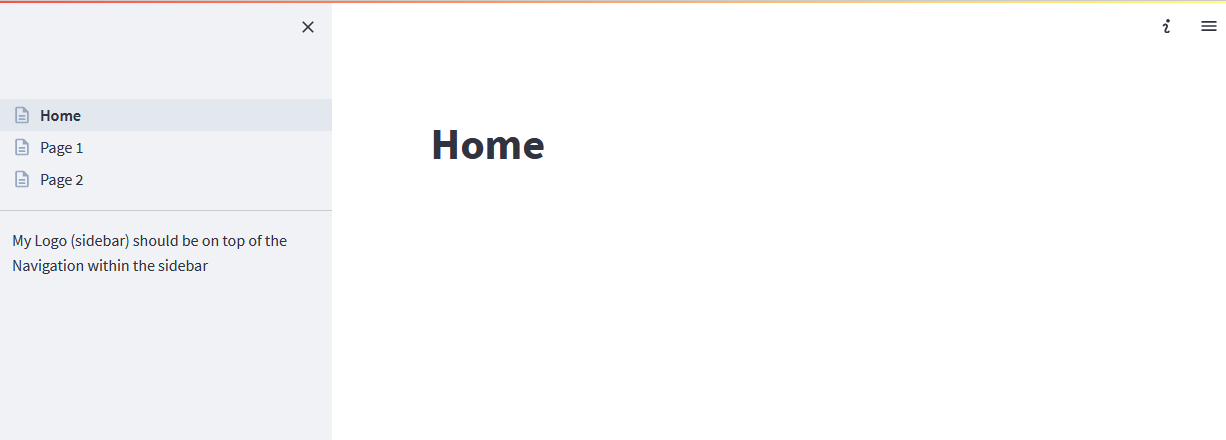
有办法这样做吗?任何提示都欢迎!
最美好的祝愿,科德
回答 3
Stack Overflow用户
回答已采纳
发布于 2022-08-05 14:32:33
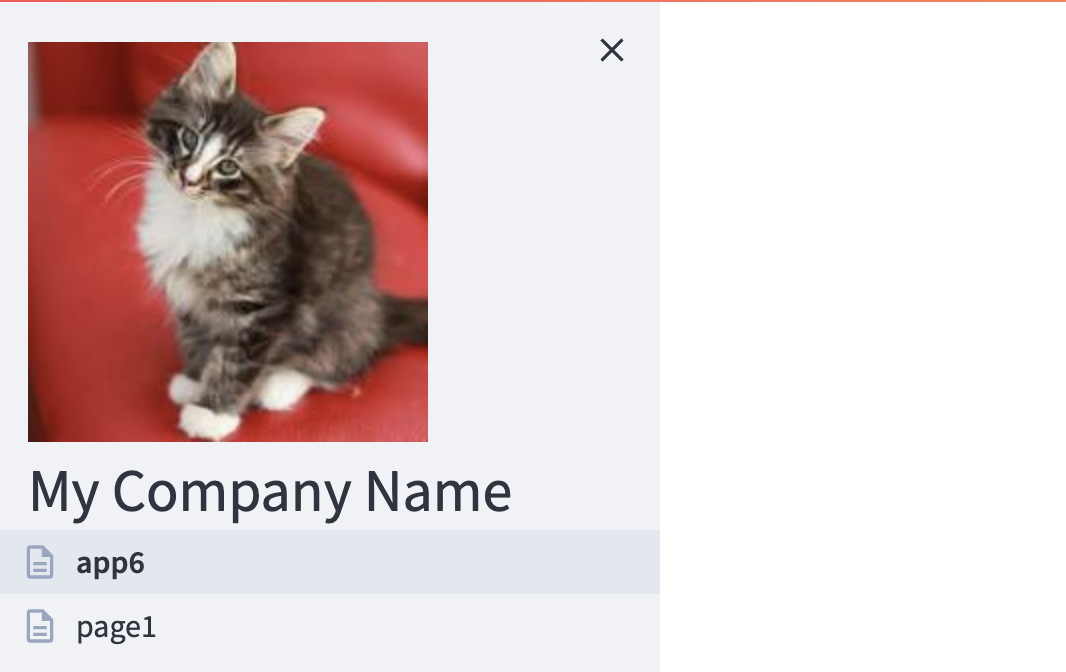
一种选择是通过CSS来实现,其功能如下:
def add_logo():
    st.markdown(
        """
        <style>
            [data-testid="stSidebarNav"] {
                background-image: url(http://placekitten.com/200/200);
                background-repeat: no-repeat;
                padding-top: 120px;
                background-position: 20px 20px;
            }
            [data-testid="stSidebarNav"]::before {
                content: "My Company Name";
                margin-left: 20px;
                margin-top: 20px;
                font-size: 30px;
                position: relative;
                top: 100px;
            }
        </style>
        """,
        unsafe_allow_html=True,
    )
然后在每一页的顶部调用这个函数。产生这样的效果:
Stack Overflow用户
发布于 2022-08-08 13:39:08
基于Zachary Blackwoods答案和一个流光论坛的回答 (同时提供一个字符串编码的本地文件),我在我的Home.py中提出了这个解决方案。
import base64
import streamlit as st


@st.cache(allow_output_mutation=True)
def get_base64_of_bin_file(png_file):
    with open(png_file, "rb") as f:
        data = f.read()
    return base64.b64encode(data).decode()


def build_markup_for_logo(
    png_file,
    background_position="50% 10%",
    margin_top="10%",
    image_width="60%",
    image_height="",
):
    binary_string = get_base64_of_bin_file(png_file)
    return """
            <style>
                [data-testid="stSidebarNav"] {
                    background-image: url("data:image/png;base64,%s");
                    background-repeat: no-repeat;
                    background-position: %s;
                    margin-top: %s;
                    background-size: %s %s;
                }
            </style>
            """ % (
        binary_string,
        background_position,
        margin_top,
        image_width,
        image_height,
    )


def add_logo(png_file):
    logo_markup = build_markup_for_logo(png_file)
    st.markdown(
        logo_markup,
        unsafe_allow_html=True,
    )

add_logo("img/my_logo.png")

st.markdown("# Home")
@Zachary Blackwood:你可以把这个放在你的答案里,我会删除我的答案。
希望它能帮到别人!
Stack Overflow用户
发布于 2022-08-05 15:03:32
您还可以使用PIL实现这一结果。
此功能将使您能够控制徽标大小以及。
from PIL import Image
import streamlit as st

# You can always call this function where ever you want

def add_logo(logo_path, width, height):
    """Read and return a resized logo"""
    logo = Image.open(logo_path)
    modified_logo = logo.resize((width, height))
    return modified_logo

my_logo = add_logo(logo_path="your/logo/path", width=50, height=60)
st.sidebar.image(my_logo)

# OR

st.sidebar.image(add_logo(logo_path="your/logo/path", width=50, height=60)) 您可以在主页中call函数以显示logo,并且应该在任何页面中显示附加的图像。
页面原文内容由Stack Overflow提供。腾讯云小微IT领域专用引擎提供翻译支持
原文链接:
https://stackoverflow.com/questions/73251012
复制相关文章
相似问题
腾讯云开发者

Copyright © 2013 - 2026 Tencent Cloud. All Rights Reserved. 腾讯云 版权所有
深圳市腾讯计算机系统有限公司 ICP备案/许可证号:粤B2-20090059  粤公网安备44030502008569号
腾讯云计算(北京)有限责任公司 京ICP证150476号 | 京ICP备11018762号