
JavaFX代码gui不执行代码建议的操作
JavaFX代码gui不执行代码建议的操作
提问于 2022-08-14 17:10:24
我正在写一个JavaFX项目,目的是在一个不可调整大小的窗口上展示奥林匹克五环的正确联锁。我已经编写了代码,它包含在这篇文章的末尾,但是每次运行它都会显示如下(并且是可调整大小的):
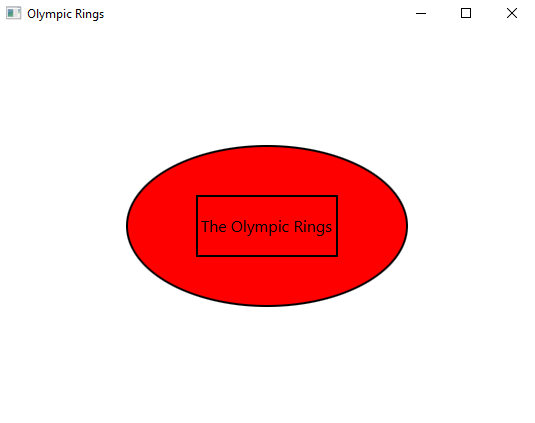
这是我的第一个javaFX项目,我希望有任何关于我哪里出错的建议。代码:
import javafx.application.Application;
import javafx.scene.Scene;
import javafx.scene.layout.StackPane;
import javafx.scene.paint.Color;
import javafx.scene.shape.Ellipse;
import javafx.scene.shape.Rectangle;
import javafx.scene.text.Text;
import javafx.stage.Stage;

public class OlympicRings extends Application {

    public static void main(String[] args) {
        launch(args);
    }

    @Override
    public void start(Stage

    primaryStage) {
        primaryStage.setTitle("Olympic Rings");

        StackPane root = new StackPane();

        // create 5 ellipses
        Ellipse e1 = new Ellipse(60, 40);
        e1.setFill(Color.BLUE);
        e1.setStroke(Color.BLACK);
        e1.setStrokeWidth(2);

        Ellipse e2 = new Ellipse(80, 50);
        e2.setFill(Color.YELLOW);
        e2.setStroke(Color.BLACK);
        e2.setStrokeWidth(2);

        Ellipse e3 = new Ellipse(100, 60);
        e3.setFill(Color.BLACK);
        e3.setStroke(Color.BLACK);
        e3.setStrokeWidth(2);

        Ellipse e4 = new Ellipse(120, 70);
        e4.setFill(Color.GREEN);
        e4.setStroke(Color.BLACK);
        e4.setStrokeWidth(2);

        Ellipse e5 = new Ellipse(140, 80);
        e5.setFill(Color.RED);
        e5.setStroke(Color.BLACK);
        e5.setStrokeWidth(2);

        // create 5 rectangles
        Rectangle r1 = new Rectangle(60, 20);
        r1.setFill(Color.BLUE);
        r1.setStroke(Color.BLACK);
        r1.setStrokeWidth(2);

        Rectangle r2 = new Rectangle(80, 30);
        r2.setFill(Color.YELLOW);
        r2.setStroke(Color.BLACK);
        r2.setStrokeWidth(2);

        Rectangle r3 = new Rectangle(100, 40);
        r3.setFill(Color.BLACK);
        r3.setStroke(Color.BLACK);
        r3.setStrokeWidth(2);

        Rectangle r4 = new Rectangle(120, 50);
        r4.setFill(Color.GREEN);
        r4.setStroke(Color.BLACK);
        r4.setStrokeWidth(2);

        Rectangle r5 = new Rectangle(140, 60);
        r5.setFill(Color.RED);
        r5.setStroke(Color.BLACK);
        r5.setStrokeWidth(2);

        // create a text
        Text t = new Text("The Olympic Rings");
        t.setStyle("-fx-font-size: 16px;");

        // put all the shapes together
        root.getChildren().addAll(e1, e2, e3, e4, e5, r1, r2, r3, r4, r5, t);

        // create a scene
        Scene scene = new Scene(root, 600, 400);

        // set the scene on the stage
        primaryStage.setScene(scene);

        // show the stage
        primaryStage.show();
    }
}回答 1
Stack Overflow用户
发布于 2022-08-14 17:28:50
您尚未为形状安排位置,请使用不同的构造函数来组织形状的相对大小和位置:
new Ellipse(double centerX, double centerY, double radiusX, double radiusY)
new Rectangle(double x, double y, double width, double height)
当您使用StackPane时,它们可能是对齐的。相反,您可以将所有组件添加到Group中,然后将单个组放入窗格中:
final Group g = new Group();
g.getChildren().addAll(e1, e2, e3, e4, e5, r1, r2, r3, r4, r5, t);
root.getChildren().addAll(g); 页面原文内容由Stack Overflow提供。腾讯云小微IT领域专用引擎提供翻译支持
原文链接:
https://stackoverflow.com/questions/73353574
复制相关文章
相似问题
腾讯云开发者

Copyright © 2013 - 2026 Tencent Cloud. All Rights Reserved. 腾讯云 版权所有
深圳市腾讯计算机系统有限公司 ICP备案/许可证号:粤B2-20090059  粤公网安备44030502008569号
腾讯云计算(北京)有限责任公司 京ICP证150476号 | 京ICP备11018762号