
从数据表导出时如何将文本对齐到excel第一列的顶部
在这里,当我从数据表导出时,我想对齐列的文本--顶部对齐在excel工作表中。我的新程序员,如有任何帮助,将不胜感激。
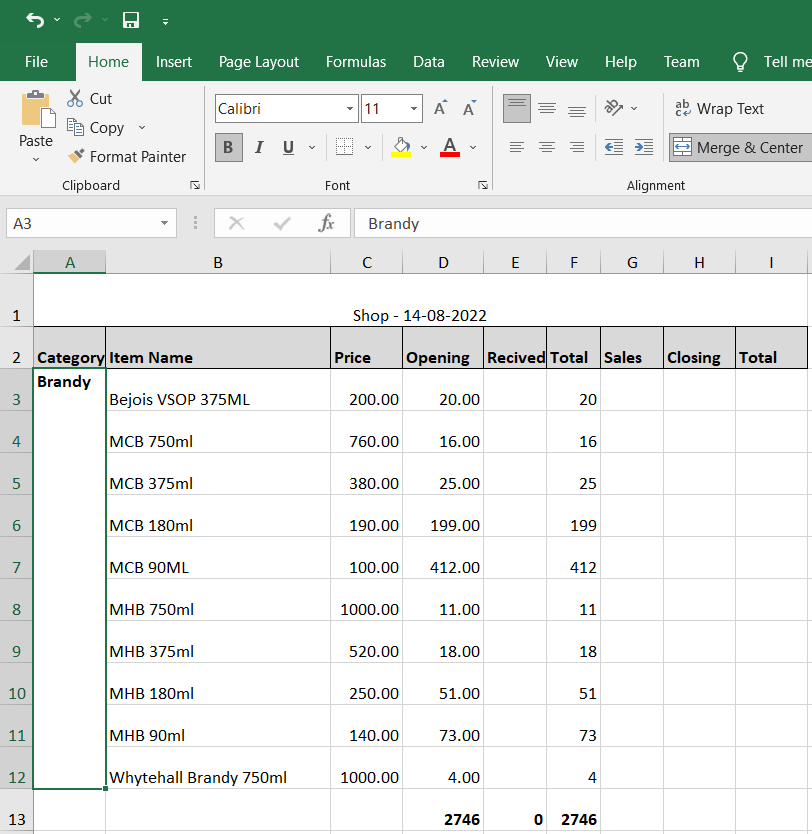
这就是我要得到的
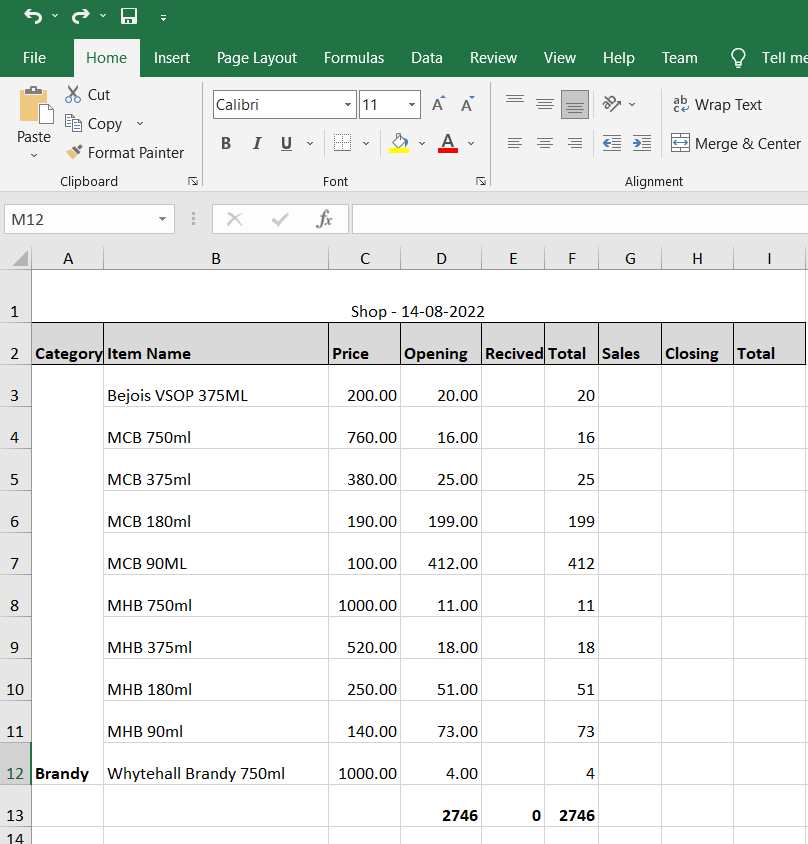
我想要的结果是excel中的列A在导出它时应该是对齐的,这是I want.as的结果,您可以看到列A文本是顶对齐的
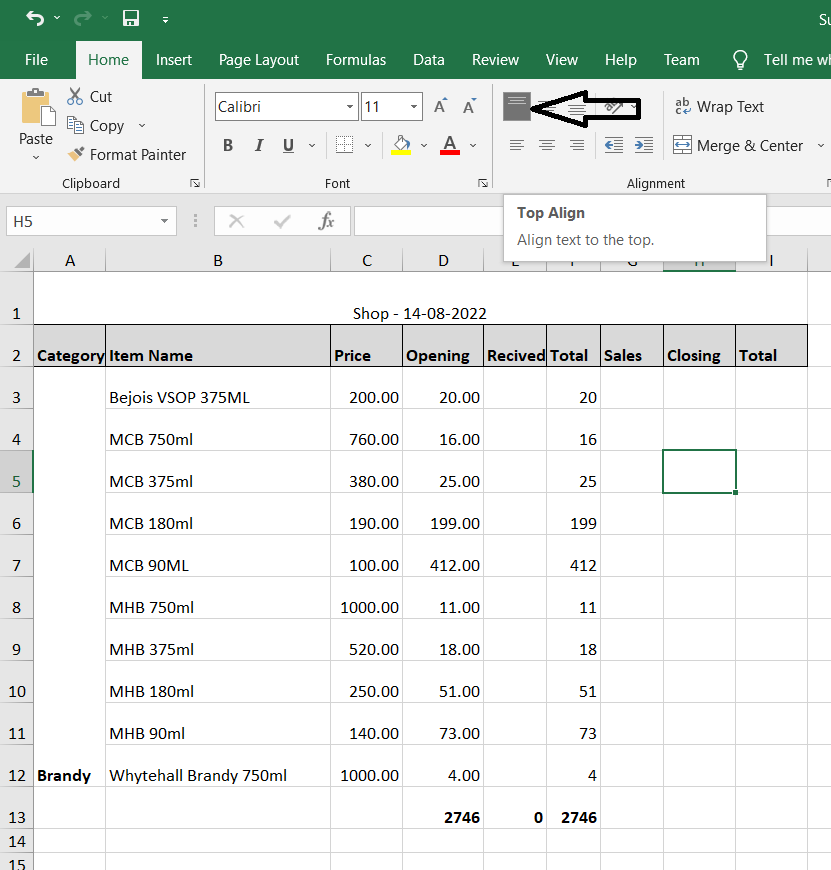
这是MS中的顶级对齐功能,如下面的图所示,我希望它在datatable代码中
这是到目前为止我用来导出的代码
    {
              extend: 'excelHtml5',
              footer: true,
              text: 'Save as Excel',
              pageSize: 'A4',
              title:'shop',
              filename:'shop',


              customize: function (xlsx) {


                            var sheet = xlsx.xl.worksheets['sheet1.xml'];
                            var style = xlsx.xl['styles.xml'];


                           var tagName = style.getElementsByTagName('sz');

                           $('row c[r^="A"]', sheet).attr( 's', '2' );
                            $('row c[r^="B"]', sheet).attr( 's', '55' );
                            $('row[r=2] c', sheet).attr( 's', '32' );
                            $('row[r=1] c', sheet).attr( 's', '51' );

                            $('xf', style).find("alignment[horizontal='center']").attr("wrapText", "1");

                            $('row', sheet).first().attr('ht', '40').attr('customHeight', "1");


                            var col = $('col', sheet);
                            $(col[0]).attr('width', 8);
                            $(col[1]).attr('width', 25);
                            $(col[2]).attr('width', 8);
                            $(col[3]).attr('width', 9);
                            $(col[4]).attr('width', 7);
                            $(col[5]).attr('width', 6);
                            $(col[6]).attr('width', 7);
                            $(col[7]).attr('width', 8);
                            $(col[8]).attr('width', 8);
                            $('row* ', sheet).each(function (index) {
                                if (index > 0) {
                                    $(this).attr('ht', 32);
                                    $(this).attr('customHeight', 1);

                                }
                            });


                            var ranges = buildRanges(sheet);
                            ranges.push( "A1:I1" );

                            // build the HTML string:
                            var mergeCellsHtml = '<mergeCells count="' + ranges.length + '">';
                            ranges.forEach(function(range) {
                                mergeCellsHtml = mergeCellsHtml + '<mergeCell ref="' + range + '"/>';
                            })
                            mergeCellsHtml = mergeCellsHtml + '</mergeCells>';

                            $( 'sheetData', sheet ).after( mergeCellsHtml );
                            // don't know why, but Excel auto-adds an extra mergeCells tag, so remove it:
                            $( 'mergeCells', sheet ).last().remove();


                        },
              exportOptions: {
                columns: [1, 2, 3, 4, 5, 6, 7, 8, 9],


                rows: function (idx, data, node) {
                  return data[6] + data[7] > 0 ?
                    true : false;

                }
              }
            }`
 function buildRanges(sheet) {

let prevCat = ''; // previous category
let currCat = ''; // current category
let currCellRef = ''; // current cell reference
let rows = $('row', sheet);
let startRange = '';
let endRange = '';
let ranges = [];

rows.each(function (i) {
  if (i > 0 && i < rows.length) { // skip first (headings) row
    let cols = $('c', $(this));
    cols.each(function (j) {
      if (j == 0) { // the "Category" column
        currCat = $(this).text(); // current row's category
        currCellRef = $(this).attr('r'); // e.g. "B3"
        if (currCat !== prevCat) {
          if (i == 0) {
            // start of first range
            startRange = currCellRef;
            endRange = currCellRef;
            prevCat = currCat;
          } else {
            // end of previous range
            if (endRange !== startRange) {
              // capture the range:
              ranges.push( startRange + ':' + endRange );

            }
             // start of a new range
            startRange = currCellRef;
            endRange = currCellRef;
            prevCat = currCat;
          }
        } else {
          // extend the current range end:
          endRange = currCellRef;
        }
        //console.log( $(this).attr('r') );
      }
    });
    if (i == rows.length -1 && endRange !== startRange) {
      // capture the final range:
      ranges.push( startRange + ':' + endRange );

    }
  }
});
return ranges;
}回答 1
Stack Overflow用户
发布于 2022-08-14 18:34:42
您需要在Excel文件中创建新样式,然后将该样式应用于导出工作表的A列。
在Excel文件中,使用以下XML片段定义对齐文本的样式:
<xf numFmtId="0" fontId="0" fillId="0" borderId="0" xfId="0" applyAlignment="1">
    <alignment vertical="top"/>
</xf>重要的部分是applyAlignment="1" --意思是“使用对齐指令;和<alignment vertical="top"/> --这是您想要的对齐类型。
此样式数据存储在Excel工作簿:styles.xml中的一个单独的XML文件中。因此,首先您需要创建一个新样式,并将其添加到该XML文件中现有的样式列表中。
从DataTables导出的Excel文件带有一组预定义的样式,它们是列在这里。你想要的风格不是其中之一--这就是为什么我们需要创建自己的风格。
这种方法非常类似于另一个问题:JQuery数据表Excel导出号格式,它创建了一个定制的数字格式。
但在这种情况下,我们的逻辑比数字格式示例要简单一些。
customize函数:
customize: function( xlsx ) {
  addCustomFormat(xlsx);
  formatTargetColumn(xlsx, 'A'); // Excel column A
}
上文所使用的两项支助职能:
function addCustomFormat(xlsx) {
  // add a new "cellXfs" cell formatter, which uses the next available format index (numFmt 176):
  var celXfsElement = xlsx.xl['styles.xml'].getElementsByTagName('cellXfs');
  var cellStyle = '<xf numFmtId="176" fontId="0" fillId="0" borderId="0" xfId="0" applyAlignment="1"'
      + ' applyFont="1" applyFill="1" applyBorder="1"><alignment vertical="top"/></xf>';
  $( celXfsElement ).append( cellStyle );
  $( celXfsElement ).attr("count", "69"); // increment the count
}
以及:
function formatTargetColumn(xlsx, col) {
  var sheet = xlsx.xl.worksheets['sheet1.xml'];
  // select all the cells whose addresses start with the letter prvoided
  // in 'col', and add a style (s) attribute for style number 68:
  $( 'row c[r^="' + col + '"]', sheet ).attr( 's', '68' );
}此逻辑将导致A列中的每个单元格使用对齐文本。您可能希望通过对上述formatTargetColumn()函数进行一些更改来改进该逻辑,以防您只想将其应用于第3行或更低的行。否则,你的标题看上去可能不像你想要的那样。
我把这个练习留给你。
如果您想亲自了解Excel如何使用这些XML片段,只需将Excel文件解压缩即可。您将看到一个文件夹结构,其中包含构成Excel文件的所有不同的XML文件,如sheet1.xml、styles.xml等。
这是一个很好的方法,您可以亲自了解Excel是如何存储不同格式的。
https://stackoverflow.com/questions/73353748
复制相似问题
腾讯云开发者

Copyright © 2013 - 2026 Tencent Cloud. All Rights Reserved. 腾讯云 版权所有
深圳市腾讯计算机系统有限公司 ICP备案/许可证号:粤B2-20090059  粤公网安备44030502008569号
腾讯云计算(北京)有限责任公司 京ICP证150476号 | 京ICP备11018762号