
Flutter Firebase推送通知使用成功的firebase消息传递,但没有得到通知。
Flutter Firebase推送通知使用成功的firebase消息传递,但没有得到通知。
提问于 2022-08-18 09:47:03
我只是尝试使用firebase推送通知和消息传递。我遇到了一个问题,当我尝试通过控制台发送消息时,它显示已完成,但我没有收到通知。你们能解释一下我的编码错误吗。我该怎么做?
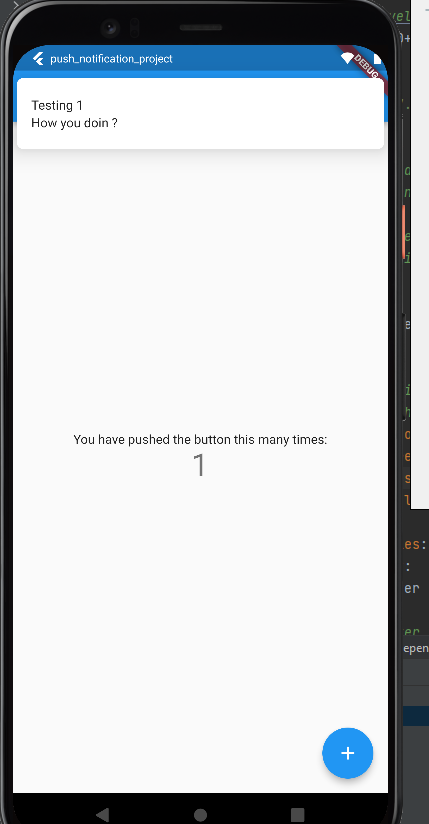
当地通知没问题。本地通知
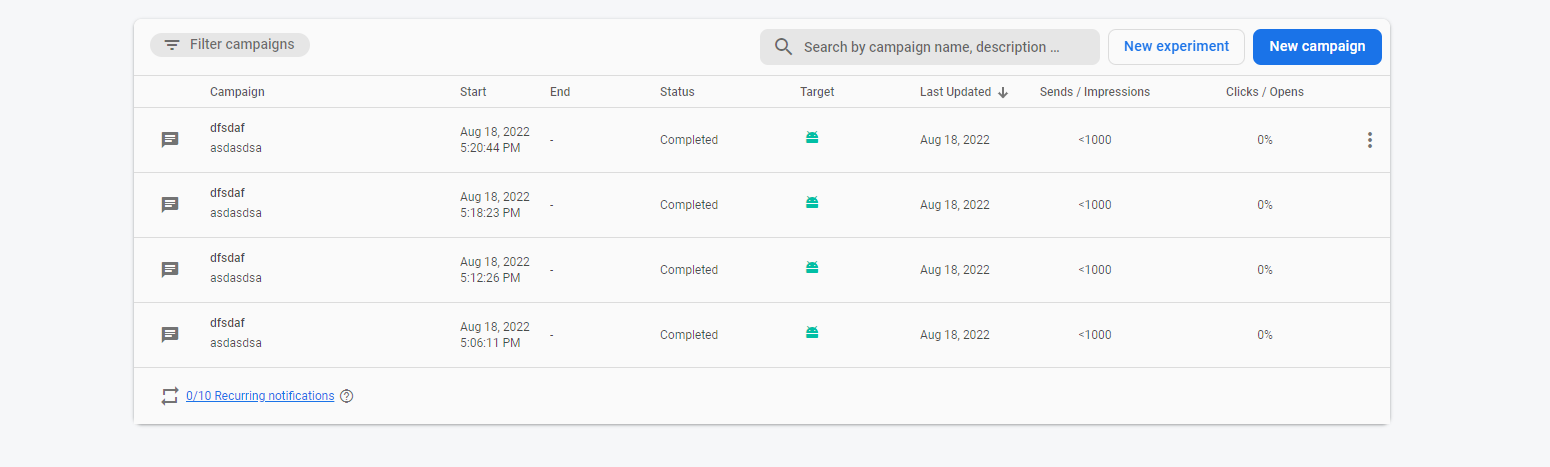
这里我试着在控制台上发送的信息,但我没有收到任何通知电话。
防火墙控制台
这是我的密码
    import 'package:flutter/material.dart';
    import 'package:firebase_core/firebase_core.dart';
    import 'firebase_options.dart';
    import 'package:firebase_messaging/firebase_messaging.dart';
    import 'package:flutter_local_notifications/flutter_local_notifications.dart';

    const AndroidNotificationChannel channel = AndroidNotificationChannel(
        'high_importance_channel', // id
        'High Importance Notifications', // title
        description: 'This channel is used for important notifications.', // description
        importance: Importance.high,
        playSound: true);

    final FlutterLocalNotificationsPlugin flutterLocalNotificationsPlugin =
    FlutterLocalNotificationsPlugin();

    Future<void> _firebaseMessagingBackgroundHandler(RemoteMessage message) async {
      await Firebase.initializeApp();
      print('A bg message just showed up :  ${message.messageId}');
    }


    Future<void> main() async {
      WidgetsFlutterBinding.ensureInitialized();
      await Firebase.initializeApp(
        options: DefaultFirebaseOptions.currentPlatform,
      );
FirebaseMessaging.onBackgroundMessage(_firebaseMessagingBackgroundHandler);

      await flutterLocalNotificationsPlugin
          .resolvePlatformSpecificImplementation<AndroidFlutterLocalNotificationsPlugin>()
          ?.createNotificationChannel(channel);

      await FirebaseMessaging.instance.setForegroundNotificationPresentationOptions(
        alert: true,
        badge: true,
        sound: true,
      );

      runApp(const MyApp());
    }

    class MyApp extends StatelessWidget {
      const MyApp({Key key}) : super(key: key);

      // This widget is the root of your application.
      @override
      Widget build(BuildContext context) {
        return MaterialApp(
          title: 'Flutter Demo',
          theme: ThemeData(
            // This is the theme of your application.
            //
            // Try running your application with "flutter run". You'll see the
            // application has a blue toolbar. Then, without quitting the app, try
            // changing the primarySwatch below to Colors.green and then invoke
            // "hot reload" (press "r" in the console where you ran "flutter run",
            // or simply save your changes to "hot reload" in a Flutter IDE).
            // Notice that the counter didn't reset back to zero; the application
            // is not restarted.
            primarySwatch: Colors.blue,
          ),
          home: const MyHomePage(title: 'Flutter Demo Home Page'),
        );
      }
    }

    class MyHomePage extends StatefulWidget {
      const MyHomePage({Key key, this.title}) : super(key: key);

      // This widget is the home page of your application. It is stateful, meaning
      // that it has a State object (defined below) that contains fields that affect
      // how it looks.

      // This class is the configuration for the state. It holds the values (in this
      // case the title) provided by the parent (in this case the App widget) and
      // used by the build method of the State. Fields in a Widget subclass are
      // always marked "final".

      final String title;

      @override
      State<MyHomePage> createState() => _MyHomePageState();
    }

    class _MyHomePageState extends State<MyHomePage> {
      int _counter = 0;

          @override
          void initState() {
            super.initState();
            FirebaseMessaging.onMessage.listen((RemoteMessage message) {
              RemoteNotification notification = message.notification;
              AndroidNotification android = message.notification?.android;
              if (notification != null && android != null) {
                flutterLocalNotificationsPlugin.show(
                    notification.hashCode,
                    notification.title,
                    notification.body,
                    NotificationDetails(
                      android: AndroidNotificationDetails(
                        channel.id,
                        channel.name,
                        channelDescription : channel.description,
                        color: Colors.blue,
                        playSound: true,
                        icon: '@mipmap/ic_launcher',
                      ),
                    ));
              }
        });

            FirebaseMessaging.onMessageOpenedApp.listen((RemoteMessage message) {
              print('A new onMessageOpenedApp event was published!');
              RemoteNotification notification = message.notification;
              AndroidNotification android = message.notification?.android;
              if (notification != null && android != null) {
                showDialog(
                    context: context,
                    builder: (_) {
                      return AlertDialog(
                        title: Text(notification.title),
                        content: SingleChildScrollView(
                          child: Column(
                            crossAxisAlignment: CrossAxisAlignment.start,
                            children: [Text(notification.body)],
                          ),
                        ),
                      );
                    });
              }
            });
          }

      void showNotification() {
        setState(() {
          _counter++;
        });
        flutterLocalNotificationsPlugin.show(
            0,
            "Testing $_counter",
            "How you doin ?",
            NotificationDetails(
                android: AndroidNotificationDetails(channel.id, channel.name, channelDescription: channel.description,
                    importance: Importance.high,
                    color: Colors.blue,
                    playSound: true,
                    icon: '@mipmap/ic_launcher')));
      }

      @override
      Widget build(BuildContext context) {
        // This method is rerun every time setState is called, for instance as done
        // by the _incrementCounter method above.
        //
        // The Flutter framework has been optimized to make rerunning build methods
        // fast, so that you can just rebuild anything that needs updating rather
        // than having to individually change instances of widgets.
        return Scaffold(
          appBar: AppBar(
            // Here we take the value from the MyHomePage object that was created by
            // the App.build method, and use it to set our appbar title.
            title: Text(widget.title),
          ),
          body: Center(
            // Center is a layout widget. It takes a single child and positions it
            // in the middle of the parent.
            child: Column(
              // Column is also a layout widget. It takes a list of children and
              // arranges them vertically. By default, it sizes itself to fit its
              // children horizontally, and tries to be as tall as its parent.
              //
              // Invoke "debug painting" (press "p" in the console, choose the
              // "Toggle Debug Paint" action from the Flutter Inspector in Android
              // Studio, or the "Toggle Debug Paint" command in Visual Studio Code)
              // to see the wireframe for each widget.
              //
              // Column has various properties to control how it sizes itself and
              // how it positions its children. Here we use mainAxisAlignment to
              // center the children vertically; the main axis here is the vertical
              // axis because Columns are vertical (the cross axis would be
              // horizontal).
              mainAxisAlignment: MainAxisAlignment.center,
              children: <Widget>[
                const Text(
                  'You have pushed the button this many times:',
                ),
                Text(
                  '$_counter',
                  style: Theme.of(context).textTheme.headline4,
                ),
              ],
            ),
          ),
          floatingActionButton: FloatingActionButton(
            onPressed: showNotification,
            tooltip: 'Increment',
            child: const Icon(Icons.add),
          ), // This trailing comma makes auto-formatting nicer for build methods.
        );
      }
    }
与设备的火线连接是否有错误?
解决了
编码工作fined.This之所以发生,是因为我正在使用模拟器而不是真正的设备来tested.Thanks给回答我question.Those的U人,他们也帮助我理解了很多事情。
Stack Overflow用户
发布于 2022-08-18 09:54:17
按下面的代码调用_firebasebackgroundhanler函数
    void main() async {
      final FlutterLocalNotificationsPlugin flutterLocalNotificationsPlugin = FlutterLocalNotificationsPlugin();

      WidgetsFlutterBinding.ensureInitialized();
      await Firebase.initializeApp();

FirebaseMessaging.onBackgroundMessage(_firebaseMessagingBackgroundHandler);
  await FirebaseMessaging.instance.setForegroundNotificationPresentationOptions(
    alert: true,
    badge: true,
    sound: true,
  );
function后台处理程序函数:
Future<void> _firebaseMessagingBackgroundHandler(RemoteMessage message) async {
  await Firebase.initializeApp();
  print("Handling a background message: ${message.messageId}");
}页面原文内容由Stack Overflow提供。腾讯云小微IT领域专用引擎提供翻译支持
原文链接:
https://stackoverflow.com/questions/73400871
复制相关文章
相似问题
腾讯云开发者

Copyright © 2013 - 2026 Tencent Cloud. All Rights Reserved. 腾讯云 版权所有
深圳市腾讯计算机系统有限公司 ICP备案/许可证号:粤B2-20090059  粤公网安备44030502008569号
腾讯云计算(北京)有限责任公司 京ICP证150476号 | 京ICP备11018762号