
如何使用Openpyxl为一行中的所有列设置背景颜色
如何使用Openpyxl为一行中的所有列设置背景颜色
提问于 2022-08-20 07:25:26
我在我的python应用程序中使用openpyxl来生成excel文件。除了一行的背景色设置外,一切正常。我需要为一行中的所有列设置相同的背景色。目前,我正在使用以下代码来设置单元格的颜色。现在,我想知道如何指定列部分中的所有列,以便将颜色应用于所有列。
worksheet.cell(row=10, column=1).fill = PatternFill(start_color='D6BFD4',
                                                        end_color='D6BFD4',
                                                        fill_type="solid")
我需要相同的背景为所有的列,如1,2,3等,如下图。

回答 1
Stack Overflow用户
回答已采纳
发布于 2022-08-20 09:34:34
这里给出了一个示例,说明如何根据上面的代码对整行进行着色。它将为row=10的所有列设置颜色。您可以更改颜色和行号以满足您的需要。请注意,它将设置颜色,直到显示数据的列(等效于ws.max_column)。
import openpyxl
from openpyxl import load_workbook
from openpyxl.styles import PatternFill

file = 'input.xlsx'
wb = load_workbook(filename=file)
ws = wb['Sheet1']
clr_background = PatternFill(start_color='D6BFD4', end_color='D6BFD4', fill_type="solid")

# Enumerate the cells in the tenth row
for cell in ws["10:10"]:
    cell.fill = clr_background

wb.save(filename=file)
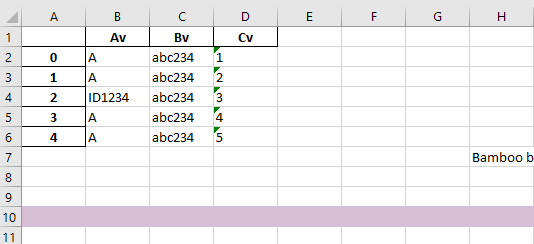
编辑
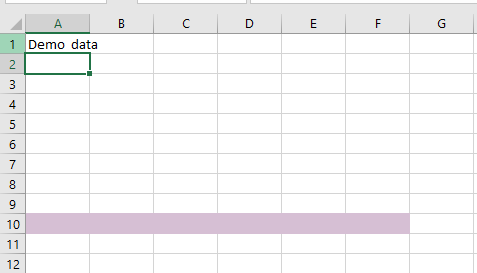
请参考此链接访问多个单元格。上述代码将用数据将单元格从第1列到最后一列着色。如果您想要更改它,您需要像这样替换for循环.注意:如果您将F10设置为XFD10,它将显示到excel的最后一列(没有测试,希望您不需要它)。
for row in ws["A10":"F10"]: ##This will give you a cell range
    for cell in row:
        cell.fill = clr_background
输出excel
页面原文内容由Stack Overflow提供。腾讯云小微IT领域专用引擎提供翻译支持
原文链接:
https://stackoverflow.com/questions/73424833
复制相关文章
相似问题
腾讯云开发者

Copyright © 2013 - 2026 Tencent Cloud. All Rights Reserved. 腾讯云 版权所有
深圳市腾讯计算机系统有限公司 ICP备案/许可证号:粤B2-20090059  粤公网安备44030502008569号
腾讯云计算(北京)有限责任公司 京ICP证150476号 | 京ICP备11018762号