
java.lang.NoClassDefFoundError:失败的决议:Lcom/xxx/xxx/viewmodel/CameraXViewModel;
java.lang.NoClassDefFoundError:失败的决议:Lcom/xxx/xxx/viewmodel/CameraXViewModel;
提问于 2022-08-24 06:15:00
APK是生成的,一切都在编译时工作,但应用程序在运行时崩溃。崩溃是在启动CameraX实现的条形码扫描相机模块时发生的。
以下是崩溃日志:
08-22 17:31:16.537 16660-16660/com.xxx.xxx E/AndroidRuntime: FATAL EXCEPTION: main
    Process: com.xxx.xxx, PID: 16660
    java.lang.NoClassDefFoundError: Failed resolution of: Lcom/xxx/xxx/viewmodels/CameraXViewModel;
        at com.xxx.xxx.barcode.CameraXLivePreviewActivity.onCreate(CameraXLivePreviewActivity.kt:94)
        at android.app.Activity.performCreate(Activity.java:7314)
        at android.app.Activity.performCreate(Activity.java:7305)
        at android.app.Instrumentation.callActivityOnCreate(Instrumentation.java:1215)
        at android.app.ActivityThread.performLaunchActivity(ActivityThread.java:2948)
        at android.app.ActivityThread.handleLaunchActivity(ActivityThread.java:3073)
        at android.app.ActivityThread.-wrap11(Unknown Source:0)
        at android.app.ActivityThread$H.handleMessage(ActivityThread.java:1774)
        at android.os.Handler.dispatchMessage(Handler.java:106)
        at android.os.Looper.loop(Looper.java:198)
        at android.app.ActivityThread.main(ActivityThread.java:7055)
        at java.lang.reflect.Method.invoke(Native Method)
        at com.android.internal.os.RuntimeInit$MethodAndArgsCaller.run(RuntimeInit.java:523)
        at com.android.internal.os.ZygoteInit.main(ZygoteInit.java:836)
     Caused by: java.lang.ClassNotFoundException: Didn't find class "com.xxx.xxx.viewmodels.CameraXViewModel" on path: DexPathList[[zip file "/data/app/com.xxx.xxx-LKiFwx0pU2KUfueyYsAm-w==/base.apk"],nativeLibraryDirectories=[/data/app/com.xxx.xxx-LKiFwx0pU2KUfueyYsAm-w==/lib/arm64, /data/app/com.xxx.xxx-LKiFwx0pU2KUfueyYsAm-w==/base.apk!/lib/arm64-v8a, /system/lib64, /vendor/lib64]]
        at dalvik.system.BaseDexClassLoader.findClass(BaseDexClassLoader.java:125)
下面是访问ViewModel的第94行。
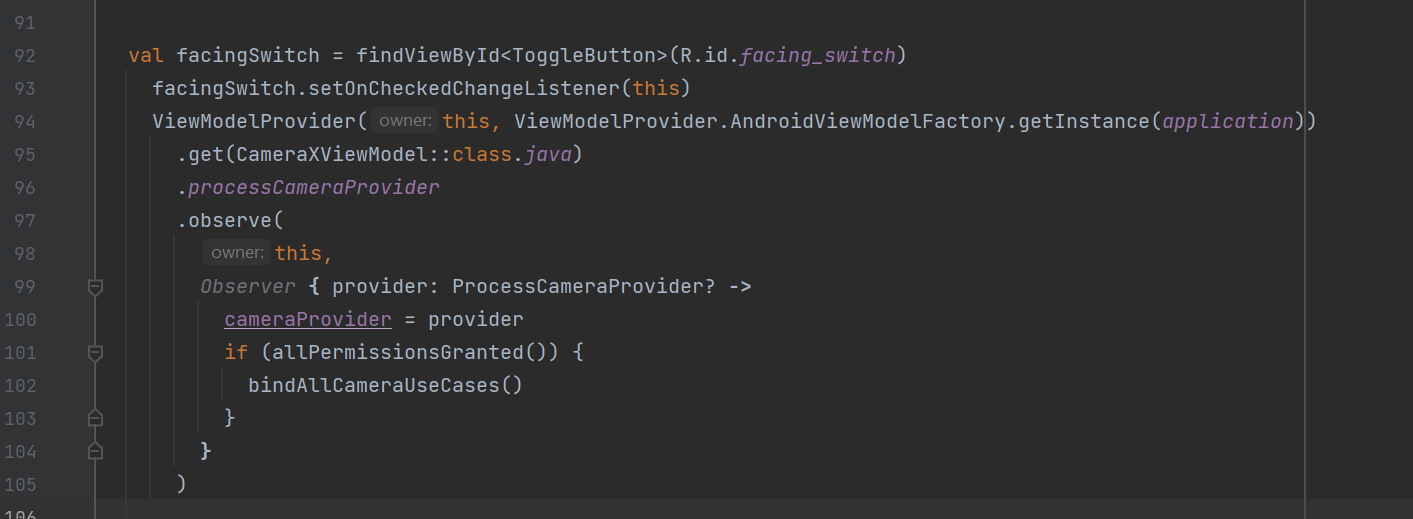
请参考我的构建细节。
下面是项目级别的build.gradle
// Top-level build file where you can add configuration options common to all sub-projects/modules.

buildscript {
    repositories {
        google()
        mavenCentral()
    }
    dependencies {
        classpath 'com.google.gms:google-services:4.3.10'
        classpath 'com.android.tools.build:gradle:7.1.3'
        classpath "org.jetbrains.kotlin:kotlin-gradle-plugin:1.5.10"

    }
}

task clean(type: Delete) {
    delete rootProject.buildDir
}
build.gradle(:app)
plugins {
    id 'com.android.application'
    id 'org.jetbrains.kotlin.android'
    id 'com.google.gms.google-services'
    id 'kotlin-android'
    id 'kotlin-android-extensions'
    id 'kotlin-kapt'
}


android {
    compileSdk 31

    defaultConfig {
        applicationId "com.xxx.xxx"
        minSdk 21
        targetSdk 31
        versionCode 19
        versionName "1.2.13"
        multiDexEnabled true
        signingConfig signingConfigs.config
        testInstrumentationRunner "androidx.test.runner.AndroidJUnitRunner"
    }

    buildTypes {
        debug {
            minifyEnabled false
            proguardFiles getDefaultProguardFile('proguard-android.txt'), 'proguard-rules.pro'
            signingConfig signingConfigs.config
            buildConfigField "String", "AREA", "\"\""
        }
        release {
            minifyEnabled false
            proguardFiles getDefaultProguardFile('proguard-android-optimize.txt'), 'proguard-rules.pro'
            signingConfig signingConfigs.config
            buildConfigField "String", "AREA", "\"\""
        }
        ABC {
            minifyEnabled false
            proguardFiles getDefaultProguardFile('proguard-android.txt'), 'proguard-rules.pro'
            signingConfig signingConfigs.config
            buildConfigField "String", "AREA", "\"_A\""

        }
        XYZ {
            minifyEnabled false
            proguardFiles getDefaultProguardFile('proguard-android.txt'), 'proguard-rules.pro'
            signingConfig signingConfigs.config
            buildConfigField "String", "AREA", "\"_X\""
        }
    }

    flavorDimensions "appVariant", "projectCode"
    productFlavors {
        A {
            dimension "appVariant"
        }
        B {
            dimension "appVariant"
        }
        C {
            dimension "appVariant"
        }
        D {
            dimension "appVariant"
        }
        DEV {
            dimension "projectCode"
        }
        QA {
            dimension "projectCode"
        }
        LIVE {
            dimension "projectCode"
        }
        DEMO {
            dimension "projectCode"
        }
        BETA {
            dimension "projectCode"
        }
    }

    applicationVariants.all { variant ->
        variant.outputs.all { output ->
            def project = "TEST_PROJECT"
            def SEP = "_"
            def flavor = variant.productFlavors[0].name
            def projcode = variant.productFlavors[1].name
            def buildType = variant.buildType.name
            def buildTypeName = "";
            switch (buildType) {
                case "ABC": buildTypeName = SEP + "AB"; break;
                case "XYZ": buildTypeName = SEP + "XY"; break;
                default:
                    buildTypeName = "";
            }

            def version = variant.versionName
            def date = new Date();
            def formattedDate = date.format('ddMMyy_HHmm')

            def newApkName = project + buildTypeName + SEP + flavor + SEP + projcode + SEP + version + ".apk"

            outputFileName = new File(newApkName)
        }
    }

    compileOptions {
        sourceCompatibility JavaVersion.VERSION_1_8
        targetCompatibility JavaVersion.VERSION_1_8
    }
    kotlinOptions {
        jvmTarget = '1.8'
    }
    buildFeatures {
        dataBinding true
    }
}

dependencies {

    implementation 'androidx.core:core-ktx:1.6.0'
    implementation 'androidx.appcompat:appcompat:1.3.1'
    implementation 'com.google.android.material:material:1.4.0'
    implementation 'androidx.constraintlayout:constraintlayout:2.1.0'
    implementation 'androidx.databinding:databinding-runtime:7.0.2'
    implementation 'com.google.android.gms:play-services-location:18.0.0'
    implementation 'com.google.firebase:firebase-messaging-ktx:22.0.0'
    implementation 'org.jetbrains.kotlinx:kotlinx-serialization-json:1.2.2'
    implementation 'androidx.camera:camera-core:1.0.2'

    testImplementation 'junit:junit:4.13.2'
    androidTestImplementation 'androidx.test.ext:junit:1.1.3'
    androidTestImplementation 'androidx.test.espresso:espresso-core:3.4.0'

    //Retrofit and GSON
    implementation 'com.squareup.retrofit2:retrofit:2.6.0'
    implementation 'com.squareup.retrofit2:converter-gson:2.6.0'
    implementation 'com.squareup.retrofit2:adapter-rxjava:2.5.0'
    implementation 'com.squareup.okhttp3:logging-interceptor:4.2.1'
    implementation 'com.jakewharton.retrofit:retrofit2-kotlin-coroutines-adapter:0.9.2'

    //Kotlin Coroutines
    implementation "org.jetbrains.kotlinx:kotlinx-coroutines-android:1.3.0"
    implementation "org.jetbrains.kotlinx:kotlinx-coroutines-core:1.3.0"

    // ViewModel and LiveData
    implementation "androidx.lifecycle:lifecycle-extensions:2.2.0"


    //Kodein Dependency Injection
    implementation "org.kodein.di:kodein-di-generic-jvm:6.2.1"
    implementation "org.kodein.di:kodein-di-framework-android-x:6.2.1"

    //Android Room
    implementation "androidx.room:room-runtime:2.2.5"
    implementation "androidx.room:room-ktx:2.2.5"
    kapt  "androidx.room:room-compiler:2.2.5"

    //Android Navigation Architecture
    implementation "androidx.navigation:navigation-fragment-ktx:2.2.0-alpha02"
    implementation "androidx.navigation:navigation-ui-ktx:2.2.0-alpha02"

    implementation 'com.xwray:groupie:2.8.0'
    implementation 'com.xwray:groupie-kotlin-android-extensions:2.8.0'
    implementation 'com.xwray:groupie-databinding:2.8.0'
    implementation "androidx.preference:preference-ktx:1.1.0"

    //Image loading
    implementation "com.squareup.picasso:picasso:2.71828"

    //barcode
    implementation 'com.google.mlkit:barcode-scanning:17.0.0'

    // CameraX
    implementation "androidx.camera:camera-camera2:1.0.0-SNAPSHOT"
    implementation "androidx.camera:camera-lifecycle:1.0.0-SNAPSHOT"
    implementation "androidx.camera:camera-view:1.0.0-SNAPSHOT"

    // On Device Machine Learnings
    implementation "com.google.android.odml:image:1.0.0-beta1"
    implementation 'com.google.mlkit:camera:16.0.0-beta1'

    implementation 'me.dm7.barcodescanner:zxing:1.9.13'

    implementation(files("./libs/scandecode-release.aar"))
    implementation 'com.valdesekamdem.library:md-toast:0.9.0'
    implementation 'com.tt:whorlviewlibrary:1.0.3'
}不知道出了什么问题,。任何帮助都将不胜感激。
回答 1
Stack Overflow用户
回答已采纳
发布于 2022-08-29 07:07:26
解决了!.
从开发者网站上实现了多重索引。
https://developer.android.com/studio/build/multidex
还有两个视图模型类CameraXViewModel & CameraXviewModel.kt,从项目中删除了文件CameraXviewModel.kt。CameraXViewModel是使用的,CameraXviewModel在项目的任何位置都没有引用。
ASFAIK和Kotlin对类是区分大小写的,所以理想情况下它应该可以工作。这里,所有的编译和APK都生成了,但是应用程序在运行时崩溃了。希望这能帮上忙。
页面原文内容由Stack Overflow提供。腾讯云小微IT领域专用引擎提供翻译支持
原文链接:
https://stackoverflow.com/questions/73468256
复制相关文章
相似问题
腾讯云开发者

Copyright © 2013 - 2026 Tencent Cloud. All Rights Reserved. 腾讯云 版权所有
深圳市腾讯计算机系统有限公司 ICP备案/许可证号:粤B2-20090059  粤公网安备44030502008569号
腾讯云计算(北京)有限责任公司 京ICP证150476号 | 京ICP备11018762号