
我如何传递道具值输入不出错反应?
我如何传递道具值输入不出错反应?
提问于 2022-08-30 13:15:45
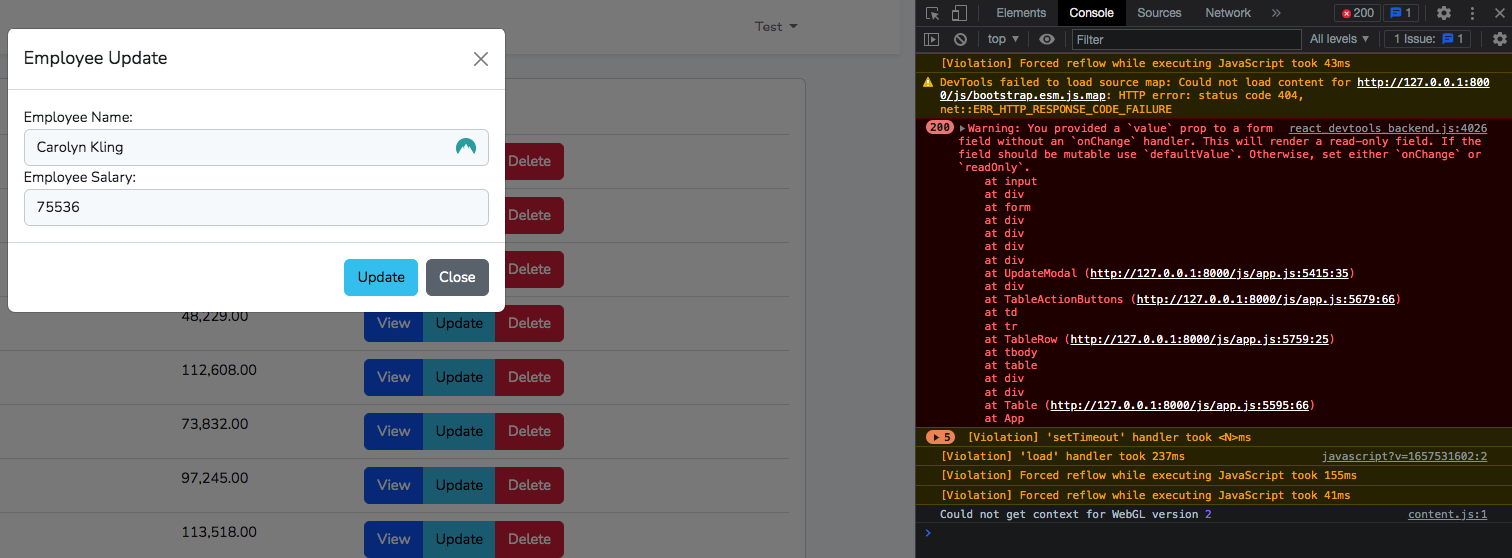
我有我的更新模式,我想把值从道具传递到当前的员工数据,但是当我这样做的时候,我得到了一个错误,我在google上搜索了每个人在输入中都使用的onChange,但是只有当用户开始键入用户单击“更新模式”按钮时需要显示的内容时,效果才是可见的。
Warning: You provided a `value` prop to a form field without an `onChange` handler. This will render a read-only field. If the field should be mutable use `defaultValue`. Otherwise, set either `onChange` or `readOnly`.
import React from 'react';

function UpdateModal(props){
    const currentEmployeeData = props.employeeData;

    function updateEmployeeData(){

    }

    return (
        <div className="modal fade" id={"updateModal"+ props.modalId} tabIndex="-1" aria-labelledby="updateModalLabel" aria-hidden="true">
        <div className="modal-dialog">
            <div className="modal-content">
            <div className="modal-header">
                <h5 className="modal-title" id="updateModalLabel">Employee Update</h5>
                <button type="button" className="btn-close" data-bs-dismiss="modal" aria-label="Close"></button>
            </div>
            <div className="modal-body">
                <form className="form">
                    <div className="form-group">
                        <label htmlFor="Employee Name">Employee Name: </label>
                        <input type="text" name="employeeName" id="employeeName" className="form-control" value={currentEmployeeData.employee_name ?? ""} />
                    </div>
                    <div className="form-group">
                        <label htmlFor="Employee Salary">Employee Salary:</label>
                        <input type="number" name="employeeSalary" id="employeeSalary" className="form-control" value={currentEmployeeData.salary ?? ""} />
                    </div>
                </form>
            </div>
            <div className="modal-footer">
                <input type="submit" value="Update" className="btn btn-info" onClick={updateEmployeeData} />
                <button type="button" className="btn btn-secondary" data-bs-dismiss="modal">Close</button>
            </div>
            </div>
        </div>
        </div>
    );
}

export default UpdateModal;<script src="https://cdnjs.cloudflare.com/ajax/libs/react/16.6.3/umd/react.production.min.js"></script>
<script src="https://cdnjs.cloudflare.com/ajax/libs/react-dom/16.6.3/umd/react-dom.production.min.js"></script>
有人能帮我解决这个问题吗?
回答 1
Stack Overflow用户
回答已采纳
发布于 2022-08-30 13:23:05
如果您想要一个带有value的受控value,还需要使用onChange事件来更新该值。
import React from 'react';

function UpdateModal(props){
    const currentEmployeeData = props.employeeData;

    function updateEmployeeData(){

    }

    return (
        <div className="modal fade" id={"updateModal"+ props.modalId} tabIndex="-1" aria-labelledby="updateModalLabel" aria-hidden="true">
        <div className="modal-dialog">
            <div className="modal-content">
            <div className="modal-header">
                <h5 className="modal-title" id="updateModalLabel">Employee Update</h5>
                <button type="button" className="btn-close" data-bs-dismiss="modal" aria-label="Close"></button>
            </div>
            <div className="modal-body">
                <form className="form">
                    <div className="form-group">
                        <label htmlFor="Employee Name">Employee Name: </label>
                        <input type="text" name="employeeName" id="employeeName" className="form-control" value={currentEmployeeData.employee_name ?? ""} onChange={() => {
                          // update emplyee_name value here.
                        }} />
                    </div>
                    <div className="form-group">
                        <label htmlFor="Employee Salary">Employee Salary:</label>
                        <input type="number" name="employeeSalary" id="employeeSalary" className="form-control" value={currentEmployeeData.salary ?? ""} onChange={() => {
                          // update salary value here.
                        }} />
                    </div>
                </form>
            </div>
            <div className="modal-footer">
                <input type="submit" value="Update" className="btn btn-info" onClick={updateEmployeeData} />
                <button type="button" className="btn btn-secondary" data-bs-dismiss="modal">Close</button>
            </div>
            </div>
        </div>
        </div>
    );
}

export default UpdateModal;如果您只想设置一个默认值,那么不要使用value,而是使用defaultValue属性。
import React from 'react';

function UpdateModal(props){
    const currentEmployeeData = props.employeeData;

    function updateEmployeeData(){

    }

    return (
        <div className="modal fade" id={"updateModal"+ props.modalId} tabIndex="-1" aria-labelledby="updateModalLabel" aria-hidden="true">
        <div className="modal-dialog">
            <div className="modal-content">
            <div className="modal-header">
                <h5 className="modal-title" id="updateModalLabel">Employee Update</h5>
                <button type="button" className="btn-close" data-bs-dismiss="modal" aria-label="Close"></button>
            </div>
            <div className="modal-body">
                <form className="form">
                    <div className="form-group">
                        <label htmlFor="Employee Name">Employee Name: </label>
                        <input type="text" name="employeeName" id="employeeName" className="form-control" defaultValue={currentEmployeeData.employee_name ?? ""}/>
                    </div>
                    <div className="form-group">
                        <label htmlFor="Employee Salary">Employee Salary:</label>
                        <input type="number" name="employeeSalary" id="employeeSalary" className="form-control" defaultValue={currentEmployeeData.salary ?? ""}/>
                    </div>
                </form>
            </div>
            <div className="modal-footer">
                <input type="submit" value="Update" className="btn btn-info" onClick={updateEmployeeData} />
                <button type="button" className="btn btn-secondary" data-bs-dismiss="modal">Close</button>
            </div>
            </div>
        </div>
        </div>
    );
}

export default UpdateModal;页面原文内容由Stack Overflow提供。腾讯云小微IT领域专用引擎提供翻译支持
原文链接:
https://stackoverflow.com/questions/73543114
复制相关文章
相似问题
腾讯云开发者

Copyright © 2013 - 2026 Tencent Cloud. All Rights Reserved. 腾讯云 版权所有
深圳市腾讯计算机系统有限公司 ICP备案/许可证号:粤B2-20090059  粤公网安备44030502008569号
腾讯云计算(北京)有限责任公司 京ICP证150476号 | 京ICP备11018762号