
如何在CupertinoActionSheet的末尾创建这种类型的双按钮?
如何在CupertinoActionSheet的末尾创建这种类型的双按钮?
提问于 2022-09-14 09:55:01
   showCupertinoModalPopup(
                context: context,
                builder: (context) {
                  return CupertinoActionSheet(
                    actions: [],
                    title: Text("Sampark Tag"),
                    message: CupertinoSearchTextField(),
                    cancelButton: Row(
                      mainAxisAlignment: MainAxisAlignment.spaceAround,
                      children: [
                        Container(
                          margin: EdgeInsets.symmetric(horizontal: 10),
                          child: CupertinoActionSheetAction(
                              onPressed: () {}, child: Text("Cancel")),
                        ),
                        CupertinoActionSheetAction(
                            onPressed: () {}, child: Text("Cancel"))
                      ],
                    ),
                  );
                },
);结果需要https://i.stack.imgur.com/aHRBa.png我的屏幕https://i.stack.imgur.com/cK90U.png


回答 2
Stack Overflow用户
回答已采纳
发布于 2022-09-14 11:03:21
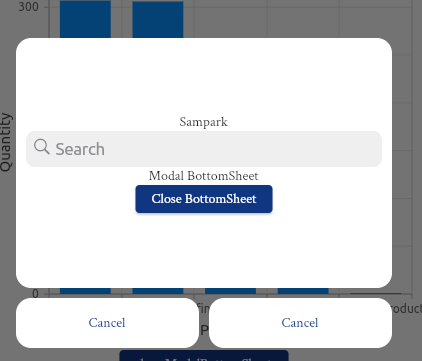
如果您想要构建相同的设计,可以使用下面的代码来完成
showModalBottomSheet<void>(
                backgroundColor: Colors.transparent,
                context: context,
                builder: (BuildContext context) {
                  return Container(
                    height: 310,
                    margin: EdgeInsets.all(30),
                    child: Column(
                      children: [
                        Container(
                          padding: const EdgeInsets.all(10),
                          decoration: BoxDecoration(
                            color: Colors.white,
                            borderRadius: BorderRadius.circular(15),
                          ),
                          height: 250,
                          child: Column(
                            mainAxisAlignment: MainAxisAlignment.center,
                            children: <Widget>[
                              Text("Sampark"),
                              CupertinoSearchTextField(),
                              const Text('Modal BottomSheet'),
                              ElevatedButton(
                                child: const Text('Close BottomSheet'),
                                onPressed: () => Navigator.pop(context),
                              ),
                            ],
                          ),
                        ),
                        SizedBox(
                          height: 10,
                        ),
                        Container(
                          child: Row(
                            children: [
                              Expanded(
                                child: Container(
                                  height: 50,
                                  decoration: BoxDecoration(
                                    borderRadius: BorderRadius.circular(15),
                                    color: Colors.white,
                                  ),
                                  child: TextButton(
                                    onPressed: () {},
                                    child: Text("Cancel"),
                                  ),
                                ),
                              ),
                              SizedBox(
                                width: 10,
                              ),
                              Expanded(
                                child: Container(
                                  height: 50,
                                  decoration: BoxDecoration(
                                    borderRadius: BorderRadius.circular(15),
                                    color: Colors.white,
                                  ),
                                  child: TextButton(
                                    onPressed: () {},
                                    child: Text("Cancel"),
                                  ),
                                ),
                              ),
                            ],
                          ),
                        ),
                      ],
                    ),
                  );
                });
查看下面的图像。只要很少调整,你就能实现你想要的设计。
Stack Overflow用户
发布于 2022-09-14 11:44:08
使用以下代码
showCupertinoModalPopup(
      context: context,
      builder: (BuildContext context) =>
          CupertinoActionSheet(
        title:
            const Text('Select Option'),
        message:
            const Text('Which option?'),
        actions: <Widget>[
          CupertinoActionSheetAction(
            child: const Text('1'),
            onPressed: () {
              print('pressed');
            },
          )
        ],
        cancelButton: Container(
          decoration: BoxDecoration(
            borderRadius:
                BorderRadius.circular(
                    14),
            color: Colors.black
                .withOpacity(0.2),
          ),
          child: Row(
            children: [
              Expanded(
                flex: 5,
                child: Container(
                  decoration:
                      BoxDecoration(
                    borderRadius:
                        BorderRadius
                            .circular(
                                14),
                    color: Colors.white
                        .withOpacity(
                            0.8),
                  ),
                  child:
                      CupertinoActionSheetAction(
                    onPressed: () =>
                        Navigator.pop(
                            context),
                    isDestructiveAction:
                        true,
                    child: const Text(
                        'Cancel'),
                  ),
                ),
              ),
              const SizedBox(
                width: 10,
              ),
              Expanded(
                flex: 5,
                child: Container(
                  decoration:
                      BoxDecoration(
                    borderRadius:
                        BorderRadius
                            .circular(
                                14),
                    color: Colors.white
                        .withOpacity(
                            0.8),
                  ),
                  child:
                      CupertinoActionSheetAction(
                    onPressed: () =>
                        Navigator.pop(
                            context),
                    child: const Text(
                        'Cancel'),
                  ),
                ),
              ),
            ],
          ),
        ),
      ),
),页面原文内容由Stack Overflow提供。腾讯云小微IT领域专用引擎提供翻译支持
原文链接:
https://stackoverflow.com/questions/73714890
复制相关文章
相似问题
腾讯云开发者

Copyright © 2013 - 2026 Tencent Cloud. All Rights Reserved. 腾讯云 版权所有
深圳市腾讯计算机系统有限公司 ICP备案/许可证号:粤B2-20090059  粤公网安备44030502008569号
腾讯云计算(北京)有限责任公司 京ICP证150476号 | 京ICP备11018762号