
如何用SwiftUI中的图像替换占位符文本?
我有一个字符串"Hello {world}",我需要用"Hello "替换它。占位符的位置不固定在末尾。我可能有不止一个占位符。
我正在使用SwiftUI,并试图使此工作与
Text("Hello {world}".replacingOccurrences(of: "{world}", with: "\(Image(systemName: "globe"))"))但很快就发现这是不可行的,并提出了这个Hello Image(provider: SwiftUI.ImageProviderBox<SwiftUI.Image.(unknown context at $1ba606db0).NamedImageProvider>)
因为这起作用了
Text(LocalizedStringKey("Hello \(Image(systemName: "globe"))"))我认为我需要将一个LocalizedStringKey传递到我再次尝试的Text中。
Text(LocalizedStringKey("Hello {world}".replacingOccurrences(of: "{world}", with: "\(Image(systemName: "globe"))")))
Text(LocalizedStringKey("Hello" + "\(Image(systemName: "globe"))")) //this doesn't work either
但是有一个类似的问题-- SwiftUI.Text.Storage.anyTextStorage(SwiftUI.(unknown context at $1ba668448).LocalizedTextStorage
我查看了LocalizedStringKey和LocalizedStringKey.StringInterpolation的API,但是找不到解决这个问题的方法。是否有办法使占位符字符串的替换工作?
回答 5
Stack Overflow用户
发布于 2022-09-17 10:58:54
我是通过回答这一个来回答这个问题的,它激起了我的兴趣。正如我在这里的回答中所说的,秘密说明是LocalizedStringKey,当使用内插字符串文字初始化时,能够在引用中构建SwiftUI Image类型,该引用可以在Text中呈现。
因为您没有使用内插字符串文字,所以可以使用多个Texts (如这里的其他答案)构建内容,也可以使用LocalizedStringKey.StringInterpolation做一些明智的事情。这种方法的优点是,您还可以在使用LocalizedStringKey的任何其他视图中使用图像保持文本(这几乎是其中任何一个显示文本的视图)。
LocalizedStringKey上的这个扩展将手动构建一个内插字符串:
extension LocalizedStringKey {

    private static let imageMap: [String: String] = [
        "world": "globe",
        "moon": "moon"
    ]

    init(imageText: String) {
        var components = [Any]()
        var length = 0
        let scanner = Scanner(string: imageText)
        scanner.charactersToBeSkipped = nil
        while scanner.isAtEnd == false {
            let up = scanner.scanUpToString("{")
            let start = scanner.scanString("{")
            let name = scanner.scanUpToString("}")
            let end = scanner.scanString("}")
            if let up = up {
                components.append(up)
                length += up.count
            }
            if let name = name {
                if start != nil, end != nil, let imageName = Self.imageMap[name] {
                    components.append(Image(systemName: imageName))
                    length += 1
                } else {
                    components.append(name)
                }
            }
        }

        var interp = LocalizedStringKey.StringInterpolation(literalCapacity: length, interpolationCount: components.count)
        for component in components {
            if let string = component as? String {
                interp.appendInterpolation(string)
            }
            if let image = component as? Image {
                interp.appendInterpolation(image)
            }
        }

        self.init(stringInterpolation: interp)
    }
}
您可能希望缓存这些值,如果它们来自API,那么我还没有在呈现循环中检查这段代码的性能。
您可以在Text或任何其他视图上添加一个扩展:
extension Text {
    init(imageText: String) {
        self.init(LocalizedStringKey(imageText: imageText))
    }
}
所以你可以这么做:
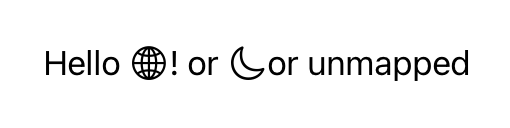
Text(imageText: "Hello {world}! or {moon} or {unmapped}")这给了你:
Stack Overflow用户
发布于 2022-09-16 10:13:38
在看了@bewithyou的答案之后,我有了这样的想法:我需要把它分割成多个子字符串,然后单独地重新组合文本。这是我能想到的最好的解决方案:
public extension String {

    func componentsKeepingSeparator(separatedBy separator: Self) -> Array<String> {

        self.components(separatedBy: separator)
            .flatMap { [$0, separator] }
            .dropLast()
            .filter { $0 != "" }
    }
}
在操场上,如果我要运行这个,它是完美的。
PlaygroundPage.current.setLiveView(

    "Hello {world}!"
        .componentsKeepingSeparator(separatedBy: "{world}")
        .reduce(Text("")) { text, str in
            if str == "{world}" { return text + Text("\(Image(systemName: "globe"))") }
            return text + Text(str)
        }
)
我相信有一个更理想的解决方案,但这将是暂时的。
编辑:
因为我需要对多个占位符的支持,所以我添加了更多的扩展来完成更全面的工作。
func componentsKeepingSeparators(separatedBy separators: [Self]) -> [String] {

    var finalResult = [self]
    separators.forEach { separator in

        finalResult = finalResult.flatMap { strElement in

            strElement.componentsKeepingSeparator(separatedBy: separator)
        }
    }
    return finalResult
}
在操场上
PlaygroundPage.current.setLiveView(
    "Hello {world}{world}{world}! {wave}"
        .componentsKeepingSeparators(separatedBy: ["{world}", "{wave}"])
        .reduce(Text("")) { text, str in
            if str == "{world}" { return text + Text("\(Image(systemName: "globe"))") }
            if str == "{wave}" { return text + Text("\(Image(systemName: "hand.wave"))") }
            return text + Text(str)
        }
)
这个扩展有一个双循环,可能不是很有效,所以,再次,如果有人可以想出一个更好的解决方案,请做post。
Stack Overflow用户
发布于 2022-09-16 10:01:55
对于您的问题,这里的键不是LocalizedStringKey,但这里的键是\()方法,意思是字符串插值。
根据Swift文件,字符串插值是一种从常量、变量、文字和表达式的混合中构造新的字符串值的方法,方法是将它们的值包含在字符串文本中。您可以在单行和多行字符串文本中使用字符串内插。
在这里,它将Text("hello")和Image(systemName: "globe")这两种东西组合成一个新的字符串。您的代码是错误的,因为您附加了值的字符串。
如果没有LocalizedStringKey,Text将显示为与您的Hello !相同。
Text("Hello \(Image(systemName: "globe"))!")或者,您可以使用组合,以便更容易理解。
Text("hello") + Text(Image(systemName: "globe")) + Text("!")对于有关映射值的问题,您可以创建一个用于映射图像或名称图像的字典。
var dict : [String:String] = ["world" : "globe"]

// Add default name image value if key is nil
Text("Hello \(Image(systemName: dict["world", default:"globe"]))!")
Text("hello") + Text(Image(systemName: dict["world", default: "globe"])) + Text("!")var dict : [String:Image] = ["world" : Image(systemName: "globe")]
// Add default image value if key is nil
Text("hello\(dict["world", default: Image(systemName: "globe")])!")
Text("hello") + Text(dict["world", default: Image(systemName: "globe")]) + Text("!")它们的工作原理相同--打印出Hello !
https://stackoverflow.com/questions/73742578
复制相似问题
腾讯云开发者

Copyright © 2013 - 2026 Tencent Cloud. All Rights Reserved. 腾讯云 版权所有
深圳市腾讯计算机系统有限公司 ICP备案/许可证号:粤B2-20090059  粤公网安备44030502008569号
腾讯云计算(北京)有限责任公司 京ICP证150476号 | 京ICP备11018762号