
修复码头映像中的安全漏洞
我有下面的停靠文件
FROM debian:stable

# Avoid warnings by switching to noninteractive
ENV DEBIAN_FRONTEND=noninteractive


#Versions
ENV HELM_VERSION=v3.10.0
ENV KUBECTL_VERSION=v1.20.9
ENV MAVEN_OPTS="-Djavax.net.ssl.trustStore=/cicd/assets/truststore.jks"
ENV TERRAFORM_VERSION=1.2.0
ENV GOLANG_VERSION=1.19.1
ENV TERRAGRUNT_VERSION=v0.38.7

RUN set -xe \
    && apt-get update -y \
    && apt-get install -y python3-pip
RUN apt-get install zip unzip
#Copy python requirements file
COPY requirements.txt /tmp/pip-tmp/

# Makes the Ansible directories
RUN mkdir /etc/ansible /ansible
RUN mkdir ~/.ssh

# Configure apt and install python packages
RUN apt-get update -y -q \
    && apt-get upgrade -y -q \
    && apt-get install -y wget \
    && apt-get -y install --no-install-recommends apt-utils dialog 2>&1 \
    && apt-get install -y --no-install-recommends apt-utils \
    && apt-get -y install ca-certificates software-properties-common build-essential curl git gettext-base maven sshpass krb5-user \
    && pip --disable-pip-version-check --no-cache-dir install -r /tmp/pip-tmp/requirements.txt \
    && apt-get -y install jq \
    && rm -rf /tmp/pip-tmp

#Install helm
RUN wget https://get.helm.sh/helm-${HELM_VERSION}-linux-amd64.tar.gz \
&& tar -zxvf helm-${HELM_VERSION}-linux-amd64.tar.gz \
&& mv linux-amd64/helm /usr/local/bin/helm

#Install kubectl
RUN curl --silent https://storage.googleapis.com/kubernetes-release/release/${KUBECTL_VERSION}/bin/linux/amd64/kubectl --output /usr/local/bin/kubectl \
&& chmod +x /usr/local/bin/kubectl

#Install Docker CLI
RUN curl -sSL https://get.docker.com/ | sh \
&& curl -L "https://github.com/docker/compose/releases/download/2.10.2/docker-compose-$(uname -s)-$(uname -m)" -o /usr/local/bin/docker-compose \
&& chmod +x /usr/local/bin/docker-compose

#Install AWS CLI
RUN curl "https://awscli.amazonaws.com/awscli-exe-linux-x86_64.zip" -o "awscliv2.zip" \
&& unzip awscliv2.zip \
&& ./aws/install

#Copy Assets
#RUN mkdir -p /cicd
#COPY assets /cicd

#Install helm plugins
#RUN helm plugin add https://github.com/databus23/helm-diff
#RUN helm plugin install /cicd/helm-nexus-push

# Downloading gcloud package
RUN curl https://dl.google.com/dl/cloudsdk/release/google-cloud-sdk.tar.gz > /tmp/google-cloud-sdk.tar.gz

# Installing the package
RUN mkdir -p /usr/local/gcloud \
  && tar -C /usr/local/gcloud -xvf /tmp/google-cloud-sdk.tar.gz \
  && /usr/local/gcloud/google-cloud-sdk/install.sh

# Adding the package path to local
ENV PATH $PATH:/usr/local/gcloud/google-cloud-sdk/bin

RUN cd /tmp && \
    wget https://releases.hashicorp.com/terraform/${TERRAFORM_VERSION}/terraform_${TERRAFORM_VERSION}_linux_amd64.zip && \
    unzip terraform_${TERRAFORM_VERSION}_linux_amd64.zip -d /usr/local/bin && \
    rm -rf /tmp/*

RUN cd /tmp && \
    wget  https://dl.google.com/go/go${GOLANG_VERSION}.linux-amd64.tar.gz && \
    tar -xzf go${GOLANG_VERSION}.linux-amd64.tar.gz -C /usr/local && \
    rm -rf /tmp/*

RUN cd /tmp && \
    wget https://github.com/gruntwork-io/terragrunt/releases/download/${TERRAGRUNT_VERSION}/terragrunt_linux_amd64 && \
    mv terragrunt_linux_amd64 /usr/local/bin/terragrunt && \
    chmod +x /usr/local/bin/terragrunt && \
    rm -rf /tmp/*

RUN git config --global http.sslCAinfo /etc/ssl/certs/ca-certificates.crt

ENV GOPATH=/usr/local/go
ENV PATH=/usr/local/go/bin:$PATH
ENV CGO_ENABLED=0

RUN go version

RUN terraform --version

RUN terragrunt --version

RUN ansible --version

CMD bash
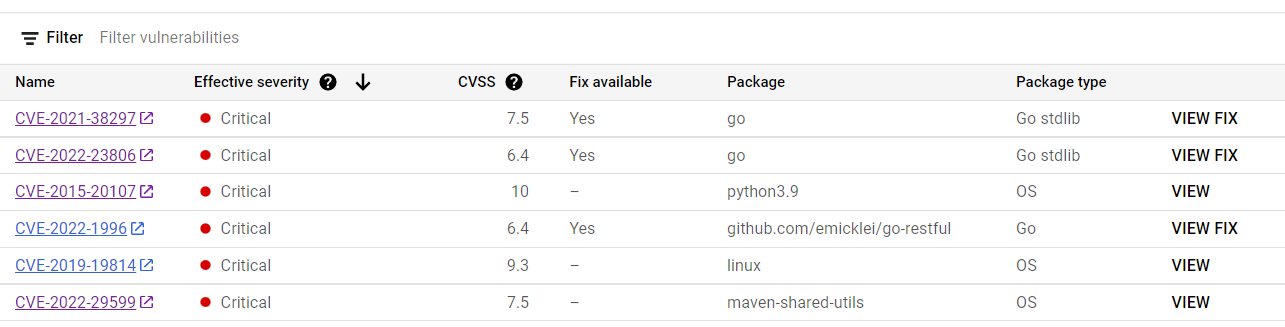
我构建了docker映像并将其上传到google工件注册中心,但我总是遇到安全漏洞--我试图修复它,但不幸的是,我无法修复安全漏洞。请看关键的错误,并让我知道我如何能够解决这个问题,任何建议都会很感激。谢谢。
Stack Overflow用户
发布于 2022-09-25 09:22:23
看起来,DockerFile正在尝试将特定版本的golang手工放入"/usr/local“,而不是使用Debian包管理器。根据https://security-tracker.debian.org/tracker/CVE-2021-38297的信息,这个错误是在1.17.3-3中修复的,Dockerfile使用的是1.19.1。所以也许在基础图像中有一个古老的金刚装置..。这也是扫描仪正在收集的东西。检查一下,如果有必要的话,apt install会更新一个版本。
同样,https://security-tracker.debian.org/tracker/CVE-2022-23806应该由更新版本的golang修复。有关版本,请参阅CVE链接。
可以通过升级到Python3.10.6-1或更高版本来修复https://security-tracker.debian.org/tracker/CVE-2015-20107。
https://security-tracker.debian.org/tracker/CVE-2019-19814似乎没有上游的修复程序,所以除了不使用f2fs之外,您什么也做不了。
可以通过更新maven共享-utils包来修复https://security-tracker.debian.org/tracker/CVE-2022-29599;有关版本,请参阅CVE链接。
https://security-tracker.debian.org/tracker/CVE-2022-1996有一个上游修复程序,但是它正在等待Debian团队的分类。
总之,一些漏洞是可以修复的,但对于其中的几个漏洞,没有现成的修补程序。所以:
available.
- Then应用
- 修复,读取CVEs和附带的解释;1)判断它们是否代表您可以承担的风险;2)确定是否可以减轻风险;例如,通过锁定对正在运行的码头容器的访问权限。
https://stackoverflow.com/questions/73842762
复制相似问题
腾讯云开发者

Copyright © 2013 - 2026 Tencent Cloud. All Rights Reserved. 腾讯云 版权所有
深圳市腾讯计算机系统有限公司 ICP备案/许可证号:粤B2-20090059  粤公网安备44030502008569号
腾讯云计算(北京)有限责任公司 京ICP证150476号 | 京ICP备11018762号