
使用dataset模式读取JSON文件
使用dataset模式读取JSON文件
提问于 2022-09-27 09:18:11
这是一个JSON文件,它被添加到Foundry数据集中:
[
  {
    "name": "Tim",
    "born": "2000 01 01",
    "location": {"country": "UK", "city": "London"},
    "scores": [
      {"date": "2022 02 01", "score": 4},
      {"date": "2022 03 01", "score": 4}
    ]
  },
  {
    "name": "Kim",
    "born": "1999 12 31",
    "location": {"country": "LT", "city": "Vilnius"},
    "scores": [
      {"date": "2022 02 01", "score": 3},
      {"date": "2022 03 01", "score": 5}
    ]
  }
]
dataset当前没有架构,因此预览仅显示文件:
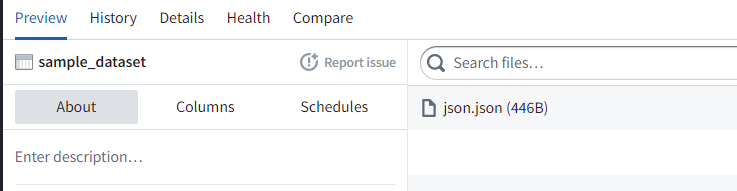
如何添加模式以便我们可以预览JSON文件?
数据类型:
“名称”:字符串
“出生”:日期
“地点”:地图
“分数”:结构数组(“日期”:日期,“分数”:整数)
回答 1
Stack Overflow用户
回答已采纳
发布于 2022-09-27 09:18:11
要读取JSON文件,必须将"multiline"选项设置为true。
(如果是JSONL文件,则不需要"multiline"选项,即它是false)。
对于地图,必须填充"mapKeyType"和"mapValueType"。
对于数组,必须填充"arraySubtype"。
对于struct,必须填充"subSchemas"。
对于日期,如果不是"dateFormat",则可能需要使用"yyyy-MM-dd"选项。
正确设置所有内容将导致此预览:

使用的模式如下:
{
  "fieldSchemaList": [
    {
      "type": "STRING",
      "name": "name",
      "nullable": null,
      "userDefinedTypeClass": null,
      "customMetadata": {},
      "arraySubtype": null,
      "precision": null,
      "scale": null,
      "mapKeyType": null,
      "mapValueType": null,
      "subSchemas": null
    },
    {
      "type": "DATE",
      "name": "born",
      "nullable": null,
      "userDefinedTypeClass": null,
      "customMetadata": {},
      "arraySubtype": null,
      "precision": null,
      "scale": null,
      "mapKeyType": null,
      "mapValueType": null,
      "subSchemas": null
    },
    {
      "type": "MAP",
      "name": "location",
      "nullable": null,
      "userDefinedTypeClass": null,
      "customMetadata": {},
      "arraySubtype": null,
      "precision": null,
      "scale": null,
      "mapKeyType": {
        "type": "STRING",
        "name": null,
        "nullable": null,
        "userDefinedTypeClass": null,
        "customMetadata": {},
        "arraySubtype": null,
        "precision": null,
        "scale": null,
        "mapKeyType": null,
        "mapValueType": null,
        "subSchemas": null
      },
      "mapValueType": {
        "type": "STRING",
        "name": null,
        "nullable": null,
        "userDefinedTypeClass": null,
        "customMetadata": {},
        "arraySubtype": null,
        "precision": null,
        "scale": null,
        "mapKeyType": null,
        "mapValueType": null,
        "subSchemas": null
      },
      "subSchemas": null
    },
    {
      "type": "ARRAY",
      "name": "scores",
      "nullable": null,
      "userDefinedTypeClass": null,
      "customMetadata": {},
      "arraySubtype": {
        "type": "STRUCT",
        "name": null,
        "nullable": null,
        "userDefinedTypeClass": null,
        "customMetadata": {},
        "arraySubtype": null,
        "precision": null,
        "scale": null,
        "mapKeyType": null,
        "mapValueType": null,
        "subSchemas": [
          {
            "type": "DATE",
            "name": "date",
            "nullable": null,
            "userDefinedTypeClass": null,
            "customMetadata": {},
            "arraySubtype": null,
            "precision": null,
            "scale": null,
            "mapKeyType": null,
            "mapValueType": null,
            "subSchemas": null
          },
          {
            "type": "INTEGER",
            "name": "score",
            "nullable": null,
            "userDefinedTypeClass": null,
            "customMetadata": {},
            "arraySubtype": null,
            "precision": null,
            "scale": null,
            "mapKeyType": null,
            "mapValueType": null,
            "subSchemas": null
          }
        ]
      },
      "precision": null,
      "scale": null,
      "mapKeyType": null,
      "mapValueType": null,
      "subSchemas": null
    }
  ],
  "primaryKey": null,
  "dataFrameReaderClass": "com.palantir.foundry.spark.input.DataSourceDataFrameReader",
  "customMetadata": {
    "format": "json",
    "options": {
      "multiline": true,
      "dateFormat": "yyyy MM dd"
    }
  }
}JSON可以找到可用的文件读取选项,包括读取这里文件。
页面原文内容由Stack Overflow提供。腾讯云小微IT领域专用引擎提供翻译支持
原文链接:
https://stackoverflow.com/questions/73865153
复制相关文章
相似问题
腾讯云开发者

Copyright © 2013 - 2026 Tencent Cloud. All Rights Reserved. 腾讯云 版权所有
深圳市腾讯计算机系统有限公司 ICP备案/许可证号:粤B2-20090059  粤公网安备44030502008569号
腾讯云计算(北京)有限责任公司 京ICP证150476号 | 京ICP备11018762号