
使用远程(vsicurl)计算哨兵-2数据与{星}包?
我正在使用rstac访问哨兵-2数据在一个需要的边界框和日期范围和计算NDVI。对于我来说,在使用{terra}包时,这是相对*干净和直接的,但是我想使用{stars}语法来代替(更多关于为什么更深入)。
首先,快速查询{rstac}以获取数据的URL:
library(rstac)
library(sf)
library(stars)
library(terra)

bbox <- st_bbox(c(xmin=-86.94663, ymin=33.43930,
                  xmax=-86.67684, ymax=33.62239),
                crs=4326) # Birmingham, AL
matches <-
  stac("https://planetarycomputer.microsoft.com/api/stac/v1/") |>
  stac_search(collections = "sentinel-2-l2a",
              bbox = bbox,
              datetime = "2019-06-01/2019-08-01") |>
  get_request() |>
  items_sign(sign_fn = sign_planetary_computer())
这将返回大量匹配和适当的元数据,为了简单起见,我将从属性元数据中选择一个(#59)具有低eo:cloudcover的元数据:
best_img <- matches$features[[59]] 现在,我将使用vsicurl机制访问红色和近红外波段,而无需下载整个文件。这些图像比我的搜索框要大得多,所以我也想要突出那些我不会使用的像素,以避免不必要的计算。
我的第一步很难看。要使用{terra}裁剪我的图像,我需要一个SpatVec曲奇切割器来传递给crop()。我已经有了上面的bbox作为sf类型的边界框,我做了下面的工作,以便在与Sentinel2资产匹配的投影中得到它,但是这感觉非常麻烦。我想要一个简洁、纯正的terra版本,但这个版本很管用:
red <- read_stars( paste0("/vsicurl/", best_img$assets$B04$href) )
bbox_proj <- bbox |> st_as_sfc() |> st_transform(st_crs(red)) |> vect()
无论如何,在手裁剪向量中,在terra中的NDVI计算非常优雅和快速(在使用最小RAM的良好网络连接上):
red <- rast( paste0("/vsicurl/", best_img$assets$B04$href) ) |> crop(bbox_proj)
nir <- rast( paste0("/vsicurl/", best_img$assets$B08$href) ) |> crop(bbox_proj)
ndvi_fun <- function(x, y) (x - y) / (x + y)
ndvi <- lapp(c(nir, red), fun = ndvi_fun)
ndvi  |> plot()
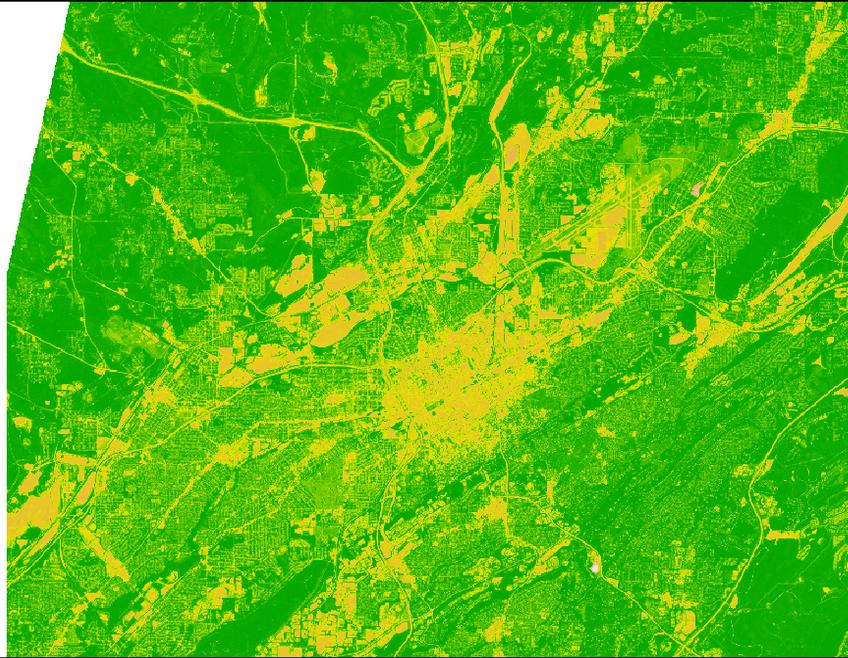
因此,我的主要问题是,与使用{stars}的相同计算的等效语法是什么?到目前为止,我只提出了下面的代码,特别是只有在使用我必须首先创建的local副本时才能工作(因此,也就不足为奇了,速度也要慢得多!)
# ugh why can't we combine these in a single read_stars?
red <- read_stars( paste0("/vsicurl/", best_img$assets$B04$href) )
nir <- read_stars( paste0("/vsicurl/", best_img$assets$B08$href) )

bbox_proj <- bbox |> st_as_sfc() |> st_transform(st_crs(red))

# combine 'by hand' and then crop...
remote <- c(r1,r2, along=3) |> st_crop(bbox_proj)

# ugh! ugh! why do we have to use local copy for this to work??
stars::write_stars(remote, "test.tif")
local <- read_stars("test.tif")

# Um, I think this is correct NDVI method, hope I didn't reverse the bands...
# also surprised this is considerably slower and uses much more RAM
calc_ndvi <- function(x) (x[2] - x[1])/(x[2] + x[1])
ndvi <- st_apply(local, 1:2,  FUN = calc_ndvi)
plot(ndvi, col =  rgb(0, (0:100)/100, 0))
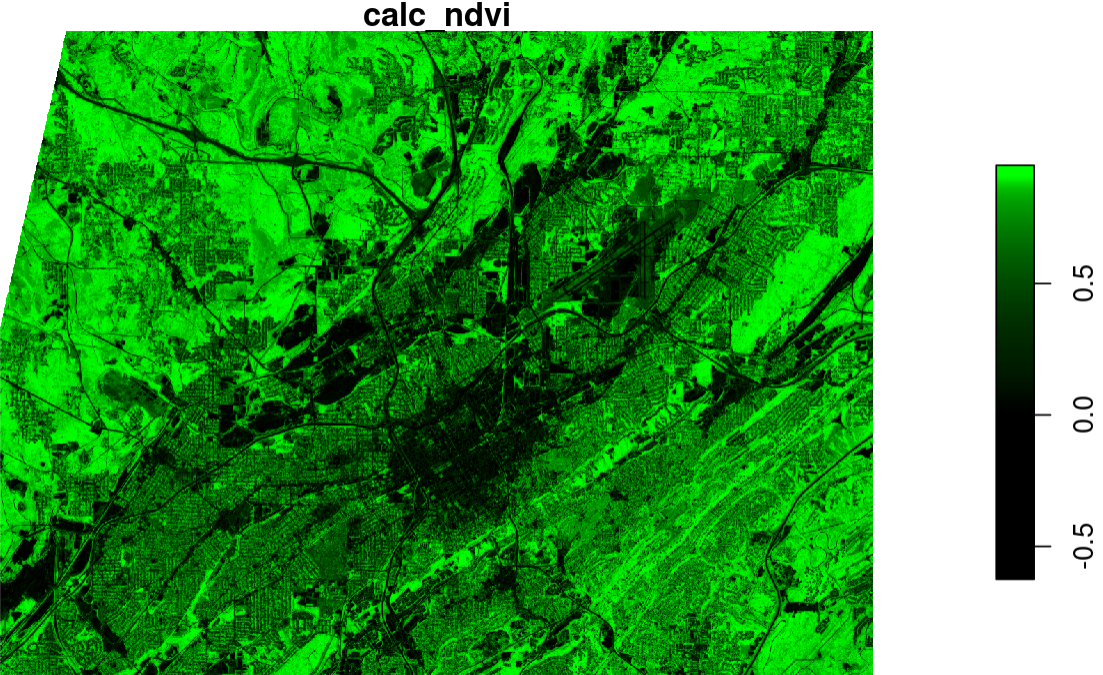
在我的星号语法中,我肯定遗漏了一些东西,导致这种情况变得更慢、更冗长,而且只在st_apply()对local副本而不是remote对象进行操作时才能工作。
风格和偏好
如果它适用于{ terra } --这其中一部分是我在学习星星,但我也是一名讲师,我总是觉得教我的学生sf和terra语法很麻烦。terra也不警告不匹配的CRS,如果您尝试上述作物而不重新投影包围框CRS,这是一个常见的错误对学生。在这两种情况下,我发现重新投影的边界框的作物比我喜欢的更麻烦。特别是访问文件“两次”,一次读取crs,然后再裁剪,这似乎很尴尬,我希望一个更优雅的语法是可能的,但还没有弄清楚。
回答 2
Stack Overflow用户
发布于 2022-10-13 03:37:36
这没有回答您的问题,但是这里有一个更简洁的terra方法,使用我在terra1.6.31中介绍的project<SpatExtent>方法(目前是开发版本)。
library(rstac)
library(terra)
#terra 1.6.31

bbox <- c(xmin=-86.94663, ymin=33.43930, xmax=-86.67684, ymax=33.62239)

matches <- stac("https://planetarycomputer.microsoft.com/api/stac/v1/") |>
        stac_search(collections = "sentinel-2-l2a",
            bbox = bbox, datetime = "2019-06-01/2019-08-01") |>
        get_request() |>  items_sign(sign_fn = sign_planetary_computer())

best_img <- matches$features[[59]] 获取第一个数据源,并将lon/lat搜索范围投影到数据的坐标参考系统。注意使用(新)参数xy=TRUE表示bbox数字的顺序为(xmin、ymin、xmax、ymax),而"terra“默认为预期(xmin、xmax、ymin、ymax )。
red <- rast( paste0("/vsicurl/", best_img$assets$B04$href) )
e <- ext(bbox, xy=TRUE) |>
     project("+proj=longlat", crs(red))
裁剪第一个数据源并下载并裁剪其他数据源
red <- crop(red, e)
nir <- rast( paste0("/vsicurl/", best_img$assets$B08$href) ) |> crop(e)
并使用这些数据
ndvi_fun <- function(x, y) (x - y) / (x + y)
ndvi <- lapp(c(nir, red), fun = ndvi_fun)以上lapp的使用是很好的,但是对于这样一个简单的函数,下面的使用会更快
ndvi <- (red-nir) / (red+nir)如果你要和lapp一起去,你可以考虑这样做
rednir <- paste0("/vsicurl/", c(best_img$assets$B04$href, best_img$assets$B08$href)) |>
          rast() |> crop(e, names=c("red", "nir"))
ndvi <- lapp(rednir, ndvi_fun)Stack Overflow用户
发布于 2022-11-01 17:00:11
请注意,在使用最新的GitHub版本(0.5.7)时,{stars}代码完全按照预期工作。基准略快于{terra},但两者都太快,很难比较。调整下采样参数可以很容易地减少与最终图相关联的内存使用,而其余部分的资源占用非常低。
在这里,{stars}和{terra}的性能和语法都令人印象深刻。
library(rstac)
library(stars)

## STAC Search
coords <- c(xmin=-86.94663, ymin=33.43930,
            xmax=-86.67684, ymax=33.62239)
bbox <- st_bbox(coords, crs=4326) # Birmingham, AL
matches <-
  stac("https://planetarycomputer.microsoft.com/api/stac/v1/") |>
  stac_search(collections = "sentinel-2-l2a",
              bbox = bbox,
              datetime = "2019-06-01/2019-08-01") |>
  get_request() |>
  items_sign(sign_fn = sign_planetary_computer())
best_img <- matches$features[[59]] # I picked one with low cloud clover
B04 <- paste0("/vsicurl/", best_img$assets$B04$href)
B08 <- paste0("/vsicurl/", best_img$assets$B08$href)

## Time to read, transform, crop, and compute NDVI!
bench::bench_time({

img <- read_stars(c(B04,B08), along=3)
bbox_proj <- bbox |> st_as_sfc() |> st_transform(st_crs(img))
remote <- img |> st_crop(bbox_proj)
calc_ndvi <- function(x) (x[2] - x[1])/(x[2] + x[1])
ndvi <- st_apply(remote, 1:2,  FUN = calc_ndvi)

})

## above is all 'lazy eval' and nearly instantaneous.
## downsample by higher power of 2 for lower resolution / less ram
bench::bench_time(

plot(ndvi, col =  rgb(0, (0:100)/100, 0), downsample = 2^3)

)
脚注
对于一些用户(美国/加拿大以外)来说,stac API搜索似乎失败了,但不确定为什么会这样。Sentinel2-L2A数据也应该可以从其他目录中获得,这些目录有STAC目录,但没有STAC API。
https://stackoverflow.com/questions/74048891
复制相似问题
腾讯云开发者

Copyright © 2013 - 2026 Tencent Cloud. All Rights Reserved. 腾讯云 版权所有
深圳市腾讯计算机系统有限公司 ICP备案/许可证号:粤B2-20090059  粤公网安备44030502008569号
腾讯云计算(北京)有限责任公司 京ICP证150476号 | 京ICP备11018762号