
角材自定义输入验证信息未用垫子显示
角材自定义输入验证信息未用垫子显示
提问于 2022-10-18 09:23:03
我使用ControlValueAccessor实现了基于官方指南的自定义控制
- https://material.angular.io/guide/creating-a-custom-form-field-control
- https://blog.angular-university.io/angular-custom-form-controls/
验证错误在我们触及自定义字段之前不会显示的问题。在我的例子中,我对步进器有一个问题,但是当我执行this.form.markAllAsTouched()时,它也不起作用。
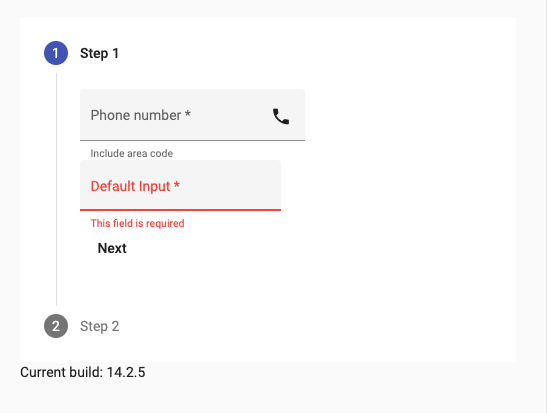
我提供下面的例子,基于官方的定制电话字段。使用空字段单击"Next“。
回答 2
Stack Overflow用户
回答已采纳
发布于 2022-10-24 10:24:19
请参见函数errroState。您可以添加条件ngControl.invalid并标记为ngControl是使用
  get errorState(): boolean {
    const touched=!!this.ngControl?.touched;
    if (touched!=this.touched)
    {
      this.touched=touched;
      this.stateChanges.next();
    }
    return (this.parts.invalid || !!this.ngControl?.invalid) && this.touched;
  }
然后,如果标记为触碰的FormControl,则会看到错误
<button type="button" mat-button matStepperNext
(click)="form.markAllAsTouched()" >Next</button>Stack Overflow用户
发布于 2022-10-24 08:06:33
您只需将MyTelInput属性touched从false更改为true即可。
export class MyTelInput
  implements ControlValueAccessor, MatFormFieldControl<MyTel>, OnDestroy
{
.
.
.
touched = true; //change from false to true
.
.
}
也可以在角度材料文档中查看更多信息。
https://material.angular.io/guide/creating-a-custom-form-field-control#errorstate

页面原文内容由Stack Overflow提供。腾讯云小微IT领域专用引擎提供翻译支持
原文链接:
https://stackoverflow.com/questions/74108591
复制相关文章
相似问题
腾讯云开发者

Copyright © 2013 - 2026 Tencent Cloud. All Rights Reserved. 腾讯云 版权所有
深圳市腾讯计算机系统有限公司 ICP备案/许可证号:粤B2-20090059  粤公网安备44030502008569号
腾讯云计算(北京)有限责任公司 京ICP证150476号 | 京ICP备11018762号