
C# .Net6.0--如何通过C#更改Windows页面文件大小(虚拟内存)?
在Windows默认设置中,页面文件大小设置为Automatically manage paging file size for all drives。
这个项目很特别。它不是由操作者维护的。这些计算机只供内部人员处理业务或学习业务流程。这些电脑没有固定的用户,它们被放置在公共场所。当他们有问题时,值班人员将使用固定的鬼文件重新安装系统,并执行脚本来优化系统。这些设备都很老,还有一些带有4G内存和64G硬盘的薄终端。不久,新设备将取代它们,并有新的管理解决方案。作为取代新方案之前的临时过渡方案,我认为提供一个简单的“优化”程序将是目前处理这一问题的最简单方法。
我想通过C# ..net 6.0将页面文件大小更改为物理内存的20% - 50%,类似于
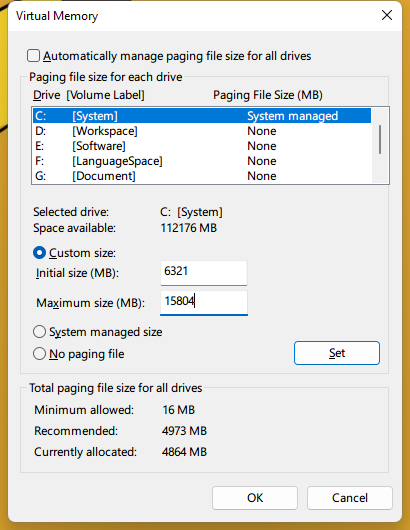
(测试计算机的物理内存为32 GB)
我检查了一些信息,似乎wmic可以满足我的需要。
wmic COMPUTERSYSTEM set AutomaticManagedPagefile=false
wmic PAGEFILESET where name ="C:\\pagefile.sys" set InitialSize=1638,MaximumSize=4095
我在Windows10 2019 LTSC上测试了这两行命令,它们在我使用代码执行时使用well.But,我有一些problems.Here是我的代码:
        internal static void ExecuteCmd(string command)
        {
            try
            {
                Process process = new();
                ProcessStartInfo startInfo = new()
                {
                    WindowStyle = ProcessWindowStyle.Hidden,
                    UseShellExecute = false,
                    CreateNoWindow = true,
                    FileName = "cmd.exe",
                    Arguments = "/c " + command,
                    RedirectStandardInput = true,
                    RedirectStandardOutput = true,
                    RedirectStandardError = true,
            };
                process.StartInfo = startInfo;
                process.Start();
            }
            catch(Exception e)
            {
                LogHelper.Error(e.Message);
            }
        }

        internal static void ChangeSystemPageFileSize()
        {
            string? TotalPhysicalMemory = "0";
            string? InitialSize = "0";
            string? MaximumSize = "0";

            try
            {
                ManagementObjectSearcher Search = new ManagementObjectSearcher();
                Search.Query = new ObjectQuery("Select * From Win32_ComputerSystem");
                foreach (ManagementObject obj in Search.Get().Cast<ManagementObject>())
                {
                    TotalPhysicalMemory = $"{Math.Round(Convert.ToDouble(obj["TotalPhysicalMemory"]) / (1024 * 1024))}";

                    if (!string.IsNullOrWhiteSpace(TotalPhysicalMemory))
                    {
                        break;
                    }
                }
                InitialSize = Math.Floor(int.Parse(TotalPhysicalMemory) * 0.2).ToString().Trim();
                MaximumSize = Math.Floor(int.Parse(TotalPhysicalMemory) * 0.5).ToString().Trim();
                CommandHelper.ExecuteCmd("wmic COMPUTERSYSTEM set AutomaticManagedPagefile=false");
                CommandHelper.ExecuteCmd("wmic PAGEFILESET where name =\"C:\\\\pagefile.sys\" set InitialSize=" + InitialSize +",MaximumSize=" + MaximumSize);
            }
            catch (Exception e)
            {
                LogHelper.Error(e.Message);
            }
我已经获得了正确的物理内存大小,但是只有执行的第一个命令需要重新启动effect.When计算机,我得到的窗口设置如下
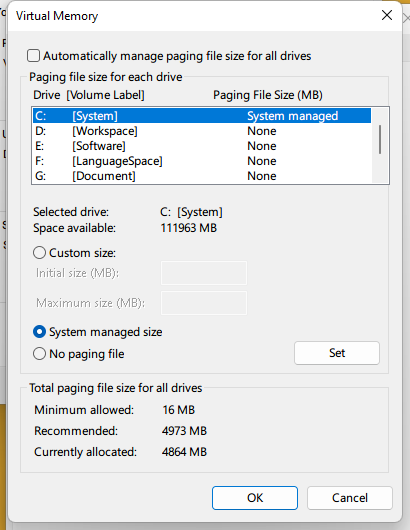
。
谢谢@ProgrammingLlama @user9938我通过WMI更新了页面文件大小设置。可能有一个小问题:
                InitialSize = (UInt32)Math.Floor(TotalPhysicalMemory * 0.2);
                MaximumSize = (UInt32)Math.Floor(TotalPhysicalMemory * 0.5);
                ManagementObject ComputerSystem = new($@"ROOT\CIMV2:Win32_ComputerSystem.Name='{Environment.MachineName}'");
                ComputerSystem["AutomaticManagedPagefile"] = false;
                ComputerSystem.Put();
                ManagementObject PageFileSetting = new($@"ROOT\CIMV2:Win32_PageFileSetting");
                PageFileSetting.SetPropertyValue("Name", "C:\\PAGEFILE.SYS");
                PageFileSetting.SetPropertyValue("InitialSize", InitialSize);
                PageFileSetting.SetPropertyValue("MaximumSize", MaximumSize);
                PageFileSetting["Name"] = "C:\\PAGEFILE.SYS";
                PageFileSetting["InitialSize"] = InitialSize;
                PageFileSetting["MaximumSize"] = MaximumSize;
PageFileSetting.Put();SetPropertyValue方法和Put方法都不能更新InitialSize MaximumSize Name的值。
也许有人能给我点建议?
回答 1
Stack Overflow用户
发布于 2022-10-24 22:55:35
以下说明如何使用ManagementObject更改Windows页文件的设置(在OS分区上)。
Note:下面的代码进行了有限的测试。建议您自己进行测试,以确保代码按需要运行。虽然代码似乎为OS驱动器设置了PageFile大小,但可能有其他(更理想的)方法来设置这些值。此外,在运行下面的代码之前,请确保您的创建系统还原点。另外,确保您已经执行了计算机的备份。
TotalPhysicalMemory 物理内存的总大小。请注意,在某些情况下,此属性可能无法返回物理内存的准确值。例如,如果BIOS使用的是一些物理内存,这是不准确的。要获得准确的值,请使用Win32_PhysicalMemory中的容量属性。
下载/安装NuGet包:System.Management
添加应用程序报表文件
- 在VS菜单中,单击Project
- 选择添加新项.
- 选择应用程序报表文件(名称: app.manifest)
- 单击添加
开放解决方案资源管理器
- 在VS菜单中,单击View
- 选择解决方案资源管理器
修改requestedExecutionLevel
- 在解决方案资源管理器中,右键单击app.manifest并选择Open。
与的变化
<requestedExecutionLevel level="asInvoker" uiAccess="false" />改为
<requestedExecutionLevel level="requireAdministrator" uiAccess="false" />看来,PagingFiles的数据可以通过以下方式进行修改:
使用指令添加以下内容
using System.Management;using Microsoft.Win32;using System.Diagnostics;
码
public UInt64 GetTotalMemoryInMB()
{
    UInt64 totalPhysicalMemoryInBytes = 0;

    using (ManagementObjectSearcher searcher = new ManagementObjectSearcher("Select Capacity from Win32_PhysicalMemory"))
    {
        foreach (ManagementObject obj in searcher.Get())
        {
            if (obj == null)
                continue;

            totalPhysicalMemoryInBytes += obj["Capacity"] is null ? 0 : Convert.ToUInt64(obj["Capacity"]);
        }
    }

    return totalPhysicalMemoryInBytes / 1024 / 1024;
}

public string SetPageFileWmi(uint initialSizePercentage, uint maximumSizePercentage)
{
    StringBuilder sb = new StringBuilder();

    //get Windows folder
    string? winDir = Environment.GetEnvironmentVariable("windir");

    //get drive letter that OS is installed on
    string winDriveLetter = winDir?.Substring(0, 2) is null ? String.Empty : winDir.Substring(0, 2); //ex: C:

    //get total physical memory
    UInt64 totalPhysicalMemory = GetTotalMemoryInMB();

    sb.AppendLine($"Total Physical Memory: {totalPhysicalMemory}");

    //calculate initial size
    UInt32 initialSize = Convert.ToUInt32(Math.Floor(totalPhysicalMemory * (initialSizePercentage / 100.0))); //ex: 20% / 100.0 = 0.2
    initialSize = initialSize < 16 ? 16 : initialSize; //initial size needs to be >= 16 MB

    //calculate maximum size
    UInt32 maximumSize = Convert.ToUInt32(Math.Floor(totalPhysicalMemory * (maximumSizePercentage / 100.0))); //ex: 50% / 100.0 = 0.5

    using (ManagementObject obj = new ManagementObject($@"ROOT\CIMV2:Win32_ComputerSystem.Name='{Environment.MachineName}'"))
    {
        //set value
        obj.SetPropertyValue("AutomaticManagedPagefile", false);

        //commit
        obj.Put(new PutOptions() { Type = PutType.UpdateOnly });
    }

    using (ManagementObjectSearcher searcher = new ManagementObjectSearcher("Select Name from Win32_PageFile"))
    {
        foreach (ManagementObject obj in searcher.Get())
        {
            string? pfName = obj["Name"]?.ToString();

            Debug.WriteLine($"pfName: '{pfName}'");

            //only get the page file for the OS drive
            if (!String.IsNullOrEmpty(pfName) && pfName.ToLower().StartsWith(winDriveLetter.ToLower()))
            {
                sb.AppendLine($"Name: {pfName}");
                sb.AppendLine($"InitialSize: {initialSize}");
                sb.AppendLine($"MaximumSize: {maximumSize}");
                sb.AppendLine("");

                using (ManagementObject obj2 = new ManagementObject($@"ROOT\CIMV2:Win32_PageFileSetting.Name='{pfName}'"))
                {
                    //set value
                    //obj2.SetPropertyValue("Name", pfName);
                    obj2.SetPropertyValue("InitialSize", initialSize);
                    obj2.SetPropertyValue("MaximumSize", maximumSize);

                    //commit
                    obj2.Put(new PutOptions() { Type = PutType.UpdateOrCreate });
                }
            }
        }
    }

    return sb.ToString();
}
使用
string result = SetPageFileWmi(20, 50);根据更改Pagefile的位置的说法,注册位置是HKLM\SYSTEM\CurrentControlSet\Control\Session Manager\Memory Management\。
更新
下面是一个重置为默认设置的方法:
public static string SetPageFileDefaultWmi()
{
    using (ManagementObject obj = new ManagementObject($@"ROOT\CIMV2:Win32_ComputerSystem.Name='{Environment.MachineName}'"))
    {
        obj.SetPropertyValue("AutomaticManagedPagefile", true);
        obj.Put(new PutOptions() { Type = PutType.UpdateOnly });
    }

    return "Paging file set to default.";
}
资源
附加资源
https://stackoverflow.com/questions/74176548
复制相似问题
腾讯云开发者

Copyright © 2013 - 2026 Tencent Cloud. All Rights Reserved. 腾讯云 版权所有
深圳市腾讯计算机系统有限公司 ICP备案/许可证号:粤B2-20090059  粤公网安备44030502008569号
腾讯云计算(北京)有限责任公司 京ICP证150476号 | 京ICP备11018762号