
C++调试器工具在VSCode中显示详细的变量细节
C++调试器工具在VSCode中显示详细的变量细节
提问于 2022-11-08 04:08:35
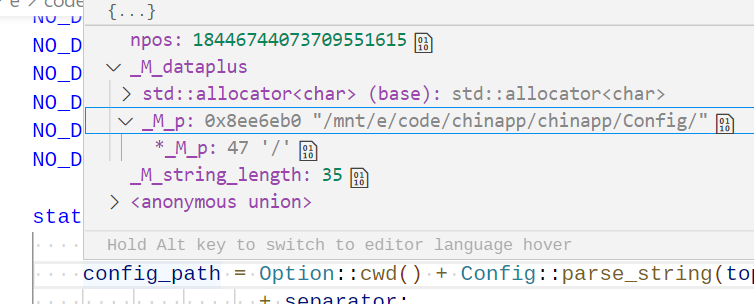
我正在VSCode中调试一个VSCode项目。但是调试器工具显示了太多关于变量的内部细节,而我只想看到string的值。以string为例
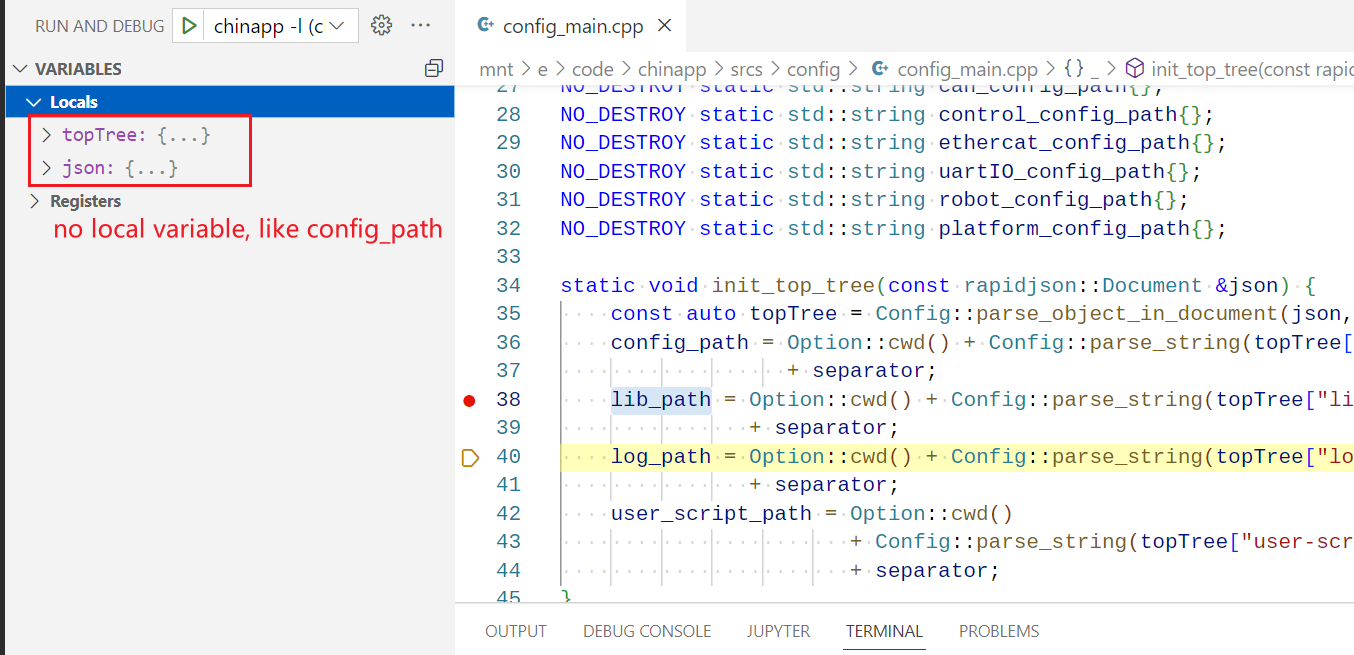
此外,在编辑器左侧面板的Debug->VARIABLES->Locals区域中,没有添加我的局部变量,应该在其中显示它们。
相关配置文件:
task.json--我的task.json相当冗长,所以我不会把它的所有内容都发出去。但本质上,我用g++ -O0
完成了这个项目
launch.json--基本上它用gdb
来修饰程序。
{
    "configurations": [
        {
            "name": "C/C++: clang++ build and debug active file",
            "type": "cppdbg",
            "request": "launch",
            "program": "${fileDirname}/${fileBasenameNoExtension}",
            "args": [],
            "stopAtEntry": false,
            "cwd": "${fileDirname}",
            "environment": [],
            "externalConsole": false,
            "MIMode": "gdb",
            "setupCommands": [
                {
                    "description": "Enable pretty-printing for gdb",
                    "text": "-enable-pretty-printing",
                    "ignoreFailures": true
                },
                {
                    "description": "Set Disassembly Flavor to Intel",
                    "text": "-gdb-set disassembly-flavor intel",
                    "ignoreFailures": true
                }
            ],
            "preLaunchTask": "C/C++: clang++ build active file",
            "miDebuggerPath": "/usr/bin/gdb"
        }
    ],
    "version": "2.0.0"
}c_cpp_properties.json--我认为最重要的选择是compileCommands和configurationProvider
{
    "configurations": [
        {
            "name": "Linux",
            "includePath": [
                "${workspaceFolder}/deps",
                "${workspaceFolder}/srcs"
            ],
            "defines": [],
            "compilerPath": "/usr/bin/g++",
            "cStandard": "c11",
            "cppStandard": "c++17",
            "compileCommands": "${workspaceFolder}/compile_commands.json",
            "configurationProvider": "ms-vscode-cpptools"
        }
    ],
    "version": 4
}compile_commands.json--它很长,这里有一个片段。
{
        "directory": "/mnt/e/code/chinapp",
        "arguments": [
            "g++",
            "-g",
            "-std=c++17",
            "-fPIC",
            "-O0",
            "-Wfatal-errors",
            "-Werror",
            "-Wall",
            "-Wextra",
            "-Weffc++",
            "-pedantic",
            "-pedantic-errors",
            "-Wshadow",
            "-Wconversion",
            "-Wfloat-equal",
            "-Wold-style-cast",
            "-Woverloaded-virtual",
            "-MF",
            "/mnt/e/code/chinapp/build/%mnt%e%code%chinapp%srcs%chinapp.d",
            "-MT",
            "/mnt/e/code/chinapp/build/%mnt%e%code%chinapp%srcs%chinapp.o",
            "-c",
            "/mnt/e/code/chinapp/srcs/chinapp.cpp",
            "-o",
            "/mnt/e/code/chinapp/build/%mnt%e%code%chinapp%srcs%chinapp.o",
            "-pthread",
            "-I",
            "/mnt/e/code/chinapp/deps",
            "-I",
            "/mnt/e/code/chinapp/srcs",
            "-finline-limit=1600",
            "-D",
            "ASSERT_ENABLE=1"
        ],
        "file": "/mnt/e/code/chinapp/srcs/chinapp.cpp"
}- 如何解决问题?
- 为什么会发生这种情况?这个项目过去运行得很好。
- 如何在将来避免它。
回答 1
Stack Overflow用户
发布于 2022-11-18 08:42:00
将下面的配置添加到lauch.json解决了问题。
"setupCommands": [
            {
                "description": "Enable pretty-printing for gdb",
                "text": "-enable-pretty-printing",
                "ignoreFailures": true
            },
            {
                "description": "Set Disassembly Flavor to Intel",
                "text": "-gdb-set disassembly-flavor intel",
                "ignoreFailures": true
            }
]但我不太明白setupCommand是用来做什么的,希望有人能把它搞清楚。
页面原文内容由Stack Overflow提供。腾讯云小微IT领域专用引擎提供翻译支持
原文链接:
https://stackoverflow.com/questions/74355578
复制相关文章
相似问题
腾讯云开发者

Copyright © 2013 - 2026 Tencent Cloud. All Rights Reserved. 腾讯云 版权所有
深圳市腾讯计算机系统有限公司 ICP备案/许可证号:粤B2-20090059  粤公网安备44030502008569号
腾讯云计算(北京)有限责任公司 京ICP证150476号 | 京ICP备11018762号