
Netlyfy: CKEditor5 - TypeError:无法读取未定义的属性(读取“版本”)
我一直在正常部署,但最后一次部署向我展示了以下内容:
1:58:34 PM: build-image version: 4c0c1cadee6a31c9bb8d824514030009c4c05c6a (focal)
1:58:34 PM: build-image tag: v4.15.0
1:58:34 PM: buildbot version: 44377b3b6a4027dd8a09c3df7d29646ce9192423
1:58:34 PM: Fetching cached dependencies
1:58:34 PM: Starting to download cache of 419.1MB
1:58:38 PM: Finished downloading cache in 4.318992901s
1:58:38 PM: Starting to extract cache
1:58:48 PM: Finished extracting cache in 9.085548565s
1:58:48 PM: Finished fetching cache in 13.475179533s
1:58:48 PM: Starting to prepare the repo for build
1:58:48 PM: Preparing Git Reference refs/heads/main
1:58:51 PM: Parsing package.json dependencies
1:58:52 PM: Section completed: initializing
1:58:52 PM: Starting build script
1:58:52 PM: Installing dependencies
1:58:52 PM: Python version set to 2.7
1:58:52 PM: Started restoring cached node version
1:58:53 PM: Finished restoring cached node version
1:58:53 PM: v16.18.1 is already installed.
1:58:53 PM: Now using node v16.18.1 (npm v8.19.2)
1:58:54 PM: Enabling node corepack
1:58:54 PM: Started restoring cached build plugins
1:58:54 PM: Finished restoring cached build plugins
1:58:54 PM: Attempting ruby version 2.7.2, read from environment
1:58:54 PM: Using ruby version 2.7.2
1:58:55 PM: Using PHP version 8.0
1:58:55 PM: Started restoring cached yarn cache
1:59:00 PM: Finished restoring cached yarn cache
1:59:00 PM: No yarn workspaces detected
1:59:00 PM: Started restoring cached node modules
1:59:00 PM: Finished restoring cached node modules
1:59:01 PM: Installing NPM modules using Yarn version 1.22.19
1:59:01 PM: yarn install v1.22.19
1:59:01 PM: warning package-lock.json found. Your project contains lock files generated by tools other than Yarn. It is advised not to mix package managers in order to avoid resolution inconsistencies caused by unsynchronized lock files. To clear this warning, remove package-lock.json.
1:59:01 PM: [1/4] Resolving packages...
1:59:12 PM: [2/4] Fetching packages...
1:59:14 PM: [3/4] Linking dependencies...
1:59:14 PM: warning "@ckeditor/ckeditor5-dev-utils > ts-loader@9.4.1" has unmet peer dependency "typescript@*".
1:59:14 PM: warning "@ckeditor/ckeditor5-dev-utils > ts-loader@9.4.1" has incorrect peer dependency "webpack@^5.0.0".
1:59:14 PM: warning " > bootstrap@4.6.1" has unmet peer dependency "popper.js@^1.16.1".
1:59:14 PM: warning " > v-calendar@2.4.1" has unmet peer dependency "@popperjs/core@^2.4.0".
1:59:14 PM: warning " > vue-cropperjs@5.0.0" has incorrect peer dependency "vue@>=3.0.0".
1:59:14 PM: warning " > vue-instantsearch@4.3.3" has unmet peer dependency "algoliasearch@>= 3.32.0 < 5".
1:59:14 PM: warning "vue-instantsearch > instantsearch.js@4.40.4" has unmet peer dependency "algoliasearch@>= 3.1 < 5".
1:59:14 PM: warning "vue-instantsearch > instantsearch.js > algoliasearch-helper@3.8.2" has unmet peer dependency "algoliasearch@>= 3.1 < 5".
1:59:14 PM: warning " > @vue/cli-plugin-eslint@4.5.17" has incorrect peer dependency "eslint@>= 1.6.0 < 7.0.0".
1:59:14 PM: warning "@vue/cli-plugin-eslint > eslint-loader@2.2.1" has incorrect peer dependency "eslint@>=1.6.0 <7.0.0".
1:59:14 PM: warning " > vue-loader@15.9.8" has unmet peer dependency "css-loader@*".
1:59:14 PM: warning " > @vue/eslint-config-prettier@6.0.0" has unmet peer dependency "eslint-plugin-prettier@^3.1.0".
1:59:14 PM: warning " > @vue/eslint-config-prettier@6.0.0" has unmet peer dependency "prettier@>= 1.13.0".
1:59:14 PM: warning " > eslint-plugin-vue@6.2.2" has incorrect peer dependency "eslint@^5.0.0 || ^6.0.0".
1:59:18 PM: [4/4] Building fresh packages...
1:59:18 PM: success Saved lockfile.
1:59:18 PM: Done in 17.36s.
1:59:18 PM: NPM modules installed using Yarn
1:59:18 PM: Started restoring cached go cache
1:59:18 PM: Finished restoring cached go cache
1:59:18 PM: Installing Go version 1.17 (requested 1.17)
1:59:23 PM: unset GOOS;
1:59:23 PM: unset GOARCH;
1:59:23 PM: export GOROOT='/opt/buildhome/.gimme/versions/go1.17.linux.amd64';
1:59:23 PM: export PATH="/opt/buildhome/.gimme/versions/go1.17.linux.amd64/bin:${PATH}";
1:59:23 PM: go version >&2;
1:59:23 PM: export GIMME_ENV="/opt/buildhome/.gimme/env/go1.17.linux.amd64.env"
1:59:23 PM: go version go1.17 linux/amd64
1:59:23 PM: Detected 1 framework(s)
1:59:23 PM: "vue" at version "4.5.17"
1:59:23 PM: Installing missing commands
1:59:23 PM: Verify run directory
1:59:25 PM: ────────────────────────────────────────────────────────────────
1:59:25 PM: 1. Build command from Netlify app
1:59:25 PM: ────────────────────────────────────────────────────────────────
1:59:25 PM:
1:59:25 PM: $ npm run build
1:59:25 PM: > oceanly@1.0.0 build
1:59:25 PM: > vue-cli-service build
1:59:26 PM: Browserslist: caniuse-lite is outdated. Please run:
1:59:26 PM: npx browserslist@latest --update-db
1:59:26 PM: Why you should do it regularly: https://github.com/browserslist/browserslist#browsers-data-updating
1:59:26 PM: - Building for production...
1:59:27 PM: ERROR TypeError: Cannot read properties of undefined (reading 'version')
1:59:27 PM: TypeError: Cannot read properties of undefined (reading 'version')
1:59:27 PM: at getCompilationHooks (/opt/build/repo/node_modules/@ckeditor/ckeditor5-dev-webpack-plugin/lib/servetranslations.js:206:29)
1:59:27 PM: at /opt/build/repo/node_modules/@ckeditor/ckeditor5-dev-webpack-plugin/lib/servetranslations.js:95:3
1:59:27 PM: at SyncHook.eval [as call] (eval at create (/opt/build/repo/node_modules/tapable/lib/HookCodeFactory.js:19:10), <anonymous>:21:1)
1:59:27 PM: at SyncHook.lazyCompileHook (/opt/build/repo/node_modules/tapable/lib/Hook.js:154:20)
1:59:27 PM: at Compiler.newCompilation (/opt/build/repo/node_modules/webpack/lib/Compiler.js:631:26)
1:59:27 PM: at /opt/build/repo/node_modules/webpack/lib/Compiler.js:667:29
1:59:27 PM: at AsyncSeriesHook.eval [as callAsync] (eval at create (/opt/build/repo/node_modules/tapable/lib/HookCodeFactory.js:33:10), <anonymous>:6:1)
1:59:27 PM: at AsyncSeriesHook.lazyCompileHook (/opt/build/repo/node_modules/tapable/lib/Hook.js:154:20)
1:59:27 PM: at Compiler.compile (/opt/build/repo/node_modules/webpack/lib/Compiler.js:662:28)
1:59:27 PM: at /opt/build/repo/node_modules/webpack/lib/Compiler.js:321:11
1:59:27 PM: at Compiler.readRecords (/opt/build/repo/node_modules/webpack/lib/Compiler.js:529:11)
1:59:27 PM: at /opt/build/repo/node_modules/webpack/lib/Compiler.js:318:10
1:59:27 PM: at AsyncSeriesHook.eval [as callAsync] (eval at create (/opt/build/repo/node_modules/tapable/lib/HookCodeFactory.js:33:10), <anonymous>:6:1)
1:59:27 PM: at AsyncSeriesHook.lazyCompileHook (/opt/build/repo/node_modules/tapable/lib/Hook.js:154:20)
1:59:27 PM: at /opt/build/repo/node_modules/webpack/lib/Compiler.js:315:19
1:59:27 PM: at AsyncSeriesHook.eval [as callAsync] (eval at create (/opt/build/repo/node_modules/tapable/lib/HookCodeFactory.js:33:10), <anonymous>:15:1)
1:59:27 PM:
1:59:27 PM: ────────────────────────────────────────────────────────────────
1:59:27 PM: "build.command" failed
1:59:27 PM: ────────────────────────────────────────────────────────────────我不明白这里引用的是哪个版本。
我一直在寻找这个错误。我和我三天前的好部署相比.
这种差异与以下几行有关:
 ERROR  TypeError: Cannot read properties of undefined (reading 'version')
    1:59:27 PM: TypeError: Cannot read properties of undefined (reading 'version')
    1:59:27 PM:     at getCompilationHooks (/opt/build/repo/node_modules/@ckeditor/ckeditor5-dev-webpack-plugin/lib/servetranslations.js:206:29)
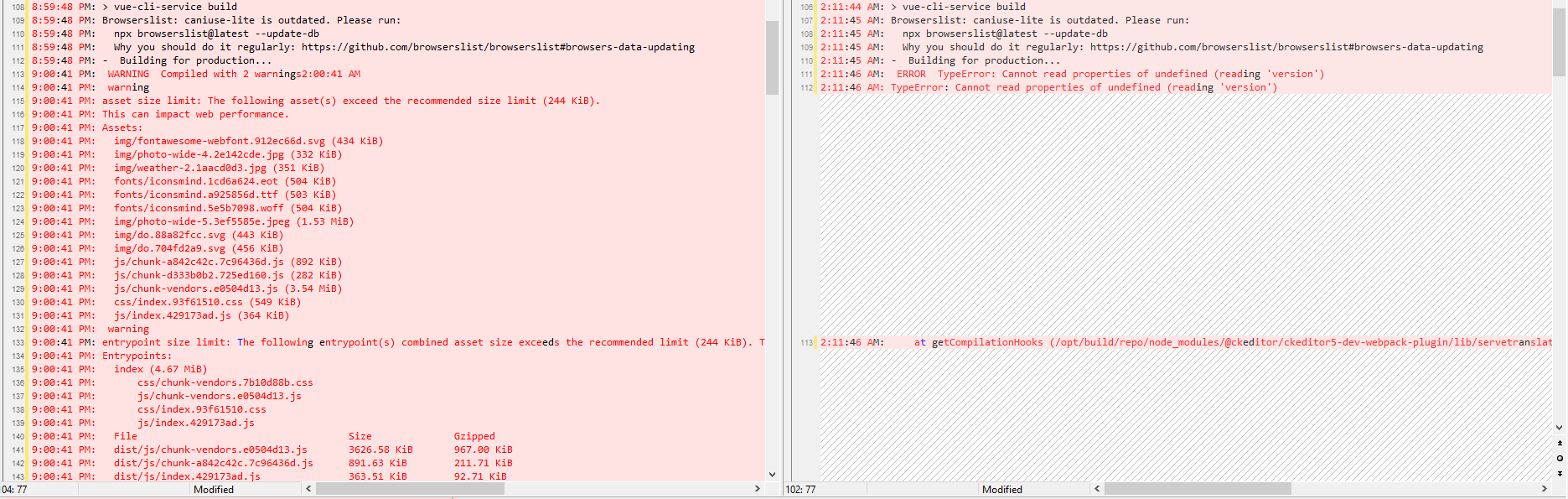
我想跟webpack有关系,所以我执行了这个:
npm list webpack然后,我将其保存在package.json中:
npm install --save-dev "webpack@4.46.0"所有这些都在我的dev环境中工作,但是当我使用Netlify进行部署时,它会产生错误。
回答 1
Stack Overflow用户
发布于 2022-11-25 01:40:50
以前版本的CKEditor 31.1.x与webpack v4.46.0有问题。我试图更新到webpack v5,但错误仍然存在。因此,我搜索了插件的正式文档,并找到了解决CKEditor和webpack问题的最新版本。我向GitHub的开发团队报告了这个问题,他们解决了这个问题。
解决方案是等到新版本(v31.1.11)之后再安装它。
运行以下行以获得插件的最后版本:
npm i @ckeditor/ckeditor5-dev-utils
npm i @ckeditor/ckeditor5-dev-webpack-plugin如果您正在使用更多的CKEditor插件,请运行发行版中详细介绍的其他插件
@ckeditor/ckeditor5-dev-docs: v31.1.11 => v31.1.12 @ckeditor5-dev-env: v31.1.11 => v31.1.12 @ckeditor/ckeditor5-dev- => v31.1.11 => v31.1.12 @ckeditor5-dev-utils: v31.1.11 => v31.1.12 @ckeditor5-dev-webpack-插件: v31.1.11 => v31.1.12 @ckeditor/jsdoc-plugins: v31.1.11 => v31.1.12 @ckeditor/ckeditor5-dev-plugin:v31.1.11=>v31.1.12@ckeditor/jsdoc-plugins:v31.1.11=>v31.1.12@ckeditor5-dev-webpack-插件:v31.1.11=>v31.1.12@ckeditor/jsdoc-plugins:v31.1.11=>v31.1.12
官方文件:https://github.com/ckeditor/ckeditor5-dev
报道:https://github.com/ckeditor/ckeditor5/issues/12887
更改日志:https://github.com/ckeditor/ckeditor5-dev/blob/master/CHANGELOG.md
特别感谢波密克
https://stackoverflow.com/questions/74551983
复制相似问题
腾讯云开发者

Copyright © 2013 - 2026 Tencent Cloud. All Rights Reserved. 腾讯云 版权所有
深圳市腾讯计算机系统有限公司 ICP备案/许可证号:粤B2-20090059  粤公网安备44030502008569号
腾讯云计算(北京)有限责任公司 京ICP证150476号 | 京ICP备11018762号