
如何显示块而不是表的全部宽度?
我想用CSS和HTML在我的应用程序的左边显示一个表格。我得到的是:
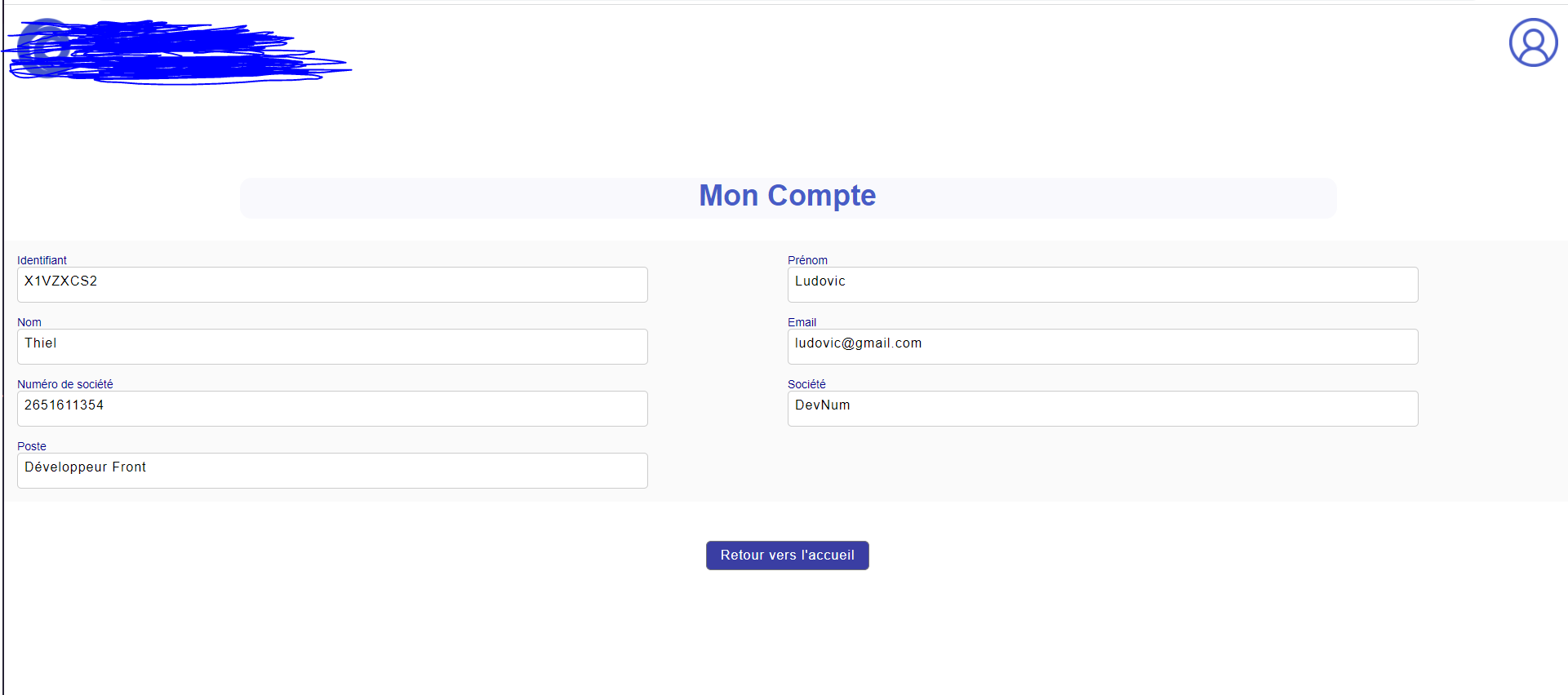
我想得到这样的结果:
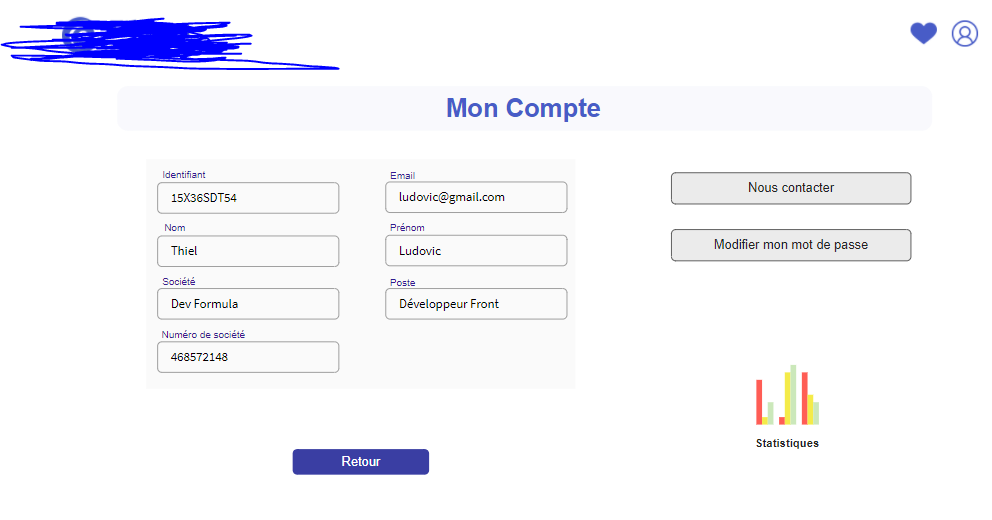
我找不到如何裁剪它,使它漂亮,并作出反应。
是否有可能定义边框,使文本和案例适合于缩小范围?
.container {
  display: flex;
  flex-wrap: wrap;
  padding: 1em 1em 0 1em;
  background: #FAFAFA;
}

.column {
  width: 50%;
  margin-bottom: 1em;
}

.title {
  font-size: 0.875rem;
  font-family: "Helvetica";
  color: darkblue;
}

.rectangle-13 {
  display: inline-block;
  padding-left: 150px;
  background-color: white;
  width: 80%;
  height: 26px;
  padding: 8px 8px 8px 8px;
  border-color: #cccccc;
  border-width: 1px;
  border-style: solid;
  border-radius: 5px;
  box-shadow: black;
  font-family: "Helvetica";
  letter-spacing: 1;
  font-size: 16px;
}<header>
<img href="google.com" class="logo" src="images/.png" alt="logo"><br><br>
<a href="profile.html"><img class="profil" src="images/account.png" alt="logo"><br><br></a>
<!--
<nav>
<ul class="nav_links">
<li><a href='#'>Comment ça marche?</a></li>
<li><a href='#'>Contact</a></li>
<li><a href='#'>Blog</a></li>
</ul>
</nav>
-->
</header>
<div class="entete"></div>
<div class="textentete">Mon Compte</div>
<br>
</div>
<div class="container">
<div class="column">
<div class="title">Identifiant</div>
<div class="rectangle-13">X1VZXCS2</div>
</div>
<div class="column">
<div class="title">Prénom</div>
<div class="rectangle-13">Ludovic</div>
</div>
<div class="column">
<div class="title">Nom</div>
<div class="rectangle-13">Thiel</div>
</div>
<div class="column">
<div class="title">Email</div>
<div class="rectangle-13">ludovic@gmail.com</div>
</div>
<div class="column">
<div class="title">Numéro de société</div>
<div class="rectangle-13">2651611354</div>
</div>
<div class="column">
<div class="title">Société</div>
<div class="rectangle-13">DevNum</div>
</div>
<div class="column">
<div class="title">Poste</div>
<div class="rectangle-13">Développeur Front</div>
</div>
</div>
<div class="centrage">
<form method="get" action="/inscription.html">
<input type="submit" value="Retour vers l'accueil">
</form>
</div>
有人知道怎么做吗?
回答 2
Stack Overflow用户
发布于 2021-10-13 10:37:03
剧透:我在CSS中留下了很多评论,告诉你一切都做什么。
好的。这有很多地方不对。我决定重写代码,因为原来的代码太混乱了。似乎您对HTML和CSS了解不多。我已经帮你做了一半这样你就能弄清楚另一半了。
一些提示:
1.确保组织,并正确命名一切。如果它是一个输入字段,当您的文档变得更大时,将它命名为“输入字段”而不是"rectangle13“,就很难知道到底发生了什么。
2.在处理诸如padding:__或margin:__之类的设置时,如果您想要为保证金或填充的top、left、bottom和right提供相同的值,只需将其设置为一个单数值即可。
以前:margin: 5px, 5px, 5px, 5px;
后:margin: 5px;
3.不使用<div>做任何事情。是的,它们很有用,但是有更好的方法来生成输入字段和文本。例子:<h1>(标题),<p>(段落),<input type=text>(文本输入)
哦,也是:
我知道我提供的和CSS并不是完美的(对不起,我没有太多时间)。
--这是
<!DOCTYPE html>
<html lang="en">
<head>
    <meta charset="UTF-8">
    <meta http-equiv="X-UA-Compatible" content="IE=edge">
    <meta name="viewport" content="width=device-width, initial-scale=1.0">
    <title>Document</title>
    <link rel="stylesheet" href="index.css">
</head>
<body>
    <div class="content">
        <div class="title">
            <h1>Mon Compte</h1>
        </div>

        <div class="form">
            <div class="column">
                <div class="inputField">
                    <h1>Identifiant</h1>
                    <input type="text" value="X1VZXCS2">
                </div>

                <div class="inputField">
                    <h1>Nom</h1>
                    <input type="text" value="Thiel">
                </div>

                <div class="inputField">
                    <h1>Numéro de société</h1>
                    <input type="text" value="2651611354">
                </div>

                <div class="inputField">
                    <h1>Poste</h1>
                    <input type="text" value="Développeur Front">
                </div>

                <div class="inputField">
                    <h1>Prénom</h1>
                    <input type="text" value="Ludovic">
                </div>

                <div class="inputField">
                    <h1>Email</h1>
                    <input type="text" value="ludovic@gmail.com">
                </div>

                <div class="inputField">
                    <h1>Société</h1>
                    <input type="text" value="DevNum">
                </div>
            </div>

            <div class="column">
                <div class="submit">
                    <input type="submit" value="button">
                    <input type="submit" value="button">
                </div>
            </div>
        </div>
    </div>
</body>
</html>
这是CSS
body, html {
    /* Make the HTML fill the screen */
    font-family: Helvetica;
    width: 100%;
    height: 100%;
    margin: 0px;
    padding: 0px;
}

.content {
    /* Make DIV in the HTML fill the screen */
    width: 100%;
    height: 100%;
}

.title {
    /* Setting the width and height of the container containing the title */
    width: 100%;
    height: 100px;

    /* Display flex will align everything inside it HORIZONTALLY */
    display: flex;

    /* Justify content will align everything inside it to the center HORIZONTALLY */
    justify-content: center;

    /* Setting the background color */
    background-color: #FAFAFA;
}

.form {
    /* Setting the width and height of the container containing the form */
    height: 500px;
    width: 100%;

    /* Setting the background color */
    background-color: #FAFAFA;

    /* Display flex will align everything inside it HORIZONTALLY */
    display: flex;

    /* Justify content will align everything inside it to the center HORIZONTALLY */
    justify-content: center;

    /* Align items will align everything inside it to the center VERTICALLY */
    align-items: center;
}

.form .column {
    /* Setting the width and height of the columns */
    width: 50%;
    height: 100%;

    /* Setting the background color */
    background-color: #FAFAFA;

    /* Setting the invisible space around the column, if all 4 values are the same, subsitute with ONE value */
    margin: 30px;

    /* Display flex will align everything inside it HORIZONTALLY */
    display: flex;

    /* Wrap items */
    flex-wrap: wrap;
}

.column .inputField {
    /* Setting the background color */
    background-color: #FAFAFA;

    /* Setting the width and height of the input fields */
    height: 70px;
    width: calc(50% - 10px); /* Accounting for margin */

    /* Setting the whitespace */
    padding-top: 2px;
    padding-bottom: 10px;

    /* Setting the invisible space */
    margin-right: 10px;
}

.column .inputField h1 {
    /* Setting the font color of the name/title of the input field. */
    color: darkblue;

    /* Setting the font size*/
    font-size: 14px;
}

.column .inputField input {
    /* Setting the font size*/
    font-size: 18px;

    /* Setting the OVERALL padding */
    padding: 4px;

    /* Setting the LEFT padding */
    padding-left: 20px;

    /* Setting the border */
    border: 1px solid #959595;

    /* Setting the width and height of the input fields */
    height: 30px;
    width: calc(100% - 40px); /* Accounting for overflow */
}Stack Overflow用户
发布于 2021-10-13 09:37:23
使用Flexbox,这样您就可以使用下面的代码轻松地解决问题以满足您的需求。
.main-title h1 {
    background-color: #e8eaf6;
    color: #311b92;
    padding: 10px;
    border-radius: 20px;
    text-align: center;
    font-family: "Helvetica";
}

.rectangle-13 {
    background-color: white;
    width: 100%;
    min-width: 230px;
    height: 40px;
    padding: 8px 8px 8px 8px;
    border: 1px solid #000;
    border-radius: 5px;
    font-family: "Helvetica";
    font-size: 16px;
    box-sizing: border-box;
}

.rectangle-12,
.rectangle-14 {
    width: 100%;
    display: flex;
    justify-content: space-between;
    flex-wrap: wrap;
    max-width: 524px;
    min-height: 323px;
    padding: 30px;
    background: #e8eaf6;
    color: #311b92;
    border: 1px solid;
    z-index: -1;
}

.main {
    display: flex;
    justify-content: space-evenly;
} <div class="main-title">
<h1>Mon Compte</h1>
</div>
<div class="main">
<div class="rectangle-12">
<div>
<div class="lable">Lable</div>
<div class="rectangle-13">X1VZXCS2</div>
</div>
<div>
<div class="lable">Lable</div>
<div class="rectangle-13">Ludovic</div>
</div>
<div>
<div class="lable">Lable</div>
<div class="rectangle-13">Thiel</div>
</div>
<div>
<div class="lable">Lable</div>
<div class="rectangle-13">ludovic@gmail.com</div>
</div>
<div>
<div class="lable">Lable</div>
<div class="rectangle-13">2651611354</div>
</div>
<div>
<div class="lable">Lable</div>
<div class="rectangle-13">DevNum</div>
</div>
<div>
<div class="lable">Lable</div>
<div class="rectangle-13">Développeur Front</div>
</div>
</div>
<div class="rectangle-14">
<div>
<h1>Add Content Here</h1>
</div>
</div>
</div>
https://stackoverflow.com/questions/69552934
复制相似问题
腾讯云开发者

Copyright © 2013 - 2026 Tencent Cloud. All Rights Reserved. 腾讯云 版权所有
深圳市腾讯计算机系统有限公司 ICP备案/许可证号:粤B2-20090059  粤公网安备44030502008569号
腾讯云计算(北京)有限责任公司 京ICP证150476号 | 京ICP备11018762号