
VSCode不能正常工作
VSCode不能正常工作
提问于 2021-09-01 18:36:07
VSCode中的正在扰乱我的代码

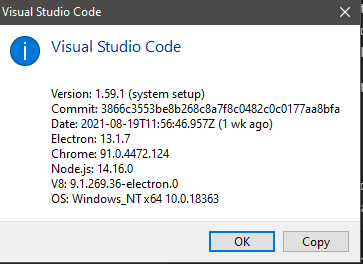
这是我的系统:
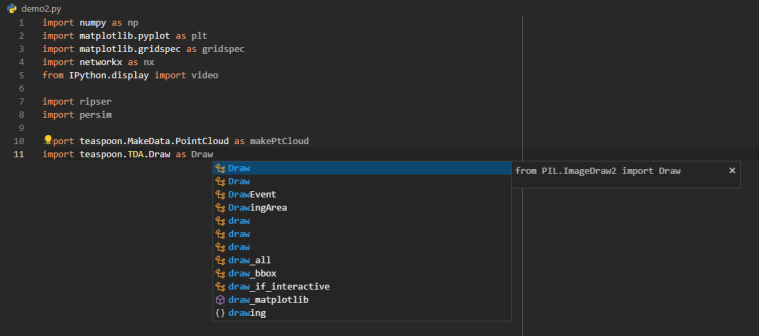
如果我使用Pylance,则Intellisense无法正常工作。
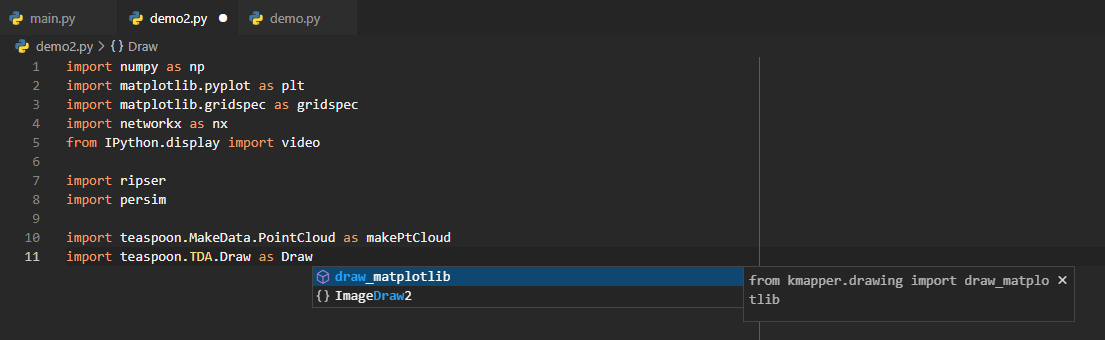
如果我使用Jedi,Intellisense就不能正常工作。
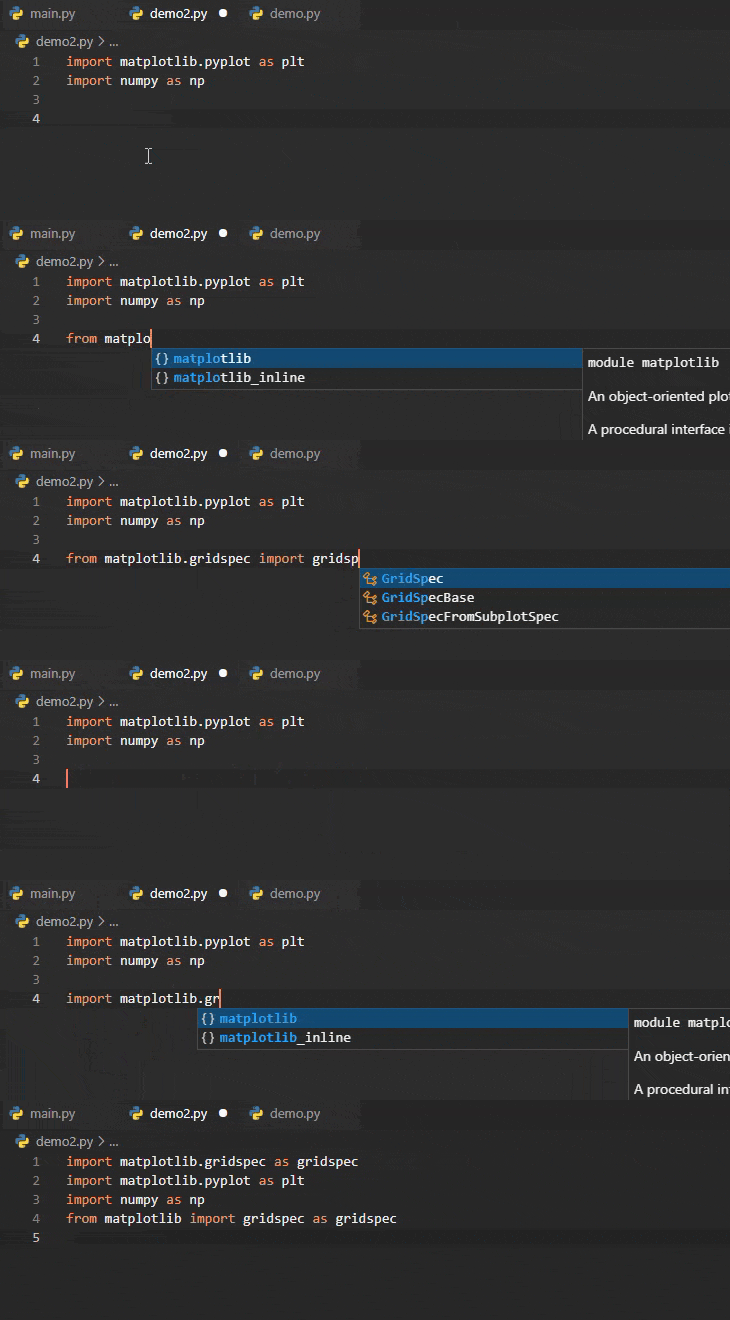
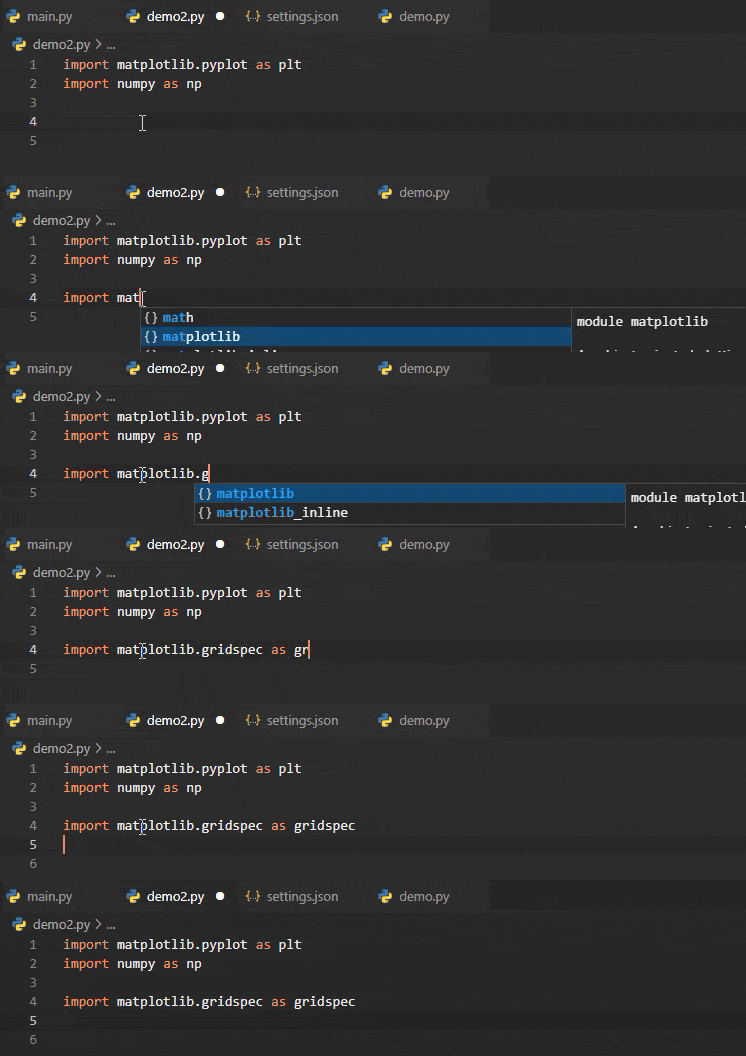
当我按enter键时,我的代码就被完全篡改了。这只是一个例子,一直令我沮丧!
下面是我的settings.json文件:
{
    "AREPL.pythonPath": "${workspaceFolder}\\.venv\\Scripts\\python.exe",
    "dicom.alwaysShowMenu": true,
    "editor.codeActionsOnSave": {
        "source.organizeImports": true
    },
    "editor.formatOnSave": true,
    "editor.insertSpaces": false,
    "editor.rulers": [
        90
    ],
    "editor.suggestSelection": "first",
    "explorer.compactFolders": false,
    "explorer.confirmDragAndDrop": false,
    "files.exclude": {
        "**/.git": false
    },
    "files.trimFinalNewlines": true,
    "files.trimTrailingWhitespace": true,
    "git-graph.defaultColumnVisibility": {
        "Author": false,
        "Commit": true,
        "Date": false
    },
    "git-graph.referenceLabels.alignment": "Branches (aligned to the graph) & Tags (on the right)",
    "glassit.alpha": 255,
    "json.format.enable": true,
    "mypy.dmypyExecutable": "${workspaceFolder}\\.venv\\Scripts\\dmypy.exe",
    "mypy.runUsingActiveInterpreter": true,
    "notebook.cellToolbarLocation": {
        "default": "right",
        "jupyter-notebook": "left"
    },
    "python.defaultInterpreterPath": "${workspaceFolder}\\.venv\\Scripts\\python.exe",
    "python.formatting.blackArgs": [
        "--line-length",
        "90"
    ],
    "python.formatting.provider": "black",
    "python.languageServer": "Jedi",
    "python.linting.enabled": true,
    // "python.linting.flake8Args": [
    //     "--line-length",
    //     "90"
    // ],
    "python.linting.mypyEnabled": true,
    "python.linting.mypyPath": "${workspaceFolder}\\.venv\\Scripts\\mypy.exe",
    // "python.linting.pylintArgs": [
    //     "--generate-members"
    // ],
    // "python.linting.pylintEnabled": true,
    "python.pythonPath": "${workspaceFolder}\\.venv\\Scripts\\python.exe",
    "python.terminal.activateEnvironment": true,
    "python.testing.pytestArgs": [
        "${workspaceFolder}\\tests"
    ],
    "python.testing.pytestEnabled": true,
    "python.testing.unittestEnabled": true,
    "python.venvPath": ".venv",
    "restructuredtext.builtDocumentationPath": "${workspaceFolder}\\docs\\build\\html",
    "restructuredtext.confPath": "{workspaceFolder}\\docs\\source",
    "restructuredtext.languageserver.disabled": true,
    "restructuredtext.sphinxBuildPath": "${workspaceFolder}\\.venv\\Scripts\\sphinx-build.exe",
    "screencastMode.keyboardOverlayTimeout": 1500,
    "screencastMode.mouseIndicatorSize": 20,
    "screencastMode.onlyKeyboardShortcuts": true,
    "screencastMode.verticalOffset": 0,
    "security.workspace.trust.untrustedFiles": "open",
    "shellcheck.customargs": [
        "-x"
    ],
    "terminal.integrated.defaultProfile.windows": "PowerShell",
    "terminal.integrated.fontFamily": "CaskaydiaCove Nerd Font Mono",
    "terminal.integrated.tabs.enabled": true,
    "trailing-spaces.syntaxIgnore": [
        "markdown"
    ],
    "update.enableWindowsBackgroundUpdates": false,
    "vsicons.dontShowNewVersionMessage": true,
    "workbench.colorTheme": "Predawn",
    "workbench.editor.enablePreview": true,
    "workbench.editorAssociations": {
        "*.dcm": "default",
        "*.ipynb": "jupyter-notebook",
        "*.tiff": "tiff.preview",
        "git-rebase-todo": "default"
    },
    "workbench.iconTheme": "material-icon-theme",
    "workbench.settings.editor": "json",
    "workbench.settings.openDefaultSettings": true,
    "workbench.settings.useSplitJSON": true,
    "workbench.startupEditor": "newUntitledFile"
}
为什么会发生这种情况,我如何修复我的智能感知?
更新:
删除"editor.suggestSelection": "first"很有帮助,但我仍然会遇到错误:
回答 1
Stack Overflow用户
回答已采纳
发布于 2021-09-01 19:29:08
将以下内容添加到我的settings.json中可以使Intellisense像预期的那样工作:
"editor.acceptSuggestionOnEnter": "off",
"editor.tabCompletion": "on"
为什么默认值分别是"on"和"off",我永远也不会知道。如果您想使用建议(如在tab中),每个人都希望按下bash terminal,而且没有人希望在按回车时盲目地完成自动完成。
页面原文内容由Stack Overflow提供。腾讯云小微IT领域专用引擎提供翻译支持
原文链接:
https://stackoverflow.com/questions/69019035
复制相关文章
相似问题
腾讯云开发者

Copyright © 2013 - 2026 Tencent Cloud. All Rights Reserved. 腾讯云 版权所有
深圳市腾讯计算机系统有限公司 ICP备案/许可证号:粤B2-20090059  粤公网安备44030502008569号
腾讯云计算(北京)有限责任公司 京ICP证150476号 | 京ICP备11018762号