
如何将stickyHeader添加到LazyVerticalGrid中,如jetpack中的LazyColumn?
如何将stickyHeader添加到LazyVerticalGrid中,如jetpack中的LazyColumn?
提问于 2021-08-23 03:03:34
我想实现这样的UI效果:
<GridView>
    <Title of Grid content in a single row />
    <Grid content arranged in the form of n * 3 />

    <Title of Grid content in a single row />
    <Grid content arranged in the form of n * 3 />

    <Title of Grid content in a single row />
    <Grid content arranged in the form of n * 3 />
</GridView>
但我无法将该行添加到LazyColumnGrid中。
我尝试使用带有垂直卷轴的LazyColumnGrid but列,但是它说it's wrong to nest two scrollable views in the same direction.
此外,我尝试在<Title of Grid />上使用<Title of Grid />,但这使item{ }成为网格视图中的一个项,而不是一个行。
那么,我怎样才能简单地做到这一点呢?
回答 2
Stack Overflow用户
回答已采纳
发布于 2022-04-25 04:08:43
您不能使用Compose的LazyGrid apis真正创建一个粘性的标题,但是您可以创建一个标题,如下所示:
fun LazyGridScope.header(
    content: @Composable LazyGridItemScope.() -> Unit
) {
    item(span = { GridItemSpan(this.maxLineSpan) }, content = content)
}代码使用带this.maxLineSpan的span块,这将成为一个完全宽度的标头。
所以,你可以这样用它
LazyVerticalGrid(
    ...
) {
    header {
        Text("Header Title") // or any composable for your single row
    }
    items(count = n * 3) {
        GridItem()
    }


    header {
        Text("Header Title") // or any composable for your single row
    }
    items(count = n * 3) {
        GridItem()
    }

}奖金你也可以用这种方式抵消你的细胞
fun LazyGridScope.offSetCells(count: Int) {
    item(span = { GridItemSpan(count) }) {}
}

...

LazyVerticalGrid(
   ...
) {
    offsetCells(count = 3)
}Stack Overflow用户
发布于 2021-08-23 05:54:15
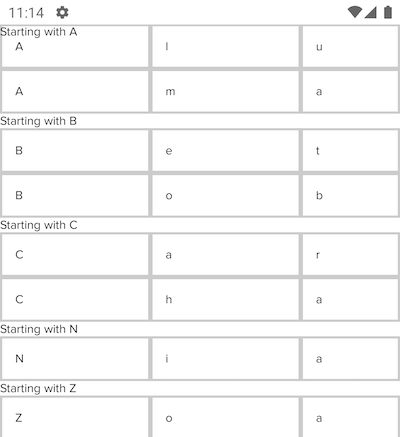
目前可用的方法是在没有nested scrolling的情况下实现它。
LazyColumn {
    grouped.forEach { (headText, allGrids) ->
        stickyHeader {
            //Sticky Heading
            Text(text = "Starting with $headText");
        }
        items(allGrids) { grid ->
            // Implement <Grid content- n*3 /> without scrolling

            // Method 1: Rows & .forEach{ }
            Row {
             name.forEach { gridItem ->
               // implement gridItem
               Text(
                 gridItem.toString(),
                 modifier = Modifier
                   .border(BorderStroke(2.dp, Color.LightGray))
                   .padding(15.dp)
                   .fillParentMaxWidth(0.3f)
                )
               }
             }

            // Method 2: Using basic Column & Rows
        }
    }
}
输出
页面原文内容由Stack Overflow提供。腾讯云小微IT领域专用引擎提供翻译支持
原文链接:
https://stackoverflow.com/questions/68886848
复制相关文章
相似问题
腾讯云开发者
