
根据所选择的装配图中的部件从装配图中提取零件编号(CATIA VBA)
我正在为CATIA编写一个VBA程序,该程序生成一个领导者,其中包含用户单击(选择)的绘图中元素的部分编号。
宏用于具有大量零件的装配图。用户应该能够点击绘图中的部件,并且该特定部件的部件号应该由领导在文本中显示。
有两个问题。
- 我必须为用户可以选择的内容提供一个参数。
我不认为它可以是"DrawingView“,因为用户需要能够在程序集视图中选择各个部件。
- 从该选择中提取零件编号。
现在,我的代码提取生成视图的文件名。在本例中,这也是零件编号,但是宏的主要用途是一组包含大量部件的装配图。
我尝试了"AnyObject“作为选择,但是VBA只是选择视图,即使我单击视图中的不同部分。我在https://catiadesign.org/_doc/V5Automation/generated/interfaces/_index/CAAHomeIdx.htm上花了大量的时间研究不同的对象、属性和方法,但是我找不到任何可以根据视图中选择的部分来操作信息的东西。
我认为这可能是可能的,因为CATIA在装配视图中给出了不同零件的数量,如果您将尺寸工具悬停在绘图上的零件上。这样CATIA就能以某种方式得到这些信息。
Sub CatMain()
    'Sets drawing doc as active doc and makes sure a drawing is open
    Dim draw_doc As DrawingDocument
    On Error Resume Next
    Set draw_doc = CATIA.ActiveDocument
    If Err.Number <> 0 Then
        MsgBox "A drawing must be open to run this macro"
        End
    End If
    On Error GoTo 0

    Dim draw_sheets As DrawingSheets            'Create drawing sheets collection
    Set draw_sheets = draw_doc.Sheets           'Set the drawing sheets collection to be the collection for the drawing document
    Dim draw_sheet As DrawingSheet              'Create drawing sheet object
    Set draw_sheet = draw_sheets.ActiveSheet    'Makes that drawing sheet object the active sheet
    Dim draw_view As DrawingView                'Creates drawing view objec
    Dim draw_leaders As DrawingLeaders          'Creates drawing leaders collection
    Dim draw_leader As DrawingLeader            'Makes drawing leader object

    Dim selection_array(0)                      'Create array that stores the the types of things CATIA can select
    selection_array(0) = "DrawingView"          'Make drawing views be the only thing that can be selected
    Set selection_1 = draw_doc.Selection        'Set the selection object to select things in this drawing document
    'Enable CATIA to go into selection mode and let the user click on something to select it
    status = selection_1.SelectElement2(selection_array, "Select the View(s) to Re-link. DON'T FORGET TO CLICK 'FINISH' ON TOOLS PALETTE.", False)
    'If the user presses ctrl+z or cancels then we stop the program
    If status = "Undo" Or status = "Cancel" Then
        MsgBox "You have chosen to terminate this macro."
        End
    End If
    Set draw_view = selection_1.Item(1).Value   'The drawing view is set to be the value of the view that was selected

    Dim leader_pos_x, leader_pox_y As Double    '==\
    leader_pos_x = 20                           '===> Dimension and set leader position
    leader_pos_y = 20                           '==/
    'The name/part number of can be taken from the drawing view with the .GenerativeBehavior.Document.Name properties
    Dim part_number As String
    part_number = draw_view.GenerativeBehavior.Document.Name 'gets the name of the document that generated the drawing view
    part_number = Replace(part_number, "_", " ")
    Dim draw_texts As DrawingTexts              'Create drawing texts collection
    Set draw_texts = draw_sheet.Views.ActiveView 'Set the drawing texts to the avtive view
    Dim draw_text As DrawingText                'Make drawing text object
    'Set the drawing text and position we're goint to use for the leader
    Set draw_text = draw_view.Texts.Add(part_number, 30, 50)
    'Create the leader with x and y position relative to the drawing view
    Set draw_leader = draw_text.Leaders.Add(leader_pos_x, leader_pos_y)

    'MsgBox "Done"
End Sub回答 3
Stack Overflow用户
发布于 2021-07-08 09:35:18
嗨,如果你不介意用气球,试试吧。他们可以给你PartNumbers,InstanceNames,当然还有编号。你必须改变画气球的选项。这是一个屏幕
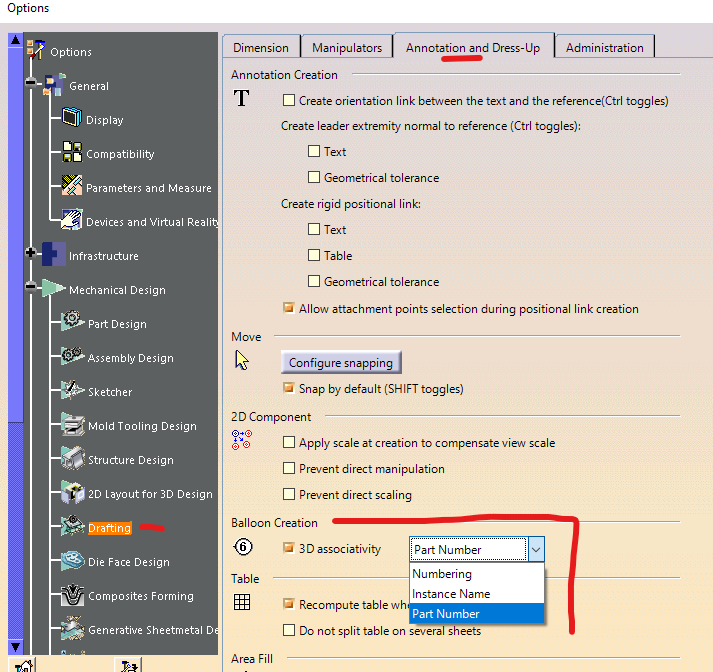
然后,您创建气球的部分数字,如下所示。
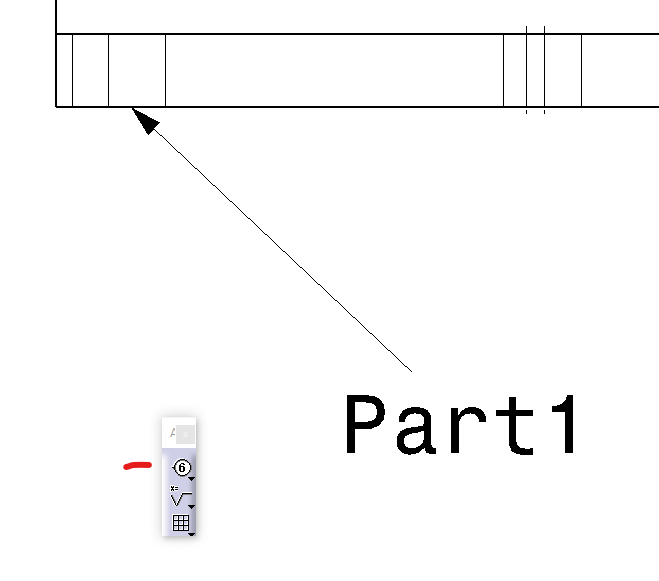
Catia知道部件号并不意味着它在免费api中可用。恐怕你不能比- draw_view.GenerativeBehavior.Document更深入了
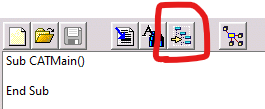
只需尝试在宏中记录您的操作或插入对象解析,并查看您可以得到什么。
我做了一次类似的程序,自动绘图。我读取装配中的部件,获取它们的坐标,并根据装配部件坐标将零件编号放在绘图中。如果您没有注意到,绘图和装配共享相同的轴系统(蓝色箭头是三维装配的起源)。但是这是一个特殊情况,只适用于特定的程序集,一般不能在随机程序集上使用。
Stack Overflow用户
发布于 2021-07-10 22:44:12
如果你不想像DJakub提议的那样使用气球,这里有一个小的解决办法。
该脚本通过CATIA.StartCommand调用Catia的气球命令,并等待用户单击某个位置。特别是,它等待一个新的DrawingText被添加,获取它的内容并删除它。我无法给出一个很好的错误处理,但是10秒后脚本也会退出循环。
Set oView = CATIA.ActiveDocument.DrawingRoot.ActiveSheet.Views.ActiveView
numtexts = oView.Texts.Count

'Change ToolsOptions so that balloons will be created with PartNumbers
'(Hint from DJakub)
Set settingRepository1 = CATIA.SettingControllers.Item("DraftingOptions")
settingValueBeforeChange = settingRepository1.GetAttr("DrwBalloonAssocMod")
settingRepository1.PutAttr "DrwBalloonAssocMod", 2 'Balloon creation with PartNumber

'Start Catia's Balloon command
CATIA.StartCommand "Balloon"

'Wait until user clicks somewhere
'(DrawingText with PartNumber will be added from Balloon command)
tic = Timer
Do
    DoEvents
    If oView.Texts.Count > numtexts Then
        'Get text and remove balloon
        Set oText = oView.Texts.Item(oView.Texts.Count)
        strPartNumber = oText.Text
        oView.Texts.Remove oView.Texts.Count

        Exit Do
    End If

    toc = Timer
Loop Until toc - tic > 10 'Exit loop after 10 seconds

'Exit Ballon command
SendKeys "{ESC}", True

'Reset setting to standard
settingRepository1.PutAttr "DrwBalloonAssocMod", settingValueBeforeChange
有些案子你可能需要处理
如果用户手动退出气球命令,
- 怎么办?一个新的DrawingText在10秒内就会被删除,如果用户不点击DrawingText脚本只得到PartNumber,怎么办?你可能知道怎么做剩下的事。我没有检查,但我敢打赌你也可以从临时气球的领队处得到点击点。
Stack Overflow用户
发布于 2021-07-15 19:28:55
感谢温德尔和DJakub的帮助!我在我的程序中实现了你的答案,它运行得很好!下面是用Vyndell在回答中展示的方法创建领导者的代码。
显著变化:
使用CATIA.StartCommand "Select“,这样用户就不必在单击生成的项(绘图中的一部分)后处理气球创建框。
如果用户单击绘图中的随机点,则使用检查。如果未选择部件,则气球默认为创建编号的气球。所以我让代码把零件编号转换成整数。如果没有错误号,用户很可能点击一个随机点,程序就结束了。如果出现错误,程序将继续运行。
该程序的代码如下。
Sub CATMain()


'Sets drawing doc as active doc and makes sure a drawing is open
Dim draw_doc As DrawingDocument
On Error Resume Next
Set draw_doc = CATIA.ActiveDocument
If Err.Number <> 0 Then
    MsgBox "A drawing must be open to run this macro"
    End
End If
On Error GoTo 0


'Brings up macro instructions. The false sets the modal to false aka code runs with out messing with the form
Leader_Gen_With_Pt_Num_Inst.Show (False)


'Sets the view to be the current active view in CATIA
Set oView = CATIA.ActiveDocument.DrawingRoot.ActiveSheet.Views.ActiveView
'Stores the number of text associated with a view
numtexts = oView.Texts.Count


'Change Tools-->Options-->Drafting-->Annotation and Dress-up-->Balloon Creation so
'that balloons will be created with PartNumbers. Thanks DJakub!
Set settingRepository1 = CATIA.SettingControllers.Item("DraftingOptions")       'Set the options selection to drafting options
settingValueBeforeChange = settingRepository1.GetAttr("DrwBalloonAssocMod")     'The original user settings
settingRepository1.PutAttr "DrwBalloonAssocMod", 2                              'Balloon creation with PartNumber


'Start Catia's Balloon command
CATIA.StartCommand "Balloon"


'Dimension positioning variables
Dim i As Long
Dim x As Double
Dim y As Double
'Create drawing leader object
Dim draw_leader As DrawingLeader


'Sets the starting time for the timer for the variable tic
tic = Timer

Do

    DoEvents
    'Goes into the if statment when a text object has been added
    If oView.Texts.Count > numtexts Then

        'Get most recently create text in a text object
        Set oText = oView.Texts.Item(oView.Texts.Count)
        'Set a leader object to be the leader created from the balloon
        Set draw_leader = oText.Leaders.Item(oText.Leaders.Count)
        'Store the position of the leader in the doubles x and y
        draw_leader.GetPoint i, x, y
        'Store the part number in the string strpartnumber
        strpartnumber = oText.Text
        'Deletes the most recent text. Also deletes the leader since the text is its parent
        oView.Texts.Remove oView.Texts.Count
        Exit Do
    End If

    'Sets the end time for the timer to the variable toc
    toc = Timer

    'Since toc is the start and tic is the end, then toc minus tic means the timer will go to 8 seconds
    If toc - tic = 8 Then
        MsgBox "Ending macro since eight seconds have passed"
        'Ends program
        End
    End If

Loop Until toc - tic > 8 'Exit loop after 8 seconds

'Exit Ballon command
SendKeys "{ESC}", True


'Setting the CATIA command to select makes it so the balloon creation box doesn't appear when the user clicks away
CATIA.StartCommand "Select"


'Returns the ballon settings to what the user originally had
settingRepository1.PutAttr "DrwBalloonAssocMod", settingValueBeforeChange 'Will want to put this at the end of the main program


Dim draw_sheets As DrawingSheets            'Create drawing sheets collection
Set draw_sheets = draw_doc.Sheets           'Set the drawing sheets collection to be the collection for the drawing document
Dim draw_sheet As DrawingSheet              'Create drawing sheet object
Set draw_sheet = draw_sheets.ActiveSheet    'Makes that drawing sheet object the active sheet
'Dim draw_view As DrawingView                'Creates drawing view objec
Dim draw_leaders As DrawingLeaders          'Creates drawing leaders collection


'When something that is not a part in a drawing is clicked on, a numbered balloon is created
'So we cast the part number as an integer. When an error happens we know the user did not click on a random spot so we create the leader
'When an error is not thrown the user didn't click on the part, so we end the program and tell them what went wrong.
Dim test_int As Integer
On Error Resume Next
test_int = CInt(strpartnumber)
If Err.Number <> 0 Then

    On Error GoTo 0

    Dim part_number As String
    'part_number stores the part number value of strpartnumber that we got from the balloon
    part_number = strpartnumber
    'Repalce underscores with spaces
    part_number = Replace(part_number, "_", " ")
    Dim draw_texts As DrawingTexts              'Create drawing texts collection
    Set draw_texts = draw_sheet.Views.ActiveView 'Set the drawing texts to the avtive view
    Dim draw_text As DrawingText                'Make drawing text object
    'Set the drawing text and position we're goint to use for the leader
    'The text is set 40 mm over and 40 mm up from the leader arrow
    Set draw_text = oView.Texts.Add(part_number, x + 40, y + 40)
    'Create the leader with x and y position relative to the drawing view
    Set draw_leader = draw_text.Leaders.Add(x, y)

Else
    On Error GoTo 0
    'The message box actually doesn't run, but this code keeps the leader from being created if the user clicked a random spot
    MsgBox "You may have selected an item that is not an assembly part, so the program did not pull the part number"
    'Hides opened form
    Leader_Gen_With_Pt_Num_Inst.Hide
    End
End If


'Hides form once code has ran
Leader_Gen_With_Pt_Num_Inst.Hide


End Subhttps://stackoverflow.com/questions/68292176
复制相似问题
腾讯云开发者

Copyright © 2013 - 2026 Tencent Cloud. All Rights Reserved. 腾讯云 版权所有
深圳市腾讯计算机系统有限公司 ICP备案/许可证号:粤B2-20090059  粤公网安备44030502008569号
腾讯云计算(北京)有限责任公司 京ICP证150476号 | 京ICP备11018762号