
更改Google的地区
我希望在中更改本地设置(更改日期格式)
在JupyterNotebook中,以下内容适用于我,但在GoogleColab中不适用:
locale.setlocale(locale.LC_TIME, 'de_DE.UTF-8')
它总是返回错误:不支持的地区设置
我已经看过许多其他的解决方案,并且尝试了所有的方法。改变我所见过的时区的一个解决方案是:
'!rm /etc/localtime
!ln -s /usr/share/zoneinfo/Asia/Bangkok /etc/localtime
!date回答 3
Stack Overflow用户
发布于 2021-12-01 22:58:06
很长一段时间后我发现了这件事:
- 在
Colab中,您必须安装所需的locale。!sudo dpkg-reconfigure locales- 这将提示输入一个数字,例如匈牙利的
268和269。 所以你输入268 269。 - 安装后,它还会提示输入
default locale。在这里,您需要选择,您想要的自定义locale。这一次,它是3-5选项中的一个数字选择,这取决于您在上一步中选择了多少。在我的例子中,我选择了3,默认的locale变成了hu_HU。
- 这将提示输入一个数字,例如匈牙利的
- 您需要重新启动
Colab运行时:Ctrl + M然后是. - 您需要激活
localeimport localelocale.setlocale(locale.LC_ALL, 'hu_HU')<- -确保为LC_ALL上下文执行此操作。 - 自定义
locale现在可以与pandaspd.to_datetime('2021-01-01').day_name()一起使用,返回Friday,但是pd.to_datetime('2021-01-01').day_name('hu_HU')返回Péntek
Stack Overflow用户
发布于 2021-12-01 11:35:42
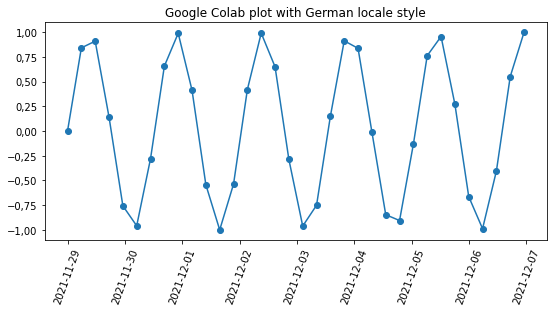
我在Google上没有成功地使用德语语言环境,但是想要的格式可以作为十进制分隔符和日期格式的重写locale的组合来获得。
德国格式规则可以找到这里。
对于自定义字符串格式,不错的备忘表是这里。
from datetime import datetime, timedelta
import matplotlib.dates as mdates
import matplotlib.pyplot as plt
import numpy as np
import locale

german_format_str_full = '%Y-%m-%d, %H.%M Uhr'
german_format_str_date = '%Y-%m-%d'

# genereting plot data, xs are dates with not obvious step
xs = np.arange(datetime(year=2021, month=11, day=28, hour=23, minute=59, second=59),
               datetime(year=2021, month=12, day=6, hour=23, minute=59, second=59),
               timedelta(hours=5,minutes=47,seconds=27))
ys = np.sin(np.arange(0,len(xs),1)) # whatever

# use overwritten locale for comma as decimal point -- German formatting
plt.rcParams['axes.formatter.use_locale'] = True
locale._override_localeconv["decimal_point"]= ','

# plot
fig, ax = plt.subplots(figsize=(9,4))
ax.plot(xs,ys, 'o-')

# set formatting string using mdates from matplotlib
ax.xaxis.set_major_formatter(mdates.DateFormatter(german_format_str_date))

# rotate formatted ticks or use autoformat 'fig.autofmt_xdate()'
plt.xticks(rotation=70)
plt.title('Google Colab plot with German locale style')
plt.show()
它给了我这个情节:
如果需要检查计算机上的格式化设置是什么样的,可以使用locale.nl_langinfo(locale.D_T_FMT)。例如:
import locale
from datetime import datetime

now = datetime.now()

#  find local date time formatting on Google Colab
local_format_str = locale.nl_langinfo(locale.D_T_FMT)
print('local_format_str on Google Colab: ', local_format_str)
print('now in Google Colab default format:', now.strftime(local_format_str))

german_format_str_full = '%Y-%m-%d, %H.%M Uhr'
german_format_str_date = '%Y-%m-%d'
print('now in German format, full:',now.strftime(german_format_str_full))
print('now in German format, only date:',now.strftime(german_format_str_date))

ridiculous_format = '%Y->%m-->%d'
print('now ridiculous_format:',now.strftime(ridiculous_format))Stack Overflow用户
发布于 2021-12-01 12:27:30
基于这个答案,我能够加载德国地区。然而,它需要分两个步骤来完成:安装新的德国地区。重新启动内核并加载德国地区。
简而言之::
import os

# Install de_DE
!/usr/share/locales/install-language-pack de_DE
!dpkg-reconfigure locales

# Restart Python process to pick up the new locales
os.kill(os.getpid(), 9)更详细的版本:--原来可用的地区列表很短,可以这样检查:
import locale
from datetime import datetime

now = datetime.now()

#  find local date time formatting on Google Colab
local_format_str = locale.nl_langinfo(locale.D_T_FMT)
print('local_format_str on Google Colab: ', local_format_str)
print('now in Google Colab default format:', now.strftime(local_format_str))

print('Loading avaliable locales via real names...')
for real_name in set(locale.locale_alias.values()):
  try:
    locale.setlocale(locale.LC_ALL, real_name)
    print('success: real_name = ', real_name)
  except:
    pass

print('Loading avaliable locales via aliases...')
for alias , real_name in locale.locale_alias.items():
  try:
    locale.setlocale(locale.LC_ALL, alias)
    print('success: alias = ' , alias, ' , real_name = ', real_name)
  except:
    pass
产出:
local_format_str on Google Colab:  %a %b %e %H:%M:%S %Y
now in Google Colab default format: Wed Dec  1 12:10:52 2021
Loading avaliable locales via real names...
success: real_name =  en_US.UTF-8
success: real_name =  C
Loading avaliable locales via aliases...
正如我们所看到的,这里没有德语语言环境,因此需要安装代码:
import os

# Install de_DE
!/usr/share/locales/install-language-pack de_DE
!dpkg-reconfigure locales

# Restart Python process to pick up the new locales
os.kill(os.getpid(), 9)
给出输出:
Generating locales (this might take a while)...
  de_DE.ISO-8859-1... done
Generation complete.
dpkg-trigger: error: must be called from a maintainer script (or with a --by-package option)

Type dpkg-trigger --help for help about this utility.
Generating locales (this might take a while)...
  de_DE.ISO-8859-1... done
  en_US.UTF-8... done
Generation complete.然后,我们加载德国地区locale.setlocale(locale.LC_ALL, 'german'),与开始时相同的代码(请记住再次导入包)提供给我们:
Loading avaliable locales via real names...
success: real_name =  C
success: real_name =  en_US.UTF-8
success: real_name =  de_DE.ISO8859-1
Loading avaliable locales via aliases...
success: alias =  deutsch  , real_name =  de_DE.ISO8859-1
success: alias =  german  , real_name =  de_DE.ISO8859-1
默认格式更像德语:
local_format_str on Google Colab:  %a %d %b %Y %T %Z
now in Google Colab default format: Mi 01 Dez 2021 12:12:03https://stackoverflow.com/questions/67045349
复制相似问题
腾讯云开发者

Copyright © 2013 - 2026 Tencent Cloud. All Rights Reserved. 腾讯云 版权所有
深圳市腾讯计算机系统有限公司 ICP备案/许可证号:粤B2-20090059  粤公网安备44030502008569号
腾讯云计算(北京)有限责任公司 京ICP证150476号 | 京ICP备11018762号