
Python用交叉口检测形状
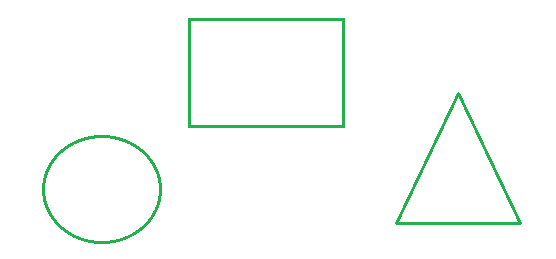
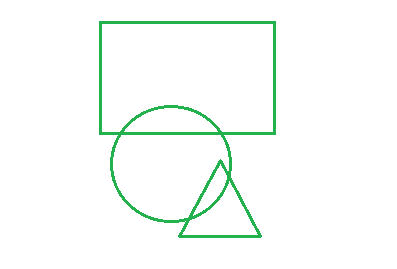
我们正在使用Python openCV进行形状检测。我们找到approx_poly_dp,然后计数顶点数。然而,当对象有许多交叉点(见下面的第二张图片)时,这个过程就不能工作了。Opencv无法检测单个对象,只能找到一个大的形状。在处理交叉口,什么是最好的方法寻找形状,给出一般的图片输入。或者这不是opencv的一个功能,也许更适合机器学习?
    image_original = cv2.imread(file_name)
    image_gray = cv2.cvtColor(image_original, cv2.COLOR_BGR2GRAY)
    image_blur = cv2.GaussianBlur(image_gray, (5, 5), 0)
    image_morph = cv2.morphologyEx(image_blur, cv2.MORPH_OPEN, kernel)
    image_canny = cv2.Canny(image_morph, 50, 50)
    image_dilate = cv2.dilate(image_canny, kernel, iterations=2)
    image_final = cv2.erode(image_dilate, kernel, iterations=1)

    contours, hierarchy = cv2.findContours(image_final, cv2.RETR_EXTERNAL, cv2.CHAIN_APPROX_NONE)
    peri = cv2.arcLength(contours, True)
    approx = cv2.approxPolyDP(contours, 0.04 * peri, True)

    if len(approx) == 3:
        shape = "triangle"
    elif len(approx) == 4:
        (x, y, w, h) = cv2.boundingRect(approx)
        ar = w / float(h)
        shape = "square" if ar >= 0.95 and ar <= 1.05 else "rectangle"
    elif len(approx) == 5:
        shape = "pentagon"
    else:
        shape = "circle"
相交图:
回答 2
Stack Overflow用户
发布于 2021-04-17 09:44:16
以下程序可能适用于简单的数字:
查找已连接的组件,并查找每个组件的相邻组件,忽略背景和大纲组件。
尝试一个具有相邻组件组合的组件,并将其提供给您已经拥有的形状分类器。作为预处理步骤,您可能需要使用形态关闭将组件组合成单个blob。
import cv2 as cv
import numpy as np
from itertools import combinations

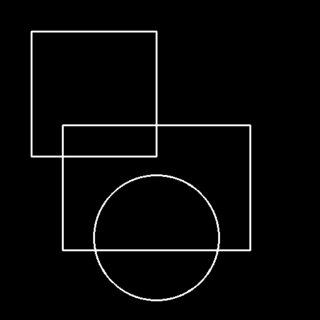
im = np.zeros((512, 512), dtype=np.uint8)
im = cv.rectangle(im, (100, 200), (400, 400), 255, 2)
im = cv.circle(im, (250, 380), 100, 255, 2)
im = cv.rectangle(im, (50, 50), (250, 250), 255, 2)

ret, bw = cv.threshold(im, 0, 255, cv.THRESH_BINARY_INV | cv.THRESH_OTSU)
ncomp, labels, stats, centroids = cv.connectedComponentsWithStats(bw)

def getNeighbors(labels, n):
    r = 4 # you might have to change this depending on outline thickness
    se = cv.getStructuringElement(cv.MORPH_CROSS, (2*r+1, 2*r+1))
    neighbors = cv.dilate((labels==n).astype(np.uint8), se)
    # ignore background, outline and the component of interest
    return np.setdiff1d(np.unique(labels[neighbors==1]), [0, 1, n])

def shapes(arr, i):
    p = arr.tolist()
    for r in range(1, len(p)+1):
        for l in list(combinations(p, r)):
            print l + (i, )
对于下图,您将得到所列出的连接组件的组合。请注意,我没有费心删除重复。
for i in range(2, ncomp):
    shapes(getNeighbors(labels, i), i)

(3, 2)
(2, 3)
(4, 3)
(2, 4, 3)
(3, 4)
(5, 4)
(3, 5, 4)
(4, 5)
(6, 5)
(4, 6, 5)
(5, 6)
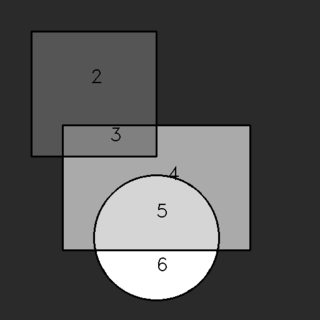
我不会说这是一个有效的解决方案,因为它涉及尝试所有的邻居组合,但我发布这个,以防有人发现这个基于图像处理的解决方案有用。
Stack Overflow用户
发布于 2021-04-20 03:52:42
提出了一种利用父子轮廓关系和轮廓平滑方法从相交图像中检测形状的方法。
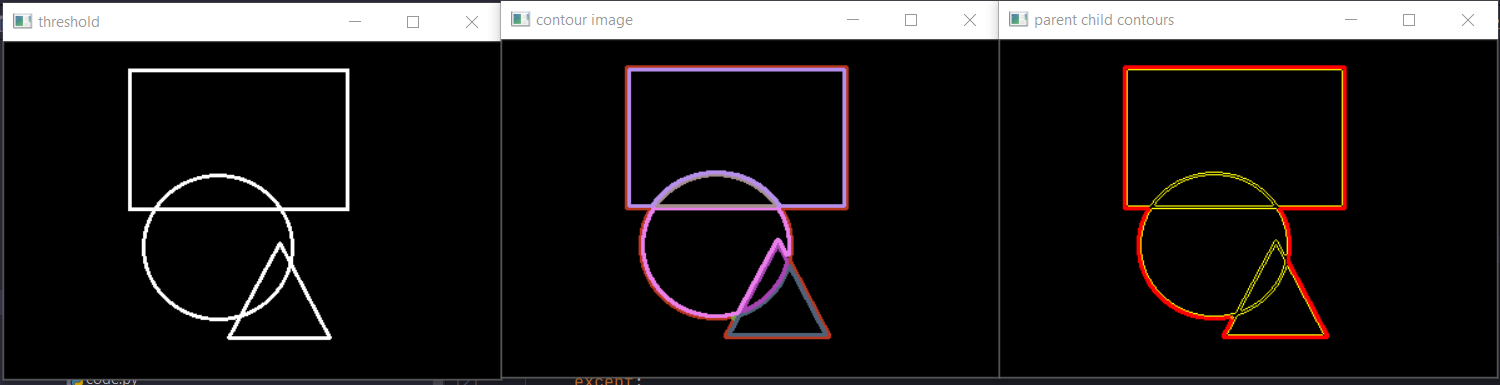
在上面的图像中,红色边框是父轮廓,黄色是子轮廓的边界。用父轮廓迭代所有子轮廓,应用轮廓平滑方法提取形状。这种误差平滑方法是在my question中用ian-chu进行讨论的。
import cv2
import numpy as np


def get_parent_contour(contours, hierarchy):
    parent = hierarchy[0, :, 3]
    unique_parent, counts_parent = np.unique(parent, return_counts=True)

    parent_contour_id = -1
    max_area = 0

    for c in unique_parent:
        if c != -1:
            area = cv2.contourArea(contours[c])
            if area > max_area:
                max_area = area
                parent_contour_id = c

    return parent_contour_id, contours[parent_contour_id]


def get_child_contours(contours, hierarchy, parent_contour_id):
    parent = hierarchy[0, :, 3]

    # Select all contour whose parent is selected parent above
    child_contour_id = [i for i, v in enumerate(parent) if v == parent_contour_id]
    child_contours = [contours[i] for i in child_contour_id]

    return child_contour_id, child_contours


def smoothed(contour, dists, cutoff):
    smooth_con = []
    for a in range(len(dists)):
        if dists[a] < cutoff:
            smooth_con.append(contour[a])
    return np.asarray(smooth_con)


# get the distance list for an array of points
def distList(src, other):
    dists = []
    for point in src:
        point = point[0]  # drop extra brackets
        _, dist = closestPoint(point, other)
        dists.append(dist)
    return dists


# returns squared distance of two points
def squaredDist(one, two):
    dx = one[0] - two[0]
    dy = one[1] - two[1]
    return dx * dx + dy * dy


# find closest point (just do a linear search)
def closestPoint(point, arr):
    # init tracker vars
    closest = None
    best_dist = np.Inf

    # linear search
    for other in arr:
        other = other[0]  # remove extra brackets
        dist = squaredDist(point, other)
        if dist < best_dist:
            closest = other
            best_dist = dist
    return closest, best_dist


image = cv2.imread("image.png")
gray = cv2.cvtColor(image, cv2.COLOR_BGR2GRAY)

_, threshold = cv2.threshold(gray, 200, 255, cv2.THRESH_BINARY_INV)
cv2.imshow("threshold", threshold)

contours, hierarchy = cv2.findContours(threshold, cv2.RETR_TREE, cv2.CHAIN_APPROX_SIMPLE)

blank_image = np.zeros_like(image)

if hierarchy is not None:

    for contour in contours:
        color = np.random.randint(0, 255, size=(3,))
        color = (int(color[0]), int(color[1]), int(color[2]))
        cv2.drawContours(blank_image, [contour], 0, color, 2)

cv2.imshow("contour image", blank_image)

parent_contour_id, parent_contour = get_parent_contour(contours, hierarchy)
child_contour_ids, child_contours = get_child_contours(contours, hierarchy, parent_contour_id)

blank_image_2 = np.zeros_like(image)
cv2.drawContours(blank_image_2, [parent_contour], 0, (0, 0, 255), 2)

for child_cnt in child_contours:
    cv2.drawContours(blank_image_2, [child_cnt], 0, (0, 255, 255), 1)
cv2.imshow("parent child contours", blank_image_2)

for child_cnt in child_contours:

    one = parent_contour
    two = child_cnt

    # get distances
    one_dists = distList(one, two)
    two_dists = distList(two, one)
    try:
        # dump values greater than 10
        smooth_one = smoothed(one, one_dists, 35)
        smooth_two = smoothed(two, two_dists, 35)

        # draw new contour
        blank_image_3 = np.zeros_like(threshold)
        cv2.drawContours(blank_image_3, [smooth_one], -1, 255, -1)
        cv2.drawContours(blank_image_3, [smooth_two], -1, 0, -1)

        cv2.imshow("smooth image", blank_image_3)

        # you can apply filters on smoothed contour image to accepting and reject smooth contour
        # And apply single shape detection algorithm on smoothed contour image to find shapes

    except:
        print("no near points. ")

    cv2.waitKey(0)

cv2.destroyAllWindows()
平滑输出图像
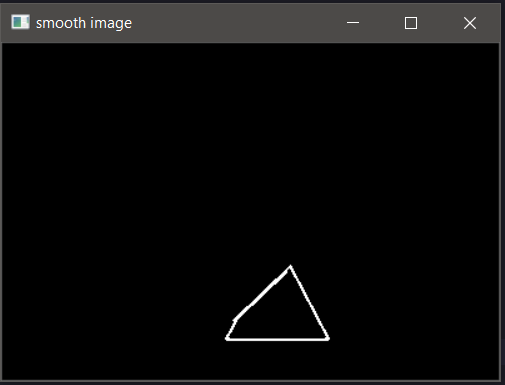
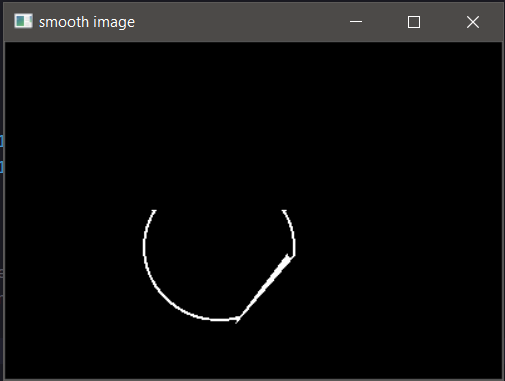
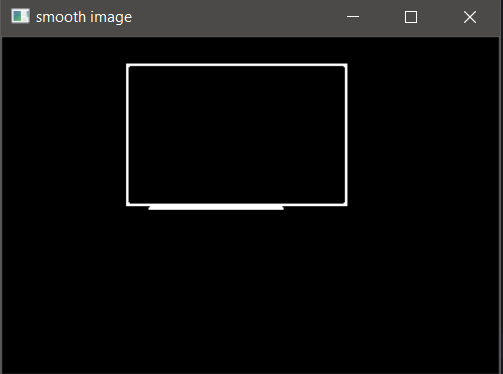
https://stackoverflow.com/questions/66977282
复制相似问题
腾讯云开发者

Copyright © 2013 - 2026 Tencent Cloud. All Rights Reserved. 腾讯云 版权所有
深圳市腾讯计算机系统有限公司 ICP备案/许可证号:粤B2-20090059  粤公网安备44030502008569号
腾讯云计算(北京)有限责任公司 京ICP证150476号 | 京ICP备11018762号