
如何在VSCode中改变编辑器缩进的颜色
如何在VSCode中改变编辑器缩进的颜色
提问于 2021-03-29 06:41:28
我使用的是一个黑暗的专业主题,但我不喜欢的颜色突出显示缩进。
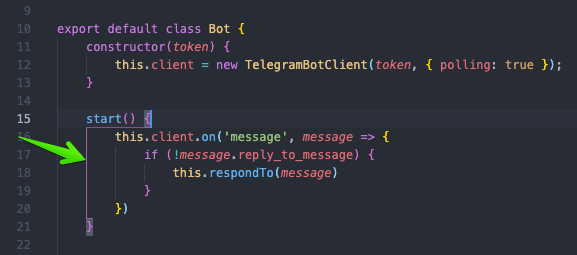
此设置无助于:
"workbench.colorCustomizations": {
    "editorIndentGuide.activeBackground": "#9e9e9e"
},它不是editorIndentGuide,因为我甚至不能用以下方法关闭它们:
"editor.renderIndentGuides": false,Stack Overflow用户
发布于 2022-06-09 16:16:21
现在,托架对着色剂-2已被废弃,新的解决方案是。
{
  "editor.bracketPairColorization.enabled": true,
  "editor.guides.bracketPairs": true,

  "workbench.colorCustomizations": {
    "editorBracketHighlight.foreground1": "#ffe625",
    "editorBracketHighlight.foreground2": "#00ff15",
    "editorBracketHighlight.foreground3": "#25deff",
    "editorBracketHighlight.foreground4": "#c825ff",
    "editorBracketHighlight.foreground5": "#ff0077",
    "editorBracketHighlight.foreground6": "#ff803b",
    "editorBracketHighlight.unexpectedBracket.foreground": "#ff0000"
  }
}页面原文内容由Stack Overflow提供。腾讯云小微IT领域专用引擎提供翻译支持
原文链接:
https://stackoverflow.com/questions/66849686
复制相关文章
相似问题
腾讯云开发者

Copyright © 2013 - 2026 Tencent Cloud. All Rights Reserved. 腾讯云 版权所有
深圳市腾讯计算机系统有限公司 ICP备案/许可证号:粤B2-20090059  粤公网安备44030502008569号
腾讯云计算(北京)有限责任公司 京ICP证150476号 | 京ICP备11018762号