
找不到带有VSCode类的JDBC
我在用VS代码添加“mysql-连接器-java-8.0.21.jar”创建Java项目时遇到了严重的困难。我已经完成了以下步骤:
- 从命令行用VS代码创建一个新的Java项目
- 通过“添加引用库”添加mysql连接器。
我尝试同时使用jdk 11和15 (而不是8,因为VS代码不再支持它)
启动我的代码会导致错误:java.lang.ClassNotFoundException: com.mysql.cj.LocalizedErrorMessages
以下是我的代码摘录:
import java.lang.reflect.InvocationTargetException;
import java.sql.Connection;
import java.sql.DriverManager;
import java.sql.ResultSet;
import java.sql.SQLException;
import java.sql.Statement;

public class SimpleJDBCApplication {

   static final String DB_URL = "jdbc:mysql://localhost:3306/company";
   static final String DB_DRV = "com.mysql.jdbc.Driver";
   static final String DB_USER = "root";
   static final String DB_PASSWD = "";

   public static void main(String[] args) throws InstantiationException, IllegalAccessException, ClassNotFoundException,
         IllegalArgumentException, InvocationTargetException, NoSuchMethodException, SecurityException {

      Connection connection = null;
      Statement statement = null;
      ResultSet resultSet = null;

      try{
          /*To connect with a database using JDBC you need to select get the
                 driver for the respective database and register the driver.
                 The forName() method of the class named Class accepts a class name
                as a String parameter and loads it into the memory, Soon the is
                loaded into the memory it gets registered automatically  */
                //Take new instance
         System.setProperty("jdbc.drivers", "com.mysql.jdbc.Driver");
         Class.forName("com.mysql.jdbc.Driver").getDeclaredConstructor().newInstance();
         connection=DriverManager.getConnection(DB_URL,DB_USER,DB_PASSWD);
         statement=connection.createStatement();
         resultSet=statement.executeQuery ("SELECT * FROM dept");
         while(resultSet.next()){
            System.out.printf("%d\t%s\t%s\n",
            resultSet.getInt(1),
            resultSet.getString(2),
resultSet.getString(3));错误发生在行connection=DriverManager.getConnection(DB_URL,DB_USER,DB_PASSWD);
谢谢你的帮助


回答 4
Stack Overflow用户
发布于 2020-10-08 09:43:42
1.这适用于8.0以下的MySQL版本:
静态最后字符串DB_URL = "jdbc:mysql://localhost:3306/company";
把它改成
static final String DB_URL ="jdbc:mysql://localhost:3306/company?useSSL=false&allowPublicKeyRetrieval=true&serverTimezone=UTC"2.将com.mysql.jdbc.Driver转移到com.mysql.cj.jdbc.Driver;
3.Class.forName("com.mysql.cj.jdbc.Driver")就足够了,也可以用这段代码,不需要System.setProperty("jdbc.drivers", "com.mysql.jdbc.Driver"),可以注释或删除;
这对我有用,你可以试试。
Stack Overflow用户
发布于 2020-10-07 10:14:09
根据文档,类名应该是com.mysql.cj.jdbc.Driver而不是com.mysql.jdbc.Driver。而且,对getDeclaredConstructor()的调用似乎是不必要的。也许这些就是你问题的根源。
Stack Overflow用户
发布于 2022-01-23 17:21:33
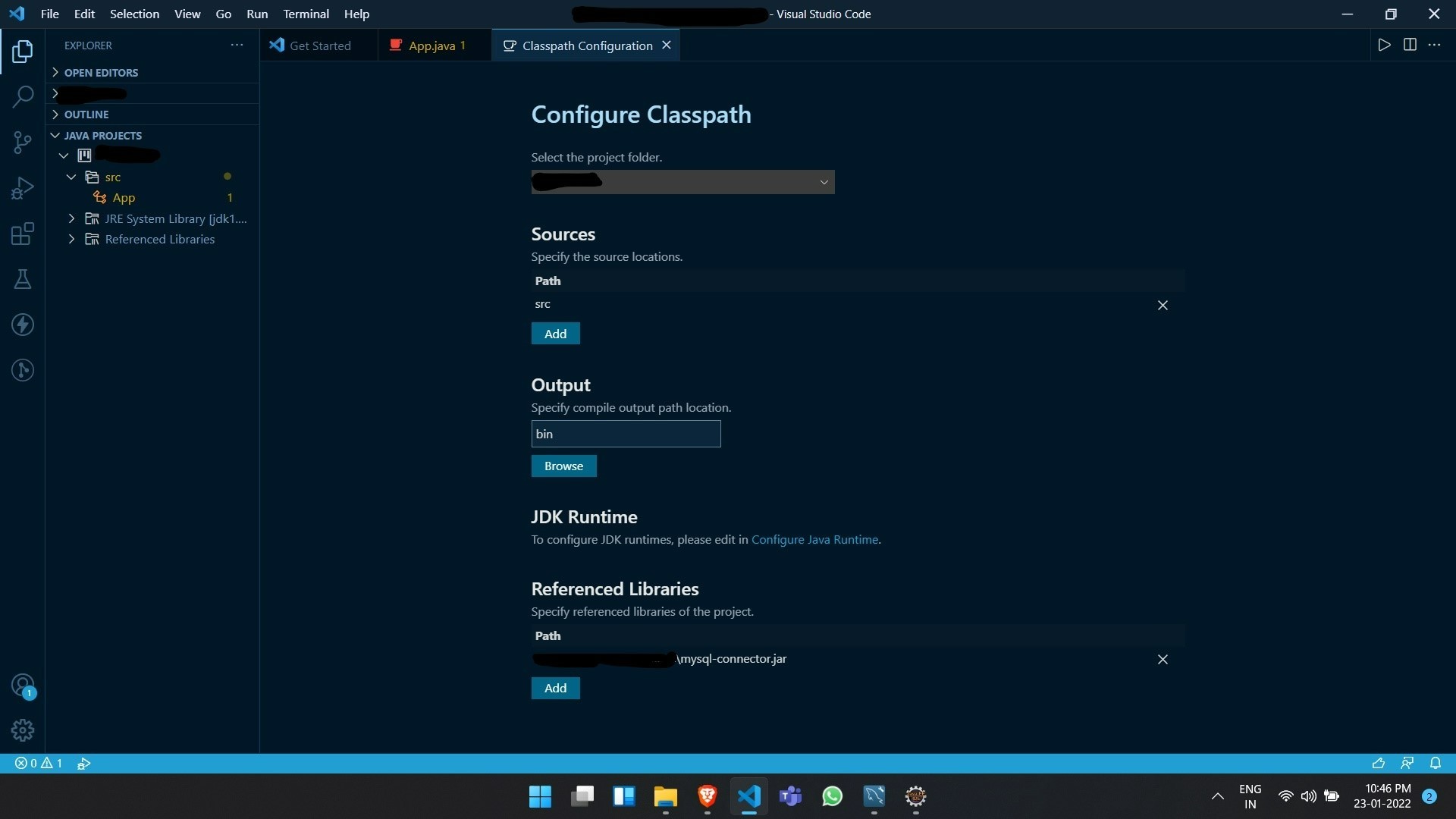
单击VSCode左侧资源管理器选项卡中的。然后右击您的项目名称,然后单击Classpath。这将在一个新选项卡中打开Classpath配置。滚动到底部,然后单击引用库上的add。这将打开资源管理器弹出窗口。选择java连接器jar文件,然后它就可以工作了。
https://stackoverflow.com/questions/64241365
复制相似问题
腾讯云开发者
